
302 Browser Use Mcp
What is 302 Browser Use Mcp
302_browser_use_mcp is a server designed to facilitate browser usage through the MCP framework, enabling seamless integration with applications like Claude Desktop.
Use cases
Use cases include developing browser-based applications, integrating AI functionalities into web applications, and testing browser interactions in a controlled environment.
How to use
To use 302_browser_use_mcp, install the necessary dependencies using ‘npm install’, build the server with ‘npm run build’, and configure it in the Claude Desktop settings by adding the server configuration to the appropriate JSON file.
Key features
Key features include easy installation, auto-rebuild during development, and debugging capabilities through the MCP Inspector.
Where to use
302_browser_use_mcp can be used in software development environments, particularly for applications that require browser interaction and integration with AI services.
Clients Supporting MCP
The following are the main client software that supports the Model Context Protocol. Click the link to visit the official website for more information.





Overview
What is 302 Browser Use Mcp
302_browser_use_mcp is a server designed to facilitate browser usage through the MCP framework, enabling seamless integration with applications like Claude Desktop.
Use cases
Use cases include developing browser-based applications, integrating AI functionalities into web applications, and testing browser interactions in a controlled environment.
How to use
To use 302_browser_use_mcp, install the necessary dependencies using ‘npm install’, build the server with ‘npm run build’, and configure it in the Claude Desktop settings by adding the server configuration to the appropriate JSON file.
Key features
Key features include easy installation, auto-rebuild during development, and debugging capabilities through the MCP Inspector.
Where to use
302_browser_use_mcp can be used in software development environments, particularly for applications that require browser interaction and integration with AI services.
Clients Supporting MCP
The following are the main client software that supports the Model Context Protocol. Click the link to visit the official website for more information.
Content
🤖 302AI BrowserUse MCP Server🚀✨
An AI-powered browser automation server implementing Model Context Protocol (MCP) for natural language browser control and web research.

Previews
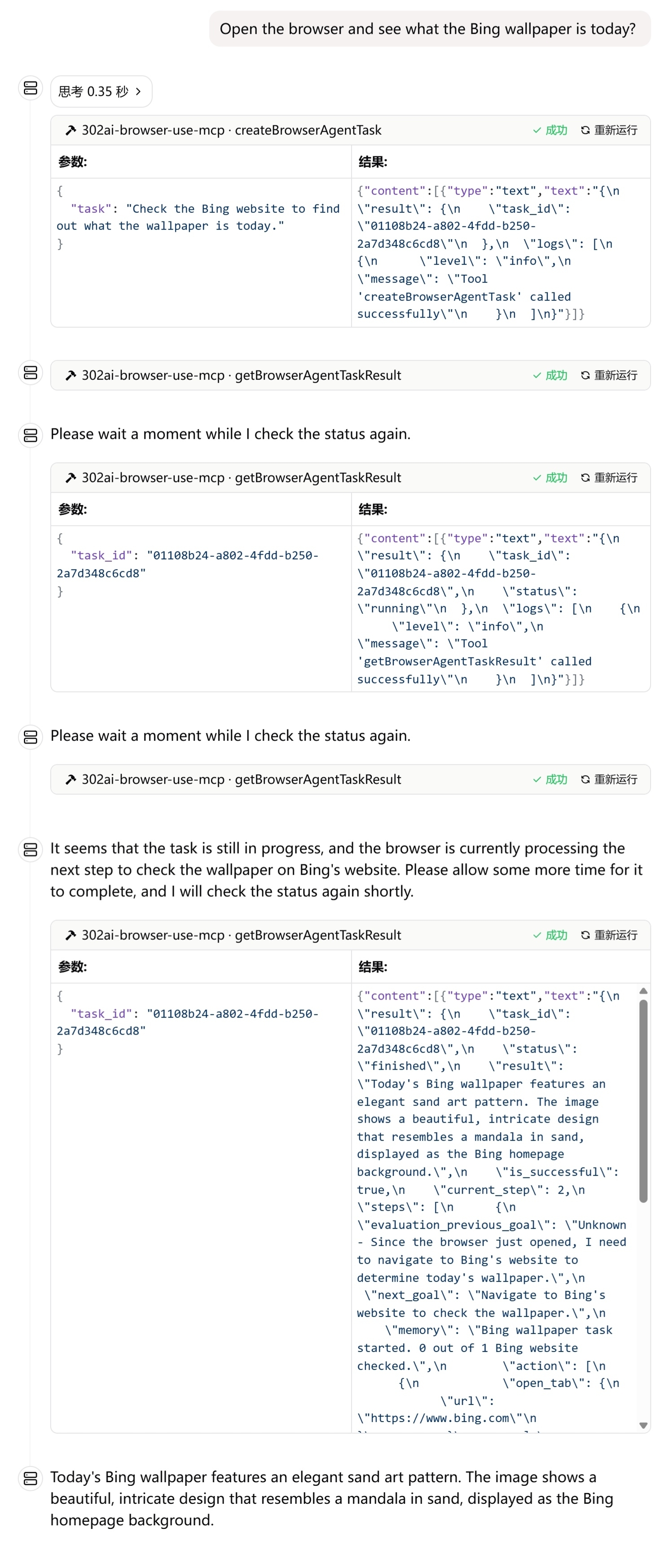
Here are some usage examples
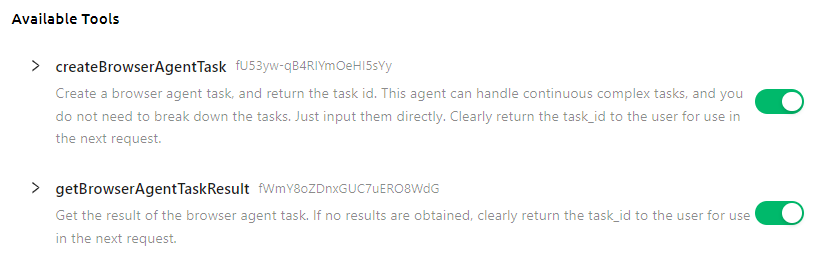
Here is the list of supported tools
✨ Features ✨
- 🔧 Dynamic Loading - Automatically update tool list from remote server.
- 🌐 Multi modes supported, you can use
stdinmode locally, or host it as a remote HTTP server
🚀 Tool List
Development
Install dependencies:
npm install
Build the server:
npm run build
For development with auto-rebuild:
npm run watch
Installation
To use with Claude Desktop, add the server config:
On MacOS: ~/Library/Application Support/Claude/claude_desktop_config.json
On Windows: %APPDATA%/Claude/claude_desktop_config.json
{
  "mcpServers": {
    "302ai-browser-use-mcp": {
      "command": "npx",
      "args": [
        "-y",
        "@302ai/browser-use-mcp"
      ],
      "env": {
        "302AI_API_KEY": "YOUR_API_KEY_HERE"
      }
    }
  }
}
To use with Cherry Studio, add the server config:
{
  "mcpServers": {
    "Li2ZXXJkvhAALyKOFeO4N": {
      "name": "302ai-browser-use-mcp",
      "description": "",
      "isActive": true,
      "registryUrl": "",
      "command": "npx",
      "args": [
        "-y",
        "@302ai/browser-use-mcp"
      ],
      "env": {
        "302AI_API_KEY": "YOUR_API_KEY_HERE"
      }
    }
  }
}
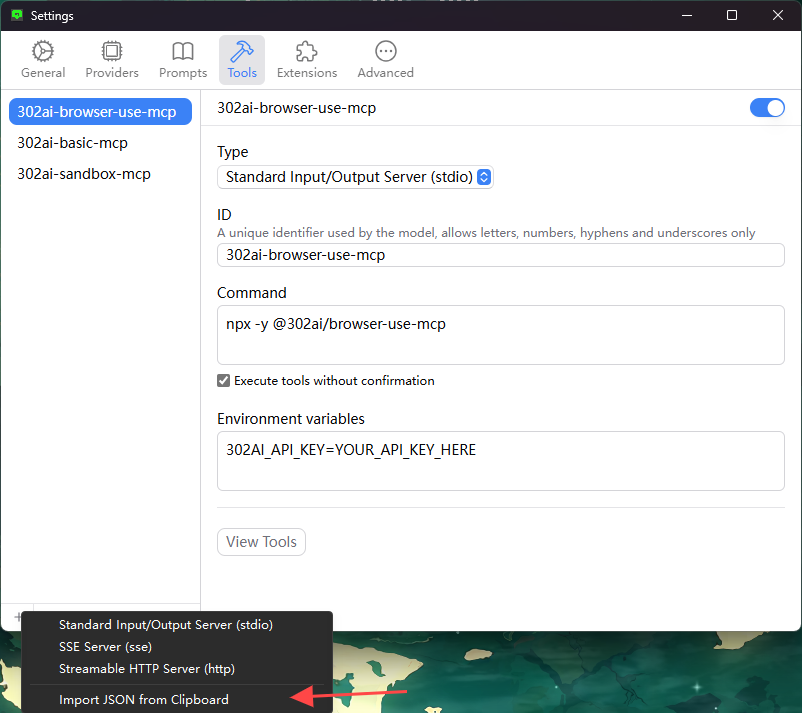
To use with ChatWise, copy the following content to clipboard
{
  "mcpServers": {
    "302ai-sandbox-mcp": {
      "command": "npx",
      "args": [
        "-y",
        "@302ai/browser-use-mcp"
      ],
      "env": {
        "302AI_API_KEY": "YOUR_API_KEY_HERE"
      }
    }
  }
}
Go to Settings -> Tools -> Add button -> Select Import from Clipboard
Find Your 302AI_API_KEY here
Debugging
Since MCP servers communicate over stdio, debugging can be challenging. We recommend using the MCP Inspector, which is available as a package script:
npm run inspector
The Inspector will provide a URL to access debugging tools in your browser.
✨ About 302.AI ✨
302.AI is an enterprise-oriented AI application platform that offers pay-as-you-go services, ready-to-use solutions, and an open-source ecosystem.✨
- 🧠 Integrates the latest and most comprehensive AI capabilities and brands, including but not limited to language models, image models, voice models, and video models.
- 🚀 Develops deep applications based on foundation models - we develop real AI products, not just simple chatbots
- 💰 Zero monthly fee, all features are pay-per-use, fully open, achieving truly low barriers with high potential.
- 🛠 Powerful management backend for teams and SMEs - one person manages, many people use.
- 🔗 All AI capabilities provide API access, all tools are open source and customizable (in progress).
- 💡 Strong development team, launching 2-3 new applications weekly, products updated daily. Developers interested in joining are welcome to contact us.
Dev Tools Supporting MCP
The following are the main code editors that support the Model Context Protocol. Click the link to visit the official website for more information.







