
4o Mini Search Mcp
What is 4o Mini Search Mcp
4o-mini-search-mcp is a lightweight MCP Server designed to enhance AI capabilities by enabling web search functionalities, allowing users to obtain information without incurring high AI credit costs.
Use cases
Use cases include searching for the latest documentation, retrieving information on specific programming models, and obtaining current templates or frameworks relevant to development tasks.
How to use
To use 4o-mini-search-mcp, add the provided configuration to your MCP JSON config file, replace ‘your-api-key’ with your actual API key, set the provider to either ‘openai’ or ‘openrouter’, and restart your MCP client.
Key features
Key features include cost-effective searches (1-3 cents per search), beginner-friendly setup with a simple npx command, compatibility with popular MCP clients like Claude and Cursor AI, and flexible APIs for integration.
Where to use
4o-mini-search-mcp can be used in various fields such as software development, research, and any domain requiring up-to-date information retrieval from the web.
Clients Supporting MCP
The following are the main client software that supports the Model Context Protocol. Click the link to visit the official website for more information.





Overview
What is 4o Mini Search Mcp
4o-mini-search-mcp is a lightweight MCP Server designed to enhance AI capabilities by enabling web search functionalities, allowing users to obtain information without incurring high AI credit costs.
Use cases
Use cases include searching for the latest documentation, retrieving information on specific programming models, and obtaining current templates or frameworks relevant to development tasks.
How to use
To use 4o-mini-search-mcp, add the provided configuration to your MCP JSON config file, replace ‘your-api-key’ with your actual API key, set the provider to either ‘openai’ or ‘openrouter’, and restart your MCP client.
Key features
Key features include cost-effective searches (1-3 cents per search), beginner-friendly setup with a simple npx command, compatibility with popular MCP clients like Claude and Cursor AI, and flexible APIs for integration.
Where to use
4o-mini-search-mcp can be used in various fields such as software development, research, and any domain requiring up-to-date information retrieval from the web.
Clients Supporting MCP
The following are the main client software that supports the Model Context Protocol. Click the link to visit the official website for more information.
Content
🔎 Supercharge Your AI with Web Search Powers
Want to give your AI coder the power to search the web without going broke?
Save on expensive AI credits, and pay cash instead (it’s worth it)!
This is exactly why I built this super simple MCP Server.
✨ What This Does For You
You can search the web through OpenAI’s 4o-mini Search model.
It basically crawls the web, and gives you (or your AI coder) a super helpful answer.
- Get Docs: Read the latest docs without searching/copy/pasting.
- Save Money: Pay just 1-3 cents per search instead of wasting monthly credits.
- Beginner-Friendly: Works right out of the box thanks to a simple
npxcommand. - Super Compatible: Works seamlessly with Claude, Cursor AI, and other popular MCP clients
- Flexible APIs: Use with either OpenAI directly, or OpenRouter.ai!
🚀 Get Started Fast
Literally all you have to do is add it to your MCP JSON config file.
If you don’t know what it is, a quick search like this one should help you out.
- Copy this configuration into the JSON file of your AI coder.
{
  "mcpServers": {
    "4o-mini-search": {
      "command": "npx",
      "args": [
        "@rebers/4o-mini-search-mcp"
      ],
      "env": {
        "API_KEY": "your-api-key",
        "PROVIDER": "openai"
      }
    }
  }
}- Replace
your-api-keywith your actual API key. - Set
PROVIDERto eitheropenai(default) oropenrouter(for OpenRouter.ai). - Add to your configuration file.
- Restart your MCP client (Claude App, Cursor AI, Windsurf, etc).
💡 Using Your New Search Power
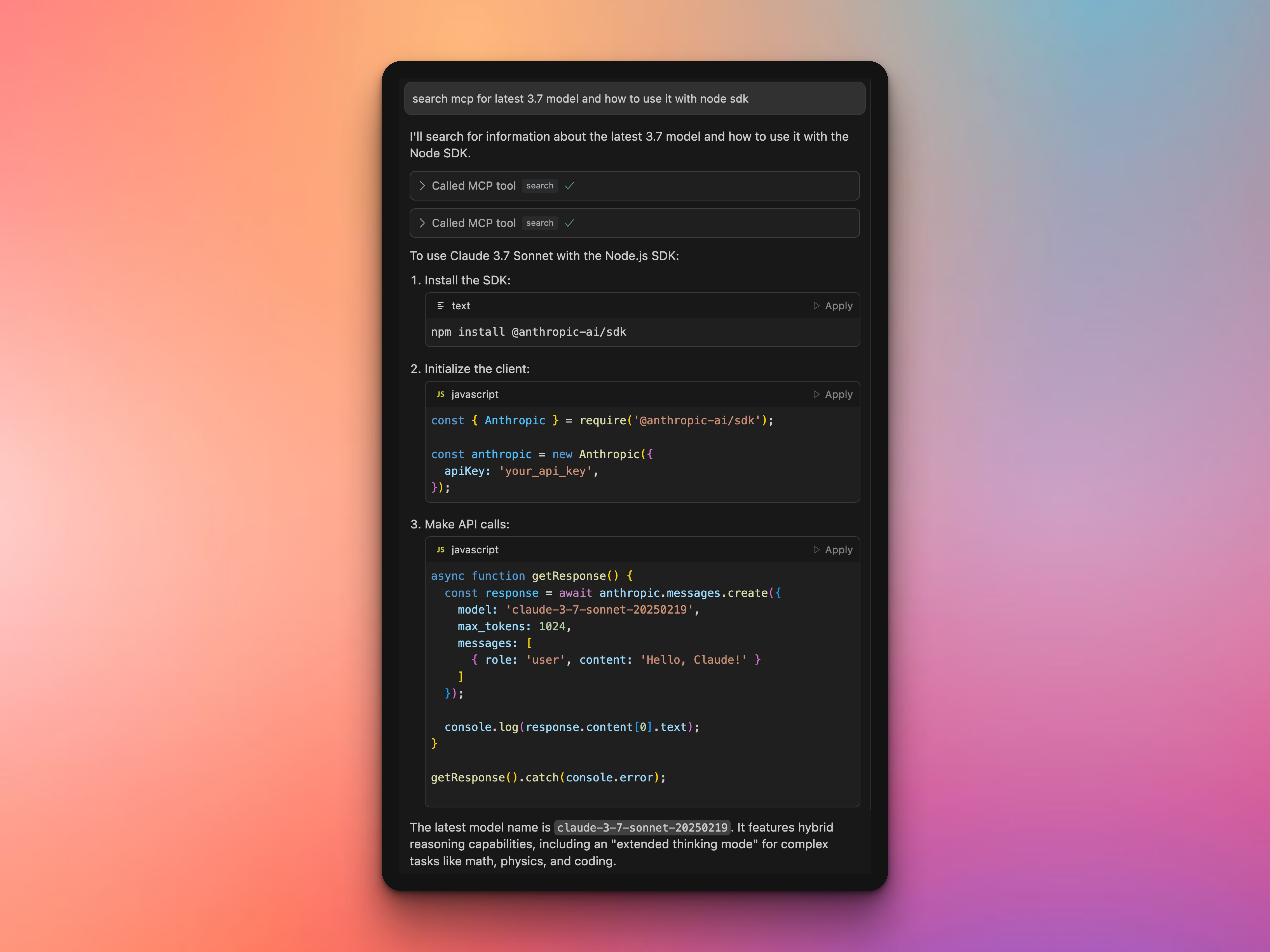
Once set up, simply ask your AI to search something.
“search mcp for latest 3.7 model and how to use it with node sdk”
“search mcp for how nextjs app router works exactly and how to use it”
“search mcp for for the latest sveltekit templates”
It will then use OpenAI’s 4o-mini-search and deliver fresh information directly to your AI’s context!
🛠️ Troubleshooting
Issue: Server not connecting in Cursor AI (wrong API key or similar)
Fix: There is a weird bug in Cursor with the MCP file. Just restart the entire editor completely and try again.
Dev Tools Supporting MCP
The following are the main code editors that support the Model Context Protocol. Click the link to visit the official website for more information.







