
Ai Customer Support Bot Mcp Server
What is Ai Customer Support Bot Mcp Server
The AI Customer Support Bot is an MCP server that leverages Cursor AI and Glama.ai integration to provide intelligent and real-time customer support. It processes queries and fetches contextual information to generate accurate responses, aiming to enhance overall customer service experiences.
Use cases
This bot can be employed in various customer support scenarios such as handling common inquiries, password resets, business hours information, and general support questions. It is ideal for businesses looking to automate their customer interaction while maintaining high-quality support.
How to use
To use the AI Customer Support Bot, start by setting up the server with your credentials, including the necessary API keys and database configurations. After running the server, you can interact with it through provided API endpoints to process single or batch queries and check server health.
Key features
Key features of the AI Customer Support Bot include real-time context fetching from Glama.ai, AI-based response generation with Cursor AI, support for batch processing, priority queuing, rate limiting, user interaction tracking, and health monitoring. It also complies with MCP protocols for standardized communication.
Where to use
The AI Customer Support Bot can be implemented in diverse environments where customer interaction is vital, such as e-commerce websites, service-oriented businesses, and help desks. It is suitable for sectors that require efficient query handling and quick response times, like tech support, customer service, and online retail.
Clients Supporting MCP
The following are the main client software that supports the Model Context Protocol. Click the link to visit the official website for more information.





Overview
What is Ai Customer Support Bot Mcp Server
The AI Customer Support Bot is an MCP server that leverages Cursor AI and Glama.ai integration to provide intelligent and real-time customer support. It processes queries and fetches contextual information to generate accurate responses, aiming to enhance overall customer service experiences.
Use cases
This bot can be employed in various customer support scenarios such as handling common inquiries, password resets, business hours information, and general support questions. It is ideal for businesses looking to automate their customer interaction while maintaining high-quality support.
How to use
To use the AI Customer Support Bot, start by setting up the server with your credentials, including the necessary API keys and database configurations. After running the server, you can interact with it through provided API endpoints to process single or batch queries and check server health.
Key features
Key features of the AI Customer Support Bot include real-time context fetching from Glama.ai, AI-based response generation with Cursor AI, support for batch processing, priority queuing, rate limiting, user interaction tracking, and health monitoring. It also complies with MCP protocols for standardized communication.
Where to use
The AI Customer Support Bot can be implemented in diverse environments where customer interaction is vital, such as e-commerce websites, service-oriented businesses, and help desks. It is suitable for sectors that require efficient query handling and quick response times, like tech support, customer service, and online retail.
Clients Supporting MCP
The following are the main client software that supports the Model Context Protocol. Click the link to visit the official website for more information.
Content
AI Customer Support Bot - MCP Server
A Model Context Protocol (MCP) server that provides AI-powered customer support using Cursor AI and Glama.ai integration.
Features
- Real-time context fetching from Glama.ai
- AI-powered response generation with Cursor AI
- Batch processing support
- Priority queuing
- Rate limiting
- User interaction tracking
- Health monitoring
- MCP protocol compliance
Prerequisites
- Python 3.8+
- PostgreSQL database
- Glama.ai API key
- Cursor AI API key
Installation
- Clone the repository:
git clone <repository-url>
cd <repository-name>
- Create and activate a virtual environment:
python -m venv venv
source venv/bin/activate  # On Windows: venv\Scripts\activate
- Install dependencies:
pip install -r requirements.txt
- Create a
.envfile based on.env.example:
cp .env.example .env
- Configure your
.envfile with your credentials:
# API Keys
GLAMA_API_KEY=your_glama_api_key_here
CURSOR_API_KEY=your_cursor_api_key_here

# Database
DATABASE_URL=postgresql://user:password@localhost/customer_support_bot

# API URLs
GLAMA_API_URL=https://api.glama.ai/v1

# Security
SECRET_KEY=your_secret_key_here

# MCP Server Configuration
SERVER_NAME="AI Customer Support Bot"
SERVER_VERSION="1.0.0"
API_PREFIX="/mcp"
MAX_CONTEXT_RESULTS=5

# Rate Limiting
RATE_LIMIT_REQUESTS=100
RATE_LIMIT_PERIOD=60

# Logging
LOG_LEVEL=INFO
- Set up the database:
# Create the database
createdb customer_support_bot

# Run migrations (if using Alembic)
alembic upgrade head
Running the Server
Start the server:
python app.py
The server will be available at http://localhost:8000
API Endpoints
1. Root Endpoint
GET /
Returns basic server information.
2. MCP Version
GET /mcp/version
Returns supported MCP protocol versions.
3. Capabilities
GET /mcp/capabilities
Returns server capabilities and supported features.
4. Process Request
POST /mcp/process
Process a single query with context.
Example request:
curl -X POST http://localhost:8000/mcp/process \
  -H "Content-Type: application/json" \
  -H "X-MCP-Auth: your-auth-token" \
  -H "X-MCP-Version: 1.0" \
  -d '{
    "query": "How do I reset my password?",
    "priority": "high",
    "mcp_version": "1.0"
  }'
5. Batch Processing
POST /mcp/batch
Process multiple queries in a single request.
Example request:
curl -X POST http://localhost:8000/mcp/batch \
  -H "Content-Type: application/json" \
  -H "X-MCP-Auth: your-auth-token" \
  -H "X-MCP-Version: 1.0" \
  -d '{
    "queries": [
      "How do I reset my password?",
      "What are your business hours?",
      "How do I contact support?"
    ],
    "mcp_version": "1.0"
  }'
6. Health Check
GET /mcp/health
Check server health and service status.
Rate Limiting
The server implements rate limiting with the following defaults:
- 100 requests per 60 seconds
- Rate limit information is included in the health check endpoint
- Rate limit exceeded responses include reset time
Error Handling
The server returns structured error responses in the following format:
{
  "code": "ERROR_CODE",
  "message": "Error description",
  "details": {
    "timestamp": "2024-02-14T12:00:00Z",
    "additional_info": "value"
  }
}
Common error codes:
RATE_LIMIT_EXCEEDED: Rate limit exceededUNSUPPORTED_MCP_VERSION: Unsupported MCP versionPROCESSING_ERROR: Error processing requestCONTEXT_FETCH_ERROR: Error fetching context from Glama.aiBATCH_PROCESSING_ERROR: Error processing batch request
Development
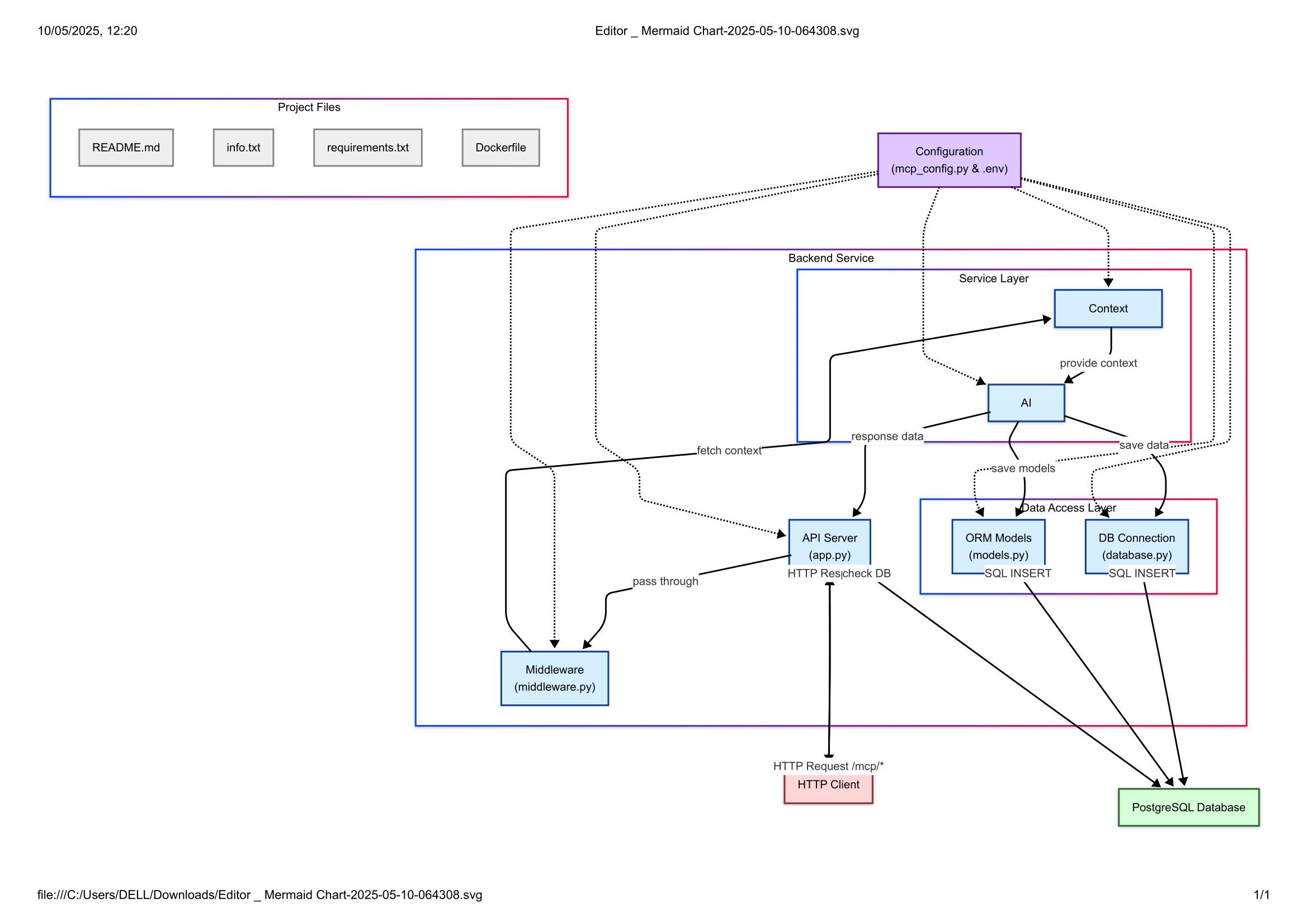
Project Structure
.
├── app.py              # Main application file
├── database.py         # Database configuration
├── middleware.py       # Middleware (rate limiting, validation)
├── models.py          # Database models
├── mcp_config.py      # MCP-specific configuration
├── requirements.txt   # Python dependencies
└── .env              # Environment variables
Adding New Features
- Update
mcp_config.pywith new configuration options - Add new models in
models.pyif needed - Create new endpoints in
app.py - Update capabilities endpoint to reflect new features
Security
- All MCP endpoints require authentication via
X-MCP-Authheader - Rate limiting is implemented to prevent abuse
- Database credentials should be kept secure
- API keys should never be committed to version control
Monitoring
The server provides health check endpoints for monitoring:
- Service status
- Rate limit usage
- Connected services
- Processing times
Contributing
- Fork the repository
- Create a feature branch
- Commit your changes
- Push to the branch
- Create a Pull Request
Flowchart
Verification Badge

License
This project is licensed under the MIT License - see the LICENSE file for details.
Support
For support, please create an issue in the repository or contact the development team.
Dev Tools Supporting MCP
The following are the main code editors that support the Model Context Protocol. Click the link to visit the official website for more information.







