
Aifoundry Mcpconnector Fabricgraphql
What is Aifoundry Mcpconnector Fabricgraphql
AIFoundry-MCPConnector-FabricGraphQL is a project that demonstrates the integration of an Azure OpenAI-powered AI agent with a Microsoft Fabric data warehouse using the Model Context Protocol (MCP). It exposes this integration through a GraphQL interface, allowing for dynamic discovery of tools, data resources, and prompt templates.
Use cases
Use cases for AIFoundry-MCPConnector-FabricGraphQL include developing AI agents that can query and analyze data from a data warehouse, creating interactive dashboards for data visualization, and automating data-driven decision-making processes.
How to use
To use AIFoundry-MCPConnector-FabricGraphQL, you need to configure the Microsoft Fabric backend by creating a data warehouse and a GraphQL API endpoint. Then, set up your local client environment by installing the required Python packages. Detailed steps are provided in the README, including creating sample data and configuring the GraphQL API.
Key features
Key features of AIFoundry-MCPConnector-FabricGraphQL include dynamic discovery of resources, bidirectional access to enterprise data, and an abstraction layer provided by GraphQL for universal data connection. It also supports integration with Azure OpenAI for enhanced AI capabilities.
Where to use
AIFoundry-MCPConnector-FabricGraphQL can be used in various fields such as data analytics, business intelligence, and AI-driven applications where integration of AI agents with data warehouses is required.
Clients Supporting MCP
The following are the main client software that supports the Model Context Protocol. Click the link to visit the official website for more information.





Overview
What is Aifoundry Mcpconnector Fabricgraphql
AIFoundry-MCPConnector-FabricGraphQL is a project that demonstrates the integration of an Azure OpenAI-powered AI agent with a Microsoft Fabric data warehouse using the Model Context Protocol (MCP). It exposes this integration through a GraphQL interface, allowing for dynamic discovery of tools, data resources, and prompt templates.
Use cases
Use cases for AIFoundry-MCPConnector-FabricGraphQL include developing AI agents that can query and analyze data from a data warehouse, creating interactive dashboards for data visualization, and automating data-driven decision-making processes.
How to use
To use AIFoundry-MCPConnector-FabricGraphQL, you need to configure the Microsoft Fabric backend by creating a data warehouse and a GraphQL API endpoint. Then, set up your local client environment by installing the required Python packages. Detailed steps are provided in the README, including creating sample data and configuring the GraphQL API.
Key features
Key features of AIFoundry-MCPConnector-FabricGraphQL include dynamic discovery of resources, bidirectional access to enterprise data, and an abstraction layer provided by GraphQL for universal data connection. It also supports integration with Azure OpenAI for enhanced AI capabilities.
Where to use
AIFoundry-MCPConnector-FabricGraphQL can be used in various fields such as data analytics, business intelligence, and AI-driven applications where integration of AI agents with data warehouses is required.
Clients Supporting MCP
The following are the main client software that supports the Model Context Protocol. Click the link to visit the official website for more information.
Content
MCP Connector: Integrating AI agent with Data Warehouse in Microsoft Fabric
This repo demonstrates the integration of an Azure OpenAI-powered AI agent with a Microsoft Fabric data warehouse using the Model Context Protocol (MCP), open integration standard for AI agents by Anthropic.
MCP enables dynamic discovery of tools, data resources and prompt templates (with more coming soon), unifying their integration with AI agents. GraphQL provides an abstraction layer for universal data connection. Below, you will find detailed steps on how to combine MCP and GraphQL to enable bidirectional access to enterprise data for your AI agent.
[!NOTE]
In the MCP server’s script, some query parameter values are hard-coded for the sake of this example. In a real-world scenario, these values would be dynamically generated or retrieved.
Table of contents:
- Part 1: Configuring Microsoft Fabric Backend
- Part 2: Configuring Local Client Environment
- Part 3: User Experience - Gradio UI
- Part 4: Demo video on YouTube
Part 1: Configuring Microsoft Fabric Backend
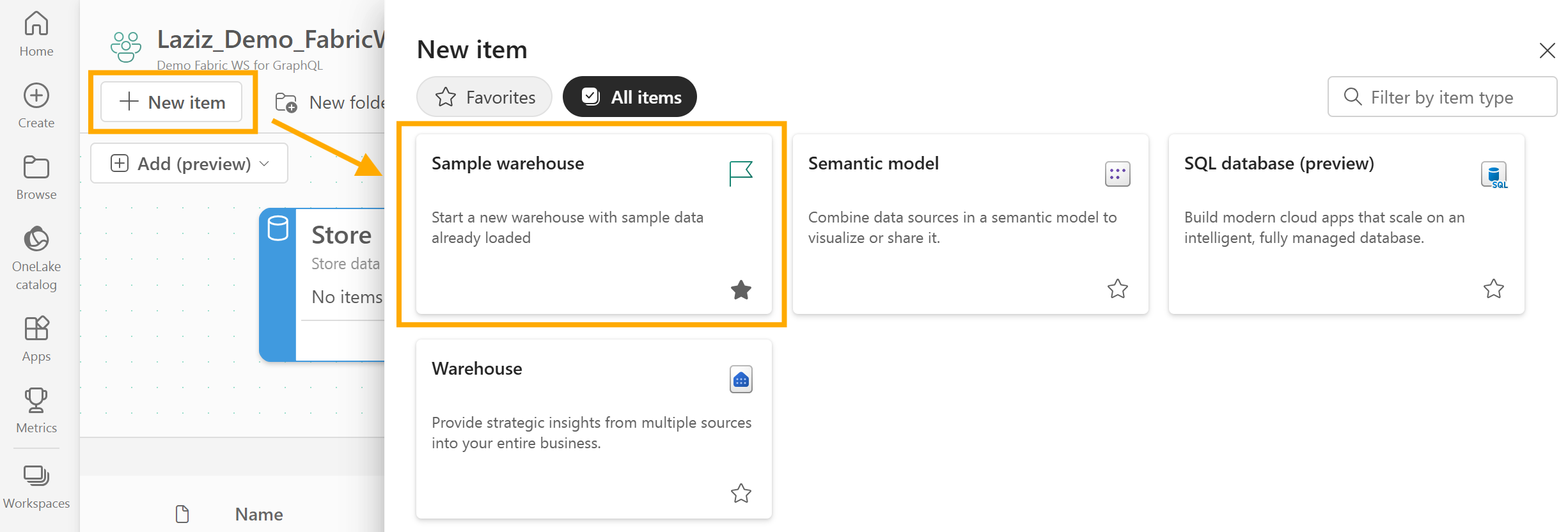
- In Microsoft Fabric, create a new data warehouse pre-populated by sample data by clicking New item -> Sample warehouse:
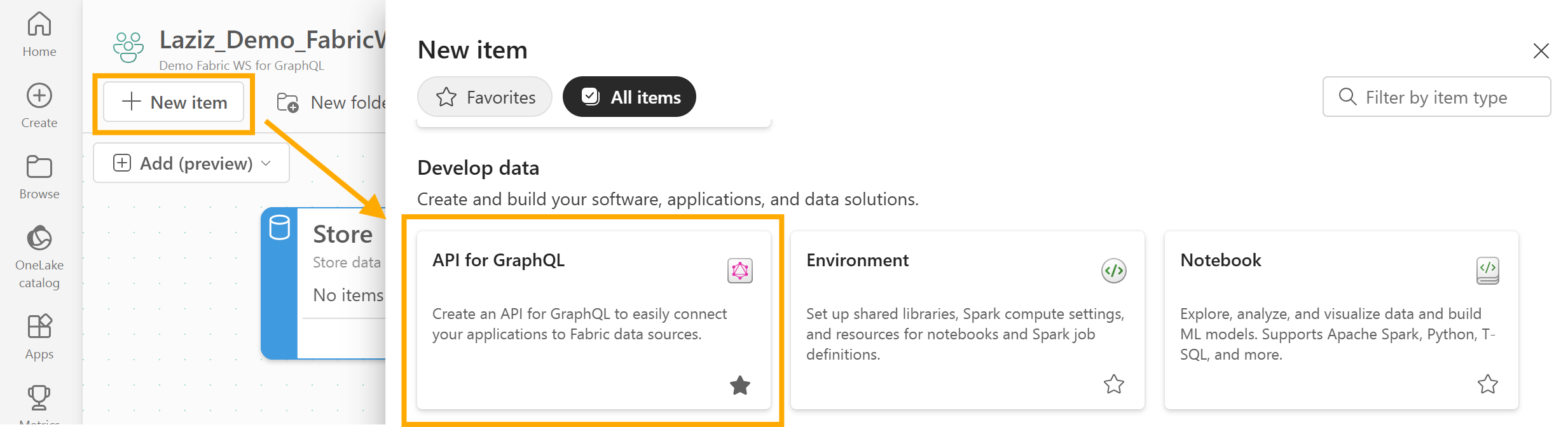
- Next, create a GraphQL API endpoint by clicking New item -> API for GraphQL:
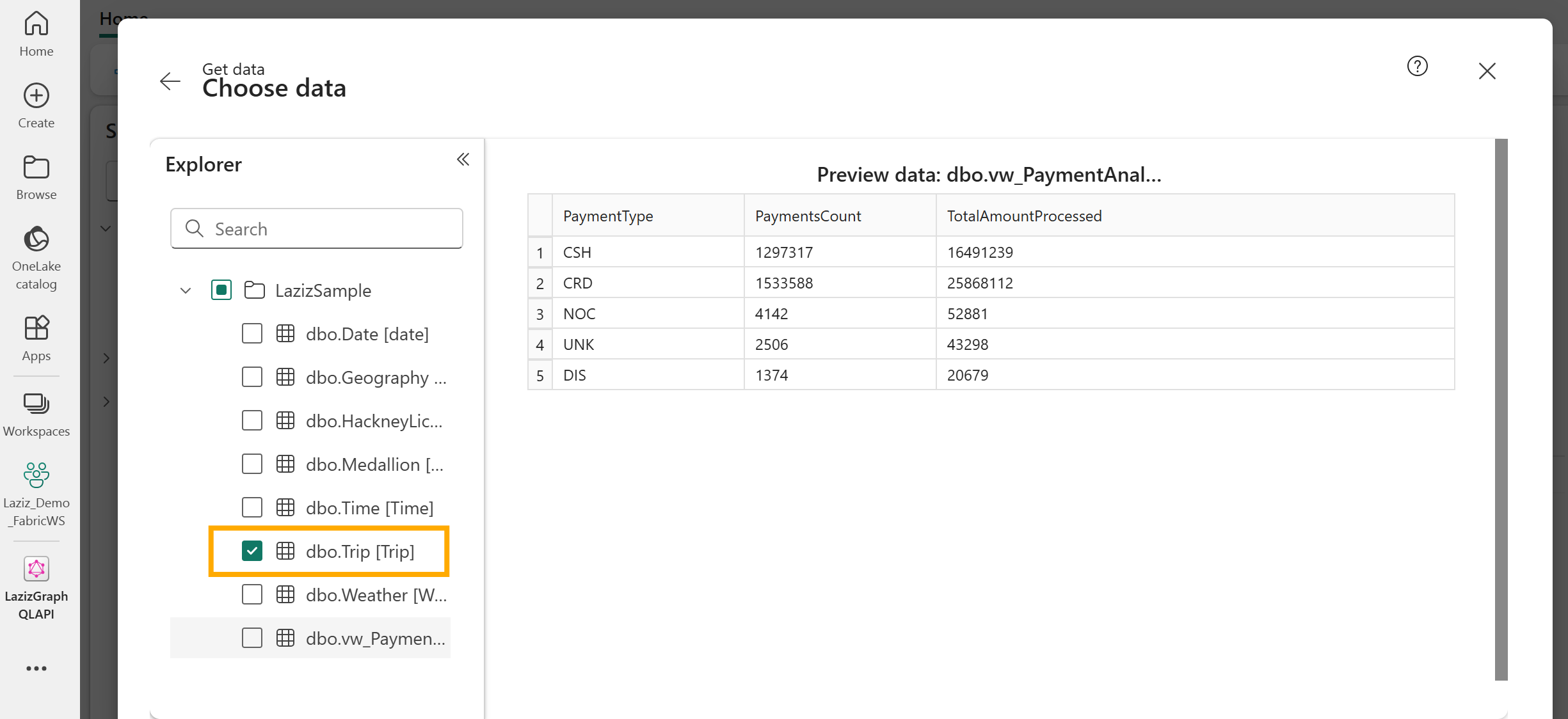
- In the data configuration of GraphQL API, choose the Trip (dbo.Trip) table:
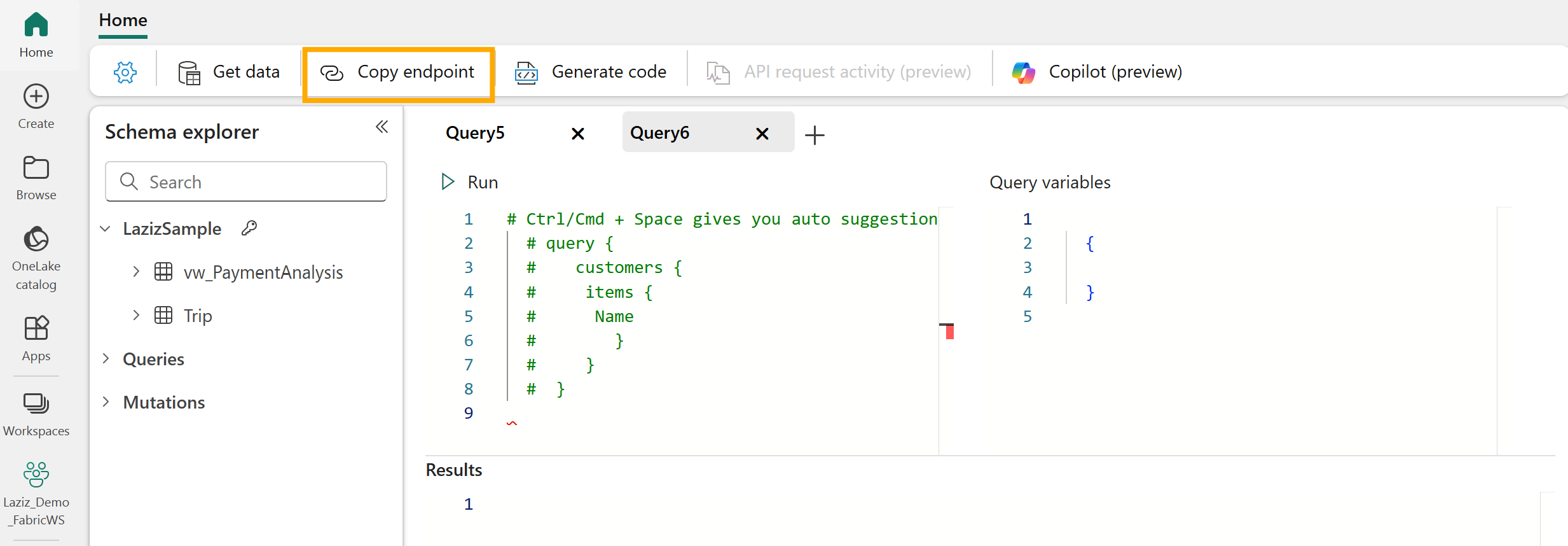
- Copy the endpoint URL of your GraphQL API:
Part 2: Configuring Local Client Environment
- Install the required Python packages, listed in the provided requirements.txt:
pip install -r requirements.txt
- Configure environmnet variables for the MCP client:
| Variable | Description |
|---|---|
AOAI_API_BASE |
Base URL of the Azure OpenAI endpoint |
AOAI_API_VERSION |
API version of the Azure OpenAI endpoint |
AOAI_DEPLOYMENT |
Deployment name of the Azure OpenAI model |
- Set the value of the
AZURE_FABRIC_GRAPHQL_ENDPOINTvariable with the GraphQL endpoint URL from Step 1.4 above. It will be utilised by the MCP Server script to establish connectivity with Microsoft Fabric:
| Variable | Description |
|---|---|
AZURE_FABRIC_GRAPHQL_ENDPOINT |
Microsoft Fabric’s GraphQL API endpoint |
Part 3: User Experience - Gradio UI
- Launch the MCP client in your command prompt:
python MCP_Client_Gradio.py
- Click the Initialise System button to start the MCP server and connect your AI agent to the Microsoft Fabric’s GraphQL API endpoint:
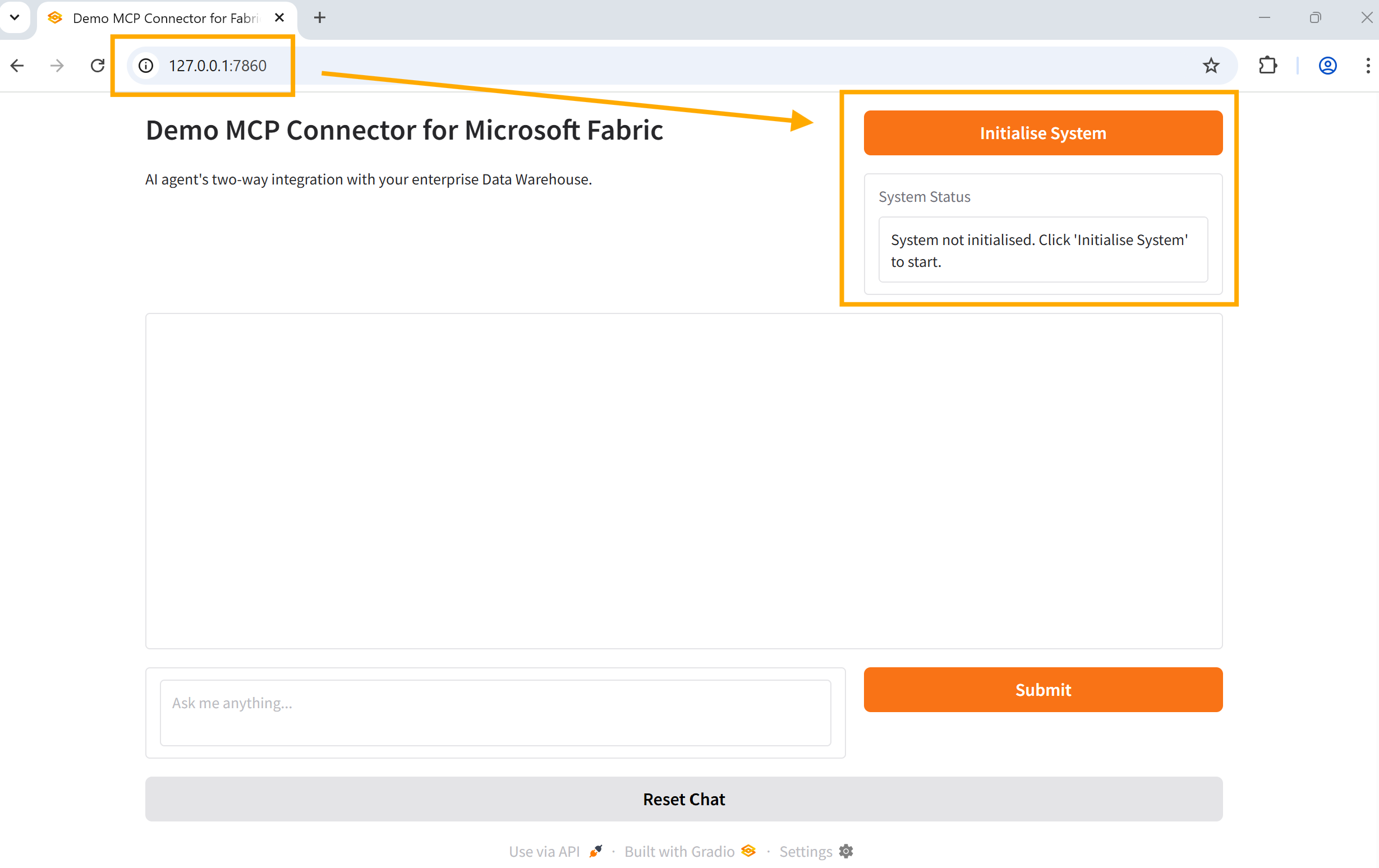
- You can now pull and push data to your data warehouse using GraphQL’s queries and mutations enabled by this MCP connector:
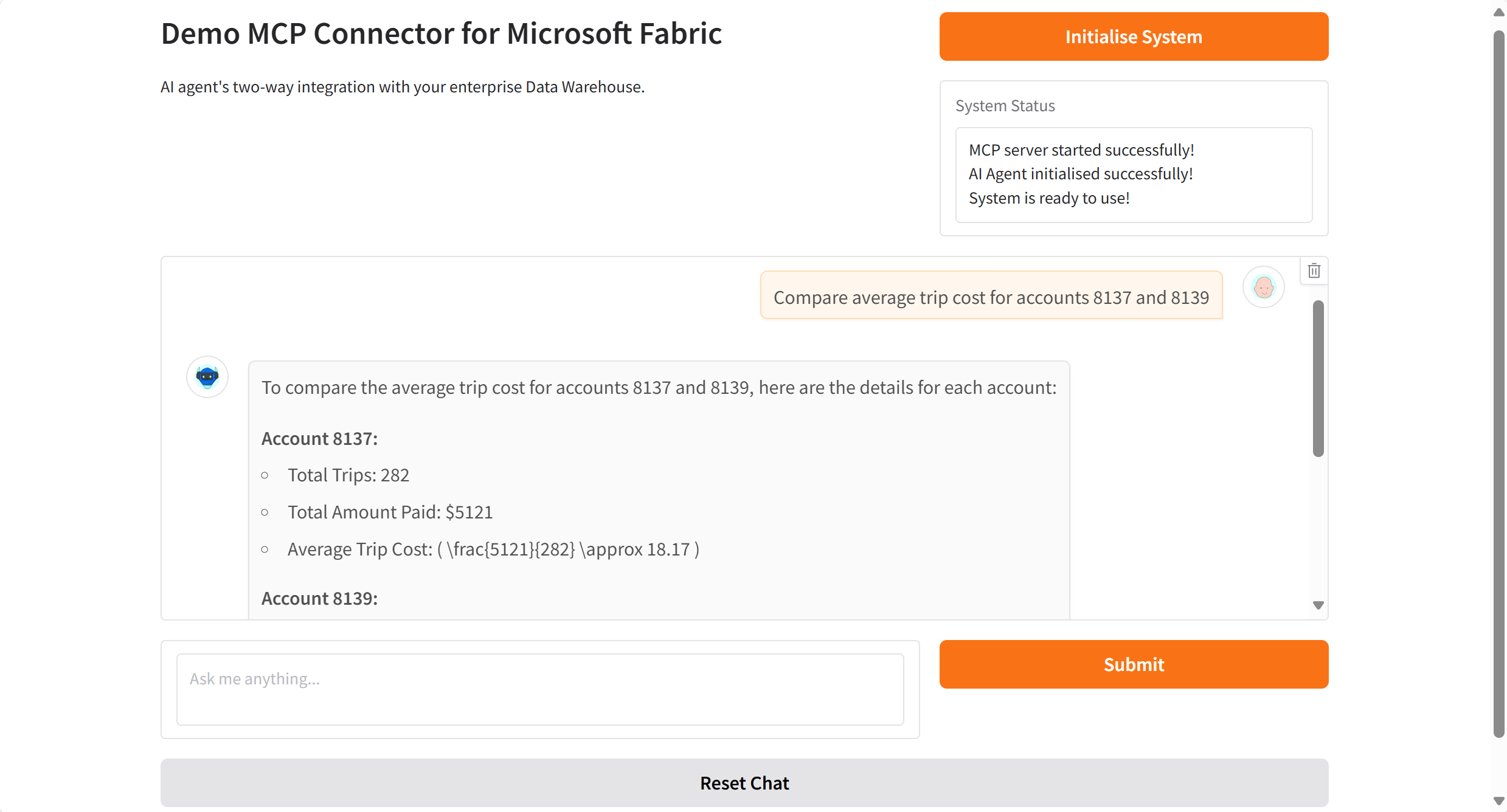
Part 4: Demo video on YouTube
A practical demo of the provided MCP connector can be found on this YouTube video.
Dev Tools Supporting MCP
The following are the main code editors that support the Model Context Protocol. Click the link to visit the official website for more information.







