
Agent To Agent Mcp
What is Agent To Agent Mcp
Agent-to-Agent-MCP is a framework designed for building intelligent systems that facilitate communication between agents using the Model Context Protocol. It enables agents to interpret natural language queries, translate them into SQL, and interact with databases effectively.
Use cases
Use cases include creating intelligent chatbots for database queries, automating report generation from databases, providing user-friendly interfaces for database interactions, and enhancing data accessibility for non-technical users.
How to use
To use Agent-to-Agent-MCP, clone the repository, install the required dependencies, set up Google Cloud authentication, configure environment variables, and run the application. Optionally, you can prepare few-shot examples to enhance the agent’s performance.
Key features
Key features include natural language to SQL conversion, database schema introspection, error handling and query refinement, example-enhanced prompting for improved SQL generation, and conversational presentation of query results.
Where to use
Agent-to-Agent-MCP can be used in various fields such as data analysis, business intelligence, customer support, and any application requiring natural language interaction with databases.
Clients Supporting MCP
The following are the main client software that supports the Model Context Protocol. Click the link to visit the official website for more information.





Overview
What is Agent To Agent Mcp
Agent-to-Agent-MCP is a framework designed for building intelligent systems that facilitate communication between agents using the Model Context Protocol. It enables agents to interpret natural language queries, translate them into SQL, and interact with databases effectively.
Use cases
Use cases include creating intelligent chatbots for database queries, automating report generation from databases, providing user-friendly interfaces for database interactions, and enhancing data accessibility for non-technical users.
How to use
To use Agent-to-Agent-MCP, clone the repository, install the required dependencies, set up Google Cloud authentication, configure environment variables, and run the application. Optionally, you can prepare few-shot examples to enhance the agent’s performance.
Key features
Key features include natural language to SQL conversion, database schema introspection, error handling and query refinement, example-enhanced prompting for improved SQL generation, and conversational presentation of query results.
Where to use
Agent-to-Agent-MCP can be used in various fields such as data analysis, business intelligence, customer support, and any application requiring natural language interaction with databases.
Clients Supporting MCP
The following are the main client software that supports the Model Context Protocol. Click the link to visit the official website for more information.
Content
SQL Database Agent with Google ADK Framework
This project implements an intelligent SQL agent that can interpret natural language queries about a database, translate them into SQL, execute them, and provide human-friendly responses using the Google ADK (Agent Development Kit) framework.
Project Overview
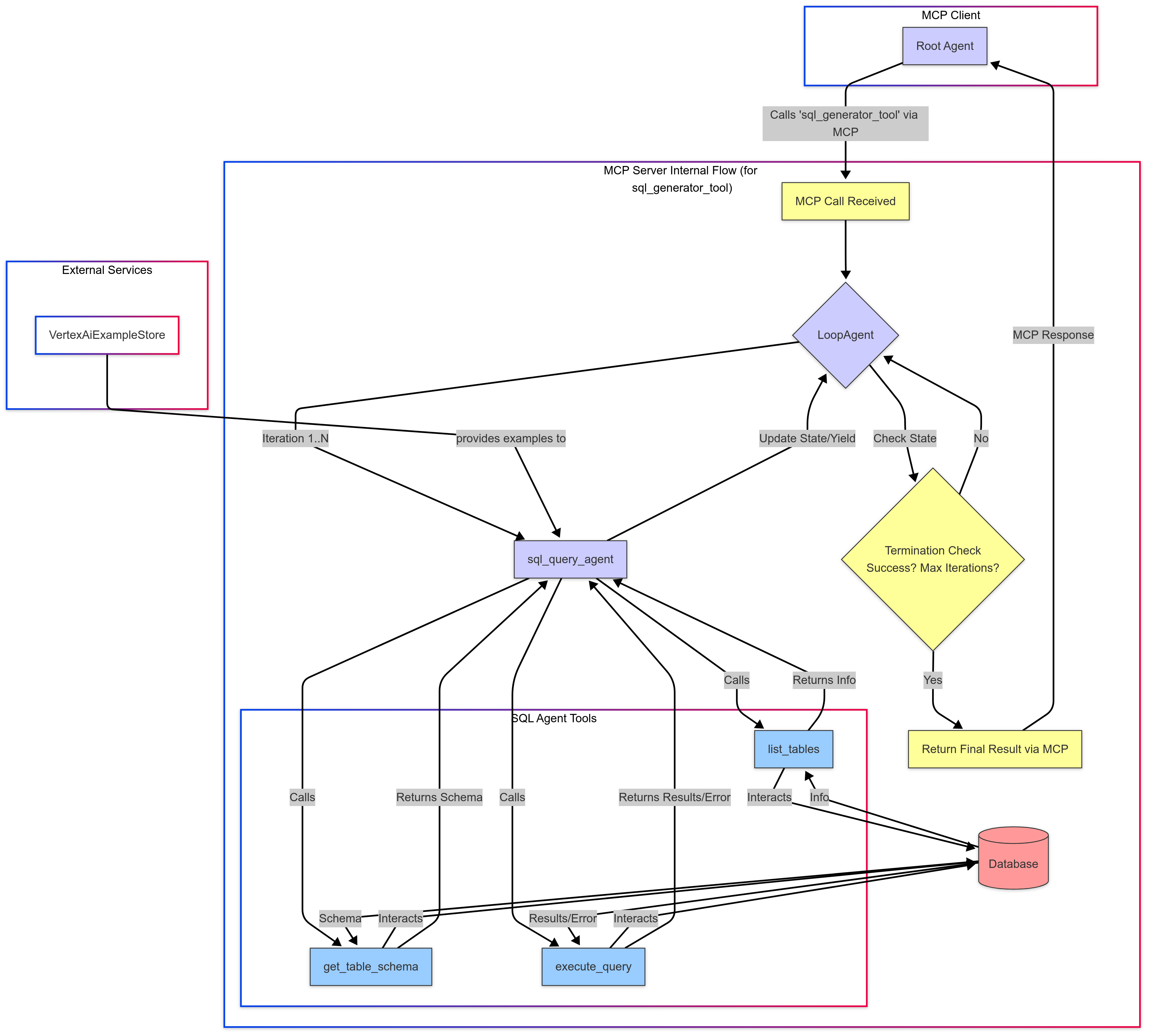
The agent uses a combination of components:
- Main Agent: Handles natural language understanding and generates responses
- SQL Query Tool: A tool that generates and executes SQL queries
- MCP Server: Multi-Call Protocol server that provides tools to the main agent
- Few-Shot Examples: Pre-loaded examples to help improve SQL query generation
- SQLite Database: The Chinook music store sample database
Features
- Natural language to SQL conversion
- Database schema introspection
- Error handling and query refinement
- Example-enhanced prompting for better SQL generation
- Conversational presentation of query results
Prerequisites
- Python 3.10+
- Google Cloud account with Vertex AI API enabled
- Google Cloud authentication configured
Installation
-
Clone this repository:
git clone <repository-url> cd sql-database-agent -
Install dependencies:
pip install -r requirements.txt -
Set up Google Cloud authentication:
# Option 1: Set up Application Default Credentials gcloud auth application-default login # Option 2: Use a service account key export GOOGLE_APPLICATION_CREDENTIALS=/path/to/your/service-account-key.json -
Configure environment variables in a
.envfile:GOOGLE_CLOUD_PROJECT=your-project-id # Optional: Pre-configured example store (after running ingestion) EXAMPLE_STORE=your-example-store-resource-name
Running the Application
Step 1: Prepare Few-Shot Examples (Optional)
To improve the agent’s performance, you can ingest few-shot examples:
python injest_examples.py --project your-project-id
After running, you’ll get an example store resource name that you should set in your .env file.
Step 2: Start the Agent
Run the main agent script:
python agent.py
This will initialize the agent and allow you to interact with it. The script includes a sample question to demonstrate functionality.
Implementation Details
Key Components
- agent.py: Main entry point and agent orchestration
- sql_query_mcp_server.py: MCP server that provides SQL tools
- sqlite_database.py: Database wrapper for the Chinook SQLite database
- injest_examples.py: Tool for ingesting few-shot examples
Architecture
- The user sends a natural language query
- The main agent processes the query and calls the SQL tool
- The SQL tool uses the MCP server to:
- List tables and get schema information
- Generate an appropriate SQL query
- Execute the query against the database
- The main agent interprets the results and responds in natural language
Customization
Using a Different Database
To use a different SQLite database:
- Update the
setup_databasefunction insqlite_database.py - Update the few-shot examples in
injest_examples.pyto match your schema
Modifying Agent Behavior
You can adjust the agent’s behavior by modifying the instructions in:
agent.py: Change the main agent’s instruction promptsql_query_mcp_server.py: Modify the SQL generation agent’s prompt
Dev Tools Supporting MCP
The following are the main code editors that support the Model Context Protocol. Click the link to visit the official website for more information.







