
Agentic Rag With Mcp Server
What is Agentic Rag With Mcp Server
Agentic-RAG-with-MCP-Server is a powerful project that combines an MCP (Model Context Protocol) server and client for building Agentic RAG (Retrieval-Augmented Generation) applications, enhancing the capabilities of RAG systems with advanced tools.
Use cases
Use cases include improving search engine results, enhancing chatbots with better understanding of user queries, and supporting research applications that require precise information extraction and relevance filtering.
How to use
To use Agentic-RAG-with-MCP-Server, establish a connection using the ClientSession from the mcp library, list available server tools, and call any tool with custom arguments to process queries utilizing OpenAI or Gemini alongside MCP tools.
Key features
Key features include entity extraction, query refinement, relevance checking, and the ability to return the current date and time, all powered by OpenAI and facilitated through the FastMCP class.
Where to use
Agentic-RAG-with-MCP-Server can be used in various fields such as natural language processing, information retrieval, and any application requiring enhanced query handling and document relevance.
Clients Supporting MCP
The following are the main client software that supports the Model Context Protocol. Click the link to visit the official website for more information.





Overview
What is Agentic Rag With Mcp Server
Agentic-RAG-with-MCP-Server is a powerful project that combines an MCP (Model Context Protocol) server and client for building Agentic RAG (Retrieval-Augmented Generation) applications, enhancing the capabilities of RAG systems with advanced tools.
Use cases
Use cases include improving search engine results, enhancing chatbots with better understanding of user queries, and supporting research applications that require precise information extraction and relevance filtering.
How to use
To use Agentic-RAG-with-MCP-Server, establish a connection using the ClientSession from the mcp library, list available server tools, and call any tool with custom arguments to process queries utilizing OpenAI or Gemini alongside MCP tools.
Key features
Key features include entity extraction, query refinement, relevance checking, and the ability to return the current date and time, all powered by OpenAI and facilitated through the FastMCP class.
Where to use
Agentic-RAG-with-MCP-Server can be used in various fields such as natural language processing, information retrieval, and any application requiring enhanced query handling and document relevance.
Clients Supporting MCP
The following are the main client software that supports the Model Context Protocol. Click the link to visit the official website for more information.
Content
🚀 Agentic RAG with MCP Server 
✨ Overview
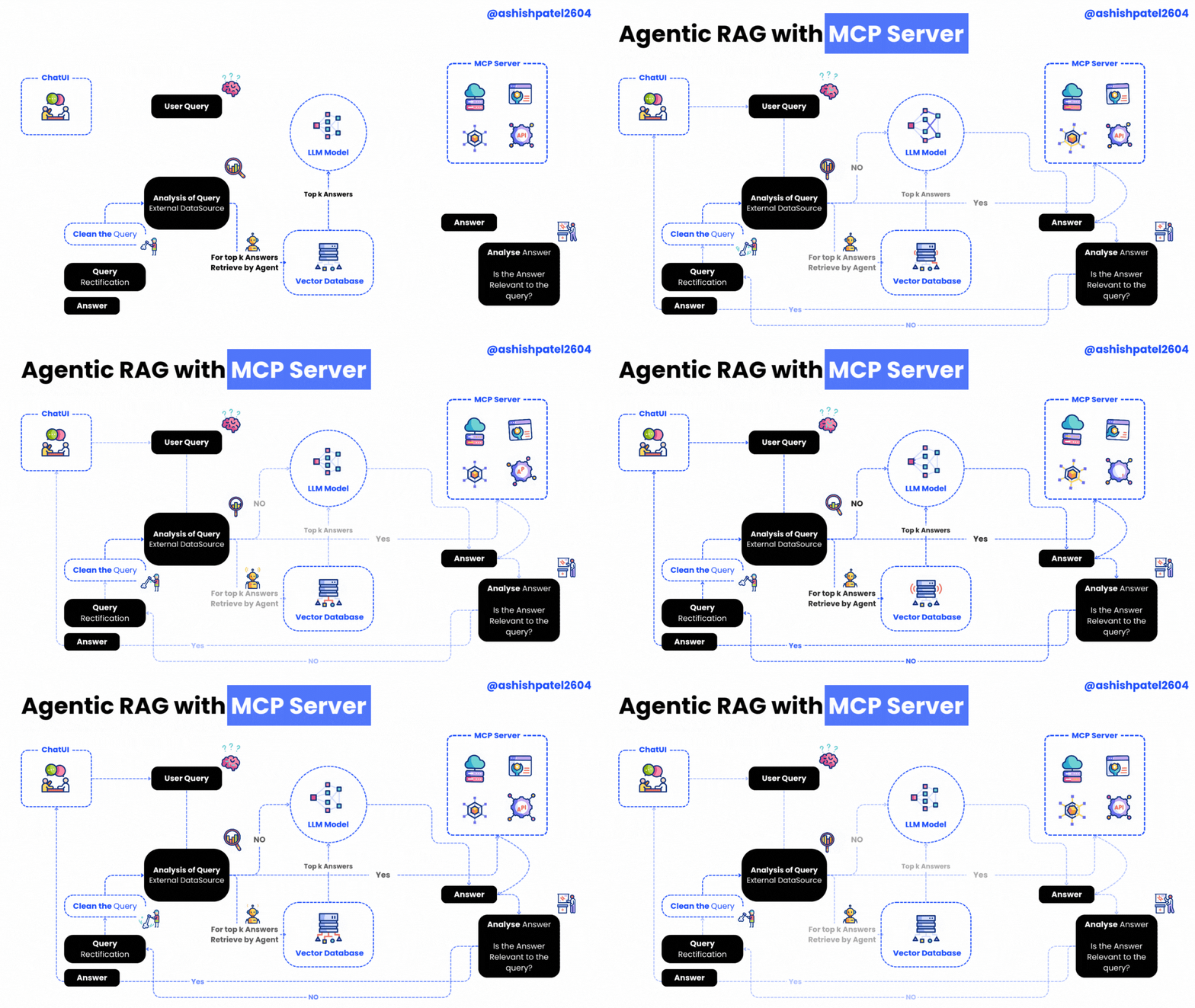
Agentic RAG with MCP Server is a powerful project that brings together an MCP (Model Context Protocol) server and client for building Agentic RAG (Retrieval-Augmented Generation) applications.
This setup empowers your RAG system with advanced tools such as:
- 🕵️♂️ Entity Extraction
- 🔍 Query Refinement
- ✅ Relevance Checking
The server hosts these intelligent tools, while the client shows how to seamlessly connect and utilize them.
🖥️ Server — server.py
Powered by the FastMCP class from the mcp library, the server exposes these handy tools:
| Tool Name | Description | Icon |
|---|---|---|
get_time_with_prefix |
Returns the current date & time | ⏰ |
extract_entities_tool |
Uses OpenAI to extract entities from a query — enhancing document retrieval relevance | 🧠 |
refine_query_tool |
Improves the quality of user queries with OpenAI-powered refinement | ✨ |
check_relevance |
Filters out irrelevant content by checking chunk relevance with an LLM | ✅ |
🤝 Client — mcp-client.py
The client demonstrates how to connect and interact with the MCP server:
- Establish a connection with
ClientSessionfrom themcplibrary - List all available server tools
- Call any tool with custom arguments
- Process queries leveraging OpenAI or Gemini and MCP tools in tandem
⚙️ Requirements
- Python 3.9 or higher
openaiPython packagemcplibrarypython-dotenvfor environment variable management
🛠️ Installation Guide
# Step 1: Clone the repository
git clone https://github.com/ashishpatel26/Agentic-RAG-with-MCP-Server.git

# Step 2: Navigate into the project directory
cd Agentic-RAG-with-MCP-Serve

# Step 3: Install dependencies
pip install -r requirements.txt
🔐 Configuration
- Create a
.envfile (use.env.sampleas a template) - Set your OpenAI model in
.env:
OPENAI_MODEL_NAME="your-model-name-here"
GEMINI_API_KEY="your-model-name-here"
🚀 How to Use
- Start the MCP server:
python server.py
- Run the MCP client:
python mcp-client.py
📜 License
This project is licensed under the MIT License.
Thanks for Reading 🙏
Dev Tools Supporting MCP
The following are the main code editors that support the Model Context Protocol. Click the link to visit the official website for more information.







