
Appinsightmcp
What is Appinsightmcp
AppInsightMCP is a market intelligence MCP server that analyzes data from the Apple App Store and Google Play Store to provide insights about apps, market trends, competitors, and user feedback.
Use cases
Use cases include analyzing competitors’ apps, understanding market trends, gathering user feedback for app improvement, and identifying potential opportunities for new app development.
How to use
Users can interact with AppInsightMCP through its API endpoints to retrieve detailed information about apps, search for apps, and obtain reviews and ratings from both app stores.
Key features
Key features include detailed app information retrieval, app search functionality, developer-specific app listings, privacy details, user reviews, ratings, and version history for apps on both platforms.
Where to use
AppInsightMCP can be used in various fields such as market research, competitive analysis, app development, and marketing strategies within the mobile app industry.
Clients Supporting MCP
The following are the main client software that supports the Model Context Protocol. Click the link to visit the official website for more information.





Overview
What is Appinsightmcp
AppInsightMCP is a market intelligence MCP server that analyzes data from the Apple App Store and Google Play Store to provide insights about apps, market trends, competitors, and user feedback.
Use cases
Use cases include analyzing competitors’ apps, understanding market trends, gathering user feedback for app improvement, and identifying potential opportunities for new app development.
How to use
Users can interact with AppInsightMCP through its API endpoints to retrieve detailed information about apps, search for apps, and obtain reviews and ratings from both app stores.
Key features
Key features include detailed app information retrieval, app search functionality, developer-specific app listings, privacy details, user reviews, ratings, and version history for apps on both platforms.
Where to use
AppInsightMCP can be used in various fields such as market research, competitive analysis, app development, and marketing strategies within the mobile app industry.
Clients Supporting MCP
The following are the main client software that supports the Model Context Protocol. Click the link to visit the official website for more information.
Content
App Market Intelligence MCP
An MCP server that provides comprehensive market intelligence by analyzing data from both the Apple App Store and Google Play Store. Get insights about apps, market trends, competitors, and user feedback across the major mobile app marketplaces.
API Coverage
App Store API Coverage
| API Function | Implemented | MCP Tool Name | Description |
|---|---|---|---|
| app | ✅ | app-store-details | Get detailed information about an App Store app |
| list | ✅ | app-store-list | Retrieve apps from iTunes collections |
| search | ✅ | app-store-search | Search for apps on the App Store |
| developer | ✅ | app-store-developer | Get apps by a developer |
| privacy | ✅ | app-store-privacy | Get privacy details for an app |
| suggest | ✅ | app-store-suggest | Get search suggestions |
| similar | ✅ | app-store-similar | Get similar apps |
| reviews | ✅ | app-store-reviews | Get app reviews |
| ratings | ✅ | app-store-ratings | Get app ratings |
| versionHistory | ✅ | app-store-version-history | Get app version history |
Google Play API Coverage
| API Function | Implemented | MCP Tool Name | Description |
|---|---|---|---|
| app | ✅ | google-play-details | Get detailed app information |
| list | ✅ | google-play-list | Retrieve apps from collections |
| search | ✅ | google-play-search | Search for apps |
| developer | ✅ | google-play-developer | Get apps by developer |
| suggest | ✅ | google-play-suggest | Get search suggestions |
| reviews | ✅ | google-play-reviews | Get app reviews |
| similar | ✅ | google-play-similar | Get similar apps |
| permissions | ✅ | google-play-permissions | Get app permissions |
| datasafety | ✅ | google-play-datasafety | Get data safety information |
| categories | ✅ | google-play-categories | Get list of categories |
Usage
Start the MCP server:
node src/server.js
The server exposes tools that can be used through any MCP client. For example, using Claude for Desktop, you can:
- Search for apps across both stores
- Get detailed app information
- Read reviews and ratings
- Find similar apps
- Check app privacy and permissions
- And more
Usage Examples
// Get top free iOS apps
{
  "name": "app-store-list",
  "params": {
    "collection": "topfreeapplications",
    "num": 10
  }
}

// Get top paid Android games
{
  "name": "google-play-list",
  "params": {
    "collection": "TOP_PAID",
    "category": "GAME",
    "num": 10
  }
}
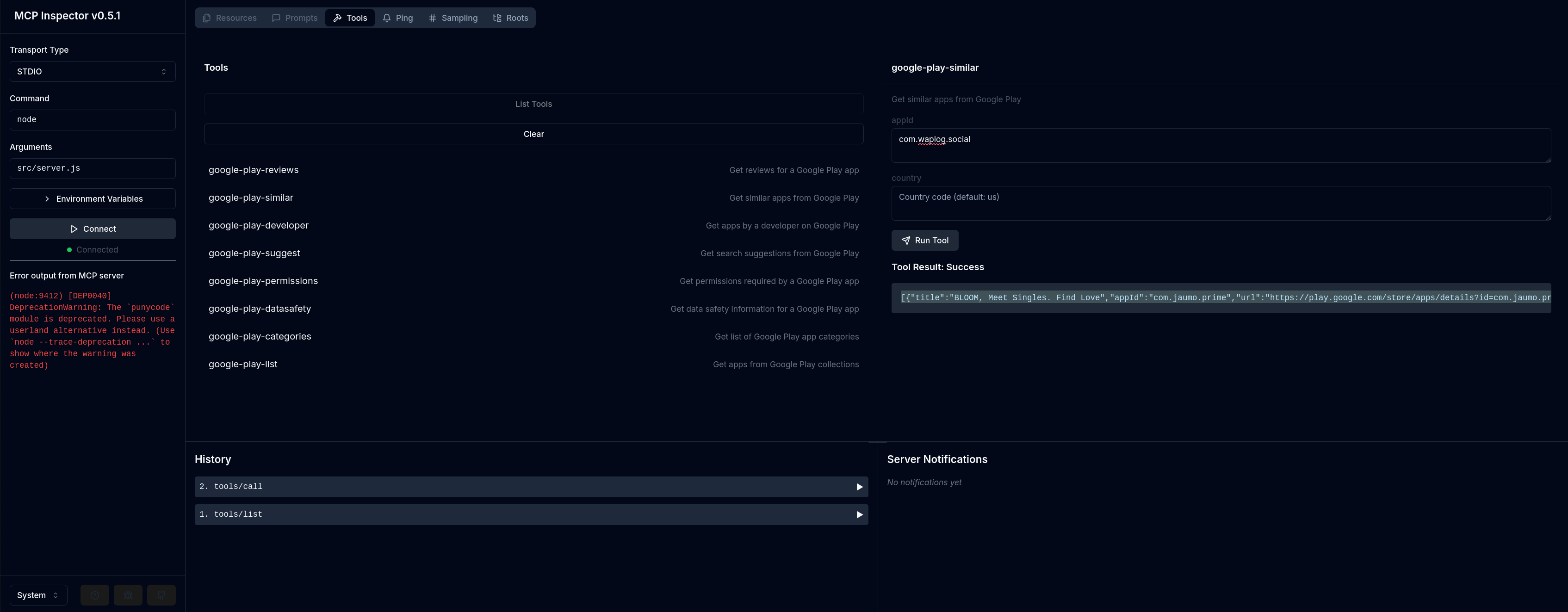
Test with MCP Inspector
npm run test:inspector
Test with mcp-cli
npx @wong2/mcp-cli npx -y "app-insight-mcp"
Usage with Claude Desktop
Add this to your claude_desktop_config.json:
Installing via Smithery
To install App Market Intelligence for Claude Desktop automatically via Smithery:
npx -y @smithery/cli install @JiantaoFu/appinsightmcp --client claude
Docker
{
  "mcpServers": {
    "app-insight-mcp": {
      "command": "docker",
      "args": [
        "run",
        "-i",
        "--rm",
        "app-insight-mcp"
      ]
    }
  }
}
NPX
{
  "mcpServers": {
    "app-insight-mcp": {
      "command": "npx",
      "args": [
        "-y",
        "@jeromyfu/app-insight-mcp"
      ]
    }
  }
}
Build
Docker build:
docker build -t app-insight-mcp -f Dockerfile .
Error Handling
All tools include error handling and will return appropriate error messages if:
- Required parameters are missing
- API calls fail
- Rate limits are hit
- Invalid IDs or parameters are provided
Contributing
Feel free to contribute by:
- Implementing missing features
- Improving error handling
- Adding more API capabilities
- Enhancing documentation
License
MIT
Dev Tools Supporting MCP
The following are the main code editors that support the Model Context Protocol. Click the link to visit the official website for more information.







