
Autoinvestmcp
What is Autoinvestmcp
AutoInvestMCP is an intelligent investment assistant based on the Multi-Component Processing (MCP) service architecture. It supports natural language queries for trading ideas and executes various financial analyses and trading functions.
Use cases
Use cases for AutoInvestMCP include analyzing the top-performing tech stocks over the past week, finding stocks with MACD crossovers and breaking through 20-day moving averages, comparing the performance of Moutai and Wuliangye based on the last three months of data, and executing grid trading strategies for Bitcoin.
How to use
To use AutoInvestMCP, install the dependencies with ‘pip install -r requirements.txt’, configure your API keys in ‘config/config.json’, start the service using ‘python src/mcp_server.py’, and access the API at ‘http://localhost:8000’.
Key features
Key features include natural language processing for understanding trading ideas, integration with multiple data sources like Binance and Futu for real-time trading data, strategy validation with various technical indicators, quantitative trading capabilities, and intelligent analysis using the DeepSeek large language model.
Where to use
AutoInvestMCP can be used in various fields including personal finance management, algorithmic trading, stock market analysis, and investment strategy development.
Clients Supporting MCP
The following are the main client software that supports the Model Context Protocol. Click the link to visit the official website for more information.





Overview
What is Autoinvestmcp
AutoInvestMCP is an intelligent investment assistant based on the Multi-Component Processing (MCP) service architecture. It supports natural language queries for trading ideas and executes various financial analyses and trading functions.
Use cases
Use cases for AutoInvestMCP include analyzing the top-performing tech stocks over the past week, finding stocks with MACD crossovers and breaking through 20-day moving averages, comparing the performance of Moutai and Wuliangye based on the last three months of data, and executing grid trading strategies for Bitcoin.
How to use
To use AutoInvestMCP, install the dependencies with ‘pip install -r requirements.txt’, configure your API keys in ‘config/config.json’, start the service using ‘python src/mcp_server.py’, and access the API at ‘http://localhost:8000’.
Key features
Key features include natural language processing for understanding trading ideas, integration with multiple data sources like Binance and Futu for real-time trading data, strategy validation with various technical indicators, quantitative trading capabilities, and intelligent analysis using the DeepSeek large language model.
Where to use
AutoInvestMCP can be used in various fields including personal finance management, algorithmic trading, stock market analysis, and investment strategy development.
Clients Supporting MCP
The following are the main client software that supports the Model Context Protocol. Click the link to visit the official website for more information.
Content
AutoInvestAI - 智能投资助手
AutoInvestAI是一个基于MCP (Multi-Component Processing)服务架构的智能投资助手,支持通过自然语言提出交易想法,并执行各种金融分析和交易功能。
GUI
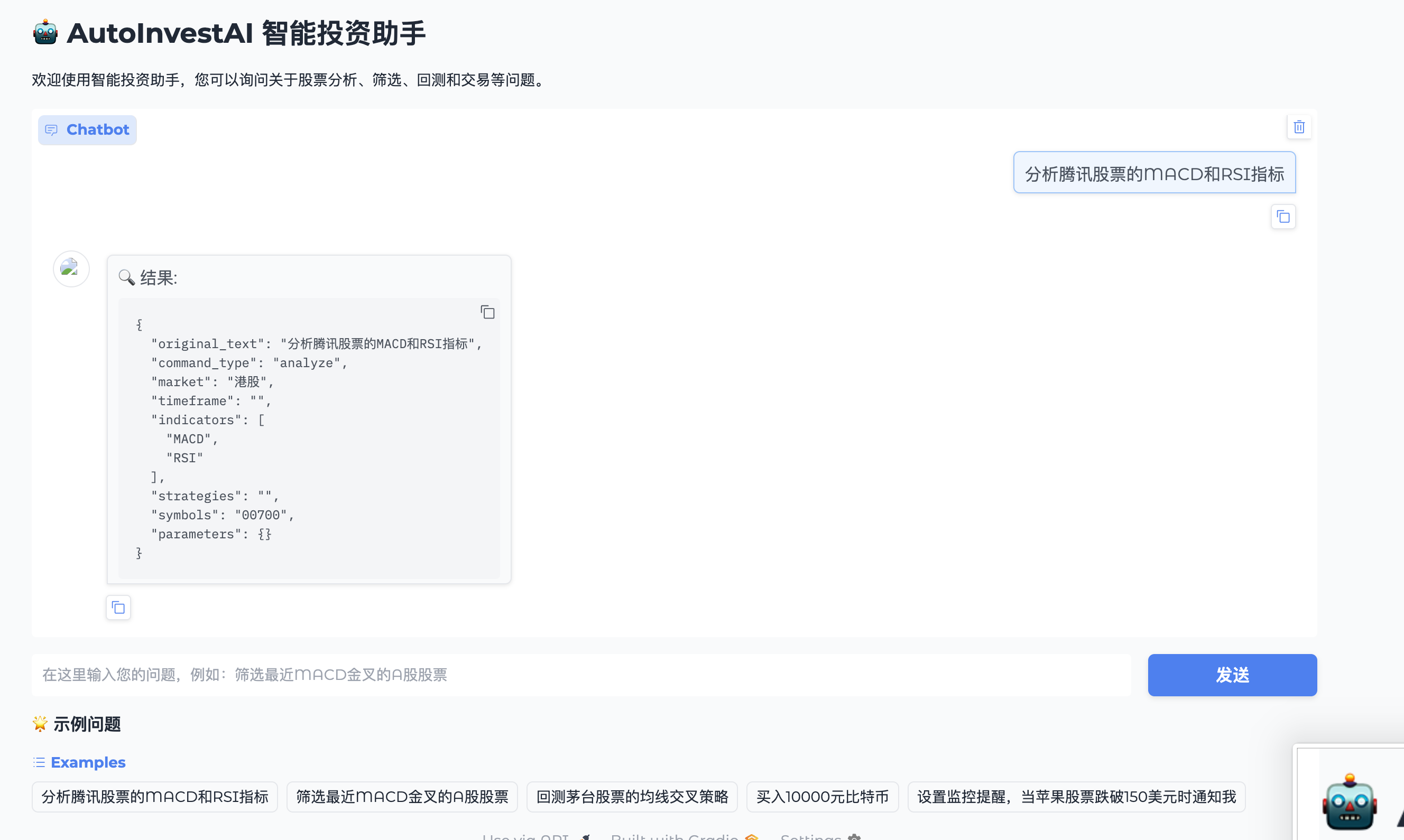
主要功能
- 自然语言处理:理解中文交易想法并转化为具体操作
- 多数据源集成:对接币安、富途等API获取实时交易数据
- 策略验证:支持多种技术指标和交易策略的验证
- 量化交易:提供多维度的股票筛选和自动化交易功能
- 智能分析:集成DeepSeek大语言模型进行深度分析
项目结构
AutoInvestAI/
├── config/               # 配置文件
├── src/                  # 源代码
│   ├── data_api/         # 数据API接口
│   ├── nlp/              # 自然语言处理
│   ├── strategy/         # 交易策略
│   ├── indicators/       # 技术指标
│   ├── trade/            # 交易执行
│   └── mcp_server.py     # MCP服务主入口
├── tests/                # 测试代码
└── requirements.txt      # 项目依赖
使用方法
- 安装依赖:
pip install -r requirements.txt - 配置API密钥:在
config/config.json中设置您的API密钥 - 启动服务:
python src/mcp_server.py - 访问API:
http://localhost:8000
示例查询
- “分析最近一周表现最好的十支科技股”
- “查找MACD金叉且突破20日均线的股票”
- “根据过去3个月的数据,对比茅台和五粮液的表现”
- “执行我的网格交易策略买入比特币”
开发与测试
每个模块都提供了独立的测试脚本,位于tests/目录下,可以通过pytest运行所有测试。
环境变量
BINANCE_API_KEY=您的币安API密钥
BINANCE_API_SECRET=您的币安API密钥Secret
FUTU_HOST=127.0.0.1
FUTU_PORT=11111
FUTU_TRD_ENV=0
FUTU_ACC_ID=FUTU AccountID
Dev Tools Supporting MCP
The following are the main code editors that support the Model Context Protocol. Click the link to visit the official website for more information.







