
Claimsprocessingassistant Mcp
What is Claimsprocessingassistant Mcp
ClaimsProcessingAssistant-MCP is a Model Context Protocol (MCP) server designed for managing insurance claims. It integrates with a Supabase database, enabling AI assistants to interact with claims processing workflows and data using natural language.
Use cases
Use cases include automating insurance claim submissions, validating claims against policies, analyzing documents for accuracy, providing real-time status updates, and maintaining a detailed audit trail of all claim activities.
How to use
To use ClaimsProcessingAssistant-MCP, users can submit claims through an API client. The server handles authentication, validates claims, and processes them according to defined rules, providing responses based on the status of the claims.
Key features
Key features include MCP protocol implementation, secure authentication and authorization, advanced claim validation through a rules engine, AI-powered document analysis, Supabase integration for data management, Redis caching for performance, and comprehensive audit trails.
Where to use
ClaimsProcessingAssistant-MCP is applicable in the insurance industry, particularly in environments where claims processing is critical, such as insurance companies, claims adjusters, and related service providers.
Clients Supporting MCP
The following are the main client software that supports the Model Context Protocol. Click the link to visit the official website for more information.





Overview
What is Claimsprocessingassistant Mcp
ClaimsProcessingAssistant-MCP is a Model Context Protocol (MCP) server designed for managing insurance claims. It integrates with a Supabase database, enabling AI assistants to interact with claims processing workflows and data using natural language.
Use cases
Use cases include automating insurance claim submissions, validating claims against policies, analyzing documents for accuracy, providing real-time status updates, and maintaining a detailed audit trail of all claim activities.
How to use
To use ClaimsProcessingAssistant-MCP, users can submit claims through an API client. The server handles authentication, validates claims, and processes them according to defined rules, providing responses based on the status of the claims.
Key features
Key features include MCP protocol implementation, secure authentication and authorization, advanced claim validation through a rules engine, AI-powered document analysis, Supabase integration for data management, Redis caching for performance, and comprehensive audit trails.
Where to use
ClaimsProcessingAssistant-MCP is applicable in the insurance industry, particularly in environments where claims processing is critical, such as insurance companies, claims adjusters, and related service providers.
Clients Supporting MCP
The following are the main client software that supports the Model Context Protocol. Click the link to visit the official website for more information.
Content
ClaimsProcessingAssistant MCP Server
🚀 Project Overview
ClaimsProcessingAssistant MCP Server is a robust, TypeScript-based backend for managing insurance claims using the MCP protocol. It features advanced validation, document analysis (AI-powered), Supabase integration, Redis caching, and comprehensive error handling—designed for scalability, security, and extensibility.
✨ Features
- MCP Protocol Implementation: Standardized claim processing API.
- Authentication & Authorization: Secure access for users and services.
- Advanced Claim Validation: Rules engine for policy, duplicate, high-value, and document checks.
- AI Document Analysis: Integrates with Claude for intelligent document validation.
- Supabase Integration: Modern, scalable Postgres backend.
- Redis Caching: Fast access to frequent queries and rate limiting.
- Audit Trail: Full traceability of claim actions.
- Comprehensive Testing: Unit, integration, and end-to-end tests.
- CI/CD Ready: GitHub Actions for automated testing and deployment.
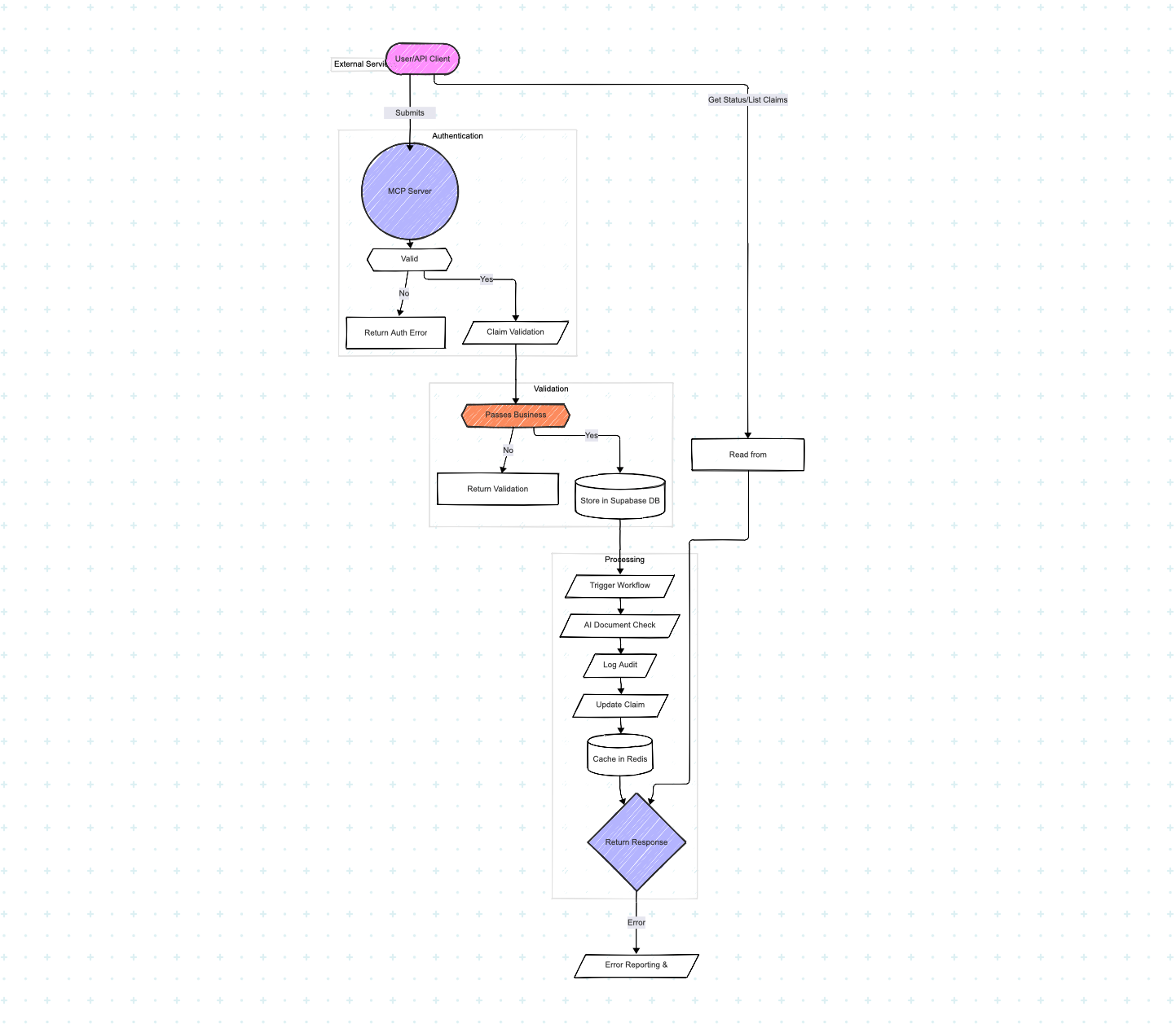
🏗️ Architecture
flowchart TD
    A[User/API Client] -->|Submit Claim| B[MCP Server]
    B --> C{Authentication}
    C -- Valid --> D[Validation Engine]
    C -- Invalid --> Z1[Auth Error]
    D --> E{Validation Rules}
    E -- Pass --> F[Store in DB]
    E -- Fail --> Z2[Validation Errors]
    F --> G[Workflow Engine]
    G --> H[AI Doc Validation]
    H --> I[Audit Trail]
    I --> J[Update Status]
    J --> K[Cache Results]
    K --> L[Return Response]
    L -->|Get Status/List| M[Read Cache/DB]
    M --> L
    L -->|Error| Z3[Error Reporting]
📦 Project Structure
ClaimsProcessingAssistant-MCP/
├── src/
│   ├── auth/                # Authentication logic
│   ├── config/              # Configuration and environment
│   ├── functions/           # MCP protocol functions (submit, validate, etc.)
│   ├── services/            # Business logic, cache, AI, rate limiting
│   ├── mcp/                 # Protocol handler, function registry
│   ├── validation/          # Validation rules and helpers
│   └── server/              # Server entrypoint
├── __tests__/               # Unit and integration tests
├── scripts/                 # Utility scripts
├── dist/                    # Compiled output
├── Dockerfile
├── package.json
├── README.md
└── images/
    └── workflow-diagram.png
⚡ Getting Started
Prerequisites
- Node.js (v18+ recommended)
- Docker (for local development)
- Supabase account (or local Postgres)
- Redis instance
Setup
git clone https://github.com/your-org/ClaimsProcessingAssistant-MCP.git
cd ClaimsProcessingAssistant-MCP
npm install
cp .env.example .env
# Edit .env with your Supabase/Redis credentials
Running Locally
# Start services (if using Docker)
docker-compose up -d

# Start the server
npm run dev
Running Tests
npm run test
🛠️ Usage
- API Endpoints: See API Documentation (or describe main endpoints here)
- Submitting a Claim:
POST /api/claims/submit - Validating a Claim:
POST /api/claims/validate - Getting Claim Status:
GET /api/claims/:id/status - Listing Claims:
GET /api/claims?filter=...
🧪 Testing & Quality
- Unit tests:
npm run test - Linting:
npm run lint - Coverage:
npm run coverage - CI/CD: Automated via GitHub Actions
🤝 Contributing
- Fork the repo and create your branch (
git checkout -b feature/your-feature) - Make your changes and add tests
- Run lint and tests before committing
- Submit a pull request!
See CONTRIBUTING.md for more details.
📝 License
MIT License. See LICENSE for details.
🙋 FAQ / Support
- Issues: GitHub Issues
- Contact: Open an issue or PR for questions and suggestions.
Happy Claim Processing!
Tip: Update links, diagram paths, and add badges (build, coverage, etc.) as needed for your repo.
Dev Tools Supporting MCP
The following are the main code editors that support the Model Context Protocol. Click the link to visit the official website for more information.







