
Dspy Mcp Client Chatbot
What is Dspy Mcp Client Chatbot
DSPy_MCP_Client_Chatbot is a conversational AI assistant built using DSPy and Streamlit, designed to facilitate user interactions with various data sources through natural language. It exemplifies its capabilities with Airbnb data as a use case.
Use cases
Use cases include querying Airbnb listings for information, performing web searches, and accessing databases to provide insights and answers to user inquiries.
How to use
To use DSPy_MCP_Client_Chatbot, clone the repository, install the required dependencies, and run the application. Users can interact with the chatbot through a web interface, asking questions and receiving responses based on the configured data sources.
Key features
Key features include natural language processing for querying data, integration with multiple tools via MCP, a chat interface for user interaction, and the ability to maintain conversation history.
Where to use
DSPy_MCP_Client_Chatbot can be used in various fields such as customer service, data analysis, and research, where natural language interaction with data is beneficial.
Clients Supporting MCP
The following are the main client software that supports the Model Context Protocol. Click the link to visit the official website for more information.





Overview
What is Dspy Mcp Client Chatbot
DSPy_MCP_Client_Chatbot is a conversational AI assistant built using DSPy and Streamlit, designed to facilitate user interactions with various data sources through natural language. It exemplifies its capabilities with Airbnb data as a use case.
Use cases
Use cases include querying Airbnb listings for information, performing web searches, and accessing databases to provide insights and answers to user inquiries.
How to use
To use DSPy_MCP_Client_Chatbot, clone the repository, install the required dependencies, and run the application. Users can interact with the chatbot through a web interface, asking questions and receiving responses based on the configured data sources.
Key features
Key features include natural language processing for querying data, integration with multiple tools via MCP, a chat interface for user interaction, and the ability to maintain conversation history.
Where to use
DSPy_MCP_Client_Chatbot can be used in various fields such as customer service, data analysis, and research, where natural language interaction with data is beneficial.
Clients Supporting MCP
The following are the main client software that supports the Model Context Protocol. Click the link to visit the official website for more information.
Content
MCP Versatile Assistant
A conversational AI assistant built with DSPy and Streamlit that helps users interact with various data sources through natural language, with Airbnb data as one example use case.
Project Overview
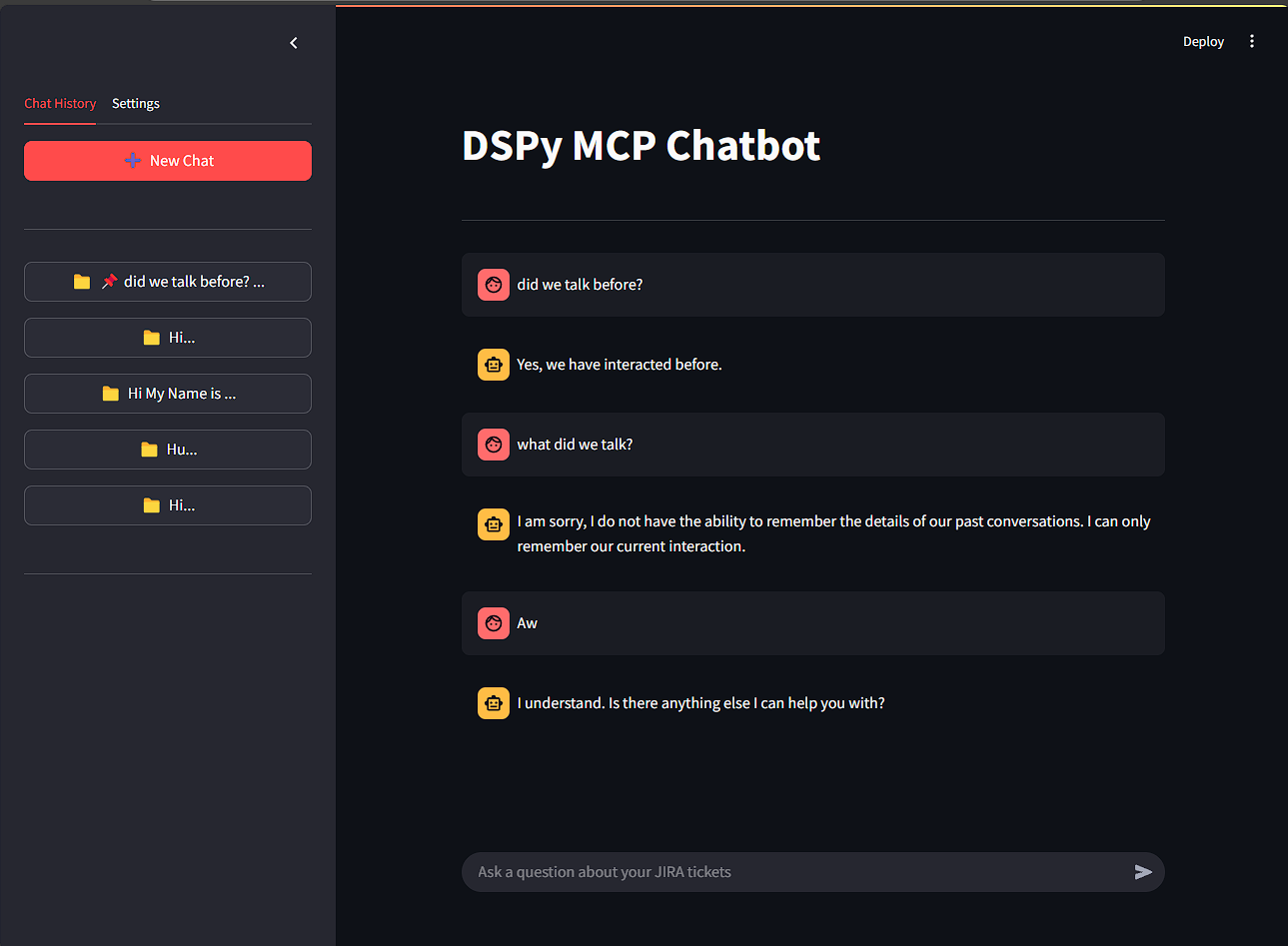
This project implements an AI-powered assistant that can answer questions, search for information, and provide insights across multiple domains through natural language conversations. The system’s capabilities depend on the MCP tools configured - from querying Airbnb listings to performing web searches, accessing databases, and more. The system uses:
- DSPy: A framework for programmatically controlling language models
- Streamlit: For building the interactive web interface
- FastAPI: For the backend API server
- MCP (Model Control Protocol): For managing the communication with various tool servers DSPy Unofficial
Architecture
The project consists of two main components:
1. Backend (FastAPI Server)
- Handles communication with DSPy and the language model
- Manages MCP server connections to various tools
- Implements the ReAct agent for reasoning and tool use
- Maintains conversation history
2. Frontend (Streamlit App)
- Provides a chat interface for users
- Sends queries to the backend
- Displays responses from the AI assistant
- Manages chat history with persistence
Setup Instructions
Prerequisites
- Python 3.9+
- API key for Google Gemini (or other compatible LLM)
Installation
-
Clone this repository:
git clone <repository-url> cd <dir> -
Install dependencies:
pip install -r requirements.txt
Running the Application
-
Install DSPy (MCP Version - Unofficial):
git clone https://github.com/ThanabordeeN/dspy-mcp-intregation.git && cd dspy-mcp-intregation && pip install . -
Start the backend server:
cd backend uvicorn main:app --host 0.0.0.0 --port 8001 -
In a separate terminal, start the Streamlit frontend:
streamlit run app.py -
Open a web browser and navigate to
http://localhost:8501
Usage
- Enter your questions in the chat input
- The assistant will process your query, using the appropriate tools configured in the MCP server
- Review the response in the chat interface
- You can save and manage multiple chat sessions through the sidebar
Example Queries
Depending on configured tools, you can ask questions like:
- Airbnb data: “Find me Airbnb listings in New York under $150 per night”
- Web browsing: “Search for the latest news about artificial intelligence”
- Data analysis: “Analyze the trend of housing prices in San Francisco over the last decade”
- Image generation: “Create an image of a futuristic city skyline”
- Math problems: “What is the solution to this equation: 3x^2 + 2x - 5 = 0?”
Project Structure
MCP_assistant/
├── README.md                 # This documentation
├── app.py                    # Streamlit frontend
├── backend/
│   └── main.py               # FastAPI backend server
├── data/
│   └── chat_sessions.json    # Persisted chat history
└── requirements.txt          # Project dependencies
Features
- Natural language querying with multiple tool capabilities
- Configurable tools through MCP server settings
- Persistent chat history management
- Export/import of chat sessions
- Customizable language model settings
License
MIT License
Contributing
Contributions are welcome! Please open an issue or submit a pull request for any improvements or bug fixes.
Dev Tools Supporting MCP
The following are the main code editors that support the Model Context Protocol. Click the link to visit the official website for more information.







