
Easy AutoCAD
What is Easy AutoCAD
Easy-MCP-AutoCad is an AutoCAD integration server based on the Model Context Protocol (MCP) that allows users to interact with AutoCAD using natural language through large language models like Claude. It facilitates the creation, modification, and analysis of AutoCAD drawings while enabling the storage and querying of CAD elements.
Use cases
Use cases include automating the creation of CAD drawings, modifying existing drawings through natural language commands, analyzing existing drawings for specific elements, and managing CAD data efficiently.
How to use
To use Easy-MCP-AutoCad, clone the repository, set up a virtual environment, install dependencies, and run the server. It can also be integrated with Claude Desktop by configuring the appropriate settings in the configuration file.
Key features
Key features include natural language interaction for creating and modifying drawings, basic drawing capabilities (lines, circles), layer management, automatic generation of professional drawings (e.g., PMC control diagrams), drawing analysis, text pattern querying, and built-in SQLite database integration for CAD element storage and querying.
Where to use
Easy-MCP-AutoCad can be used in various fields such as architecture, engineering, and design, where AutoCAD is commonly employed for drafting and modeling.
Clients Supporting MCP
The following are the main client software that supports the Model Context Protocol. Click the link to visit the official website for more information.





Overview
What is Easy AutoCAD
Easy-MCP-AutoCad is an AutoCAD integration server based on the Model Context Protocol (MCP) that allows users to interact with AutoCAD using natural language through large language models like Claude. It facilitates the creation, modification, and analysis of AutoCAD drawings while enabling the storage and querying of CAD elements.
Use cases
Use cases include automating the creation of CAD drawings, modifying existing drawings through natural language commands, analyzing existing drawings for specific elements, and managing CAD data efficiently.
How to use
To use Easy-MCP-AutoCad, clone the repository, set up a virtual environment, install dependencies, and run the server. It can also be integrated with Claude Desktop by configuring the appropriate settings in the configuration file.
Key features
Key features include natural language interaction for creating and modifying drawings, basic drawing capabilities (lines, circles), layer management, automatic generation of professional drawings (e.g., PMC control diagrams), drawing analysis, text pattern querying, and built-in SQLite database integration for CAD element storage and querying.
Where to use
Easy-MCP-AutoCad can be used in various fields such as architecture, engineering, and design, where AutoCAD is commonly employed for drafting and modeling.
Clients Supporting MCP
The following are the main client software that supports the Model Context Protocol. Click the link to visit the official website for more information.
Content
AutoCAD MCP 服务器
基于 Model Context Protocol (MCP) 的 AutoCAD 集成服务器,允许通过 Claude 等大型语言模型 (LLM) 与 AutoCAD 进行自然语言交互。
本案例仅作参考和学习,部分CAD功能尚未实现,但实现与autocad端到端之间的通信,但具体的工具函数尚未实现
示例
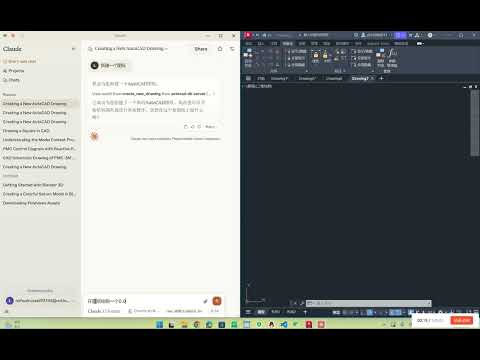
我们的项目已经被MseeP.ai引用:
https://mseep.ai/app/zh19980811-easy-mcp-autocad。
功能特点
- 自然语言交互:通过自然语言控制 AutoCAD 创建和修改图纸
- 基础绘图:支持绘制基本图形(线条、圆等)
- 图层管理:创建、修改和删除图层
- 专业图纸生成:自动生成 PMC 控制图 等专业图纸
- 图纸分析:扫描并解析现有图纸中的元素
- 文本模式查询:查询并高亮显示特定文本模式(如
PMC-3M) - 数据库集成:内置 SQLite 数据库,支持 CAD 元素的存储和查询
系统要求
- Python 3.10 或更高版本
- AutoCAD 2018 或更高版本(需支持 COM 接口)
- Windows 操作系统
安装
1. 克隆仓库
git clone https://github.com/yourusername/autocad-mcp-server.git
cd autocad-mcp-server
2. 创建并激活虚拟环境
Windows:
python -m venv .venv
.venv\Scripts\activate
macOS / Linux:
python -m venv .venv
source .venv/bin/activate
3. 安装依赖
pip install -r requirements.txt
4. (可选)构建可执行文件
pyinstaller --onefile server.py
使用方法
作为独立服务器运行
python server.py
与 Claude Desktop 集成
编辑 Claude Desktop 配置文件(路径如下):
- Windows: %APPDATA%\Claude\claude_desktop_config.json
- macOS: ~/Library/Application Support/Claude/claude_desktop_config.json
示例配置:
{
  "mcpServers": {
    "autocad-mcp-server": {
      "command": "path/to/autocad_mcp_server.exe",
      "args": []
    }
  }
}
可用工具(API 功能)
| 功能 | 说明 |
|---|---|
create_new_drawing |
创建新的 AutoCAD 图纸 |
draw_line |
画直线 |
draw_circle |
画圆 |
set_layer |
设置当前图层 |
highlight_text |
高亮显示匹配的文本 |
scan_elements |
扫描并解析图纸元素 |
export_to_database |
将 CAD 元素信息存入 SQLite |
Dev Tools Supporting MCP
The following are the main code editors that support the Model Context Protocol. Click the link to visit the official website for more information.







