
Filesys
What is Filesys
Filesys is a lightweight MCP server built with Python that allows a Large Language Model (LLM) to securely read and list files from a specified safe directory on your local machine.
Use cases
Use cases for Filesys include interacting with files in a safe directory using Claude AI, automating file management tasks, and enabling LLMs to assist users in retrieving and understanding file data.
How to use
To use Filesys, configure the safe directory in ‘config/config.json’, then start the server using ‘run.py’. You can interact with the server through endpoints like ‘files://list’ to list files and ‘files://read/{filename}’ to read specific file contents.
Key features
Key features of Filesys include secure file access, path validation to prevent directory traversal attacks, integration with Anthropic’s Claude AI for natural language interaction, and the ability to list files and read their contents and metadata.
Where to use
Filesys can be used in any environment where secure file access is required, such as local development, data analysis, or applications needing file interaction via natural language processing.
Clients Supporting MCP
The following are the main client software that supports the Model Context Protocol. Click the link to visit the official website for more information.





Overview
What is Filesys
Filesys is a lightweight MCP server built with Python that allows a Large Language Model (LLM) to securely read and list files from a specified safe directory on your local machine.
Use cases
Use cases for Filesys include interacting with files in a safe directory using Claude AI, automating file management tasks, and enabling LLMs to assist users in retrieving and understanding file data.
How to use
To use Filesys, configure the safe directory in ‘config/config.json’, then start the server using ‘run.py’. You can interact with the server through endpoints like ‘files://list’ to list files and ‘files://read/{filename}’ to read specific file contents.
Key features
Key features of Filesys include secure file access, path validation to prevent directory traversal attacks, integration with Anthropic’s Claude AI for natural language interaction, and the ability to list files and read their contents and metadata.
Where to use
Filesys can be used in any environment where secure file access is required, such as local development, data analysis, or applications needing file interaction via natural language processing.
Clients Supporting MCP
The following are the main client software that supports the Model Context Protocol. Click the link to visit the official website for more information.
Content
File system MCP
Overview
filesys is a lightweight mcp server built with Python and the mcp library that securely exposes file contents and metadata from a preconfigured directory. The project leverages FastMCP to provide a set of endpoints that allow:
- Listing all files in a specified directory.
- Reading the contents and metadata of a specified file.
New: It now includes an integration with Anthropic’s Claude AI, allowing users to interact with the file system through natural language conversation, using Claude Tools to securely access the defined MCP resources.
The project ensures safe file access by validating paths and preventing directory traversal attacks.
Preview
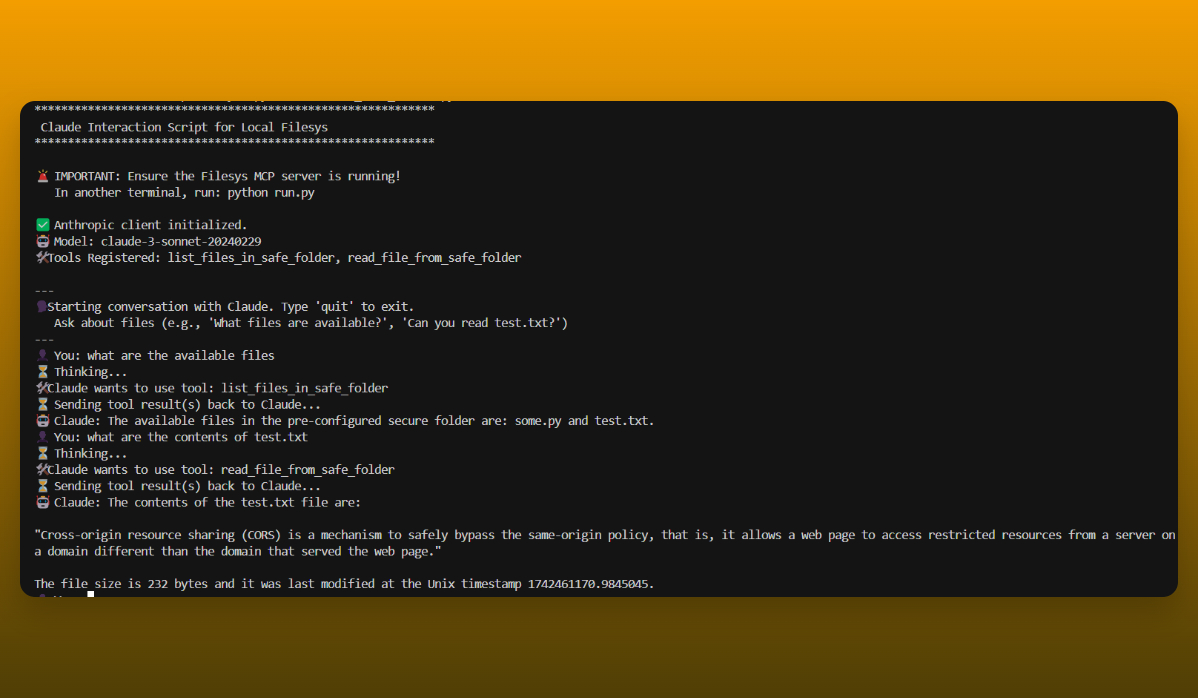
- Interacting with Claude to list and read files from the
safe_folder:
How It Works
The core functionality is divided into several components:
-
Resources:
Insrc/resources.py, two functions are responsible for file operations:list_files(): Scans the base directory (configured inconfig/config.json) to return a list of visible files.read_file(filename): Reads the content of the specified file and returns it along with metadata (size and last modified timestamp), while ensuring that the file access is safe.
-
Server:
Insrc/server.py, a FastMCP server is initialized and registers two resource endpoints:files://list: Invokeslist_files().files://read/{filename}: Invokesread_file(filename).
The server is started via run.py, and it utilizes the mcp library to handle resource requests.
-
Claude Tool Client:
Inclaude_tool_client.py, functions (list_files_in_safe_folder,read_file_from_safe_folder) are defined to interact with the running Filesys MCP server. These functions act as a bridge, translating simple function calls into MCP requests and parsing the responses. They are designed to be easily consumable by Claude Tools. -
Claude Interaction Script:
Theinteract_with_claude.pyscript sets up an Anthropic client, defines Claude Tools based on the functions inclaude_tool_client.py, and runs a command-line conversation loop. Users can ask Claude questions like “What files are available?” or “Read test.txt”, and Claude will use the provided tools (which securely call the MCP server) to fulfill the requests. -
Testing:
Unit tests intests/test_resources.pyensure that the file listing and reading functionalities work as expected.
Installation
- Clone the Repository:
git clone https://github.com/iBz-04/Filesys.git - Navigate to the Project Directory:
cd Filesys - Create a Virtual Environment (Optional but Recommended):
python -m venv venv source venv/bin/activate # On Windows: venv\Scripts\activate - Install Dependencies:
Make sure you have Python installed. Then install the required libraries:pip install -r requirements.txt - Configure API Key:
- Create a file named
.env.localin the project’s root directory. - Add your Anthropic API key to this file:
ANTHROPIC_API_KEY=your_api_key_here - Note: The
.gitignorefile is configured to prevent this file from being committed to Git.
- Create a file named
Configuration
The file server reads its configuration from config/config.json. By default, the server operates on the directory specified below:
{
  "directory": "./safe_folder"
}
You can modify this file to point to a different directory if needed.
- Anthropic API Key: The Claude interaction script reads the
ANTHROPIC_API_KEYfrom the.env.localfile (see Installation step 5).
Usage
-
Start the MCP Server:
First, ensure the Filesys MCP server is running in a terminal:python run.pyThis command initializes the FastMCP server and makes the
files://listandfiles://read/{filename}endpoints available. -
Interact with Claude:
In a separate terminal (while the server from step 1 is still running), run the Claude interaction script:python interact_with_claude.pyYou can then ask Claude to interact with the files in the configured
safe_folder. Examples:- “What files can you see?”
- “List the available files.”
- “Can you read test.txt for me?”
- “Tell me the contents of the file named test.txt”
-
Direct MCP Requests (Optional):
You can also interact with the server directly using any MCP-compatible client:- List Files: Request
files://list. - Read a File: Request
files://read/{filename}(replace{filename}with the actual file name).
- List Files: Request
Testing
- MCP Client Functions: You can test the functions that communicate with the MCP server by running:
This executes thepython claude_tool_client.pytest_tool_functionsdefined at the end of the script. Ensure the MCP server (python run.py) is running beforehand. - Core Resources (if tests exist): If unit tests are created in the
tests/directory (e.g.,tests/test_resources.py), you can run them using:python -m unittest discover tests
Contributing
Contributions are welcome! To contribute:
- Fork the repository.
- Create a new branch for your feature or bugfix.
- Commit your changes with detailed messages.
- Push your branch and open a pull request.
Additional Notes
- Customize the configuration (
config/config.json,.env.local) as needed. - Important: The Claude interaction script (
interact_with_claude.py) requires the Filesys MCP server (run.py) to be running in a separate process. - This project implements basic security measures to restrict file access to the configured directory and prevent directory traversal.
- Update this documentation as new features are added or changes are made.
Dev Tools Supporting MCP
The following are the main code editors that support the Model Context Protocol. Click the link to visit the official website for more information.







