
Gdb Mcp
What is Gdb Mcp
GDB-MCP is an MCP server designed for GDB debugging, allowing large language models (LLMs) to interact with GDB for program debugging and analysis through a generative AI interface.
Use cases
Use cases for GDB-MCP include automating debugging tasks, analyzing program crashes, and providing interactive debugging assistance through AI-driven interfaces.
How to use
To use GDB-MCP, clone the repository, install dependencies using Poetry, and start the server by running ‘python3 gdb-mcp.py’. The server will be ready to accept commands via standard input.
Key features
Key features include session management for multiple GDB sessions, advanced debugging commands (like setting breakpoints, stepping through code, and inspecting variables), and support for core dump analysis and symbol inspection.
Where to use
GDB-MCP can be used in software development, debugging complex applications, and educational environments where learning about debugging techniques is essential.
Clients Supporting MCP
The following are the main client software that supports the Model Context Protocol. Click the link to visit the official website for more information.





Overview
What is Gdb Mcp
GDB-MCP is an MCP server designed for GDB debugging, allowing large language models (LLMs) to interact with GDB for program debugging and analysis through a generative AI interface.
Use cases
Use cases for GDB-MCP include automating debugging tasks, analyzing program crashes, and providing interactive debugging assistance through AI-driven interfaces.
How to use
To use GDB-MCP, clone the repository, install dependencies using Poetry, and start the server by running ‘python3 gdb-mcp.py’. The server will be ready to accept commands via standard input.
Key features
Key features include session management for multiple GDB sessions, advanced debugging commands (like setting breakpoints, stepping through code, and inspecting variables), and support for core dump analysis and symbol inspection.
Where to use
GDB-MCP can be used in software development, debugging complex applications, and educational environments where learning about debugging techniques is essential.
Clients Supporting MCP
The following are the main client software that supports the Model Context Protocol. Click the link to visit the official website for more information.
Content
GDB MCP Server
A Model Context Protocol (MCP) server that enables LLM clients to interact with GDB for debugging and binary analysis.
Quick Start
uv sync
uv venv
uv run server.py
Integration
Note that you can use uv run to run the server.py script or you can use uv venv to create a virtual environment and then run /home/youruser/dev/personal/GDB-MCP/.venv/bin/python /home/youruser/dev/personal/GDB-MCP/server.py.
Claude Desktop
Add to your claude_desktop_config.json:
{
  "mcpServers": {
    "gdb": {
      "command": "uv",
      "args": [
        "run",
        "/home/youruser/dev/personal/GDB-MCP/server.py"
      ],
      "disabled": false
    }
  }
}
VSCode Copilot
If you’re using WSL:
If you’re not using WSL:
Available Tools
Session Management
gdb_start(): Start new GDB sessiongdb_terminate(session_id): Terminate sessiongdb_list_sessions(): List active sessions
Program Loading
gdb_load(session_id, program_path): Load programgdb_attach(session_id, pid): Attach to processgdb_load_core(session_id, core_file): Load core dump
Execution Control
gdb_continue(session_id): Continue executiongdb_step(session_id): Step into functionsgdb_next(session_id): Step over functionsgdb_finish(session_id): Finish current function
Debugging
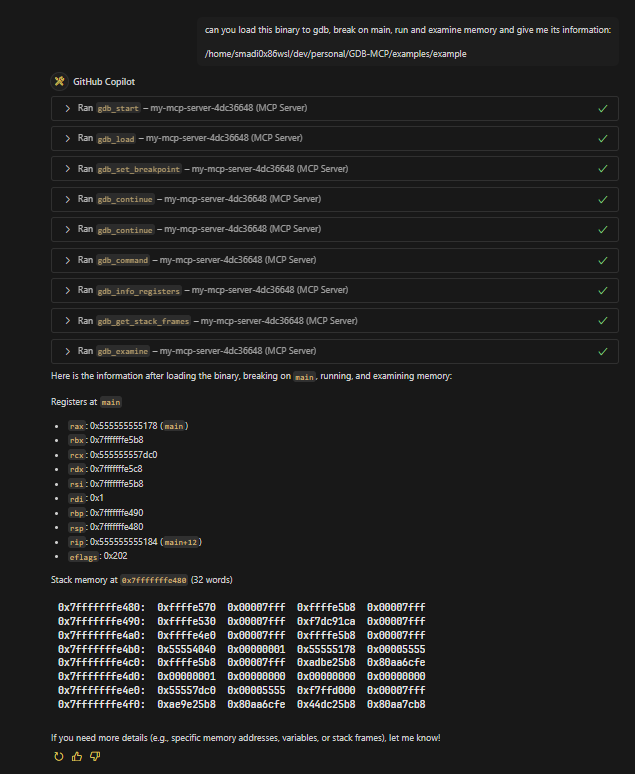
gdb_set_breakpoint(session_id, location): Set breakpointgdb_backtrace(session_id): Show call stackgdb_print(session_id, expression): Print expressiongdb_examine(session_id, address): Examine memorygdb_info_registers(session_id): Show registers
Advanced Analysis
gdb_disassemble_function(session_id, function_name): Disassemble functiongdb_disassemble_around_pc(session_id, count): Disassemble around PCgdb_get_local_variables(session_id): Get local variablesgdb_get_stack_frames(session_id): Get stack informationgdb_get_register_values(session_id): Get register valuesgdb_read_memory_bytes(session_id, address, count): Read memorygdb_get_thread_info(session_id): Get thread informationgdb_get_breakpoint_list(session_id): List breakpointsgdb_set_watchpoint(session_id, expression): Set watchpointgdb_get_symbol_info(session_id, symbol): Get symbol info
General
gdb_command(session_id, command): Execute any GDB command
Testing
uv run python run-tests.py --check-deps
uv run python run-tests.py --type all
Examples
Check the examples directory for example prompts.
License
This project is licensed under the GNU Version 3.0 License, see the LICENSE file for details.
Dev Tools Supporting MCP
The following are the main code editors that support the Model Context Protocol. Click the link to visit the official website for more information.







