
Hallucina
What is Hallucina
Hallucina is an LLVM-based obfuscation tool designed to confuse and mislead LLM clients interacting with custom MCP disassembler servers, such as Ghidra and IDA PRO.
Use cases
Use cases include obfuscating source code to prevent automated reverse engineering, enhancing security for proprietary algorithms, and integrating into build systems for larger software projects.
How to use
To use Hallucina, you can obfuscate a single file by running a command with the appropriate LLVM flags. For larger projects, integrate Hallucina into your build system by setting the compiler and flags in your configuration.
Key features
Key features include indirect jumps and function calls encryption, global variable references encryption, C string encryption, and control flow flattening obfuscation. It allows comprehensive application of all obfuscation techniques.
Where to use
Hallucina is primarily used in software development and reverse engineering contexts, particularly where protection against automated analysis by LLMs is required.
Clients Supporting MCP
The following are the main client software that supports the Model Context Protocol. Click the link to visit the official website for more information.





Overview
What is Hallucina
Hallucina is an LLVM-based obfuscation tool designed to confuse and mislead LLM clients interacting with custom MCP disassembler servers, such as Ghidra and IDA PRO.
Use cases
Use cases include obfuscating source code to prevent automated reverse engineering, enhancing security for proprietary algorithms, and integrating into build systems for larger software projects.
How to use
To use Hallucina, you can obfuscate a single file by running a command with the appropriate LLVM flags. For larger projects, integrate Hallucina into your build system by setting the compiler and flags in your configuration.
Key features
Key features include indirect jumps and function calls encryption, global variable references encryption, C string encryption, and control flow flattening obfuscation. It allows comprehensive application of all obfuscation techniques.
Where to use
Hallucina is primarily used in software development and reverse engineering contexts, particularly where protection against automated analysis by LLMs is required.
Clients Supporting MCP
The following are the main client software that supports the Model Context Protocol. Click the link to visit the official website for more information.
Content
Hallucina
Hallucina is a powerful obfuscation tool designed to confuse and hallucinate LLM clients that are used with custom MCP servers for disassemblers such as Ghidra and IDA PRO.
Hallucina makes human-driven reverse engineering mandatory, LLMs will not reverse engineer for us! Sorry Kiddos :)
Usage
Hallucina provides a simple interface for applying obfuscation techniques. Below are some examples of how to use it:
Obfuscating a Single File
To obfuscate a single source file using the generated clang (LLVM 17):
path_to_build/bin/clang -mllvm -irobf -mllvm --irobf-indbr test.c -o test_obfuscated
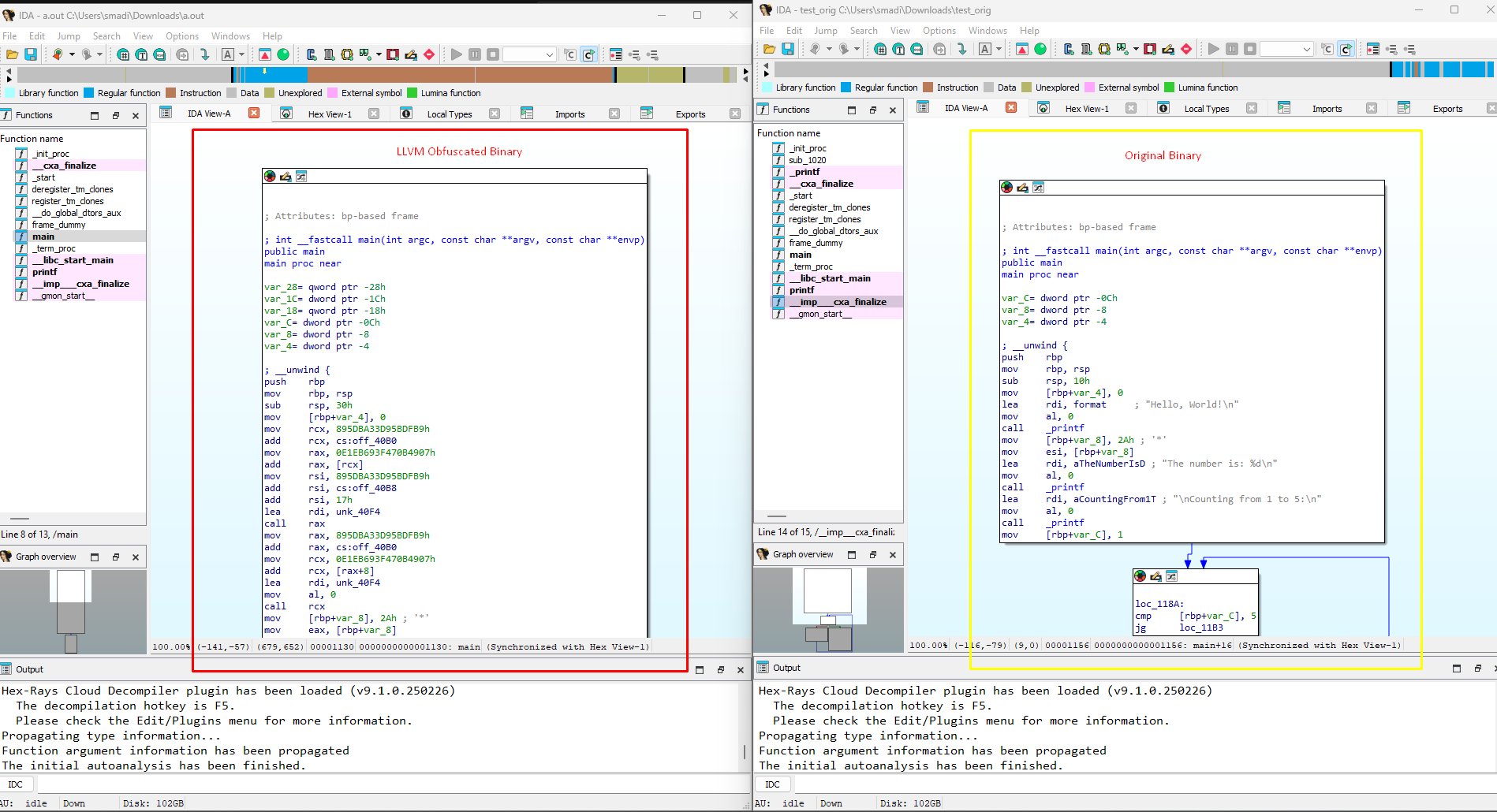
This command applies the obfuscation techniques specified by the flags -mllvm -irobf and -mllvm --irobf-indbr to the test.c file and generates an obfuscated output file named test_obfuscated.
Here you can see the difference between the original and obfuscated test code:
Obfuscating a Project
For larger projects, integrate Hallucina into your build system:
CC=path_to_build/bin/clang
CFLAGS+="-mllvm -irobf -mllvm --irobf-indbr"
./configure
make
Available Obfuscation Flags
- Correlation between obfuscation processes.
- Indirect jumps, encrypting the jump targets (
-mllvm -irobf-indbr). - Indirect function calls, encrypting the target function addresses (
-mllvm -irobf-icall). - Indirect global variable references, encrypting the variable addresses (
-mllvm -irobf-indgv). - C string encryption (
-mllvm -irobf-cse). - Procedure-related control flow flattening obfuscation (
-mllvm -irobf-cff). - Comprehensive application of all the above features (
-mllvm -irobf-indbr -mllvm -irobf-icall -mllvm -irobf-indgv -mllvm -irobf-cse -mllvm -irobf-cff).
Building Hallucina
Hallucina supports building with LLVM 17. Follow the instructions below to set up the build environment.
Prerequisites
Windows
- Install Ninja and ensure it is in your PATH.
- Install Visual Studio 2022 with the C++ development tools.
Linux
Run the following command to install prerequisites:
sudo apt update && sudo apt install -y build-essential cmake ninja-build python3
Build Instructions
Windows
- Open the x64 Native Tools Command Prompt for VS 2022.
- Run the following commands:
mkdir build
cd build
cmake -DCMAKE_CXX_FLAGS="/utf-8" -DCMAKE_BUILD_TYPE=Release -DLLVM_ENABLE_ASSERTIONS=ON -DLLVM_ENABLE_PROJECTS="clang;clang-tools-extra;lld;lldb" -G "Ninja" ../llvm
ninja
Linux
- Run the following commands:
mkdir build
cd build
cmake -DCMAKE_BUILD_TYPE=Release -DLLVM_ENABLE_ASSERTIONS=ON -DLLVM_ENABLE_PROJECTS="clang;clang-tools-extra;lld;lldb" -G "Ninja" ../llvm
ninja
Troubleshooting Common Issues
Compilation Errors
If you encounter errors during compilation, such as missing headers or GCC-specific issues, ensure the following:
- Add
#include <fstream>to any file reporting missingstd::ifstream. - Use the latest version of GCC or Clang for compatibility.
Memory Issues During Build
If you encounter memory issues during the build process, you can increase the swap memory as follows:
Linux
Run the following commands to temporarily increase swap memory:
sudo fallocate -l 4G /swapfile
sudo chmod 600 /swapfile
sudo mkswap /swapfile
sudo swapon /swapfile
To make this change permanent, add the following line to /etc/fstab:
/swapfile none swap sw 0 0
Important Note
After building, use the generated clang binary located in the build/bin directory. This version of clang is based on LLVM 17 and includes the obfuscation features provided by Hallucina.
Contributing to Hallucina
We welcome contributions! See DEVELOPMENT.md for details on setting up your development environment and submitting pull requests.
License
This project is licensed under the GNU v3 License. See the LICENSE file for details.
References
Dev Tools Supporting MCP
The following are the main code editors that support the Model Context Protocol. Click the link to visit the official website for more information.







