
Kopilot Mcp
What is Kopilot Mcp
Kopilot-MCP is a remake of a previous project that allows users to create an AI Kubernetes agent using the Model Context Protocol (MCP).
Use cases
Use cases for Kopilot-MCP include querying Kubernetes resources, automating deployment processes, and simplifying the management of Kubernetes clusters through conversational interfaces.
How to use
To use Kopilot-MCP, clone the repository, configure the necessary files, install dependencies, and run the MCP client to interact with Kubernetes resources using natural language.
Key features
Key features include the ability to create an AI Kubernetes agent, interact with Kubernetes resources using natural language, customize LLM providers for ‘kubectl-like’ commands, and learn to standardize tool calling with MCP.
Where to use
Kopilot-MCP can be used in DevOps environments, cloud infrastructure management, and any scenario where Kubernetes resources need to be managed efficiently through natural language.
Clients Supporting MCP
The following are the main client software that supports the Model Context Protocol. Click the link to visit the official website for more information.





Overview
What is Kopilot Mcp
Kopilot-MCP is a remake of a previous project that allows users to create an AI Kubernetes agent using the Model Context Protocol (MCP).
Use cases
Use cases for Kopilot-MCP include querying Kubernetes resources, automating deployment processes, and simplifying the management of Kubernetes clusters through conversational interfaces.
How to use
To use Kopilot-MCP, clone the repository, configure the necessary files, install dependencies, and run the MCP client to interact with Kubernetes resources using natural language.
Key features
Key features include the ability to create an AI Kubernetes agent, interact with Kubernetes resources using natural language, customize LLM providers for ‘kubectl-like’ commands, and learn to standardize tool calling with MCP.
Where to use
Kopilot-MCP can be used in DevOps environments, cloud infrastructure management, and any scenario where Kubernetes resources need to be managed efficiently through natural language.
Clients Supporting MCP
The following are the main client software that supports the Model Context Protocol. Click the link to visit the official website for more information.
Content
Kopilot MCP
A MCP remake 🔧 of my previous project.
Key Features
- Create an AI Kubernetes agent using MCP.
- Interact with Kubernetes resources using natural language.
- Customize LLM provider to perform “kubectl-like” commands.
- Learn how to use MCP to standardize tool calling.
Tech Stack
Getting Started
Prerequisites
- Python 3.12+
- uv
- A API key from LLM provider (e.g. OpenRouter)
- A Kubernetes cluster. (e.g. kind)
Setup
- Clone this repository.
- Configure
config/dev/example.tomland rename it toconfig/dev/config.toml. - Install dependencies.
uv sync
Run
- Run the MCP client. It will automatically start the MCP server.
uv run mcp_client.py
- Then you would see a prompt in the terminal:
Query (Type `exit`, `quit`, `q` to quit):
- Interact with natural language to operate Kubernetes resources. For example:
Query (Type `exit`, `quit`, `q` to quit): Get po in kube-system ns
- You would get the response similar like:
Here are the pods in the `kube-system` namespace:

- coredns-7db6d8ff4d-lz4s8
- coredns-7db6d8ff4d-qbgvc
- etcd-test-control-plane
- kindnet-cnjm6
- kube-apiserver-test-control-plane
- kube-controller-manager-test-control-plane
- kube-proxy-v647r
- kube-scheduler-test-control-plane
- sealed-secrets-controller-67767c668-dz4bj
Project Structure
kopilot-mcp
├── README.md             # Project documentation
├── config                # Configuration
│   ├── config.py
│   └── dev
│       └── example.toml
├── mcp_client.py         # MCP client
├── mcp_server.py         # MCP server
├── mcp_server_factory.py # MCP server factory
├── pyproject.toml        # Python project meta
├── scheme                # scheme (Kubernetes GVR ➡ GVK)
│   ├── __init__.py
│   └── scheme.py
├── utils                 # Utilities
│   ├── __init__.py
│   ├── clients.py
│   ├── helpers.py
│   └── models.py
└── uv.lock               # uv lock file
Workflow
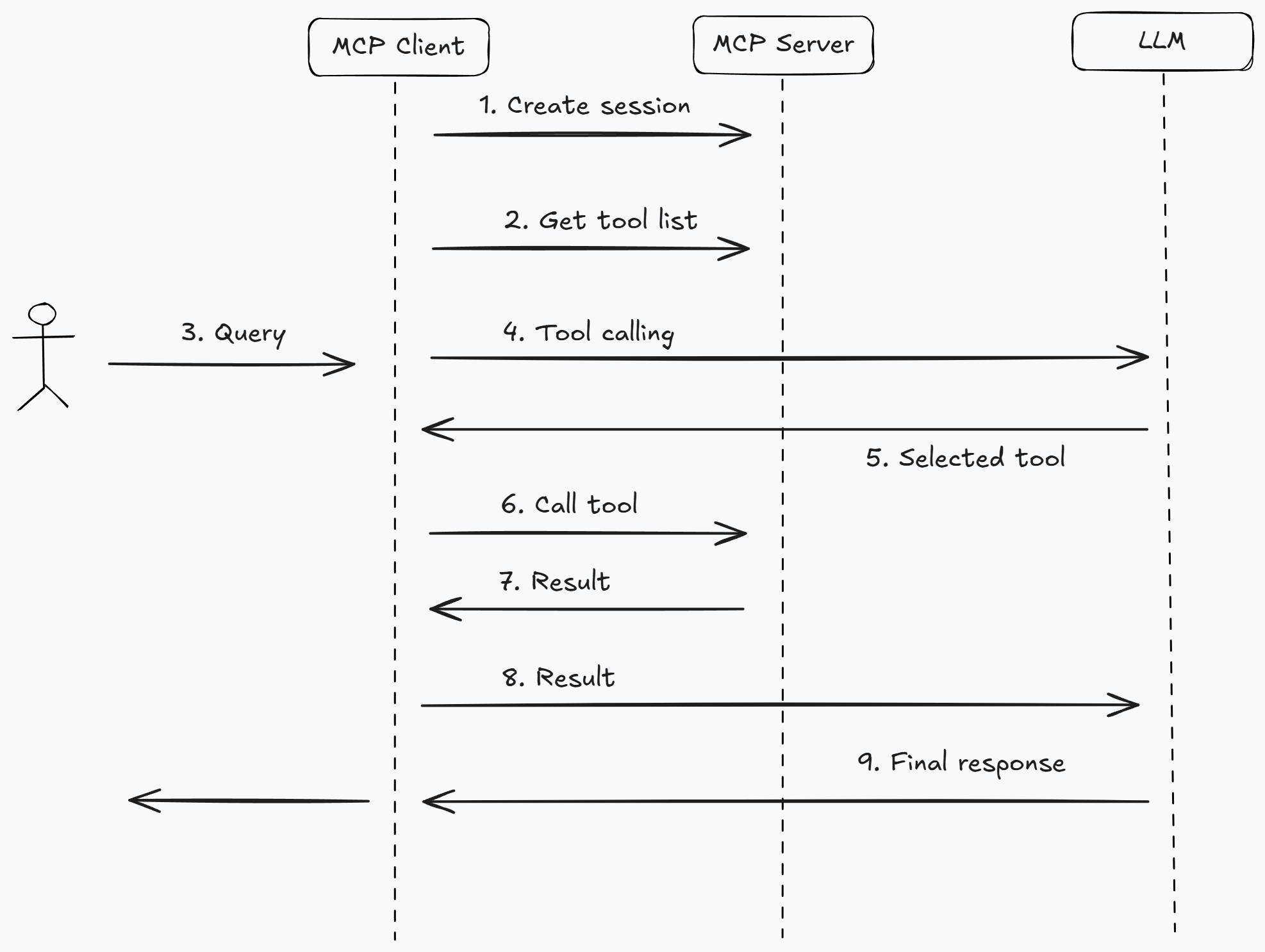
Contributing
- Fork the repository.
- Create your feature branch.
- Submit a pull request.
License
MIT License - See LICENSE file for details.
Dev Tools Supporting MCP
The following are the main code editors that support the Model Context Protocol. Click the link to visit the official website for more information.







