
Mcp Explorer
What is Mcp Explorer
MCP-Explorer is a project aimed at learning how to create an MCP client, which includes functionalities such as calling remote large models via API, deploying large models locally, establishing an MCP client, and creating local MCP servers for use.
Use cases
Use cases for MCP-Explorer include developing applications that require interaction with large language models, creating customized local servers for specific tasks, and experimenting with different model configurations and deployments.
How to use
To use MCP-Explorer, install the required environment using ‘pip install -r requirements.txt’ or ‘uv add -r requirements.txt’. Configure the MCP host by modifying ‘config.py’ for model and feature selection. Examples for clients and servers are provided in the respective directories.
Key features
Key features of MCP-Explorer include the ability to call remote large models, local deployment of large models, customizable MCP client setup, and examples for both client and server implementations.
Where to use
MCP-Explorer can be used in fields such as artificial intelligence, machine learning, and software development, particularly in scenarios requiring large model interactions and local server setups.
Clients Supporting MCP
The following are the main client software that supports the Model Context Protocol. Click the link to visit the official website for more information.





Overview
What is Mcp Explorer
MCP-Explorer is a project aimed at learning how to create an MCP client, which includes functionalities such as calling remote large models via API, deploying large models locally, establishing an MCP client, and creating local MCP servers for use.
Use cases
Use cases for MCP-Explorer include developing applications that require interaction with large language models, creating customized local servers for specific tasks, and experimenting with different model configurations and deployments.
How to use
To use MCP-Explorer, install the required environment using ‘pip install -r requirements.txt’ or ‘uv add -r requirements.txt’. Configure the MCP host by modifying ‘config.py’ for model and feature selection. Examples for clients and servers are provided in the respective directories.
Key features
Key features of MCP-Explorer include the ability to call remote large models, local deployment of large models, customizable MCP client setup, and examples for both client and server implementations.
Where to use
MCP-Explorer can be used in fields such as artificial intelligence, machine learning, and software development, particularly in scenarios requiring large model interactions and local server setups.
Clients Supporting MCP
The following are the main client software that supports the Model Context Protocol. Click the link to visit the official website for more information.
Content
MCP-Explorer
本项目意在学习创建一个MCP客户端,要实现的内容包括
- 通过API调用远端大模型
- 本地部署大模型
- 建立MCP客户端
- 创建一些本地MCP服务器供使用
依赖环境
使用pip install -r requirements.txt或者uv add -r requirements.txt安装所需环境
结构说明
-
host.py: 自己搭建的MCP host,里面实际上是一个Client负责接入本地(将来或许支持远端)的Server。其配置文件为config.py,模型与一些功能选择需要通过修改config.py来进行。该client只能接受stdio和streamable http类型的server。
-
LLM_examples: 各个模型的调用方法。
- Gemini: Google Gemini系列模型。
- OpenAI: 兼容OpenAI API 格式的模型,目前包括Deepseek和Qwen系列。
- Ollama: Ollama上可用的模型。
-
my_servers: 自己写的MCP Server脚本。
- Timetools: 提供时间查询和时区转换功能。已经改写成用了fastmcp库来实现。
- Unsplash: 提供壁纸查询、壁纸下载和设置壁纸功能。
- AlienCom: 在服务器上召唤一个外星人。这是一个通过SSE方式连接MCP Server的示例。
- CatCom: 在服务器上召唤一个小猫。这是一个通过streamable http方式连接MCP Server的示例。
- BraveSearch: 提供网络搜索功能。连接方式为streamable http,用了fastmcp库来实现,比用mcp库要简单很多。
-
client_examples: 自己写的MCP Client示例脚本。
- stdio_client: 以stdio为连接方式,只能搭配本地的服务脚本使用。命令行执行
python client.py <path to server script>即可将其连接到本地脚本。比如,将my_servers/Timetools.py中的运行方式设为run_server(mode='stdio'),然后执行python client.py my_servers/Timetools.py即可。 - sse_client: 以sse为连接方式,通过指定的端口连接到已经启动的服务。想要试用的话,以my_servers/AlienCom.py为例,先运行my_servers/AlienCom.py(默认端口号8080),再执行
uv run sse_client.py http://localhost:8080/sse即可。 - streamable-http_client.py: 以streamable http为连接方式,通过指定的端口连接到已经启动的服务。以my_servers/CatCom.py为例,先运行my_servers/CatCom.py,再运行client_examples\streamable-http_client.py即可。server与client中默认的端口号需保持一致,默认8081。
- stdio_client: 以stdio为连接方式,只能搭配本地的服务脚本使用。命令行执行
使用方法
在项目目录下创建.env文件,在其中设置API
UNSPLASH_API="xxx"
BRAVE_API_KEY="xxx"

GEMINI_API_KEY="xxx"
DASHSCOPE_API_KEY="xxx"
DEEPSEEK_API_KEY="xxx"
HUNYUAN_API_KEY="xxx"
OLLAMA_API_KEY="ollama"
Unsplash是获取壁纸的工具,申请Unsplash的API key参见这里。
Brave search是一个搜索工具,申请API点击这里。
Ollama用于本地部署大模型,并不需要API key,但为了符合OpenAI调用规则还是需要"ollama"作为key字符串。
效果
以下是调用deepseek-chat分别调用AlienCom(sse类型的server)和Timetools(stdio类型的server)工具的截图:
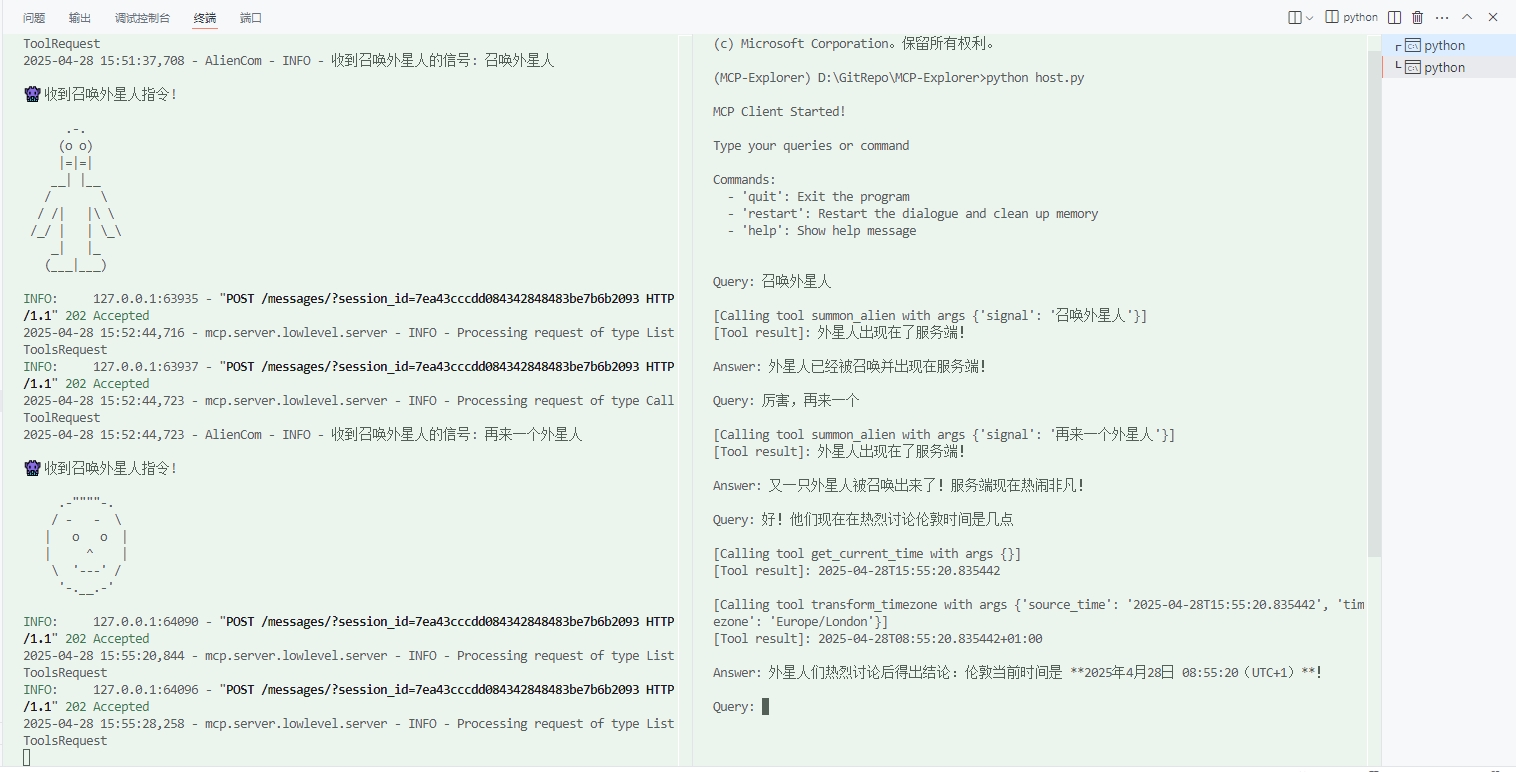
它也太捧场了XD
Dev Tools Supporting MCP
The following are the main code editors that support the Model Context Protocol. Click the link to visit the official website for more information.







