
Mcp Ollama Client
What is Mcp Ollama Client
MCP-Ollama-Client is a lightweight command-line client that operates offline using a local Ollama LLM to interact with multiple MCP servers defined in a configuration file (config.json).
Use cases
Use cases include querying databases, managing filesystems, and integrating various MCP services without the need for cloud connectivity.
How to use
To use MCP-Ollama-Client, clone the repository, set up a Python virtual environment, install dependencies, pull a local model, configure the settings in config.json, and then run the client.
Key features
Key features include running entirely offline with a local LLM, supporting multiple MCP servers simultaneously, and using collision-free tool names for seamless integration.
Where to use
MCP-Ollama-Client can be used in various fields such as software development, data management, and any application requiring interaction with multiple MCP servers.
Clients Supporting MCP
The following are the main client software that supports the Model Context Protocol. Click the link to visit the official website for more information.





Overview
What is Mcp Ollama Client
MCP-Ollama-Client is a lightweight command-line client that operates offline using a local Ollama LLM to interact with multiple MCP servers defined in a configuration file (config.json).
Use cases
Use cases include querying databases, managing filesystems, and integrating various MCP services without the need for cloud connectivity.
How to use
To use MCP-Ollama-Client, clone the repository, set up a Python virtual environment, install dependencies, pull a local model, configure the settings in config.json, and then run the client.
Key features
Key features include running entirely offline with a local LLM, supporting multiple MCP servers simultaneously, and using collision-free tool names for seamless integration.
Where to use
MCP-Ollama-Client can be used in various fields such as software development, data management, and any application requiring interaction with multiple MCP servers.
Clients Supporting MCP
The following are the main client software that supports the Model Context Protocol. Click the link to visit the official website for more information.
Content
MCP-Ollama Client
Small command‑line chat client that
- Runs entirely offline with a local LLM via Ollama
- Talks to any number of Model‑Context‑Protocol (MCP) servers, all declared in one
config.json
At start‑up the client launches every server, fetches their tool schemas, prefixes tool names (postgres.*, filesystem.*, …) and gives the merged list to the model.
The LLM decides which server to call for each user request.
Features
| Feature | Notes |
|---|---|
| Local LLM first | Default model is qwen3:14b, but any function‑calling model that Ollama exposes will work. No cloud keys required. |
| Multi‑server out‑of‑the‑box | Postgres, filesystem, or your own MCP servers can run side‑by‑side; all are defined in config.json. |
| Collision‑free tool names | Tools are exposed as <server>.<tool> so names never clash. |
Requirements
| Component | Version tested |
|---|---|
| Python | ≥ 3.12 |
| Ollama | ≥ 0.8.0 |
| MCP server(s) | Anything that supports stdio transport |
Quick start
# 1. clone
git clone https://github.com/Nagharjun17/MCP-Ollama-Client.git
cd mcp-ollama-client

# 2. set up environment
uv venv
source .venv/bin/activate
uv pip sync          # or: uv pip install -r uv.lock

# 3. pull a local model
ollama pull qwen3:14b

# 4. edit Model Name, DATABASE_URI etc. in config.json

# 5. run
uv run client.py
Example boot log:
🔌 Starting MCP server: postgres
🔌 Starting MCP server: filesystem
🛠️  Aggregated tools: ['postgres.list_schemas', 'filesystem.read_file', ...]
>>>
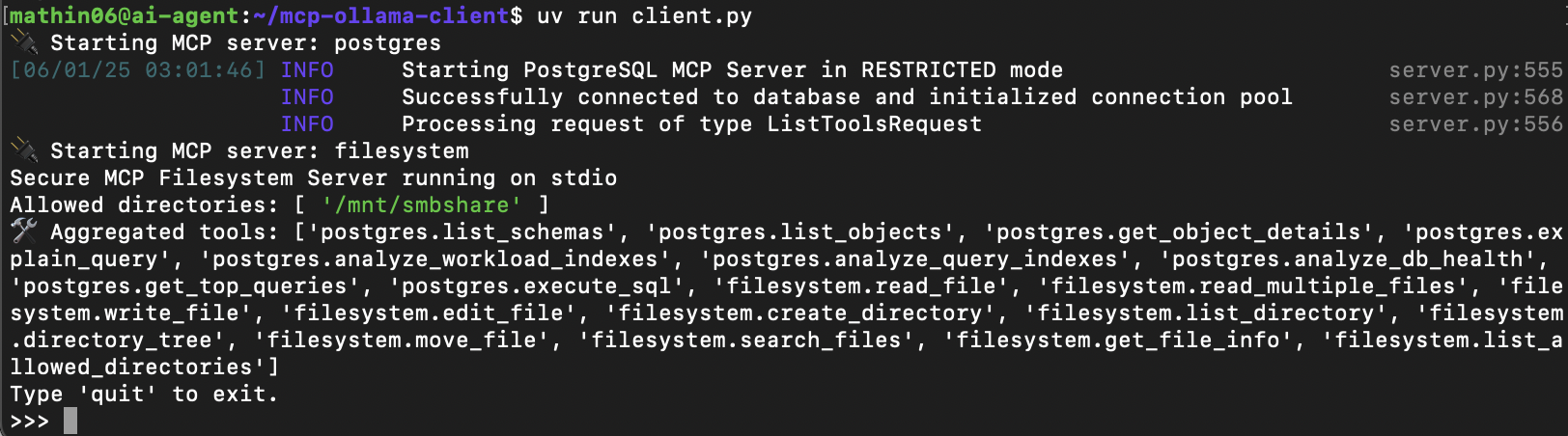
Type natural language queries; the model will decide when and how to call the exposed tools.
config.json format
{
  "llm": {
    "model": "qwen3:14b",
    "temperature": 0.7,
    "max_tokens": 2048
  },

  "mcpServers": {
    "postgres": {
      "command": "postgres-mcp",
      "args": ["--access-mode=restricted"],
      "env": {
        "DATABASE_URI": "postgresql://user:pass@localhost:5432/db"
      }
    },

    "filesystem": {
      "command": "npx",
      "args": [
        "-y",
        "@modelcontextprotocol/server-filesystem",
        "/mnt/smbshare/"
      ]
    }
  }
}
Keys under mcpServers become prefixes (postgres.*, filesystem.*).
Each server starts as its own stdio subprocess.
Add or remove servers without touching client.py.
Everything stays local, everything is configurable in one file.
Dev Tools Supporting MCP
The following are the main code editors that support the Model Context Protocol. Click the link to visit the official website for more information.







