
Mcp Sql
What is Mcp Sql
MCP-SQL is an interactive application that allows users to query a MySQL database using natural language through the Model Context Protocol (MCP) server integrated with the Gemini API.
Use cases
Use cases for MCP-SQL include enabling non-technical users to query databases easily, automating data retrieval processes, enhancing customer support with quick data access, and facilitating educational purposes in teaching SQL and database management.
How to use
To use MCP-SQL, clone the repository, set up the environment variables for your MySQL credentials and Gemini API key, install the required dependencies, and start both the frontend and backend servers. You can then interact with the database via a web interface.
Key features
Key features include a natural language interface for querying, dynamic SQL generation using the Gemini API, support for multiple queries, database schema inspection, read/write mode toggling, granular permissions for operations, live table updates, and detailed error handling.
Where to use
MCP-SQL can be used in various fields such as data analysis, business intelligence, application development, and any scenario where natural language processing can enhance database interactions.
Clients Supporting MCP
The following are the main client software that supports the Model Context Protocol. Click the link to visit the official website for more information.





Overview
What is Mcp Sql
MCP-SQL is an interactive application that allows users to query a MySQL database using natural language through the Model Context Protocol (MCP) server integrated with the Gemini API.
Use cases
Use cases for MCP-SQL include enabling non-technical users to query databases easily, automating data retrieval processes, enhancing customer support with quick data access, and facilitating educational purposes in teaching SQL and database management.
How to use
To use MCP-SQL, clone the repository, set up the environment variables for your MySQL credentials and Gemini API key, install the required dependencies, and start both the frontend and backend servers. You can then interact with the database via a web interface.
Key features
Key features include a natural language interface for querying, dynamic SQL generation using the Gemini API, support for multiple queries, database schema inspection, read/write mode toggling, granular permissions for operations, live table updates, and detailed error handling.
Where to use
MCP-SQL can be used in various fields such as data analysis, business intelligence, application development, and any scenario where natural language processing can enhance database interactions.
Clients Supporting MCP
The following are the main client software that supports the Model Context Protocol. Click the link to visit the official website for more information.
Content
MCP Server with MySQL and Gemini API Integration
An interactive natural language to SQL query application that uses the Model Context Protocol (MCP) server to connect MySQL with the Gemini API. This application allows users to interact with a MySQL database using natural language queries.
Application Overview
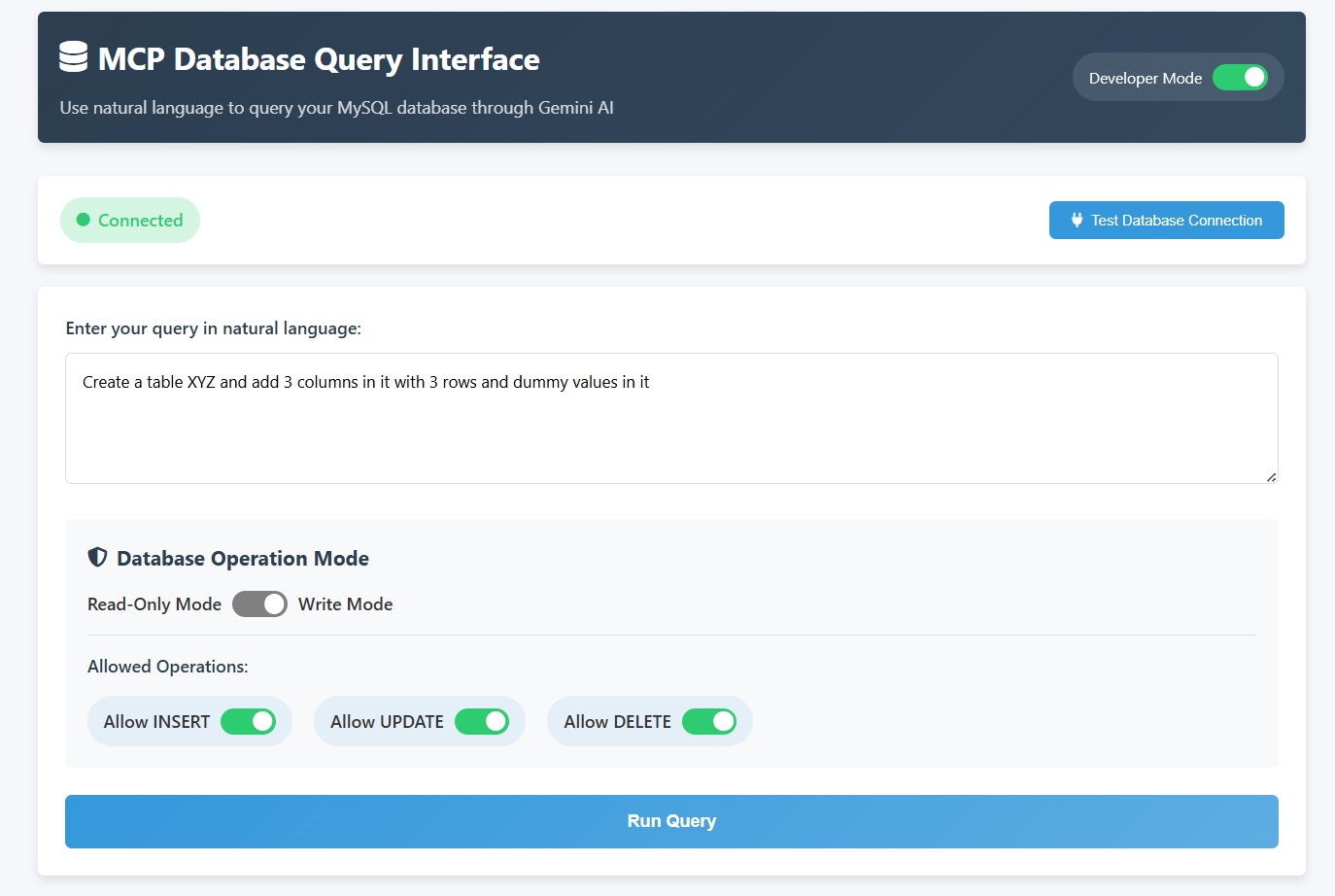
Query From the AI
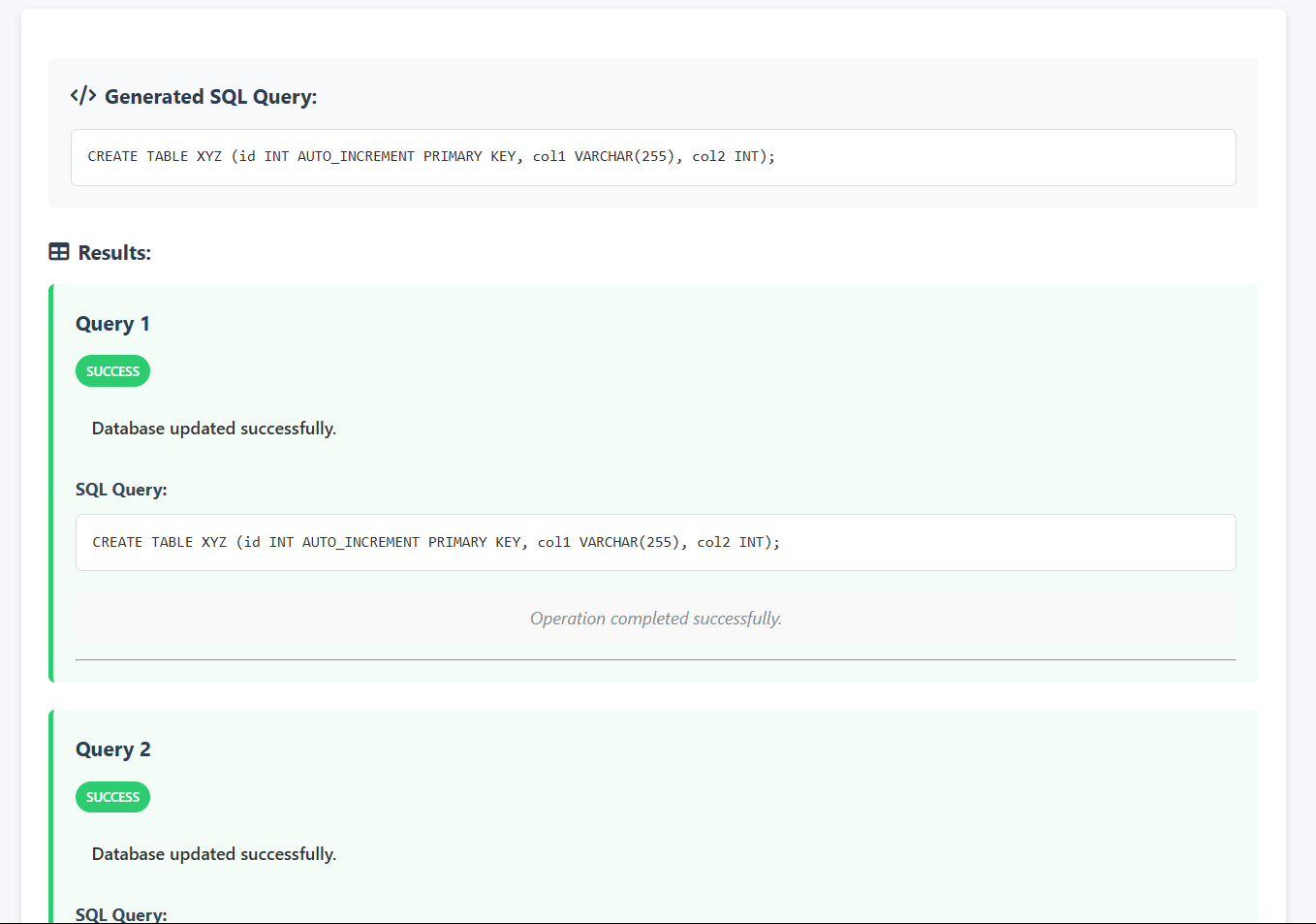
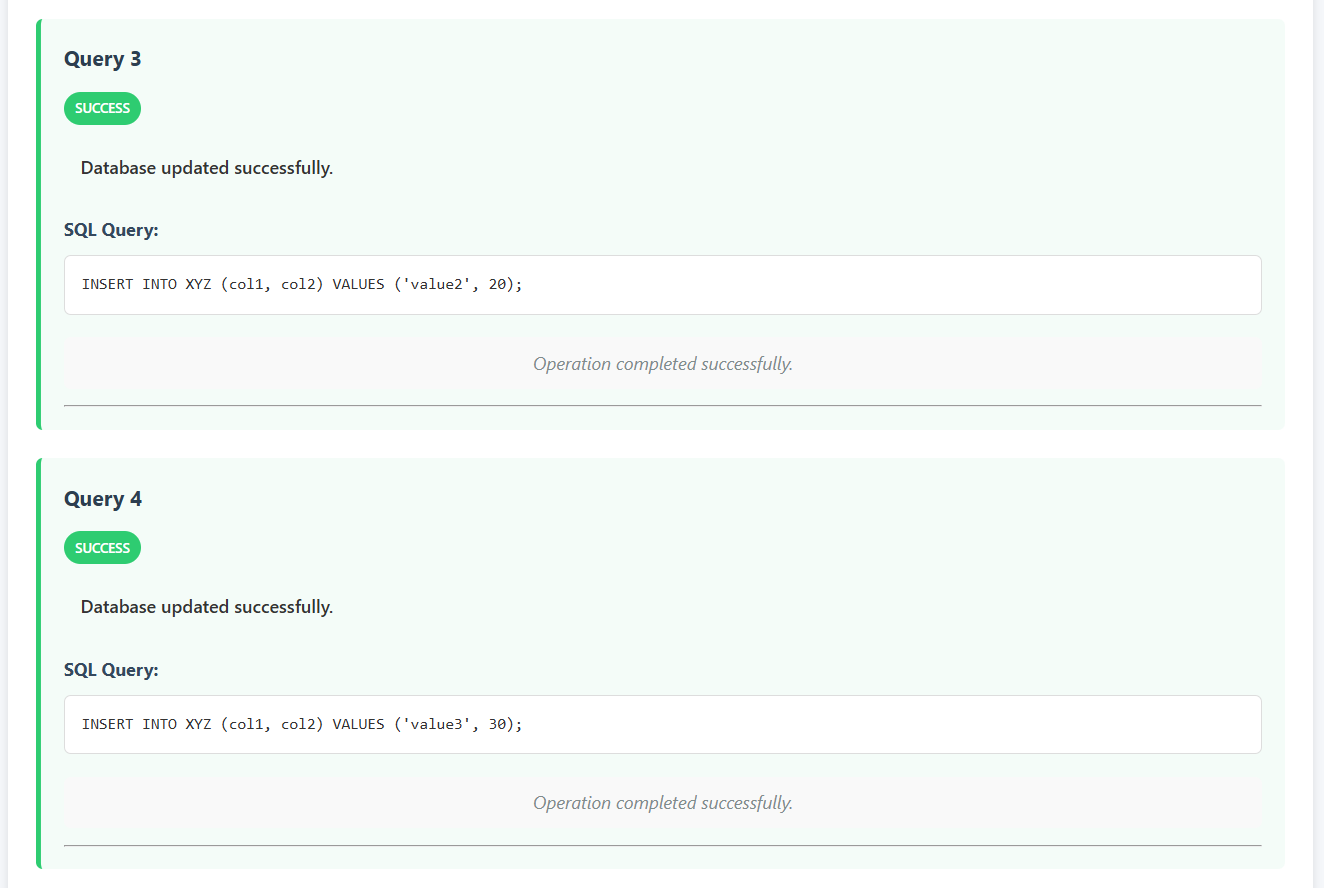
Query Executed Successfully
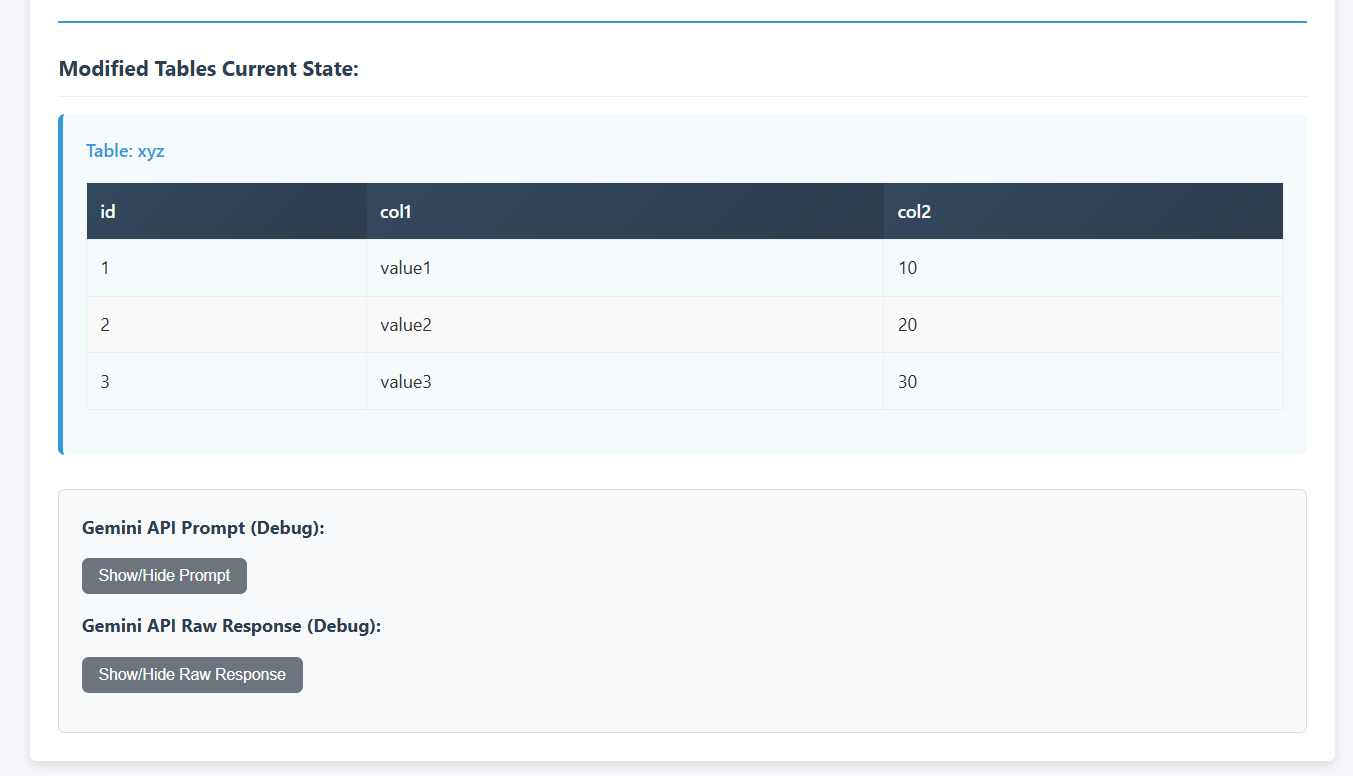
Developer Options
Features
- Natural Language Interface: Query your database using plain English
- Dynamic SQL Generation: Converts natural language to SQL using Google’s Gemini API
- Multiple Query Support: Execute multiple SQL operations from a single prompt
- Database Schema Inspection: Dynamically adapts to your database structure
- Read/Write Mode Toggle: Control which operations are allowed
- Granular Permissions: Enable/disable specific operations (INSERT, UPDATE, DELETE)
- Live Table Updates: View table contents after modifications
- Detailed Error Handling: Clear categorization of error types
Setup Instructions
Prerequisites
- Node.js (v14+)
- MySQL Server
- API key for Google’s Gemini API
Installation
- Clone this repository
- Set up environment variables:
- Copy the
.envfile to thebackenddirectory - Ensure your MySQL credentials and Gemini API key are correct
- Copy the
GEMINI_API_KEY=your_gemini_api_key
DB_HOST=localhost
DB_PORT=3306
DB_USER=your_mysql_username
DB_PASSWORD=your_mysql_password
DB_NAME=mcp_database
PORT=3000
- Install dependencies and start the server:
cd .\frontend\
python -m http.server

cd .\backend\
node .\src\index.js
- Open the frontend:
- Simply open
frontend/index.htmlin your browser - Alternatively, use a local HTTP server to serve the frontend
- Simply open
Running the Application
Running the Frontend
Navigate to the frontend directory and start a simple HTTP server:
cd frontend
python -m http.server
This will serve the frontend application on http://localhost:8000 by default.
Running the Backend
Navigate to the backend directory and start the Node.js server:
cd backend
node src/index.js
This will start the backend server according to the port specified in your environment variables (default: 3000).
Database Setup
You can import the sample database structure using the provided SQL file:
mysql -u your_username -p < database-sample.sql
This creates a sample database with users, products, orders, and related tables for demonstration.
Usage
- Connect to Database: Click “Test Database Connection” first
- Enter Natural Language Query: Type your request in plain English
- Set Operation Permissions:
- Keep “Read-Only Mode” (default) for SELECT queries only
- Enable “Write Mode” and check specific permissions to allow modifications
- Run Query: Click the button to execute
- View Results:
- See generated SQL queries and their results
- For data modification operations, view the current state of modified tables
Example Queries
Read-Only Examples:
- “Show me all users over 30”
- “List products in the Electronics category”
- “What’s the total value of all pending orders?”
- “Find the most expensive product”
Write Mode Examples:
- “Add a new product named Gaming Mouse with price $59.99 in Electronics category with 45 in stock”
- “Update the price of the Laptop to $1199.99”
- “Delete all products with zero stock”
- “Create a new table called employees with columns for id, name, position, and salary”
Advanced Features
Multiple Operations
The application now supports executing multiple SQL operations from a single prompt. For example:
Create a new table called employees with columns for id, name, position, and salary,
then add three employees: John (Manager, $5000), Mary (Developer, $4500), and Bob (Designer, $4000).
Modified Tables Display
After any data modification (INSERT, UPDATE, DELETE), the application automatically shows the current state of the modified tables so you can verify the changes.
Detailed Error Messages
Errors are now clearly categorized as:
VALIDATION ERROR: Issues with SQL syntax or invalid operationsPERMISSION ERROR: Operations not allowed by current settingsEXECUTION ERROR: Database errors during query executionSERVER ERROR: Backend processing failures
Architecture
- Frontend: HTML, CSS, and JavaScript (no frameworks)
- Backend: Node.js with Express
- Database: MySQL
- AI Integration: Google’s Gemini API
Security Considerations
- The application validates all SQL queries before execution
- Only explicitly permitted operations are allowed
- Environment variables protect sensitive credentials
- Basic SQL injection prevention measures are implemented
Dev Tools Supporting MCP
The following are the main code editors that support the Model Context Protocol. Click the link to visit the official website for more information.







