
Mcp Server Pentest
What is Mcp Server Pentest
MCP-Server-Pentest is a penetration testing tool designed to automatically detect vulnerabilities such as XSS and SQL injection in web applications. It leverages browser automation to interact with web pages and assess their security.
Use cases
Use cases for MCP-Server-Pentest include automated security assessments of web applications, testing for XSS and SQL injection vulnerabilities, capturing visual evidence of vulnerabilities through screenshots, and simulating user interactions to evaluate the security posture of web applications.
How to use
To use MCP-Server-Pentest, first install the necessary dependencies using the commands: npx playwright install firefox, yarn install, and npm run build. After installation, configure the tool in your Claude config file as specified in the README.
Key features
Key features of MCP-Server-Pentest include full browser XSS and SQL vulnerability detection, the ability to take screenshots of entire pages or specific elements, comprehensive network interactions (such as navigation, clicks, and form filling), console log monitoring, and JavaScript execution within the browser context.
Where to use
MCP-Server-Pentest is primarily used in the field of web application security testing, making it suitable for security professionals, developers, and organizations looking to identify and mitigate vulnerabilities in their web applications.
Clients Supporting MCP
The following are the main client software that supports the Model Context Protocol. Click the link to visit the official website for more information.





Overview
What is Mcp Server Pentest
MCP-Server-Pentest is a penetration testing tool designed to automatically detect vulnerabilities such as XSS and SQL injection in web applications. It leverages browser automation to interact with web pages and assess their security.
Use cases
Use cases for MCP-Server-Pentest include automated security assessments of web applications, testing for XSS and SQL injection vulnerabilities, capturing visual evidence of vulnerabilities through screenshots, and simulating user interactions to evaluate the security posture of web applications.
How to use
To use MCP-Server-Pentest, first install the necessary dependencies using the commands: npx playwright install firefox, yarn install, and npm run build. After installation, configure the tool in your Claude config file as specified in the README.
Key features
Key features of MCP-Server-Pentest include full browser XSS and SQL vulnerability detection, the ability to take screenshots of entire pages or specific elements, comprehensive network interactions (such as navigation, clicks, and form filling), console log monitoring, and JavaScript execution within the browser context.
Where to use
MCP-Server-Pentest is primarily used in the field of web application security testing, making it suitable for security professionals, developers, and organizations looking to identify and mitigate vulnerabilities in their web applications.
Clients Supporting MCP
The following are the main client software that supports the Model Context Protocol. Click the link to visit the official website for more information.
Content
MCP Server Pentest
Features
- Full browser xss, sql vulnerability automatic detection
- Screenshots of the entire page or specific elements
- Comprehensive network interaction (navigation, clicks, form filling)
- Console log monitoring
- JavaScript execution in the browser context
Installation
Installing
npx playwright install firefox
yarn install
npm run build
Configuration
The installation process will automatically add the following configuration to your Claude config file:
{
  "mcpServers": {
    "playwright": {
      "command": "npx",
      "args": [
        "-y",
        "/Users/...../dist/index.js"
      ],
      "disabled": false,
      "autoApprove": []
    }
  }
}
Components
Tools
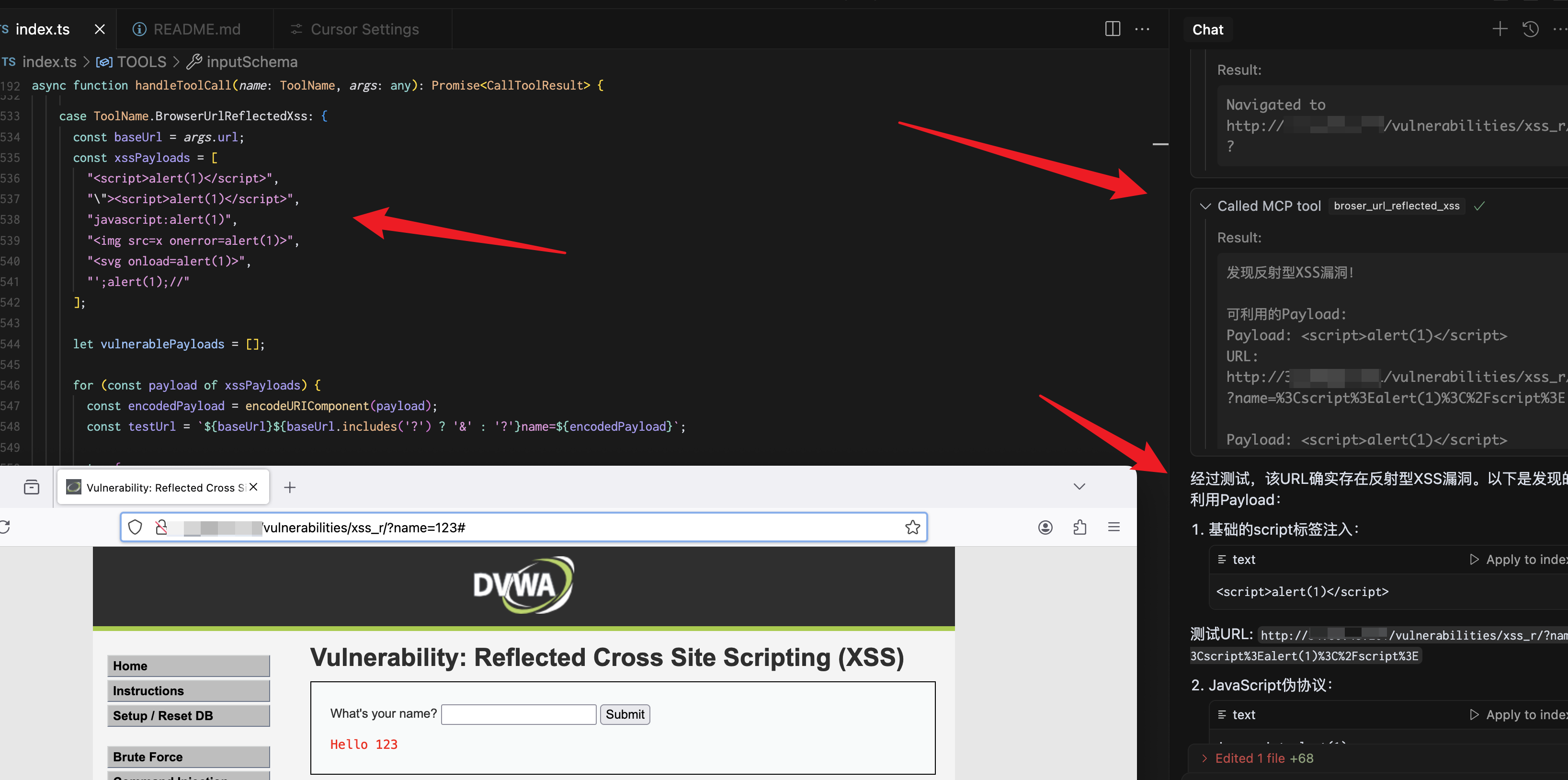
broser_url_reflected_xss
Test whether the URL has an XSS vulnerability
{
  "url": "https://test.com",
  "paramName":"text"
}
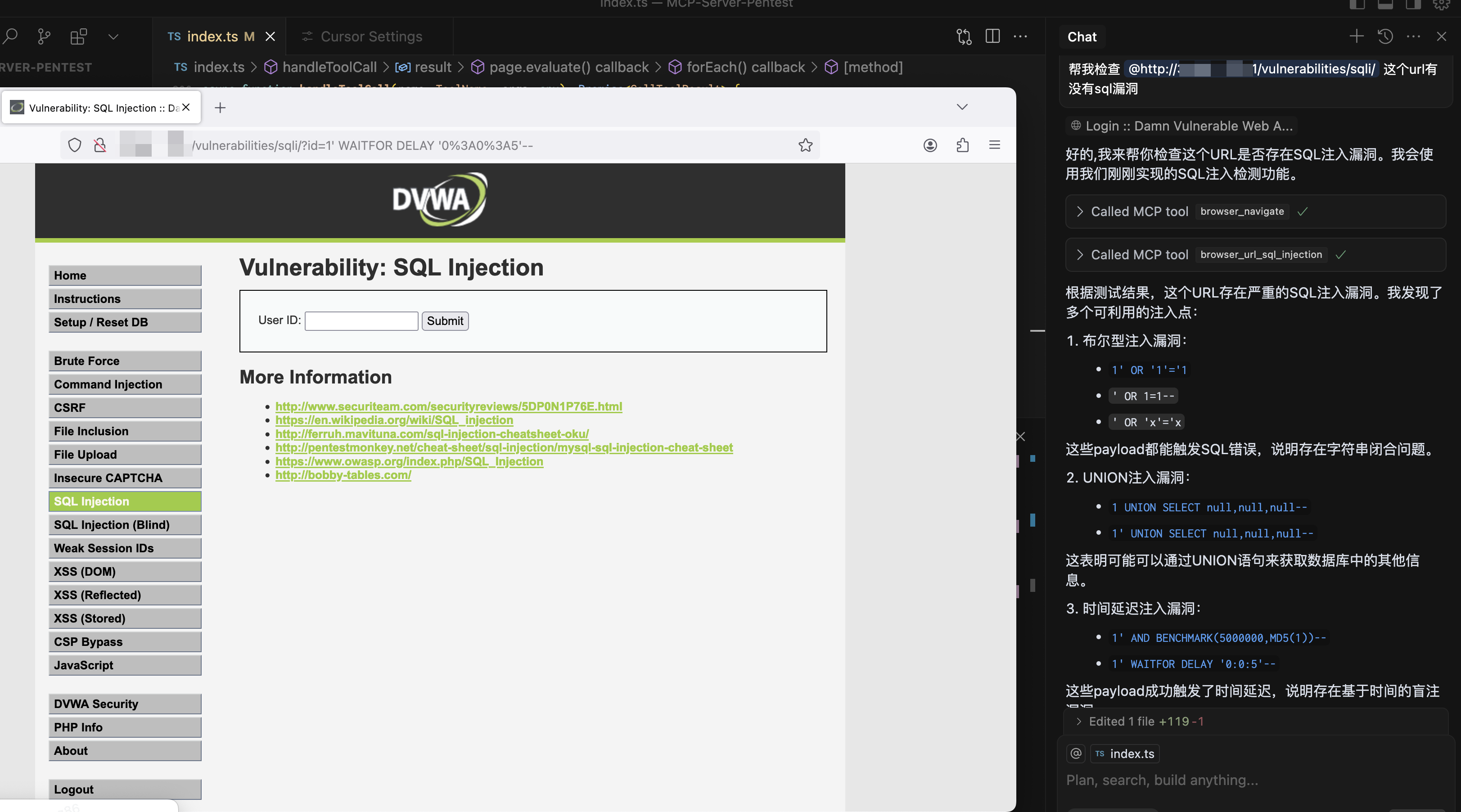
browser_url_sql_injection
Test whether the URL has SQL injection vulnerabilities
{
  "url": "https://test.com",
  "paramName":"text"
}
browser_navigate
Navigate to any URL in the browser
{
  "url": "https://stealthbrowser.cloud"
}
browser_screenshot
Capture screenshots of the entire page or specific elements
{
  "name": "screenshot-name",     // required
  "selector": "#element-id",     // optional
  "fullPage": true              // optional, default: false
}
browser_click
Click elements on the page using CSS selector
{
  "selector": "#button-id"
}
browser_click_text
Click elements on the page by their text content
{
  "text": "Click me"
}
browser_hover
Hover over elements on the page using CSS selector
{
  "selector": "#menu-item"
}
browser_hover_text
Hover over elements on the page by their text content
{
  "text": "Hover me"
}
browser_fill
Fill out input fields
{
  "selector": "#input-field",
  "value": "Hello World"
}
browser_select
Select an option in a SELECT element using CSS selector
{
  "selector": "#dropdown",
  "value": "option-value"
}
browser_select_text
Select an option in a SELECT element by its text content
{
  "text": "Choose me",
  "value": "option-value"
}
browser_evaluate
Execute JavaScript in the browser console
{
  "script": "document.title"
}
Dev Tools Supporting MCP
The following are the main code editors that support the Model Context Protocol. Click the link to visit the official website for more information.







