
Mcp Ollama Server
What is Mcp Ollama Server
MCP-ollama_server is a server that integrates the Model Context Protocol (MCP) with local large language models (LLMs) using Ollama, enabling advanced tool usage while ensuring data privacy.
Use cases
Use cases include secure document processing, automated email responses, web data extraction, and AI-driven image generation, all while keeping sensitive data local.
How to use
To use MCP-ollama_server, install it on your local infrastructure, configure the necessary components, and start interacting with your LLMs through the provided tools for file access, web browsing, and more.
Key features
Key features include complete data privacy, modular architecture, local tool use capabilities, and the ability to operate in high-security environments without data leakage.
Where to use
MCP-ollama_server is suitable for enterprise environments, research institutions, and any organization that requires secure, on-premise AI solutions.
Clients Supporting MCP
The following are the main client software that supports the Model Context Protocol. Click the link to visit the official website for more information.





Overview
What is Mcp Ollama Server
MCP-ollama_server is a server that integrates the Model Context Protocol (MCP) with local large language models (LLMs) using Ollama, enabling advanced tool usage while ensuring data privacy.
Use cases
Use cases include secure document processing, automated email responses, web data extraction, and AI-driven image generation, all while keeping sensitive data local.
How to use
To use MCP-ollama_server, install it on your local infrastructure, configure the necessary components, and start interacting with your LLMs through the provided tools for file access, web browsing, and more.
Key features
Key features include complete data privacy, modular architecture, local tool use capabilities, and the ability to operate in high-security environments without data leakage.
Where to use
MCP-ollama_server is suitable for enterprise environments, research institutions, and any organization that requires secure, on-premise AI solutions.
Clients Supporting MCP
The following are the main client software that supports the Model Context Protocol. Click the link to visit the official website for more information.
Content
🚀 MCP-Ollama Server
Connect the power of Model Context Protocol with local LLMs


Getting Started •
Features •
Architecture •
Documentation •
Contributing •
FAQ
📋 Overview
MCP-Ollama Server bridges the gap between Anthropic’s Model Context Protocol (MCP) and local LLMs via Ollama. This integration empowers your on-premise AI models with Claude-like tool capabilities, including file system access, calendar integration, web browsing, email communication, GitHub interactions, and AI image generation—all while maintaining complete data privacy.
Unlike cloud-based AI solutions, MCP-Ollama Server:
- Keeps all data processing on your local infrastructure
- Eliminates the need to share sensitive information with third parties
- Provides a modular approach that allows you to use only the components you need
- Enables enterprise-grade AI capabilities in air-gapped or high-security environments
✨ Key Features
- 🔒 Complete Data Privacy: All computations happen locally through Ollama
- 🔧 Tool Use for Local LLMs: Extends Ollama models with file, calendar, and other capabilities
- 🧩 Modular Architecture: Independent Python service modules that can be deployed selectively
- 🔌 Easy Integration: Simple APIs to connect with existing applications
- 🚀 Performance Optimized: Minimal overhead to maintain responsive AI interactions
- 📦 Containerized Deployment: Docker support for each module (coming soon)
- 🧪 Extensive Testing: Comprehensive test coverage for reliability
🚀 Quick Start
Prerequisites
- Python 3.8+ installed
- Ollama set up on your system
- Git for cloning the repository
🧩 Component Overview
MCP-Ollama Server is organized into specialized modules, each providing specific functionality:
📅 Calendar Module
calendar/
├── README.md          # Module-specific documentation
├── google_calendar.py # Google Calendar API integration
├── pyproject.toml     # Dependencies and package info
└── uv.lock        # Dependency lock file
The Calendar module enables your local LLM to:
- Create, modify, and delete calendar events
- Check availability and scheduling conflicts
- Send meeting invitations
- Set reminders and notifications
🔄 Client MCP Module
client_mcp/
├── README.md      # Module-specific documentation
├── client.py      # Main client implementation
├── pyproject.toml # Dependencies and package info
├── testing.txt    # Test data
└── uv.lock        # Dependency lock file
The Client module provides:
- A unified interface to interact with all MCP-enabled services
- Conversation history management
- Context handling for improved responses
- Tool selection and routing logic
📁 File System Module
file_system/
├── README.md          # Module-specific documentation
├── file_system.py     # File system operations implementation
├── pyproject.toml     # Dependencies and package info
└── uv.lock            # Dependency lock file
The File System module allows your local LLM to:
- Read and write files securely
- List directory contents
- Search for files matching specific patterns
- Parse different file formats (text, CSV, JSON, etc.)
Installation
# 1. First install uv if you haven't already
curl -LsSf https://astral.sh/uv/install.sh | sh

# 2. Clone the repository
git clone https://github.com/sethuram2003/mcp-ollama_server.git
cd mcp-ollama_server

# 3. Verify Ollama model is installed (replace 'llama3' with your preferred model)
ollama pull llama3
Module Configuration
- 📅 Calendar Module:
cd calendar
uv add pyproject.toml  # Install calendar-specific dependencies
- 🔄 Client MCP Module:
cd client_mcp
uv add pyproject.toml  # Install calendar-specific dependencies
- 📁 File System Module:
cd file_system
uv add pyproject.toml  # Install filesystem dependencies
Usage
cd client_mcp
uv run client.py ../file_system/file_system.py
Interactions with Agent:
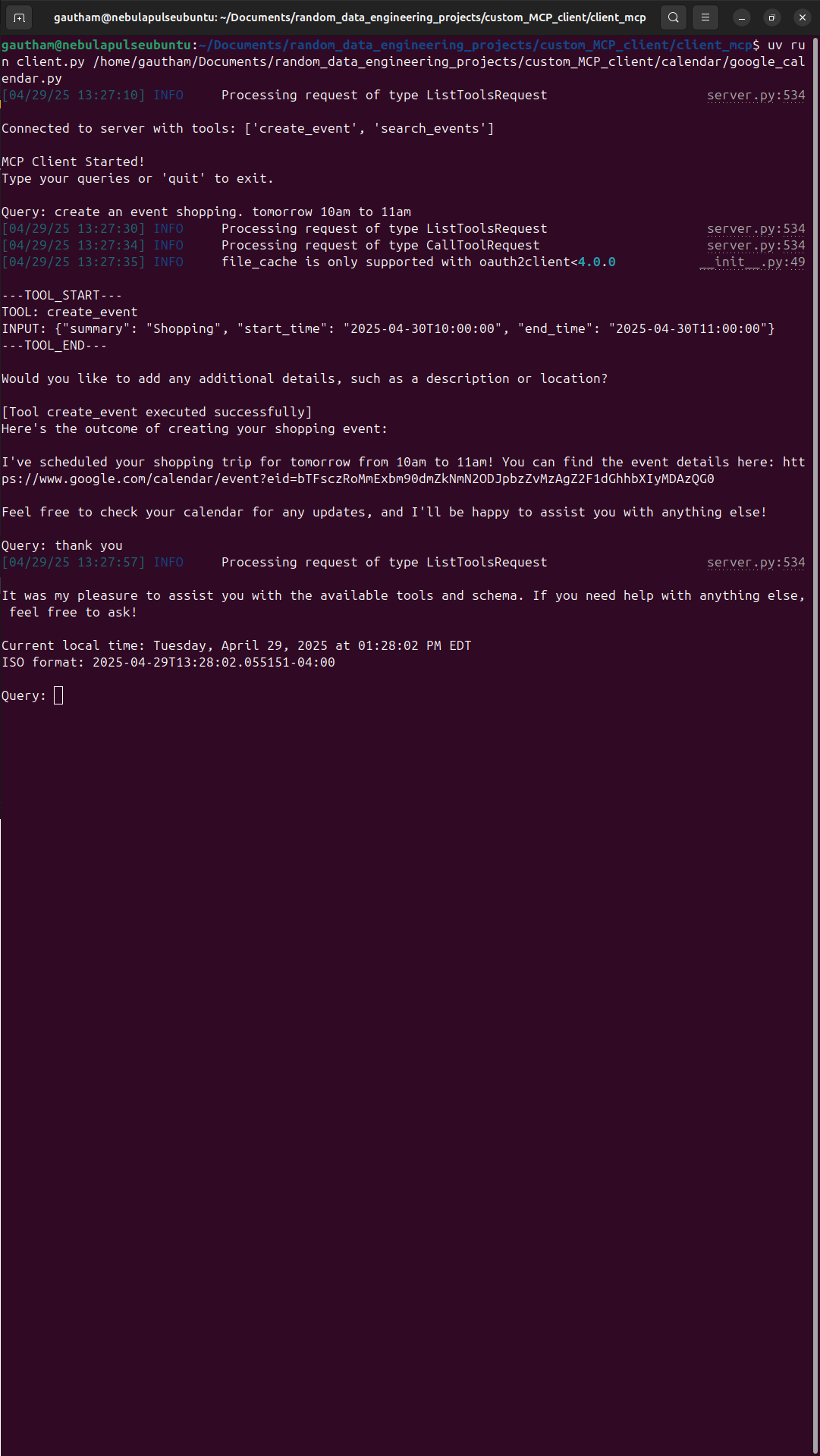
conversation between AI Agent
🏗️ Architecture
MCP-Ollama Server follows a microservices architecture pattern, where each capability is implemented as an independent service:
Key Components:
- Ollama Integration Layer: Connects to your local Ollama instance and routes appropriate requests
- MCP Protocol Handlers: Translate between standard MCP format and Ollama’s requirements
- Service Modules: Independent modules that implement specific capabilities
- Client Library: Provides a unified interface for applications to interact with the system
This architecture provides several benefits:
- Scalability: Add new modules without affecting existing ones
- Resilience: System continues functioning even if individual modules fail
- Flexibility: Deploy only the components you need
- Security: Granular control over data access for each module
📚 Documentation
Module-Specific Documentation
Each module contains its own README with detailed implementation notes:
🛠️ Use Cases
Enterprise Security & Compliance
Ideal for organizations that need AI capabilities but face strict data sovereignty requirements:
- Legal firms processing confidential case files
- Healthcare providers analyzing patient data
- Financial institutions handling sensitive transactions
Developer Productivity
Transform your local development environment:
- Code generation with access to your project files
- Automated documentation based on codebase analysis
- Integration with local git repositories
Personal Knowledge Management
Create a powerful second brain that respects your privacy:
- Process personal documents and notes
- Manage calendar and schedule optimization
- Generate content based on your personal knowledge base
🤝 Contributing
We welcome contributions from the community! Here’s how you can help:
- Fork the Repository: Create your own fork of the project
- Create a Feature Branch:
git checkout -b feature/amazing-feature - Make Your Changes: Implement your feature or bug fix
- Run Tests: Ensure your changes pass all tests
- Commit Changes:
git commit -m 'Add some amazing feature' - Push to Branch:
git push origin feature/amazing-feature - Open a Pull Request: Submit your changes for review
Please read our Contributing Guidelines for more details.
❓ FAQ
Q: How does this differ from using cloud-based AI assistants?
A: MCP-Ollama Server runs entirely on your local infrastructure, ensuring complete data privacy and eliminating dependence on external APIs.
Q: What models are supported?
A: Any model compatible with Ollama can be used. For best results, we recommend Llama 3, Mistral, or other recent open models with at least 7B parameters.
Q: How can I extend the system with new capabilities?
A: Follow the modular architecture pattern to create new service modules. See our Extension Guide for details.
Q: What are the system requirements?
A: Requirements depend on the Ollama model you choose. For basic functionality, we recommend at least 16GB RAM and a modern multi-core CPU.
📄 License
This project is licensed under the terms included in the LICENSE file.
🙏 Acknowledgements
MCP-Ollama Server - Bringing cloud-level AI capabilities to your local environment
Dev Tools Supporting MCP
The following are the main code editors that support the Model Context Protocol. Click the link to visit the official website for more information.







