
Mcpe Debugrenderer
What is Mcpe Debugrenderer
MCPE-DebugRenderer is a Minecraft Bedrock Edition script that allows users to load and render 3D OBJ models as debug lines in the game world using the @minecraft/debug-utilities API.
Use cases
Use cases include rendering custom models for debugging purposes, visualizing complex structures in-game, and enhancing educational experiences in Minecraft.
How to use
To use MCPE-DebugRenderer, place your OBJ model as a string export in the ‘scripts/obj/’ directory. Then, import and load the model in ‘scripts/index.js’ using the provided code snippets.
Key features
Key features include loading OBJ model data from strings, rendering models as wireframes, adjustable scale, fill density, lighting direction, and automatic rendering upon player spawn.
Where to use
MCPE-DebugRenderer can be used in game development, educational environments, and debugging scenarios where visualizing 3D models is necessary.
Clients Supporting MCP
The following are the main client software that supports the Model Context Protocol. Click the link to visit the official website for more information.





Overview
What is Mcpe Debugrenderer
MCPE-DebugRenderer is a Minecraft Bedrock Edition script that allows users to load and render 3D OBJ models as debug lines in the game world using the @minecraft/debug-utilities API.
Use cases
Use cases include rendering custom models for debugging purposes, visualizing complex structures in-game, and enhancing educational experiences in Minecraft.
How to use
To use MCPE-DebugRenderer, place your OBJ model as a string export in the ‘scripts/obj/’ directory. Then, import and load the model in ‘scripts/index.js’ using the provided code snippets.
Key features
Key features include loading OBJ model data from strings, rendering models as wireframes, adjustable scale, fill density, lighting direction, and automatic rendering upon player spawn.
Where to use
MCPE-DebugRenderer can be used in game development, educational environments, and debugging scenarios where visualizing 3D models is necessary.
Clients Supporting MCP
The following are the main client software that supports the Model Context Protocol. Click the link to visit the official website for more information.
Content
MCPE-DebugRenderer
A Minecraft Bedrock Edition script that loads and renders 3D OBJ models as debug lines in the world using the @minecraft/debug-utilities API.
Features
- Loads OBJ model data (vertices and faces) from a string.
- Renders the model as wireframe using debug lines.
- Supports adjustable scale, fill density, and lighting direction.
- Automatically starts rendering when a player spawns.
Usage
- Place your OBJ model as a string export in
scripts/obj/. - Import and use the model in
scripts/index.js:
import { model } from "./obj/model.js";
- You can then load a model like this
const loadedModel = loadOBJ(model);
system.runJob(renderOBJ(loadedModel, { x: 0, y: 200, z: 0 }, 1, 1, { x: 0, y: 400, z: 0 }));
Warning Loading models might take a while
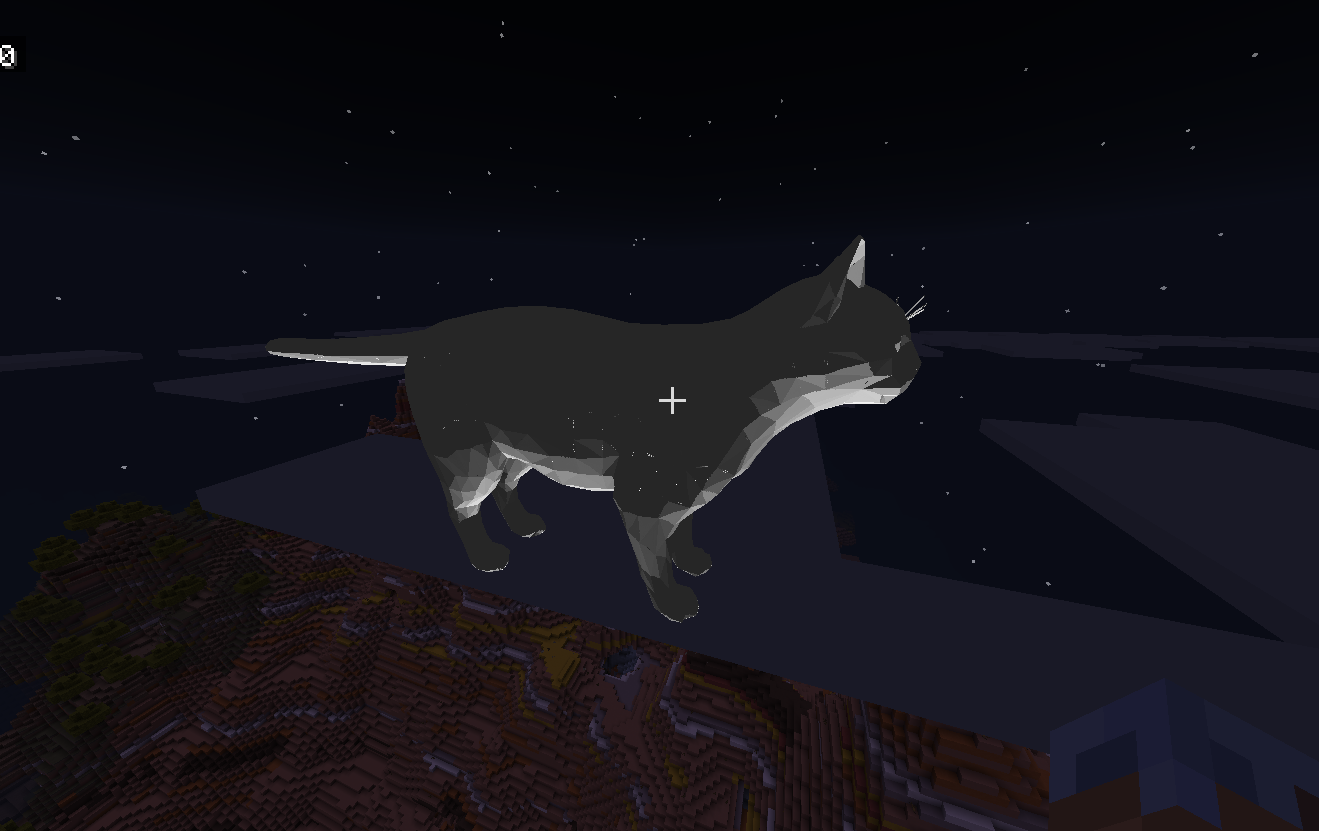
Exmaple
import { model } from "./obj/cat.js";
// other code
const loadedModel = loadOBJ(model);
system.runJob(renderOBJ(loadedModel, { x: 0, y: 200, z: 0 }, 0.1, 8));
Possible upgrades
- Add an animation engine
- Add support for vertex colors and per-face coloring
- Support for loading MTL (material) files for color
Dev Tools Supporting MCP
The following are the main code editors that support the Model Context Protocol. Click the link to visit the official website for more information.







