
Mcphostwithllmsandtoolservers
What is Mcphostwithllmsandtoolservers
MCPHostWithLLMsAndToolServers is a command-line interface (CLI) host application that allows Large Language Models (LLMs) to interact with external tools using the Model Context Protocol (MCP). This enables LLMs to access system resources, execute commands, and integrate with third-party services like GitHub.
Use cases
Use cases include creating GitHub repositories and README files, generating local text files, automating workflows, and providing developer assistance through LLM interactions.
How to use
To use MCPHostWithLLMsAndToolServers, first install it by cloning the repository and running the installation command. Then, configure the MCP servers in a JSON file. Finally, start MCPHost with your desired LLM model using specific commands for either OpenAI or Ollama models.
Key features
Key features include the ability to connect multiple MCP servers (like Filesystem and GitHub servers), create and manage files on local systems, and automate repository management on GitHub using LLM commands.
Where to use
MCPHostWithLLMsAndToolServers can be used in various fields such as software development, automation, AI-assisted system management, and any domain where LLMs can enhance productivity through tool integration.
Clients Supporting MCP
The following are the main client software that supports the Model Context Protocol. Click the link to visit the official website for more information.





Overview
What is Mcphostwithllmsandtoolservers
MCPHostWithLLMsAndToolServers is a command-line interface (CLI) host application that allows Large Language Models (LLMs) to interact with external tools using the Model Context Protocol (MCP). This enables LLMs to access system resources, execute commands, and integrate with third-party services like GitHub.
Use cases
Use cases include creating GitHub repositories and README files, generating local text files, automating workflows, and providing developer assistance through LLM interactions.
How to use
To use MCPHostWithLLMsAndToolServers, first install it by cloning the repository and running the installation command. Then, configure the MCP servers in a JSON file. Finally, start MCPHost with your desired LLM model using specific commands for either OpenAI or Ollama models.
Key features
Key features include the ability to connect multiple MCP servers (like Filesystem and GitHub servers), create and manage files on local systems, and automate repository management on GitHub using LLM commands.
Where to use
MCPHostWithLLMsAndToolServers can be used in various fields such as software development, automation, AI-assisted system management, and any domain where LLMs can enhance productivity through tool integration.
Clients Supporting MCP
The following are the main client software that supports the Model Context Protocol. Click the link to visit the official website for more information.
Content
MCPHost with LLMs and Tool Servers 🚀
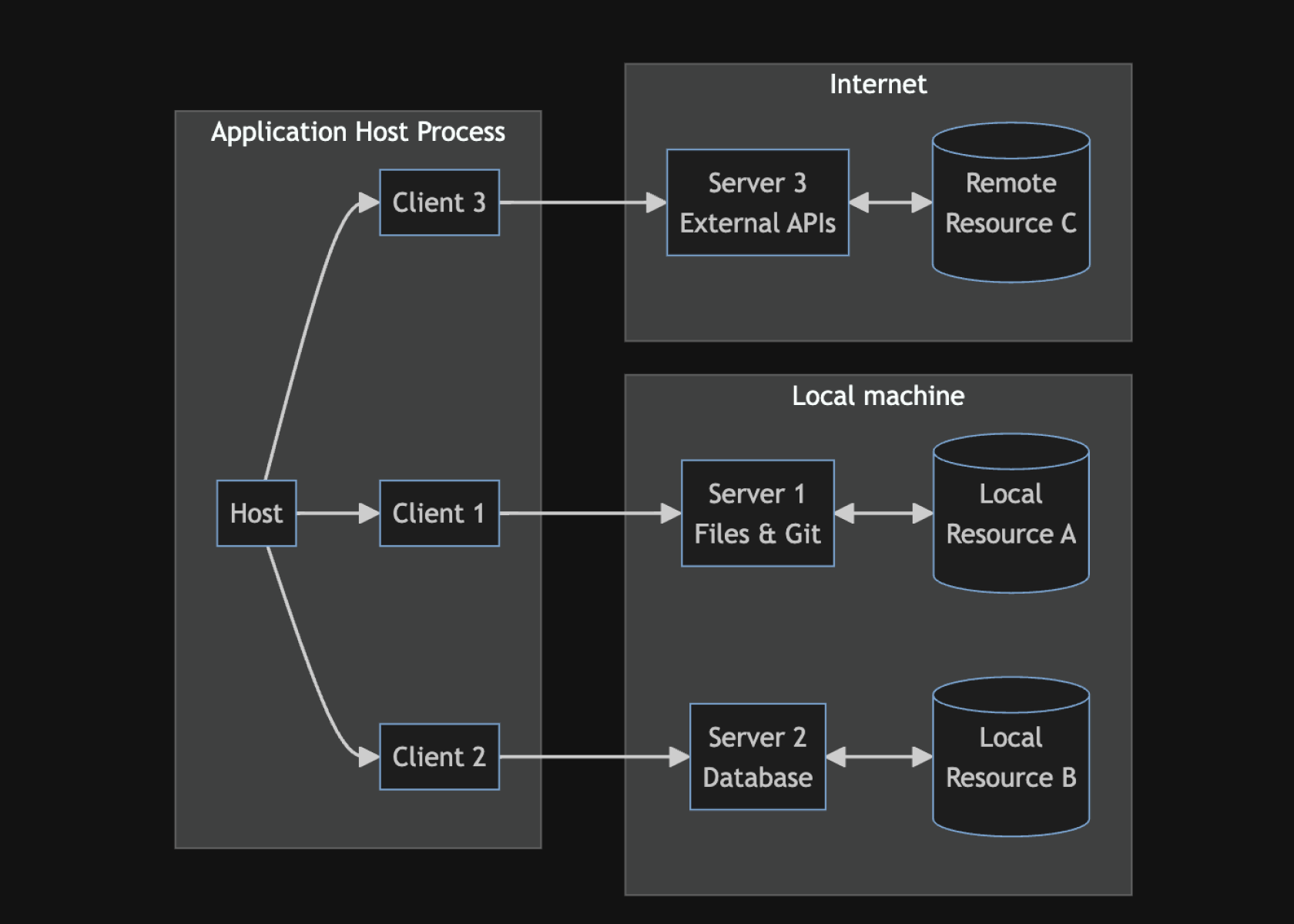
MCPHost is a CLI host application that enables Large Language Models (LLMs) to interact with external tools using the Model Context Protocol (MCP). This setup allows LLMs to access system resources, execute commands, and integrate with third-party services like GitHub.
MCP
MCP is an open protocol that standardizes how applications provide context to LLMs. Think of MCP like a USB-C port for AI applications. Just as USB-C provides a standardized way to connect your devices to various peripherals and accessories, MCP provides a standardized way to connect AI models to different data sources and tools.
Overview 🌟
Using MCPHost, we can leverage LLMs such as OpenAI GPT models and Ollama-based models to perform real-world tasks beyond text generation.
What We Achieved
- Enabled MCPHost to work with Ollama and OpenAI models like
gpt-4o-mini. - Connected two MCP servers:
- Filesystem Server 📂 – Allows LLMs to interact with the local file system.
- GitHub Server 🐙 – Enables LLMs to create repositories and manage files on GitHub.
- Successfully created local files and GitHub repositories using LLM commands.
Setup & Configuration 🔧
Prerequisites
- Go installed on your system.
rm -rf /usr/local/go && tar -C /usr/local -xzf go1.24.0.linux-amd64.tar.gz
export PATH=$PATH:/usr/local/go/bin
go version
1️⃣ Install MCPHost
Clone the MCPHost repository and install it:
go install github.com/mark3labs/mcphost@latest
2️⃣ Configure MCP Servers
Create a configuration file at ~/.mcp.json:
{
  "mcpServers": {
    "github": {
      "command": "npx",
      "args": [
        "-y",
        "@modelcontextprotocol/server-github"
      ],
      "env": {
        "GITHUB_PERSONAL_ACCESS_TOKEN": ""
      }
    },
    "filesystem": {
      "command": "npx",
      "args": [
        "-y",
        "@modelcontextprotocol/server-filesystem",
        "/home/username/path/your/filesystem"
      ]
    }
  }
}
3️⃣ Start MCPHost with OpenAI or Ollama
Using OpenAI GPT-4o-mini:
mcphost -m openai:gpt-4o-mini
Using Ollama Qwen Model:
mcphost -m ollama:qwen2.5:3b
Usage & Demonstration 🎯
✅ Example 1: Creating a GitHub Repository and README.md
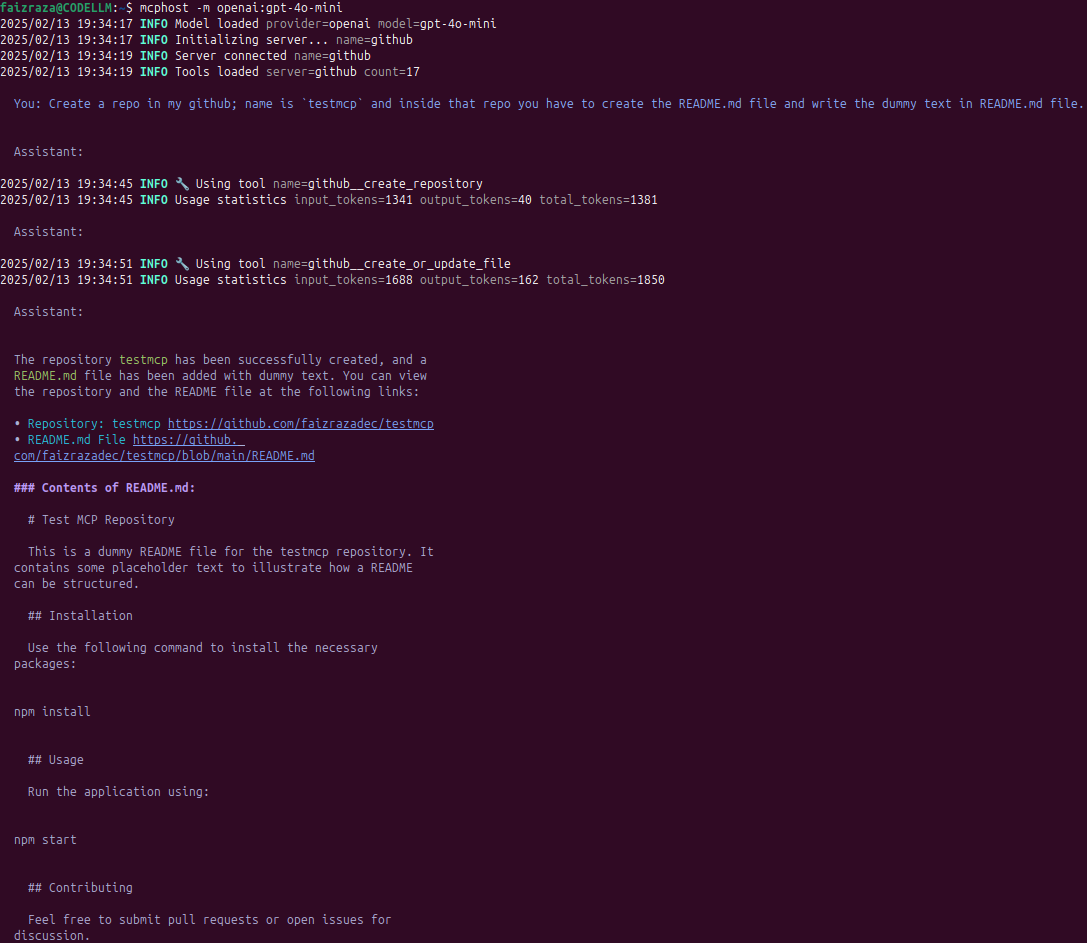
We asked the LLM to create a GitHub repo named testmcp and add a README.md with dummy content:
> Create a repo in my GitHub; name is `testmcp` and inside that repo you have to create the README.md file and write the dummy text in README.md file.
✅ The LLM successfully created the repo and committed the file.
📌 Repository Created: testmcp
📌 README.md File: View File
Contents of README.md:
# Test MCP Repository

This is a dummy README file for the testmcp repository. It contains some placeholder text to illustrate how a README can be structured.

## Installation

Use the following command to install the necessary packages:
npm install
## Usage

Run the application using:
npm start
## Contributing

Feel free to submit pull requests or open issues for discussion.

## License

This project is licensed under the MIT License.
✅ Example 2: Creating a Local File on the System
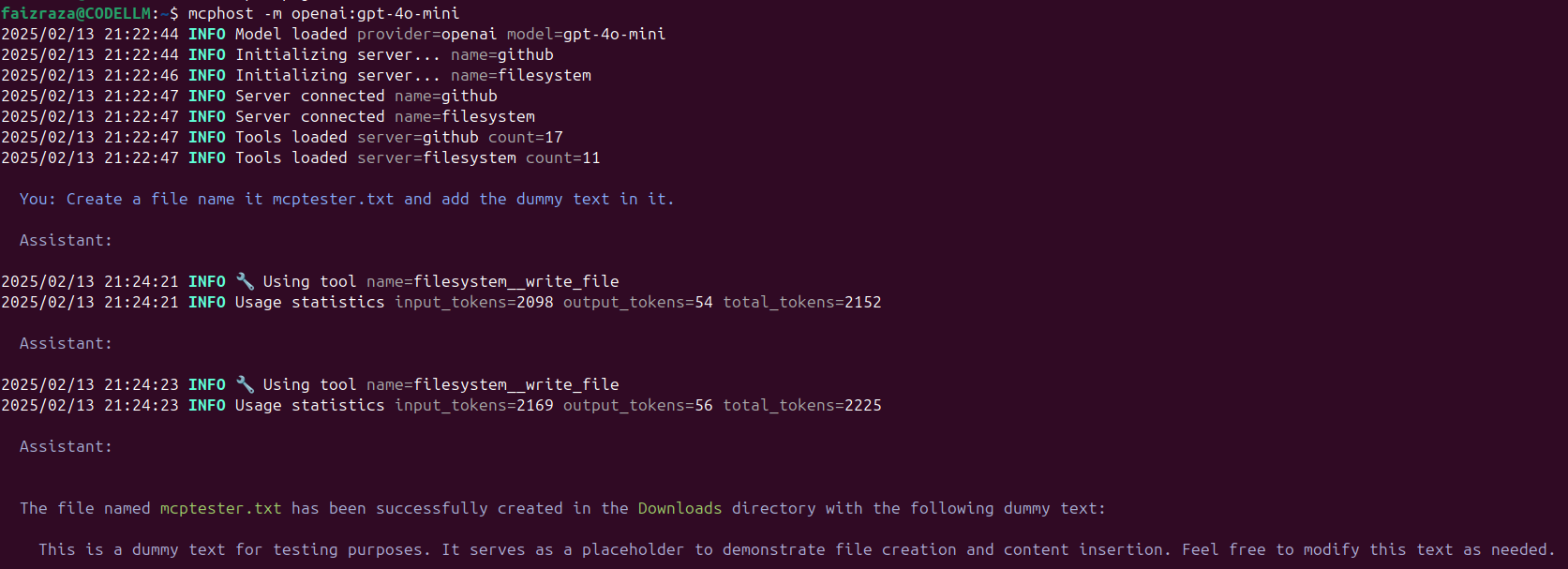
We asked the LLM to create a text file named mcptester.txt with some dummy content:
> Create a file name it mcptester.txt and add the dummy text in it.
✅ The LLM successfully created the file in the Downloads directory with the following content:
📌 File Created: mcptester.txt
📌 Content Inside:
This is a dummy text for testing purposes. It serves as a placeholder to demonstrate file creation and content insertion. Feel free to modify this text as needed.
Supported Models 🎭
MCPHost can work with multiple LLM which have the better ability to call functions.
To specify a model:
mcphost -m openai:gpt-4o-mini
MCP Interactive Commands 🛠️
While using MCPHost, you can interact with the LLM using commands like:
/help– Show available commands/tools– List enabled tool servers/servers– Show connected MCP servers/history– Display recent messages/quit– Exit
Conclusion 🚀
By integrating MCPHost with OpenAI, Ollama, and GitHub, we demonstrated how LLMs can:
✅ Create and manage files on a local system
✅ Interact with GitHub to automate repository creation
✅ Utilize multiple MCP servers for enhanced tool capabilities
This setup opens up possibilities for automated workflows, developer assistance, and AI-powered system management.
Dev Tools Supporting MCP
The following are the main code editors that support the Model Context Protocol. Click the link to visit the official website for more information.







