
Mcp To Pc Entities
What is Mcp To Pc Entities
MCP_TO_PC_ENTITIES is a project that facilitates querying DNO (Distributed Network Operator) APIs to fetch catalog entities such as offers, products, and services, as well as pricing rules from various operators. It allows seamless communication with these APIs using the Machine Communication Protocol (MCP).
Use cases
This project can be used for retrieving detailed information about available offers, products, and services from different telecommunications operators. It is also useful for accessing and understanding pricing rules, allowing users to make informed decisions based on available options and pricing structures.
How to use
To use the project, you need to clone the repository, install necessary dependencies, and set up environment variables in a .env file for DNO API authentication. Additionally, configuration in Claude Desktop is required to enable natural language interactions with the DNO API through the chat interface. Once set up, you can issue commands like fetching offers or pricing rules.
Key features
Key features of the project include the ability to fetch offers, products, and services from various operators, retrieve and interpret pricing rules, and provide a streamlined communication experience using natural language through Claude Desktop. The project is designed to handle authentication and API interactions automatically.
Where to use
You can use this project in environments where accessing telecom API data is needed, such as customer support platforms, sales applications, or market analysis tools. It can be beneficial for businesses looking to understand product offerings and pricing within the telecommunications industry.
Clients Supporting MCP
The following are the main client software that supports the Model Context Protocol. Click the link to visit the official website for more information.





Overview
What is Mcp To Pc Entities
MCP_TO_PC_ENTITIES is a project that facilitates querying DNO (Distributed Network Operator) APIs to fetch catalog entities such as offers, products, and services, as well as pricing rules from various operators. It allows seamless communication with these APIs using the Machine Communication Protocol (MCP).
Use cases
This project can be used for retrieving detailed information about available offers, products, and services from different telecommunications operators. It is also useful for accessing and understanding pricing rules, allowing users to make informed decisions based on available options and pricing structures.
How to use
To use the project, you need to clone the repository, install necessary dependencies, and set up environment variables in a .env file for DNO API authentication. Additionally, configuration in Claude Desktop is required to enable natural language interactions with the DNO API through the chat interface. Once set up, you can issue commands like fetching offers or pricing rules.
Key features
Key features of the project include the ability to fetch offers, products, and services from various operators, retrieve and interpret pricing rules, and provide a streamlined communication experience using natural language through Claude Desktop. The project is designed to handle authentication and API interactions automatically.
Where to use
You can use this project in environments where accessing telecom API data is needed, such as customer support platforms, sales applications, or market analysis tools. It can be beneficial for businesses looking to understand product offerings and pricing within the telecommunications industry.
Clients Supporting MCP
The following are the main client software that supports the Model Context Protocol. Click the link to visit the official website for more information.
Content
MCP_TO_PC_ENTITIES
A MCP (Machine Communication Protocol) project that enables querying DNO APIs to fetch catalog entities and pricing rules.
Features
- Fetch offers, products, and services from different operators
- Retrieve pricing rules from different operators
Setup
-
Clone the repository
-
Install dependencies:
# Install uv package manager (macOS) brew install uv # Install project dependencies using uv uv pip install -r requirements.txt -
Create a
.envfile with the following variables:DNO_HOST=your_dno_host DNO_TOKEN_KEY_ID=your_key_id DNO_TOKEN_KEY=your_secret_key -
Configure in Claude Desktop:
- Download Claude Desktop from Claude Desktop Downloads
- Configuration file location:
- macOS:
~/Library/Application Support/Claude Desktop/config.json# Open with VS Code code ~/Library/Application\ Support/Claude\ Desktop/config.json # Or with any text editor open -t ~/Library/Application\ Support/Claude\ Desktop/config.json - Windows:
%APPDATA%\Claude Desktop\config.jsonnotepad %APPDATA%\Claude Desktop\config.json - Linux:
~/.config/Claude Desktop/config.json# Open with your default editor xdg-open ~/.config/Claude\ Desktop/config.json
- macOS:
Add the following to your Claude Desktop configuration file:
{
  "mcpServers": {
    "@modelcontextprotocol-server-local-api": {
      "command": "/path/to/uv",
      "args": [
        "--directory",
        "/path/to/project",
        "run",
        "dno_api.py"
      ]
    }
  }
}
Note: Replace
/path/to/uvand/path/to/projectwith your actual paths
Usage
The project provides several functions to interact with the DNO API:
get_offers(operator_name, entity_type): Fetch catalog entities (offers/products/services)get_pricing_rules(operator_name): Fetch pricing rules
The server runs using FastMCP for communication.
Claude Chat Interaction
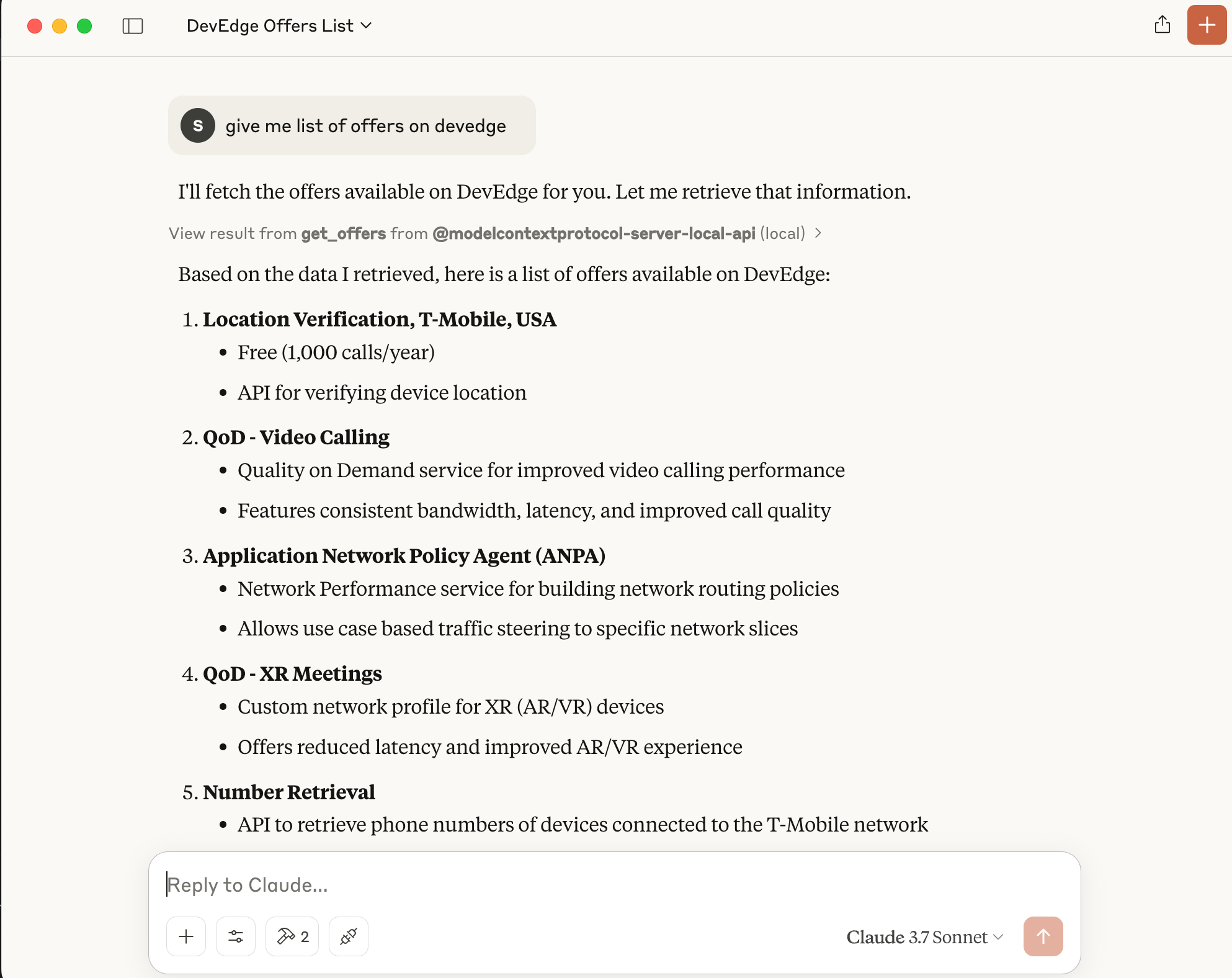
Once configured in Claude Desktop, you can interact with the DNO API through Claude chat using natural language. Here are some example interactions:
- “Get all offers for operator X”
- “Fetch pricing rules for operator Y”
- “Show me the products available for operator Z”
Claude will automatically use the appropriate API endpoints and handle the authentication for you.
Requirements
- Python 3.x
- Dependencies listed in
requirements.txt - Valid DNO API credentials
License
See the LICENSE file for details.
Dev Tools Supporting MCP
The following are the main code editors that support the Model Context Protocol. Click the link to visit the official website for more information.







