
Marketscope Ai Powered Industry Segment Intelligence Platform
What is Marketscope Ai Powered Industry Segment Intelligence Platform
MarketScope-AI-Powered-Industry-Segment-Intelligence-Platform is an intelligent analytics platform designed to help healthcare vendors understand and analyze various market segments using advanced AI and natural language processing.
Use cases
Use cases include analyzing sales data, comparing products across segments, and optimizing marketing strategies based on AI-powered insights.
How to use
To use the platform, ensure you have Python 3.8 or higher installed. You can run the simplified starter script ‘python run_servers.py’ to start the API server and Streamlit frontend, or set it up manually by installing dependencies and starting the servers individually.
Key features
Key features include Market Segmentation Analysis, Strategic Query Optimization, Product Comparison, and Sales & Marketing Analysis, allowing users to gain insights into product performance and market strategies.
Where to use
MarketScope can be utilized in various healthcare segments such as Diagnostic, Supplement, OTC Pharmaceutical, Fitness Wearable, and Skin Care segments.
Clients Supporting MCP
The following are the main client software that supports the Model Context Protocol. Click the link to visit the official website for more information.





Overview
What is Marketscope Ai Powered Industry Segment Intelligence Platform
MarketScope-AI-Powered-Industry-Segment-Intelligence-Platform is an intelligent analytics platform designed to help healthcare vendors understand and analyze various market segments using advanced AI and natural language processing.
Use cases
Use cases include analyzing sales data, comparing products across segments, and optimizing marketing strategies based on AI-powered insights.
How to use
To use the platform, ensure you have Python 3.8 or higher installed. You can run the simplified starter script ‘python run_servers.py’ to start the API server and Streamlit frontend, or set it up manually by installing dependencies and starting the servers individually.
Key features
Key features include Market Segmentation Analysis, Strategic Query Optimization, Product Comparison, and Sales & Marketing Analysis, allowing users to gain insights into product performance and market strategies.
Where to use
MarketScope can be utilized in various healthcare segments such as Diagnostic, Supplement, OTC Pharmaceutical, Fitness Wearable, and Skin Care segments.
Clients Supporting MCP
The following are the main client software that supports the Model Context Protocol. Click the link to visit the official website for more information.
Content
MarketScope AI: Healthcare Product Analytics
MarketScope AI is an intelligent analytics platform that helps you understand and analyze different healthcare market segments using advanced AI and natural language processing.
Features
- Market Segmentation Analysis - Analyze and understand different healthcare market segments
- Strategic Query Optimization - Get optimized answers to your strategic questions
- Product Comparison - Compare products across different segments
- Sales & Marketing Analysis - Upload your sales data for AI-powered insights
Getting Started
Prerequisites
- Python 3.8 or higher
- Required packages (installed automatically when following the setup instructions)
Setup and Running
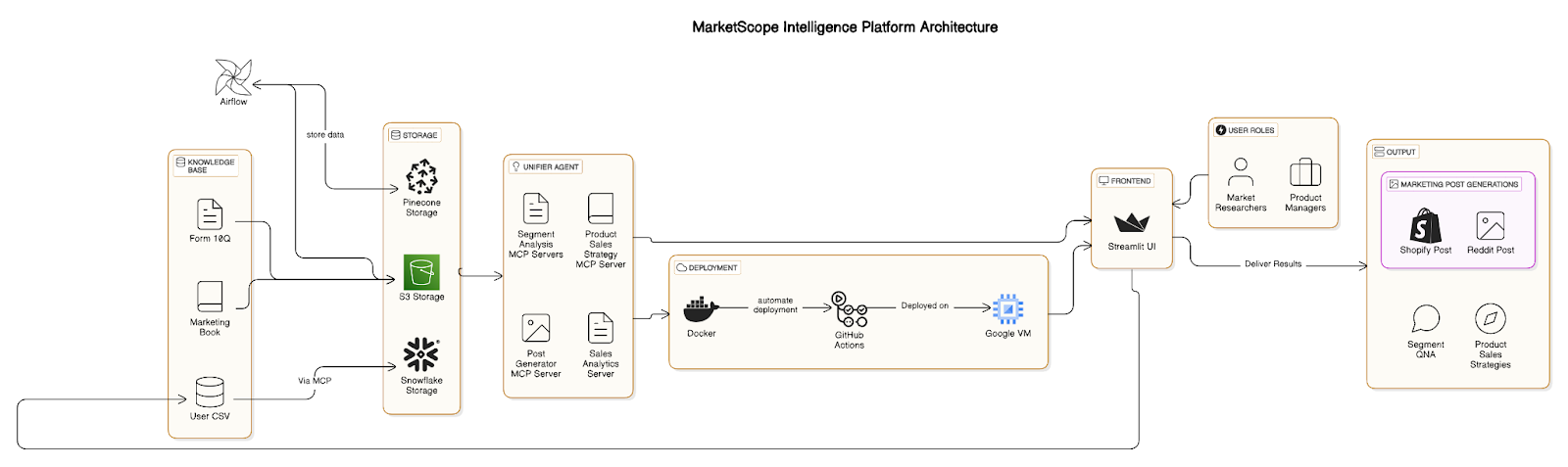
Simple Method
Run the simplified starter script:
python run_servers.py
This will:
- Check for required packages and install them if needed
- Start the API server
- Start the Streamlit frontend
- Provide you with the URL to access the application
Manual Setup
- Install dependencies:
pip install -r requirements.txt
- Start the API server:
python api/main.py
- Start the Streamlit frontend:
streamlit run frontend/app.py
Project Structure
api/- FastAPI backend serverfrontend/- Streamlit user interfacemcp_servers/- Model Context Protocol (MCP) servers for different functionalitiesagents/- AI agents for analysisconfig/- Application configuration
Healthcare Segments
The platform supports analysis across these healthcare segments:
- Diagnostic Segment
- Supplement Segment
- OTC Pharmaceutical Segment
- Fitness Wearable Segment
- Skin Care Segment
Data Analysis
To analyze your sales data:
- Select your segment from the sidebar
- Go to Sales & Marketing Analysis page
- Upload your CSV file or use the sample data
- Click “Analyze Data”
RAG for Marketing Knowledge
MarketScope includes a Retrieval Augmented Generation (RAG) system that provides access to marketing knowledge from Philip Kotler’s Marketing Management book:
- Go to the Query Optimization page
- Enter your marketing question
- The system will retrieve relevant sections from the book
- Get tailored marketing strategies for your specific segment
Deployed Links:
-## MCP SERVER:
- unified server - http://34.42.74.104:8000/docs
- marketing analysis server - http://34.42.74.104:8001/docs
- snowflake mcp server - http://34.42.74.104:8004/docs
- sales data analysis server - http://34.42.74.104:8002/docs
- segment mcp server - http://34.42.74.104:8003/docs
Troubleshooting
If you encounter issues:
- Check that all required dependencies are installed
- Verify that no other applications are using the required ports (8000-8004, 8501)
- Ensure your environment variables are properly set up
- Check the application logs for specific error messages
CodeLabs
License
Dev Tools Supporting MCP
The following are the main code editors that support the Model Context Protocol. Click the link to visit the official website for more information.







