
Mcpclientserverexample
What is Mcpclientserverexample
McpClientServerExample is a simple .NET implementation of an MCP (Model Context Protocol) Client and Server example. It demonstrates how to create and interact with an MCP server using custom tools, natural language prompts, and standard I/O transport.
Use cases
Use cases include building chatbots, creating interactive applications that require natural language processing, and developing tools that utilize the MCP for enhanced communication between clients and servers.
How to use
To use McpClientServerExample, ensure you have the .NET 8.0 SDK installed and an OpenAI API key if you want to utilize the GPT model. Set your API key in the environment and run the client using the command dotnet run --project client/McpClient.csproj.
Key features
Key features include communication between the client and server using ModelContextProtocol, support for OpenAI GPT model conversations, and built-in tools like Echo and ReverseEcho for user input handling.
Where to use
McpClientServerExample can be used in various fields such as software development, AI model integration, and educational purposes for understanding client-server communication protocols.
Clients Supporting MCP
The following are the main client software that supports the Model Context Protocol. Click the link to visit the official website for more information.





Overview
What is Mcpclientserverexample
McpClientServerExample is a simple .NET implementation of an MCP (Model Context Protocol) Client and Server example. It demonstrates how to create and interact with an MCP server using custom tools, natural language prompts, and standard I/O transport.
Use cases
Use cases include building chatbots, creating interactive applications that require natural language processing, and developing tools that utilize the MCP for enhanced communication between clients and servers.
How to use
To use McpClientServerExample, ensure you have the .NET 8.0 SDK installed and an OpenAI API key if you want to utilize the GPT model. Set your API key in the environment and run the client using the command dotnet run --project client/McpClient.csproj.
Key features
Key features include communication between the client and server using ModelContextProtocol, support for OpenAI GPT model conversations, and built-in tools like Echo and ReverseEcho for user input handling.
Where to use
McpClientServerExample can be used in various fields such as software development, AI model integration, and educational purposes for understanding client-server communication protocols.
Clients Supporting MCP
The following are the main client software that supports the Model Context Protocol. Click the link to visit the official website for more information.
Content
McpClientServerExample
McpClientServerExample 是一個基於 Model Context Protocol (MCP) 的範例專案,展示了如何實現客戶端與伺服器之間的通訊。此專案包含兩個主要部分:McpClient 和 McpServer,分別代表客戶端與伺服器。
用自製的Client,以不使用Claude Client App 為範例
功能
客戶端 (McpClient)
- 使用
ModelContextProtocol.Client與伺服器通訊。 - 支援 OpenAI GPT 模型進行對話。
- 提供工具列表並支援工具函數調用。
伺服器 (McpServer)
- 使用
ModelContextProtocol.Server提供 MCP 伺服器功能。 - 支援標準輸入/輸出通訊。
- 提供內建工具,例如:
Echo: 回傳用戶輸入的訊息。ReverseEcho: 回傳用戶輸入訊息的反轉版本。
安裝與執行
需求
- .NET 8.0 SDK
- OpenAI API 金鑰(若使用 GPT 模型)
export OPENAI_API_KEY=your_api_key_here
執行
dotnet run --project client/McpClient.csproj
使用範例
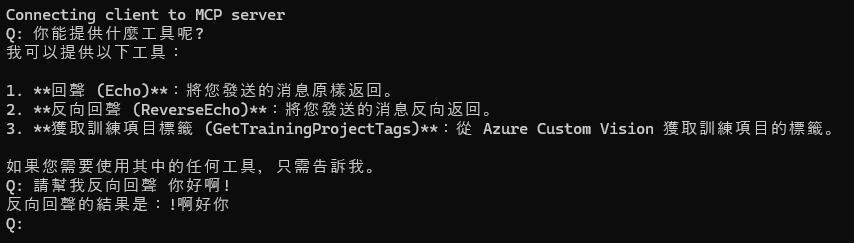
Dev Tools Supporting MCP
The following are the main code editors that support the Model Context Protocol. Click the link to visit the official website for more information.







