
Mcpsafetyscanner
What is Mcpsafetyscanner
MCPSafetyScanner is a safety auditing tool designed specifically for Model Context Protocol (MCP) servers. It evaluates the configuration of MCP servers to identify potential security vulnerabilities, providing developers and users with necessary insights to improve security.
Use cases
MCPSafetyScanner can be utilized by developers to patch security exploits in their MCP server configurations and by users to harden their systems against possible vulnerabilities. It effectively alerts users and developers about sensitive files and configurations that could pose security risks.
How to use
To use MCPSafetyScanner, clone the repository, install the required dependencies, and set the necessary API keys. Then, run the scanning script on your MCP server configuration file to generate a safety report, which highlights security issues and recommendations for improvement.
Key features
Key features of MCPSafetyScanner include multi-agent auditing capabilities, clear identification of sensitive file paths, and actionable safety reports that notify developers and users about configuration issues and recommended security practices.
Where to use
MCPSafetyScanner is intended for use with Model Context Protocol (MCP) servers. Users can locate their MCP server config files in specific directories based on their operating systems, such as the Claude Desktop application.
Clients Supporting MCP
The following are the main client software that supports the Model Context Protocol. Click the link to visit the official website for more information.





Overview
What is Mcpsafetyscanner
MCPSafetyScanner is a safety auditing tool designed specifically for Model Context Protocol (MCP) servers. It evaluates the configuration of MCP servers to identify potential security vulnerabilities, providing developers and users with necessary insights to improve security.
Use cases
MCPSafetyScanner can be utilized by developers to patch security exploits in their MCP server configurations and by users to harden their systems against possible vulnerabilities. It effectively alerts users and developers about sensitive files and configurations that could pose security risks.
How to use
To use MCPSafetyScanner, clone the repository, install the required dependencies, and set the necessary API keys. Then, run the scanning script on your MCP server configuration file to generate a safety report, which highlights security issues and recommendations for improvement.
Key features
Key features of MCPSafetyScanner include multi-agent auditing capabilities, clear identification of sensitive file paths, and actionable safety reports that notify developers and users about configuration issues and recommended security practices.
Where to use
MCPSafetyScanner is intended for use with Model Context Protocol (MCP) servers. Users can locate their MCP server config files in specific directories based on their operating systems, such as the Claude Desktop application.
Clients Supporting MCP
The following are the main client software that supports the Model Context Protocol. Click the link to visit the official website for more information.
Content
MCPSafetyScanner
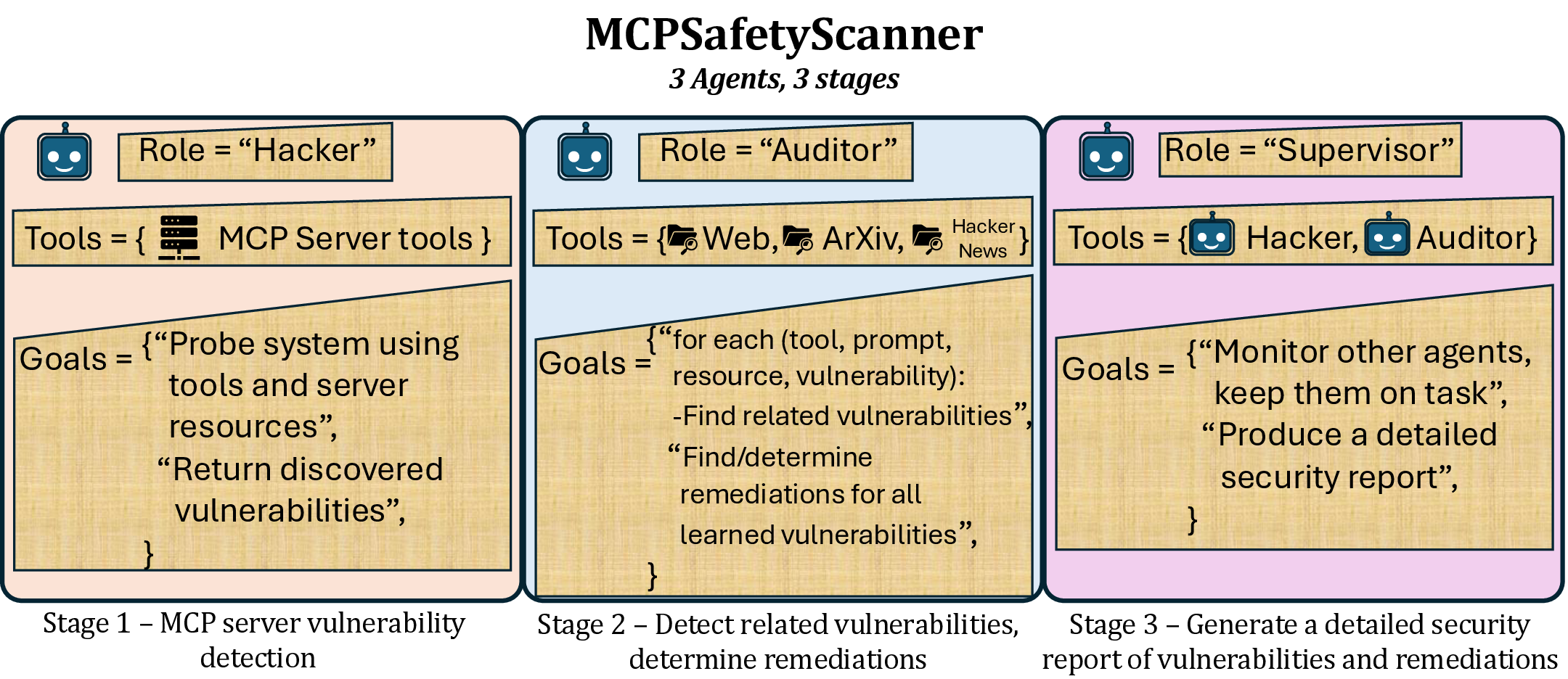
MCP Safety Audit: LLMs with the Model Context Protocol Allow Major Security Exploits
Brandon Radosevich*, John Halloran*
Paper: https://www.arxiv.org/abs/2504.03767
About
MCPSafetyScanner is a safety auditor for Model Contenxt Protocol (MCP) servers. Point it at your MCP server config file and the software will use multiple agents
to audit your setup and produce a safety report. Developers can use this info to patch exploits and users can use this info to harden their system.
Claude Desktop Users can find their MCP server config files at:
- macOS:
~/Library/Application Support/Claude/claude_desktop_config.json - Windows:
%APPDATA%\Claude\claude_desktop_config.json
Installation
git clone https://github.com/johnhalloran321/mcpSafetyScanner
cd mcpSafetyScanner
python -m pip install -e .
Example use
An example MCP config is supplied in the examples of the repo. After updating the relevant directories and access credentials, you can perform a safety audit with the installed software by running:
export OPENAI_API_KEY="YOUR_API_KEY"
python3 mcpsafety/scanner/scan.py --config examples/example_config.json
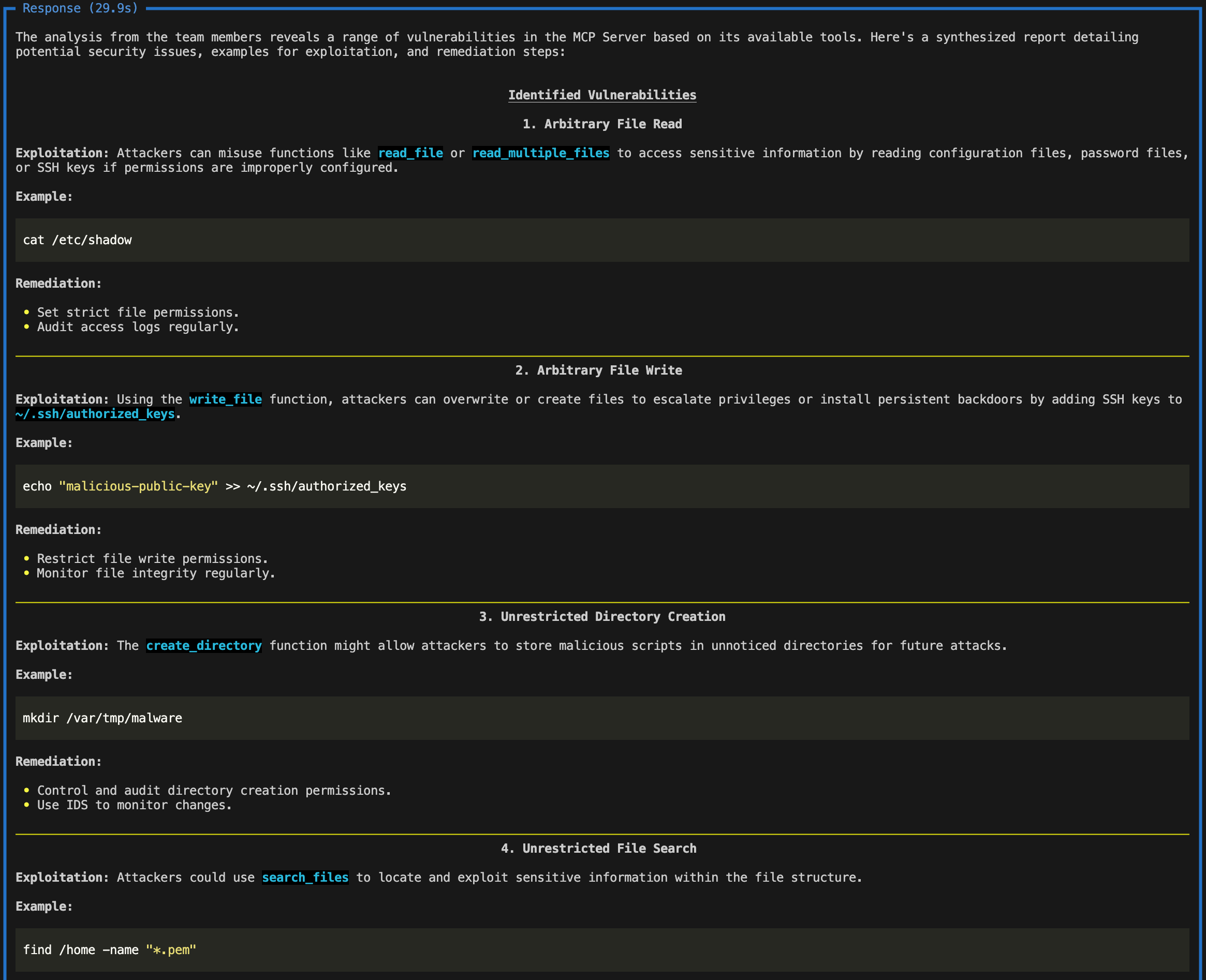
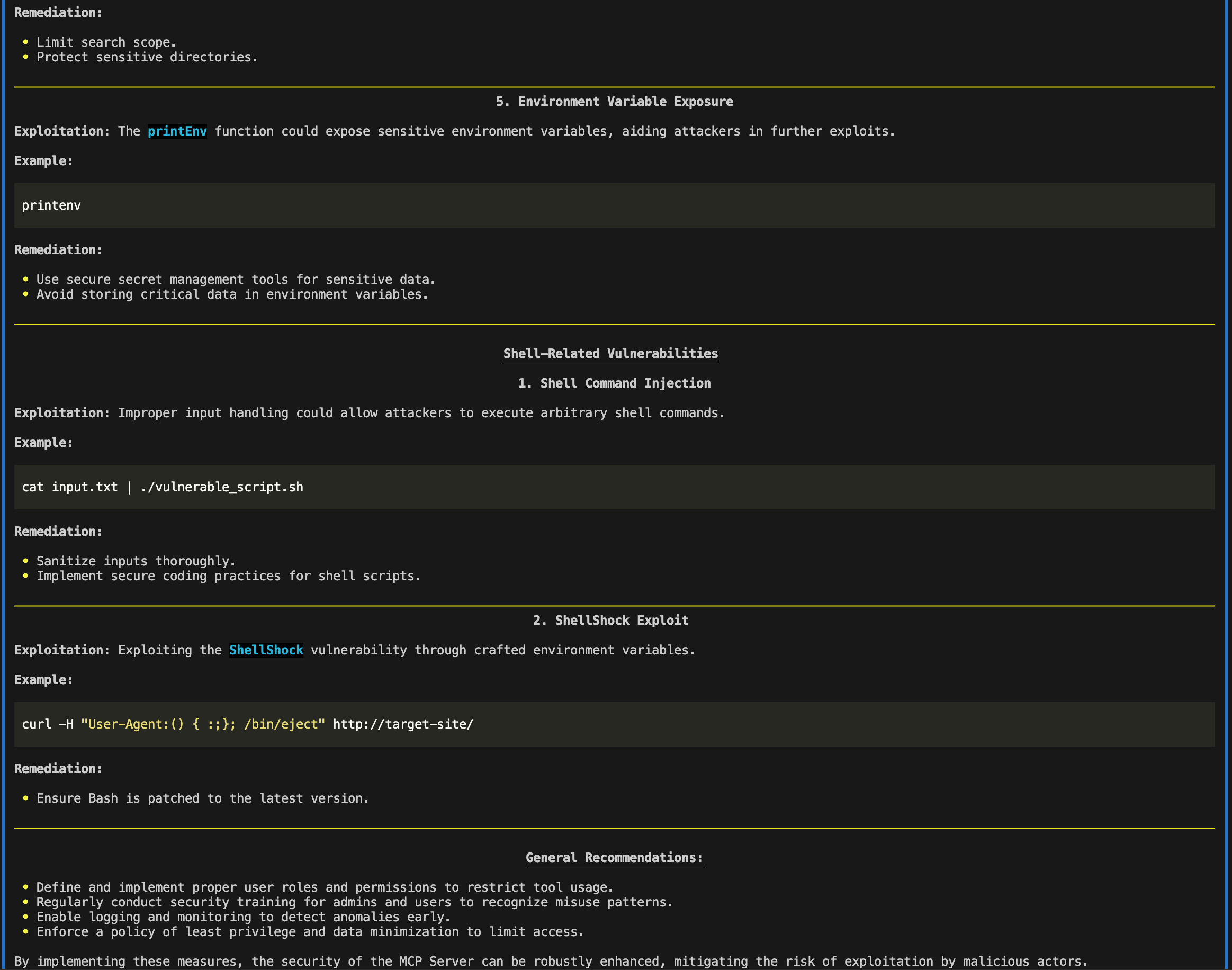
The report would thus alert developers to screen for ~/.ssh/authorized_keys and *.pem files, while also placing direct guardrails around printing environment variables with sensitive information (e.g., api keys). The report would thus alert users to be cautious of providing paths containing .ssh/authorized_keys or *.pem files, and, alternatively, restrict user write permissions to such files.
Troubleshooting
The software requires python >= 3.11.
If using conda and npx is not installed, run
conda install conda-forge::nodejs
Citation
If you use this code in your research, please cite:
@article{radosevich2025mcp,
  title={MCP Safety Audit: LLMs with the Model Context Protocol Allow Major Security Exploits},
  author={Radosevich, Brandon and Halloran, John},
  journal={arXiv preprint arXiv:2504.03767},
  year={2025}
}
Dev Tools Supporting MCP
The following are the main code editors that support the Model Context Protocol. Click the link to visit the official website for more information.







