
Multi Agents Mcp
What is Multi Agents Mcp
Multi-Agents-MCP is a system that utilizes multiple agents to assist in sales consulting, powered by MCP SSE server. It enables users to create orders and retrieve product information from a MongoDB database.
Use cases
Use cases include automated sales consultations, real-time inventory checks, order processing for online purchases, and integration with external APIs for enhanced functionality.
How to use
To start the MCP SSE server, run ‘python mcp_server.py’. For running Multi Agents, execute ‘python main.py’. If you want to use the user interface, run ‘python -m streamlit run interface/gui.py’.
Key features
Key features include AI-driven analysis of customer requests, automated order processing, product information retrieval from MongoDB, integrated function calling for order saving, a scalable processing pipeline, and flexible tool calling options.
Where to use
Multi-Agents-MCP can be used in e-commerce, retail consulting, customer service automation, and any domain requiring efficient sales processes and inventory management.
Clients Supporting MCP
The following are the main client software that supports the Model Context Protocol. Click the link to visit the official website for more information.





Overview
What is Multi Agents Mcp
Multi-Agents-MCP is a system that utilizes multiple agents to assist in sales consulting, powered by MCP SSE server. It enables users to create orders and retrieve product information from a MongoDB database.
Use cases
Use cases include automated sales consultations, real-time inventory checks, order processing for online purchases, and integration with external APIs for enhanced functionality.
How to use
To start the MCP SSE server, run ‘python mcp_server.py’. For running Multi Agents, execute ‘python main.py’. If you want to use the user interface, run ‘python -m streamlit run interface/gui.py’.
Key features
Key features include AI-driven analysis of customer requests, automated order processing, product information retrieval from MongoDB, integrated function calling for order saving, a scalable processing pipeline, and flexible tool calling options.
Where to use
Multi-Agents-MCP can be used in e-commerce, retail consulting, customer service automation, and any domain requiring efficient sales processes and inventory management.
Clients Supporting MCP
The following are the main client software that supports the Model Context Protocol. Click the link to visit the official website for more information.
Content
Multi-Agents with MCP SSE server
This repo introduce a Multi-Agents system in the field of consultant for sales product, with MCP SSE server include functions for create orders if users want to buy a products and retrieve products from MongoDB, powered by CrewAI.
The system contains 3 main agents:
- Consultant Agent: Analyze customer requirements, advise on products, create final feedback
- Inventory Agent: Check product stock status and pricing from DB
- Order Agent: Process order creation when customer has demand
Features
- Analyze customer requests using AI to identify products and purchase intentions
- Automated order processing with detailed information
- Get information of products from db (Mongodb)
- Integrated Function Calling to save orders
- Scalable and sequential processing pipeline
- Include calling tools for flexible if you want to use function calling instead of MCP SSE server
System Architecture
- CrewAI Pipeline: Coordinate workflow between agents
- Specialized agents: Consultant, stock staff, order staff
Usage
Start mongoDB Server:
sudo systemctl start mongod.service
Start MCP SSE server:
python mcp_server.py
Running Multi Agents:
python main.py
Running Multi Agents with UI:
python -m streamlit run interface/gui.py
Future plans
- Applying MCP (Model Context Protocol) for flexible plug-and-play external tools and APIs. (Done)
- Applying A2A (Agent to Agent Protocol) for Agents able to interact with each other.
- Build UI for users easy to interact with Multi Agents. (Done)
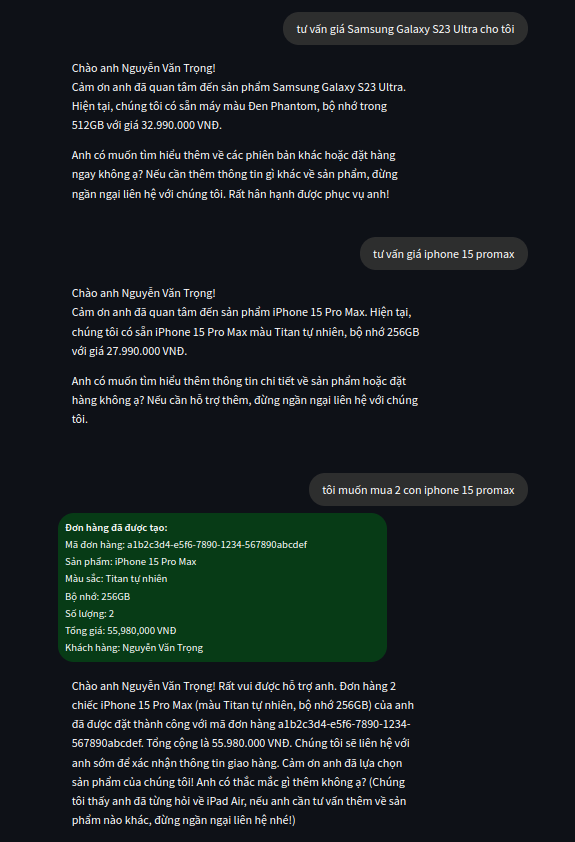
Examples output
Dev Tools Supporting MCP
The following are the main code editors that support the Model Context Protocol. Click the link to visit the official website for more information.







