
Next Level Pentesting Using Claude Ai With Burp Suite Community Via Mcp
What is Next Level Pentesting Using Claude Ai With Burp Suite Community Via Mcp
Next-Level-Pentesting-Using-Claude-AI-with-Burp-Suite-Community-via-MCP is a guide that helps users of Burp Suite Community Edition enhance their penetration testing workflow by integrating AI assistance from Claude, without the need for Burp Pro.
Use cases
Use cases include automating vulnerability scans, analyzing web application security, providing AI-driven insights during penetration tests, and enhancing the overall efficiency of security assessments.
How to use
To use this guide, install Burp Suite Community Edition, load the MCP extension from the BApp Store, and integrate Claude AI with the MCP server for real-time interaction and analysis during penetration tests.
Key features
Key features include real-time analysis of HTTP requests, dynamic response to new data, vulnerability identification, and guidance through exploitation processes, all facilitated by the Model Context Protocol (MCP).
Where to use
This integration is primarily used in cybersecurity fields, particularly in penetration testing, red teaming, and vulnerability assessments.
Clients Supporting MCP
The following are the main client software that supports the Model Context Protocol. Click the link to visit the official website for more information.





Overview
What is Next Level Pentesting Using Claude Ai With Burp Suite Community Via Mcp
Next-Level-Pentesting-Using-Claude-AI-with-Burp-Suite-Community-via-MCP is a guide that helps users of Burp Suite Community Edition enhance their penetration testing workflow by integrating AI assistance from Claude, without the need for Burp Pro.
Use cases
Use cases include automating vulnerability scans, analyzing web application security, providing AI-driven insights during penetration tests, and enhancing the overall efficiency of security assessments.
How to use
To use this guide, install Burp Suite Community Edition, load the MCP extension from the BApp Store, and integrate Claude AI with the MCP server for real-time interaction and analysis during penetration tests.
Key features
Key features include real-time analysis of HTTP requests, dynamic response to new data, vulnerability identification, and guidance through exploitation processes, all facilitated by the Model Context Protocol (MCP).
Where to use
This integration is primarily used in cybersecurity fields, particularly in penetration testing, red teaming, and vulnerability assessments.
Clients Supporting MCP
The following are the main client software that supports the Model Context Protocol. Click the link to visit the official website for more information.
Content
🧬 Next-Level Pentesting: Using Claude AI with Burp Suite Community via MCP
🚀 Post created for Hack Tools Dark Community
If you’re using Burp Suite Community Edition and want to supercharge your workflow with some powerful AI assistance – without needing Burp Pro – then this guide is going to blow your mind.
We’ll show you how to integrate Burp Suite with Claude (by Anthropic) using the Model Context Protocol (MCP). This allows your AI assistant to process live HTTP history, analyze requests, identify vulnerabilities, and even guide you through exploitation – all inside your pentest flow.
What is MCP?
Model Context Protocol (MCP) is an open framework that enables synchronous interaction between AI models and real-time tools. It’s designed to be a bridge, allowing tools like Claude to work directly with your technical environments like Burp Suite.
MCP lets AI assistants:
- Analyze structured tool output
- Respond dynamically to new data
- Collaborate interactively in pentest workflows
Released on November 25, 2024, this open standard is now the backbone of cutting-edge AI tooling in red team ops.
Architecture Overview
- MCP Server (in Burp Suite) – This extension exposes Burp’s internal data to external tools like Claude.
- Claude Desktop Integration – This links your local Claude AI with the MCP server, enabling 2-way sync.
Step-by-Step Setup (Win/macOS)
- Install Burp Suite Community Edition – Get it from PortSwigger and set it up. Or download it from here
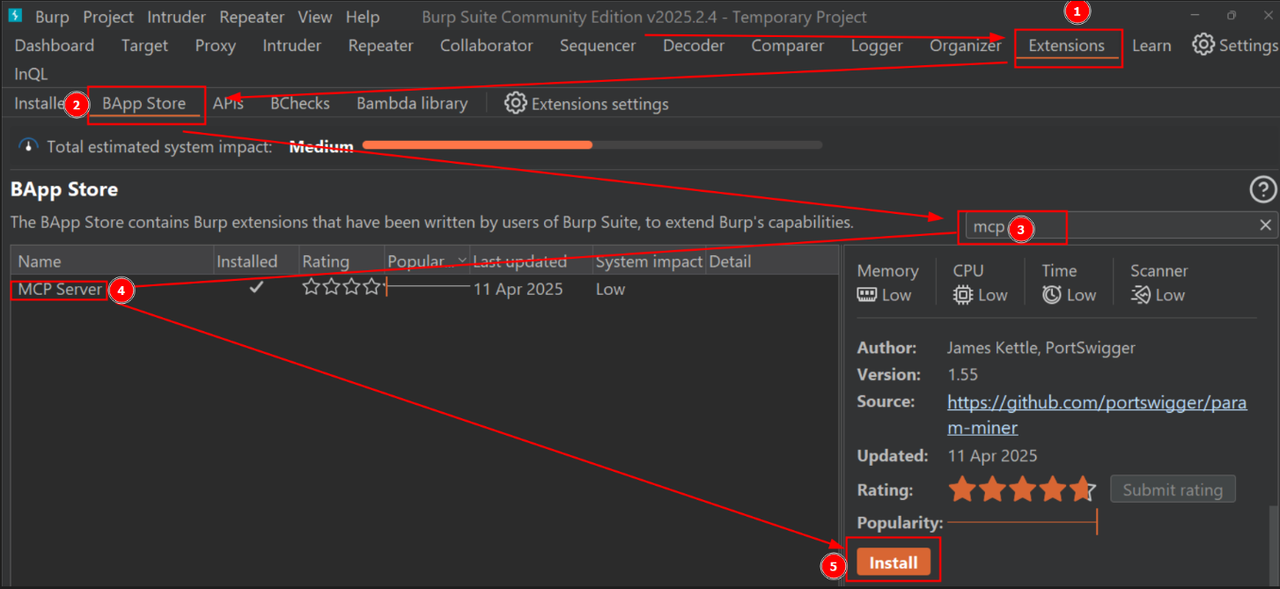
- Load MCP Extension – Go to Extender > BApp Store, search for “MCP Server”, and click install.
- Install Claude Desktop – Download from: https://claude.ai/download
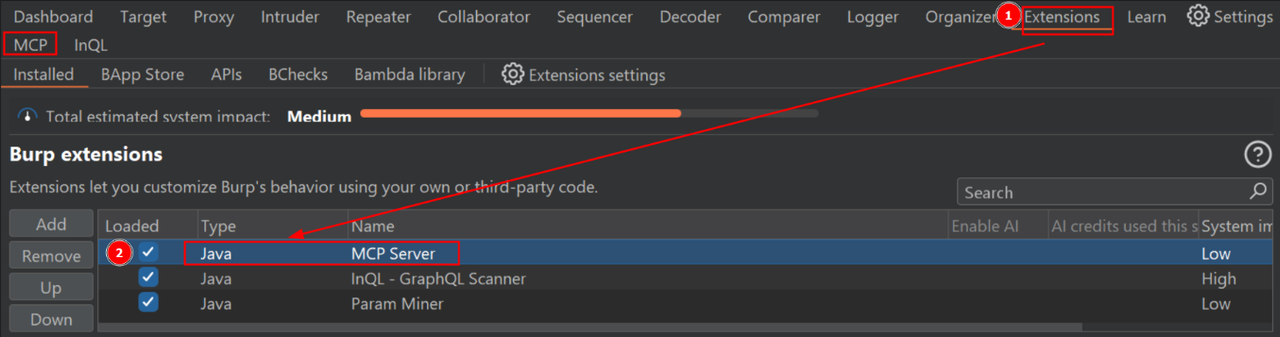
→ Works only on Windows/macOS for now. - Enable MCP in Burp – Make sure the “MCP” tab is visible in Burp. If not, check if the extension is properly loaded under Installed Extensions.
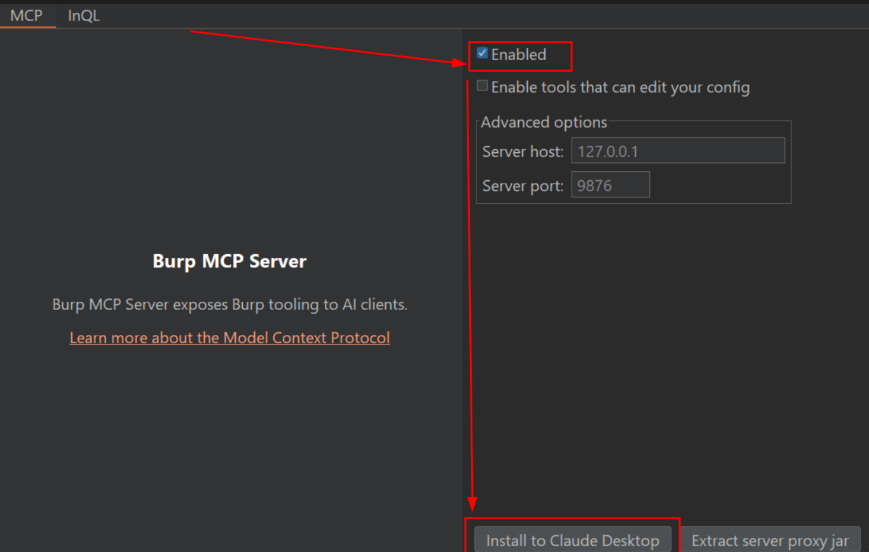
- Connect to Claude – Go to MCP tab, click Install to Claude Desktop. This generates a JSON config that links both tools.
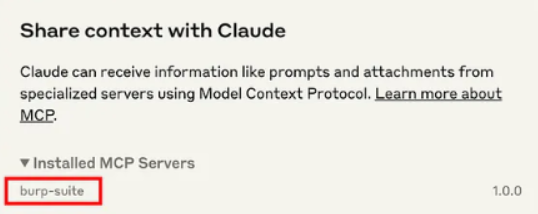
- Restart Claude Desktop – Essential to apply the configuration. After restarting, you should see an option in Claude like “Share context with Burp”.
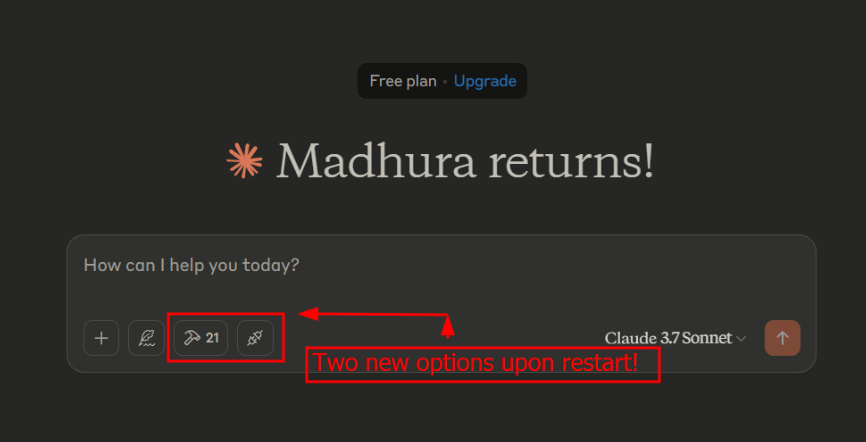
- Start Prompting – Launch your tests and fire up prompts in Claude Desktop.
Example Prompt
From the http history on burp suite tell me which ones look interesting i am hunting for `idors`
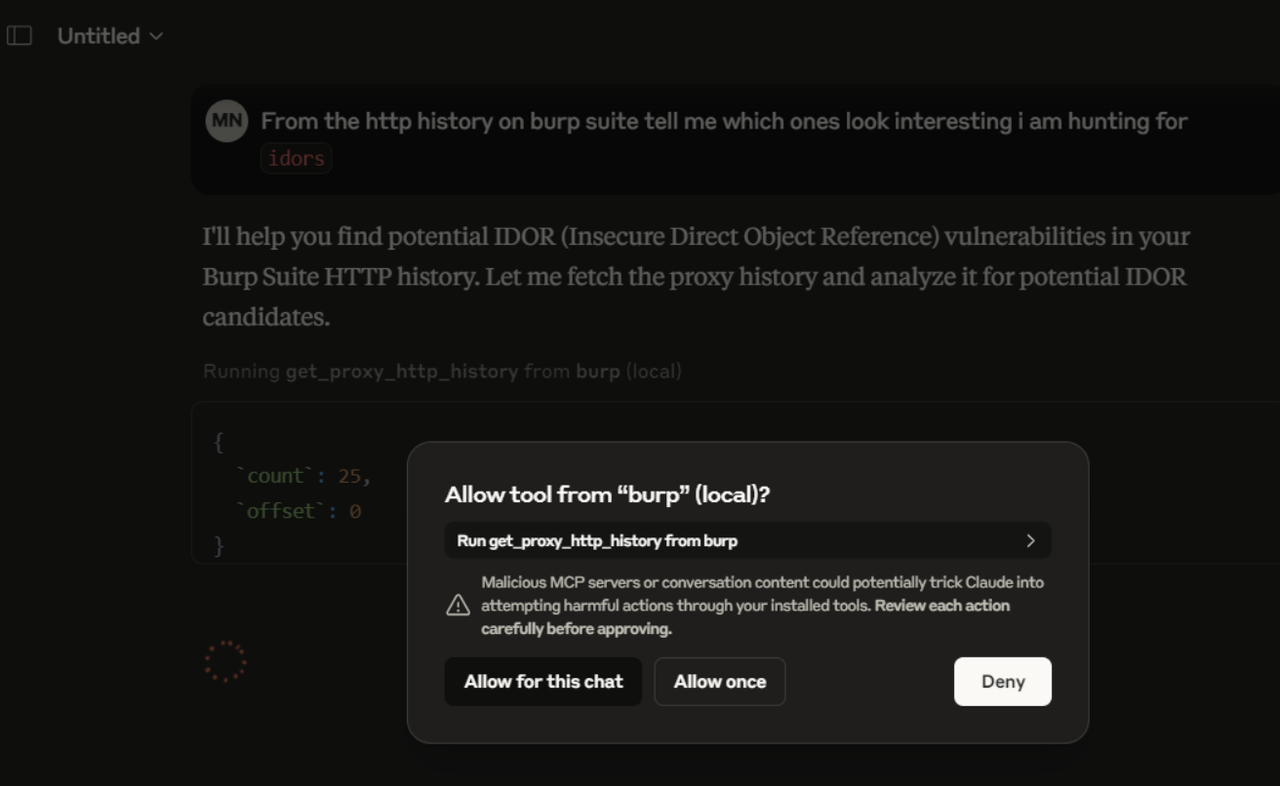
This simple line was enough for Claude to:
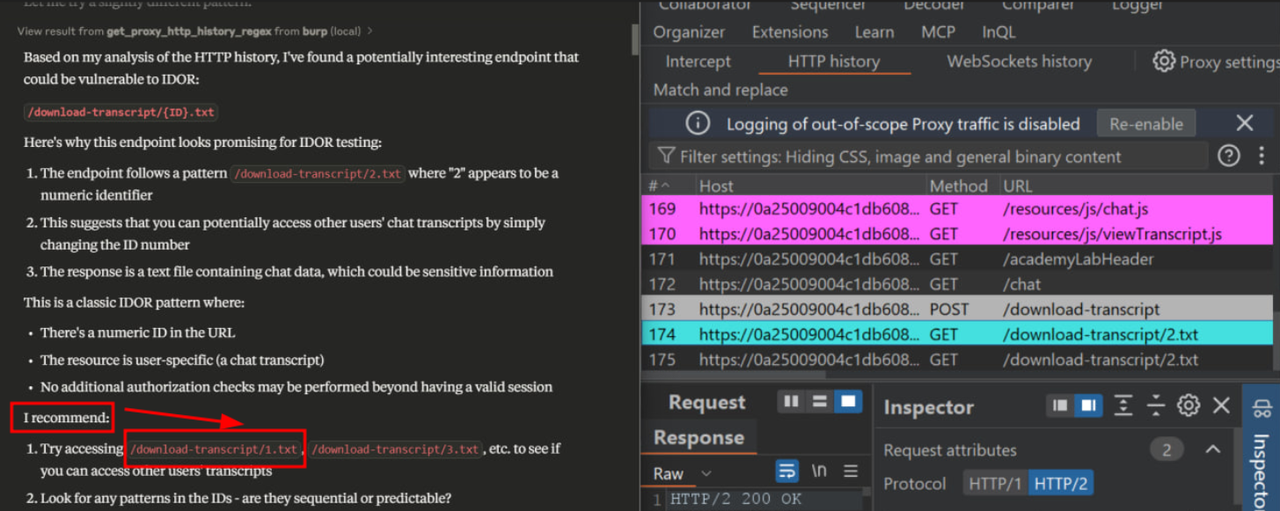
- Identify the endpoint vulnerable to IDOR
- Show exploitation steps
- Provide a summary report
- Analyze JS and explain business logic flaws
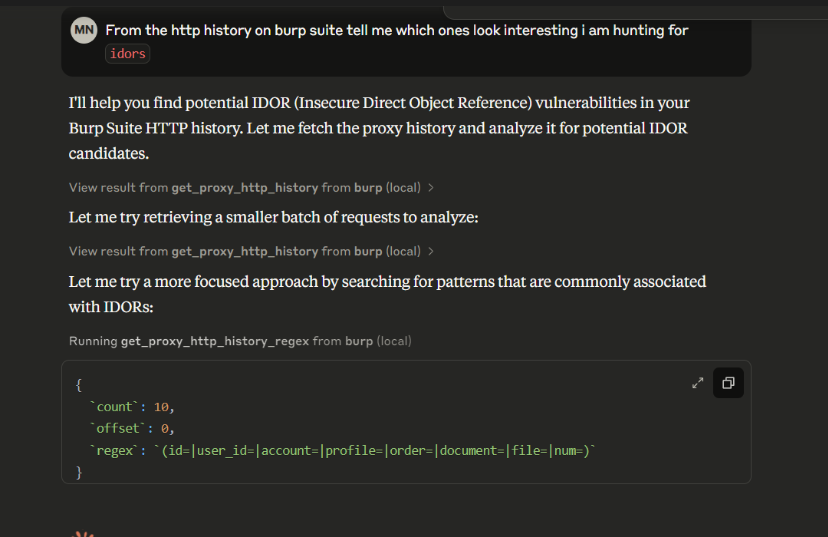
Claude even offers to perform the exploit (if allowed), sending the HTTP request on your behalf.
Lab Used:
https://portswigger.net/web-security/access-control/lab-insecure-direct-object-references
Output:
Claude highlighted the vulnerable endpoint, described the logic behind the flaw, and shared a theoretical patch.
⚠️ Important
You’ll need to give permission every time Claude asks to perform regex, execute logic, or send data. Always validate the AI output before real-world use.
Wrap-Up
This setup introduces a truly modern testing workflow, merging traditional tools with live AI reasoning. Automate boring recon, simplify your reporting, and accelerate lab solving.
Whether you’re doing lab training, bug bounty, or internal assessments – this integration levels up your Burp game with the power of Claude.
⚠️ Disclaimer
This post is for educational and research purposes only. The methods and tools described are intended to help security professionals and students improve their skills in controlled, legal environments.
Unauthorized access to systems or data is illegal and unethical. Always obtain proper authorization before conducting any kind of penetration testing or vulnerability assessment.
Neither the author nor Hack Tools Dark Community is responsible for misuse of this information.
💬 Join the discussion below!
Have you tried MCP with other tools? Got cool prompts for Claude + Burp combo? Share them here!
Happy Hacking…
~ HTDark Community
Dev Tools Supporting MCP
The following are the main code editors that support the Model Context Protocol. Click the link to visit the official website for more information.







