
Omnimcp
What is Omnimcp
OmniMCP is a server that utilizes Microsoft OmniParser and Model Context Protocol (MCP) to enhance AI models with rich UI context and interaction capabilities, enabling them to deeply understand user interfaces through visual analysis and structured responses.
Use cases
Use cases for OmniMCP include automating UI testing, enhancing virtual assistants with better context awareness, and developing intelligent applications that require interaction with complex user interfaces.
How to use
To use OmniMCP, integrate it with your AI models by leveraging its capabilities for visual parsing and interaction tracking. Implement the Model Context Protocol to facilitate structured communication between the AI and the user interface.
Key features
Key features of OmniMCP include rich visual context for deep UI understanding, a natural language interface for element targeting, comprehensive interactions with verification, structured types for clean responses, and robust error handling with detailed context.
Where to use
OmniMCP can be used in various fields such as software development, user experience design, and AI research, where understanding and interacting with user interfaces is crucial.
Clients Supporting MCP
The following are the main client software that supports the Model Context Protocol. Click the link to visit the official website for more information.





Overview
What is Omnimcp
OmniMCP is a server that utilizes Microsoft OmniParser and Model Context Protocol (MCP) to enhance AI models with rich UI context and interaction capabilities, enabling them to deeply understand user interfaces through visual analysis and structured responses.
Use cases
Use cases for OmniMCP include automating UI testing, enhancing virtual assistants with better context awareness, and developing intelligent applications that require interaction with complex user interfaces.
How to use
To use OmniMCP, integrate it with your AI models by leveraging its capabilities for visual parsing and interaction tracking. Implement the Model Context Protocol to facilitate structured communication between the AI and the user interface.
Key features
Key features of OmniMCP include rich visual context for deep UI understanding, a natural language interface for element targeting, comprehensive interactions with verification, structured types for clean responses, and robust error handling with detailed context.
Where to use
OmniMCP can be used in various fields such as software development, user experience design, and AI research, where understanding and interacting with user interfaces is crucial.
Clients Supporting MCP
The following are the main client software that supports the Model Context Protocol. Click the link to visit the official website for more information.
Content
OmniMCP




OmniMCP provides rich UI context and interaction capabilities to AI models through Model Context Protocol (MCP) and microsoft/OmniParser. It focuses on enabling deep understanding of user interfaces through visual analysis, structured planning, and precise interaction execution.
Core Features
- Visual Perception: Understands UI elements using OmniParser.
- LLM Planning: Plans next actions based on goal, history, and visual state.
- Agent Executor: Orchestrates the perceive-plan-act loop (
omnimcp/agent_executor.py). - Action Execution: Controls mouse/keyboard via
pynput(omnimcp/input.py). - CLI Interface: Simple entry point (
cli.py) for running tasks. - Auto-Deployment: Optional OmniParser server deployment to AWS EC2 with auto-shutdown.
- Debugging: Generates timestamped visual logs per step.
Overview
cli.py uses AgentExecutor to run a perceive-plan-act loop. It captures the screen (VisualState), plans using an LLM (core.plan_action_for_ui), and executes actions (InputController).
Demos
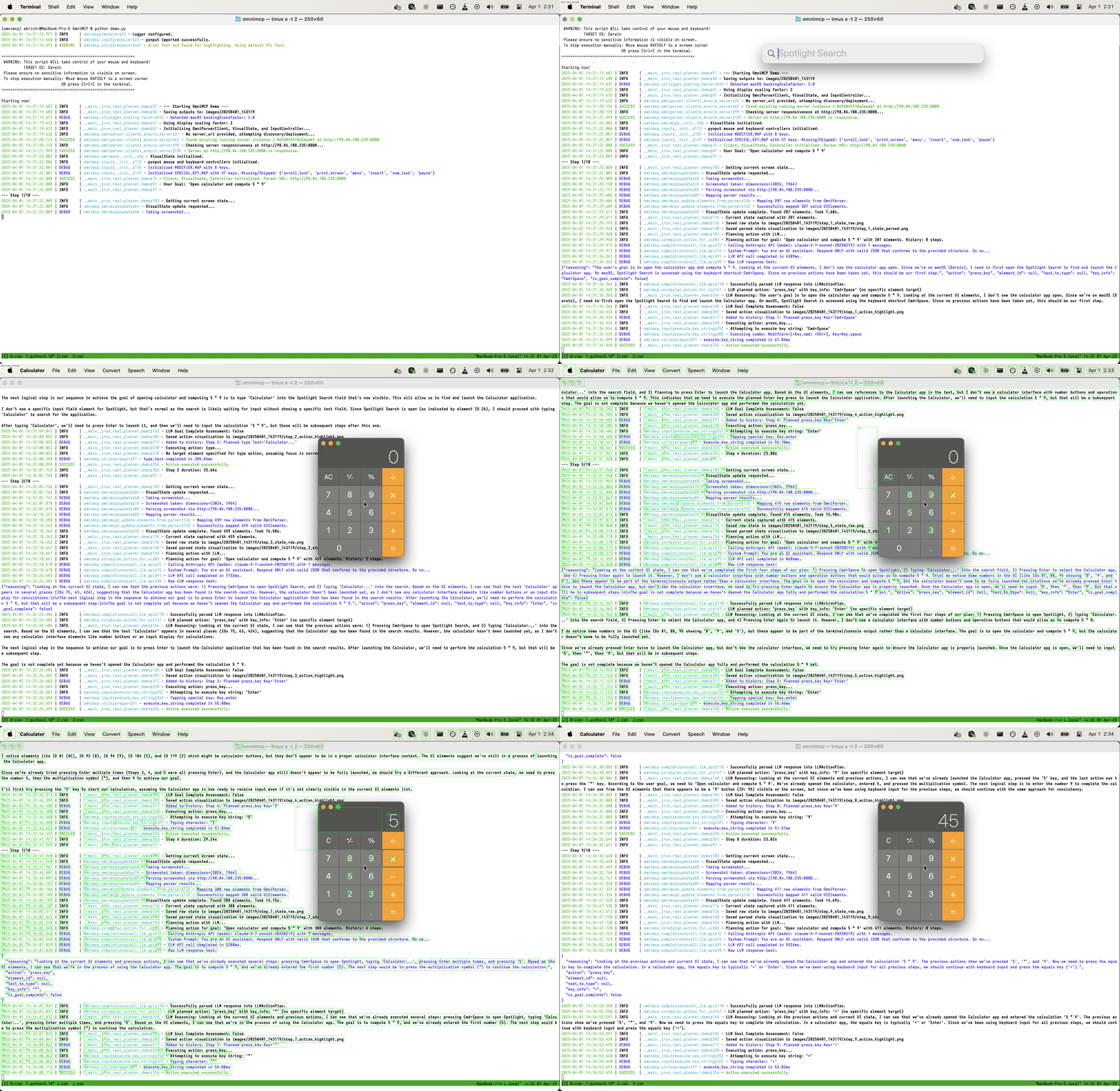
- Real Action (Calculator):
python cli.pyopens Calculator and computes 5*9.
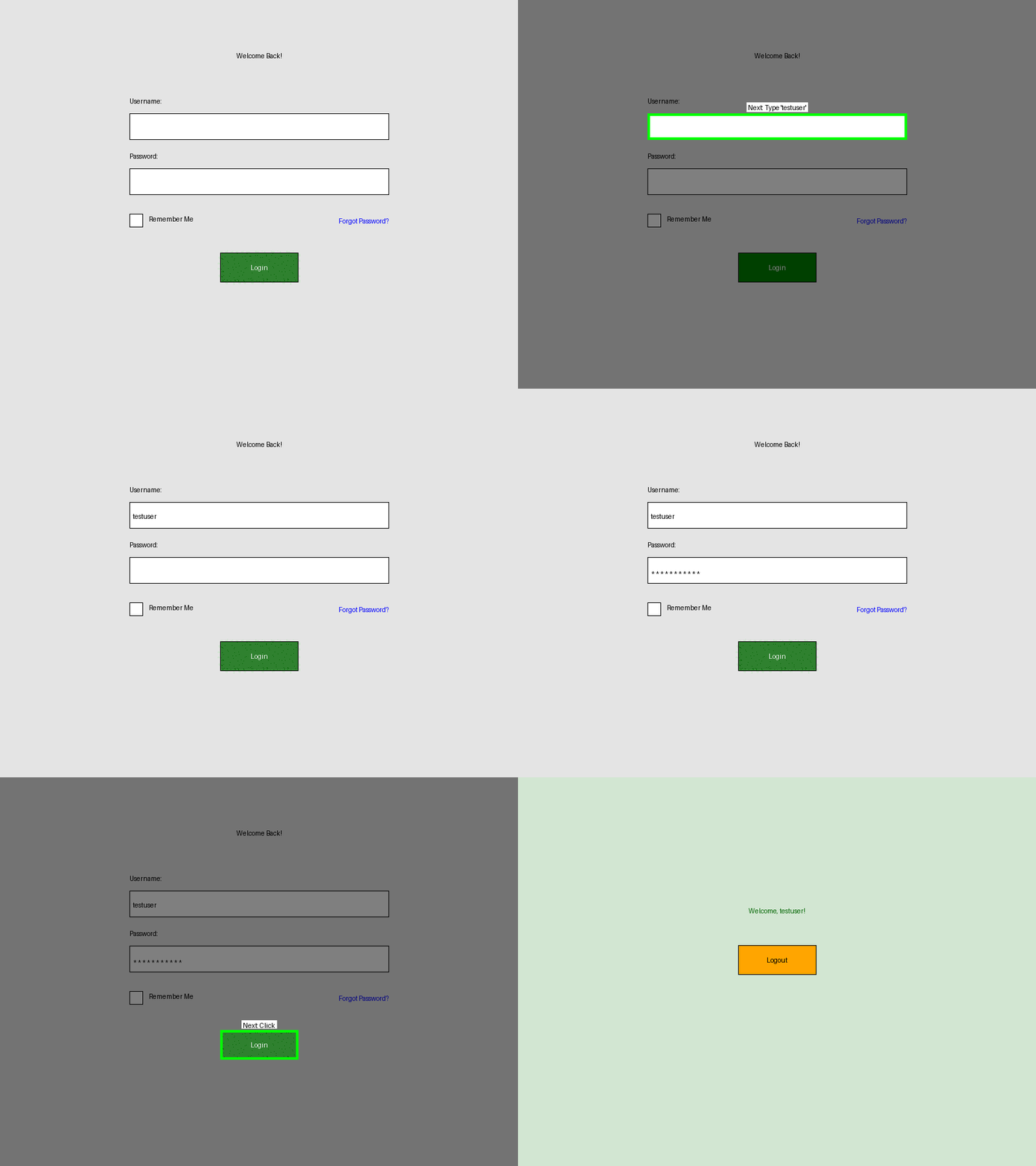
- Synthetic UI (Login):
python demo_synthetic.pyuses generated images (no real I/O). (Note: Pending refactor to use AgentExecutor).
Prerequisites
- Python >=3.10, <3.13
uvinstalled (pip install uv)- Linux Runtime Requirement: Requires an active graphical session (X11/Wayland) for
pynput. May need system libraries (libx11-dev, etc.) - seepynputdocs.
(macOS display scaling dependencies are handled automatically during installation).
For AWS Deployment Features
Requires AWS credentials in .env (see .env.example). Warning: Creates AWS resources (EC2, Lambda, etc.) incurring costs. Use python -m omnimcp.omniparser.server stop to clean up.
AWS_ACCESS_KEY_ID=YOUR_ACCESS_KEY
AWS_SECRET_ACCESS_KEY=YOUR_SECRET_KEY
ANTHROPIC_API_KEY=YOUR_ANTHROPIC_KEY
# OMNIPARSER_URL=http://... # Optional: Skip auto-deploy
Installation
git clone [https://github.com/OpenAdaptAI/OmniMCP.git](https://github.com/OpenAdaptAI/OmniMCP.git)
cd OmniMCP
./install.sh # Creates .venv, installs deps incl. test extras
cp .env.example .env
# Edit .env with your keys
# Activate: source .venv/bin/activate (Linux/macOS) or relevant Windows command
Quick Start
Ensure environment is activated and .env is configured.
# Run default goal (Calculator task)
python cli.py

# Run custom goal
python cli.py --goal "Your goal here"

# See options
python cli.py --help
Debug outputs are saved in runs/<timestamp>/.
Note on MCP Server: An experimental MCP server (OmniMCP class in omnimcp/mcp_server.py) exists but is separate from the primary cli.py/AgentExecutor workflow.
Architecture
- CLI (
cli.py) - Entry point, setup, starts Executor. - Agent Executor (
omnimcp/agent_executor.py) - Orchestrates loop, manages state/artifacts. - Visual State Manager (
omnimcp/visual_state.py) - Perception (screenshot, calls parser). - OmniParser Client & Deploy (
omnimcp/omniparser/) - Manages OmniParser server communication/deployment. - LLM Planner (
omnimcp/core.py) - Generates action plan. - Input Controller (
omnimcp/input.py) - Executes actions (mouse/keyboard). - (Optional) MCP Server (
omnimcp/mcp_server.py) - Experimental MCP interface.
Development
Environment Setup & Checks
# Setup (if not done): ./install.sh
# Activate env: source .venv/bin/activate (or similar)
# Format/Lint: uv run ruff format . && uv run ruff check . --fix
# Run tests: uv run pytest tests/
Debug Support
Running python cli.py saves timestamped runs in runs/, including:
step_N_state_raw.pngstep_N_state_parsed.png(with element boxes)step_N_action_highlight.png(with action highlight)final_state.png
Detailed logs are in logs/run_YYYY-MM-DD_HH-mm-ss.log (LOG_LEVEL=DEBUG in .env recommended).
Example Log Snippet (Auto-Deploy + Agent Step)
# --- Initialization & Auto-Deploy ---
2025-MM-DD HH:MM:SS | INFO     | omnimcp.omniparser.client:... - No server_url provided, attempting discovery/deployment...
2025-MM-DD HH:MM:SS | INFO     | omnimcp.omniparser.server:... - Creating new EC2 instance...
2025-MM-DD HH:MM:SS | SUCCESS  | omnimcp.omniparser.server:... - Instance i-... is running. Public IP: ...
2025-MM-DD HH:MM:SS | INFO     | omnimcp.omniparser.server:... - Setting up auto-shutdown infrastructure...
2025-MM-DD HH:MM:SS | SUCCESS  | omnimcp.omniparser.server:... - Auto-shutdown infrastructure setup completed...
... (SSH connection, Docker setup) ...
2025-MM-DD HH:MM:SS | SUCCESS  | omnimcp.omniparser.client:... - Auto-deployment successful. Server URL: http://...
... (Agent Executor Init) ...

# --- Agent Execution Loop Example Step ---
2025-MM-DD HH:MM:SS | INFO     | omnimcp.agent_executor:run:... - --- Step N/10 ---
2025-MM-DD HH:MM:SS | DEBUG    | omnimcp.agent_executor:run:... - Perceiving current screen state...
2025-MM-DD HH:MM:SS | INFO     | omnimcp.visual_state:update:... - VisualState update complete. Found X elements. Took Y.YYs.
2025-MM-DD HH:MM:SS | INFO     | omnimcp.agent_executor:run:... - Perceived state with X elements.
... (Save artifacts) ...
2025-MM-DD HH:MM:SS | DEBUG    | omnimcp.agent_executor:run:... - Planning next action...
... (LLM Call) ...
2025-MM-DD HH:MM:SS | INFO     | omnimcp.agent_executor:run:... - LLM Plan: Action=..., TargetID=..., GoalComplete=False
2025-MM-DD HH:MM:SS | DEBUG    | omnimcp.agent_executor:run:... - Added to history: Step N: Planned action ...
2025-MM-DD HH:MM:SS | INFO     | omnimcp.agent_executor:run:... - Executing action: ...
2025-MM-DD HH:MM:SS | SUCCESS  | omnimcp.agent_executor:run:... - Action executed successfully.
2025-MM-DD HH:MM:SS | DEBUG    | omnimcp.agent_executor:run:... - Step N duration: Z.ZZs
... (Loop continues or finishes) ...
(Note: Details like timings, counts, IPs, instance IDs, and specific plans will vary)
Roadmap & Limitations
Key limitations & future work areas:
- Performance: Reduce OmniParser latency (explore local models, caching, etc.) and optimize state management (avoid full re-parse).
- Robustness: Improve LLM planning reliability (prompts, techniques like ReAct), add action verification/error recovery, enhance element targeting.
- Target API/Architecture: Evolve towards a higher-level declarative API (e.g.,
@omni.publishstyle) and potentially integrate loop logic with the experimental MCP Server (OmniMCPclass). - Consistency: Refactor
demo_synthetic.pyto useAgentExecutor. - Features: Expand action space (drag/drop, hover).
- Testing: Add E2E tests, broaden cross-platform validation, define evaluation metrics.
- Research: Explore fine-tuning, process graphs (RAG), framework integration.
Project Status
Core loop via cli.py/AgentExecutor is functional for basic tasks. Performance and robustness need significant improvement. MCP integration is experimental.
Contributing
- Fork repository
- Create feature branch
- Implement changes & add tests
- Ensure checks pass (
uv run ruff format .,uv run ruff check . --fix,uv run pytest tests/) - Submit pull request
License
MIT License
Contact
- Issues: GitHub Issues
- Questions: Discussions
- Security: [email protected]
Dev Tools Supporting MCP
The following are the main code editors that support the Model Context Protocol. Click the link to visit the official website for more information.







