
Open Mcp Client
What is Open Mcp Client
Open-MCP-Client is a powerful command-line chat interface that connects to multiple LLM providers such as OpenAI, Anthropic, and Groq, enhancing their capabilities through the Model Context Protocol (MCP).
Use cases
Use cases include creating AI assistants for web searches, GitHub interactions, website browsing, and other tasks that require real-time processing and response from multiple LLM providers.
How to use
To use Open-MCP-Client, clone the repository, install the required packages, and set up your API keys in an environment file. You can then run the command-line interface or the web interface to interact with various LLM providers.
Key features
Key features include support for multiple LLM providers, various interface options (command-line and web), an extensible tool ecosystem, easy integration of custom tools, enterprise-grade reliability, asynchronous architecture, token management, performance metrics, and comprehensive logging.
Where to use
Open-MCP-Client can be used in various fields such as AI development, customer support automation, web searching, and any application requiring interaction with multiple LLMs.
Clients Supporting MCP
The following are the main client software that supports the Model Context Protocol. Click the link to visit the official website for more information.





Overview
What is Open Mcp Client
Open-MCP-Client is a powerful command-line chat interface that connects to multiple LLM providers such as OpenAI, Anthropic, and Groq, enhancing their capabilities through the Model Context Protocol (MCP).
Use cases
Use cases include creating AI assistants for web searches, GitHub interactions, website browsing, and other tasks that require real-time processing and response from multiple LLM providers.
How to use
To use Open-MCP-Client, clone the repository, install the required packages, and set up your API keys in an environment file. You can then run the command-line interface or the web interface to interact with various LLM providers.
Key features
Key features include support for multiple LLM providers, various interface options (command-line and web), an extensible tool ecosystem, easy integration of custom tools, enterprise-grade reliability, asynchronous architecture, token management, performance metrics, and comprehensive logging.
Where to use
Open-MCP-Client can be used in various fields such as AI development, customer support automation, web searching, and any application requiring interaction with multiple LLMs.
Clients Supporting MCP
The following are the main client software that supports the Model Context Protocol. Click the link to visit the official website for more information.
Content
Open-MCP-Client - Multi-Provider LLM Chat with Model Context Protocol
Open-MCP-Client is a powerful, flexible chatbot framework that connects to multiple LLM providers (OpenAI, Anthropic, Groq, etc.) and extends their capabilities with tools using the Model Context Protocol (MCP). Use it to create AI assistants that can perform real actions like searching the web, interacting with GitHub, browsing websites, and more.
Demo
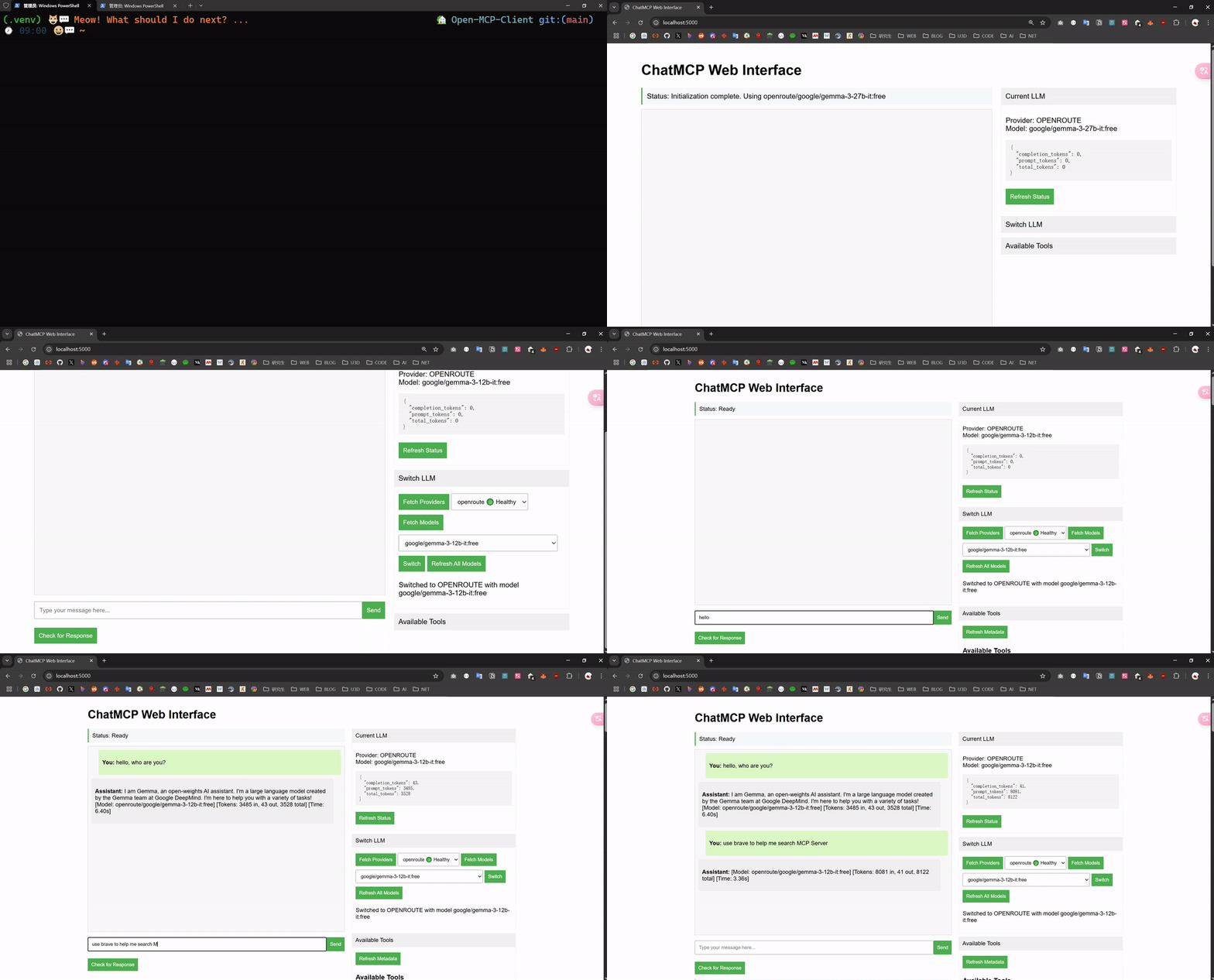
Features
- 🔄 Multiple LLM Provider Support: Seamlessly switch between OpenAI, Anthropic, Groq, Gemini, Ollama, and OpenRoute
- 🌐 Multiple Interface Options: Choose between command-line (ChatMCP.py) or web interface (FlaskMCP.py)
- 🧰 Extensible Tool Ecosystem: Connect to web search, GitHub, Gmail, web browsing, and more through MCP servers
- 🛠️ Easily Add Custom Tools: Integrate your own MCP-compatible tools and servers
- 🔁 Enterprise-Grade Reliability: Built with circuit breakers, automatic retries, health checks, and graceful degradation
- ⚡ Asynchronous Architecture: Efficiently handles multiple connections and operations concurrently
- 🔍 Token Management: Monitors token usage across different providers
- 📊 Performance Metrics: Reports response times and token counts for each interaction
- 📝 Comprehensive Logging: Detailed activity tracking for debugging and monitoring
Getting Started
Prerequisites
- Python 3.8+
- API keys for the LLM providers you want to use
- Node.js (for running NPM-based MCP servers)
Installation
-
Clone this repository:
git clone https://github.com/GongRzhe/Open-MCP-Client.git cd Open-MCP-Client -
Install the required packages:
pip install -r requirements.txt -
Create an environment file with your API keys:
touch .envAdd your API keys and configuration:
# LLM API Keys ANTHROPIC_API_KEY=your_anthropic_key OPENAI_API_KEY=your_openai_key OPENROUTE_API_KEY=your_openroute_key GEMINI_API_KEY=your_gemini_key GROQ_API_KEY=your_groq_key GITHUB_API_KEY=your_github_token # Ollama settings (if using local Ollama) OLLAMA_HOST=http://localhost:11434 # Default provider and model DEFAULT_LLM_PROVIDER=groq DEFAULT_LLM_MODEL=llama-3.2-90b-vision-preview # Advanced settings (optional) CONNECTION_TIMEOUT=10 READ_TIMEOUT=60 MAX_RETRIES=3 RETRY_DELAY_BASE=1.0 RETRY_MAX_DELAY=30.0 MESSAGE_HISTORY_LIMIT=20 -
Configure your MCP servers in
servers_config.json:{ "mcpServers": { "brave-search": { "command": "npx", "args": [ "-y", "@modelcontextprotocol/server-brave-search" ], "env": { "BRAVE_API_KEY": "your_brave_api_key" } }, "github": { "command": "npx", "args": [ "-y", "@modelcontextprotocol/server-github" ], "env": { "GITHUB_PERSONAL_ACCESS_TOKEN": "your_github_token" } }, "fetch": { "command": "uvx", "args": [ "mcp-server-fetch" ] }, "puppeteer": { "command": "npx", "args": [ "-y", "@modelcontextprotocol/server-puppeteer" ] }, "memory": { "command": "npx", "args": [ "-y", "@modelcontextprotocol/server-memory" ] }, "gmail": { "command": "npx", "args": [ "-y", "@gongrzhe/server-gmail-autoauth-mcp" ] } } }
Usage
Command Line Interface
Run the CLI version with:
python ChatMCP.py
Chat Commands
/llm- Display available LLM providers and models/switch <provider> <model>- Switch to a different LLM provider and model- Example:
/switch openai gpt-4o
- Example:
/refresh- Refresh the list of available models/tools- Show available MCP tools/resources- Show available MCP resources/prompts- Show available MCP prompts/now- Show current LLM details and token usage/help- Display help informationquitorexit- Exit the chat
Chatting with the Assistant
Simply type your message and press Enter. The assistant will respond, and if appropriate, it will use one of the available tools to provide enhanced information.
You: What's the weather in New York?
Assistant: I'll check the current weather in New York for you.

> Executing tool: brave_web_search
> With arguments: {"query": "current weather in New York"}
> Tool execution completed: brave_web_search

Based on the latest information, New York is currently experiencing temperatures around 72°F (22°C) with partly cloudy skies. Humidity is at 65% with light winds from the southwest at 5-10 mph. There's no precipitation expected in the next few hours.

[Model: openai/gpt-4o] [Tokens: 145 in, 98 out, 243 total] [Time: 1.45s]
Web Interface
Run the web interface with:
python FlaskMCP.py
Then open your browser to http://localhost:5000
The web interface provides:
- Chat interface with the LLM
- Tool result visualization
- LLM provider/model switching
- Token usage statistics
- Tool and resource browser
If the interface appears to be stuck during initialization, use the “Force Open Interface” button, or navigate to /force-start to bypass initialization checks.
Architecture
ChatMCP is built with a robust, asyncio-based architecture for high performance and reliability:
- Server Management: Connects to multiple MCP servers concurrently
- LLM Client: Manages connections to various LLM providers
- Chat Session: Orchestrates the interaction between user, LLM, and tools
- Circuit Breaker Pattern: Prevents cascading failures when services are unavailable
- Async Retry: Implements exponential backoff with jitter for reliable connections
Supported LLM Providers
- OpenAI (ChatGPT models)
- Anthropic (Claude models)
- Groq (Llama models)
- Google Gemini
- OpenRoute (proxy for various models)
- Ollama (local models)
Dev Tools Supporting MCP
The following are the main code editors that support the Model Context Protocol. Click the link to visit the official website for more information.







