
Playbookmcp
What is Playbookmcp
PlaybookMCP is a collaborative MCP server designed to facilitate the sharing of playbooks among engineering teams and agents. It bridges the gap between different programming tools by converting GitHub repository-based playbooks into a centralized platform.
Use cases
Use cases for PlaybookMCP include updating package dependencies, performing routine code refactoring, adding unit tests, and standardizing code formatting, all while ensuring that team members have access to the latest playbook capabilities.
How to use
To use PlaybookMCP, teams can create and manage playbooks within a GitHub repository. Members can collaboratively edit, version control, and share these playbooks using standard GitHub workflows, ensuring immediate access to new capabilities across the team.
Key features
Key features of PlaybookMCP include collaborative editing of playbooks, version control for team playbooks, and immediate sharing of updates across all team members’ preferred coding tools.
Where to use
PlaybookMCP can be utilized in software development environments where teams use various programming tools and require a centralized method for sharing and managing playbooks.
Clients Supporting MCP
The following are the main client software that supports the Model Context Protocol. Click the link to visit the official website for more information.





Overview
What is Playbookmcp
PlaybookMCP is a collaborative MCP server designed to facilitate the sharing of playbooks among engineering teams and agents. It bridges the gap between different programming tools by converting GitHub repository-based playbooks into a centralized platform.
Use cases
Use cases for PlaybookMCP include updating package dependencies, performing routine code refactoring, adding unit tests, and standardizing code formatting, all while ensuring that team members have access to the latest playbook capabilities.
How to use
To use PlaybookMCP, teams can create and manage playbooks within a GitHub repository. Members can collaboratively edit, version control, and share these playbooks using standard GitHub workflows, ensuring immediate access to new capabilities across the team.
Key features
Key features of PlaybookMCP include collaborative editing of playbooks, version control for team playbooks, and immediate sharing of updates across all team members’ preferred coding tools.
Where to use
PlaybookMCP can be utilized in software development environments where teams use various programming tools and require a centralized method for sharing and managing playbooks.
Clients Supporting MCP
The following are the main client software that supports the Model Context Protocol. Click the link to visit the official website for more information.
Content
A collaborative MCP server for sharing playbooks between agents


📋 Motivation & Overview
Modern programming tools like Cursor, Windsurf, Augment Code, and Cline all feature powerful “agent modes” that can automatically complete complex tasks based on natural language instructions:
- Updating package dependencies and addressing CVE vulnerabilities
- Performing routine code refactoring across multiple files
- Adding unit tests for new or existing functionality
- Standardizing code formatting and fixing linting issues
However, these capabilities face a critical limitation: context sharing.
The Problem
- Each team member uses different tools (Cursor, Cline, etc.)
- Natural language “playbooks” exist only in individual environments
- No centralized way to share, version, or collaboratively improve these playbooks
- Playbook silos form as team members develop their own agent instructions
The Solution: playbookmcp
playbookmcp converts GitHub repository-based playbooks into an MCP Server that all mainstream programming tools support. This enables:
- Collaborative editing of playbooks through standard GitHub workflows
- Version control for your team’s playbooks
- Immediate sharing of new capabilities across the entire team
For example, when engineer Alice adds a new playbook for “Updating dependency versions across the monorepo,” commits it to the playbook repo, and pushes, engineer Bob immediately gains access to this capability in his preferred coding tool.
🔍 Design
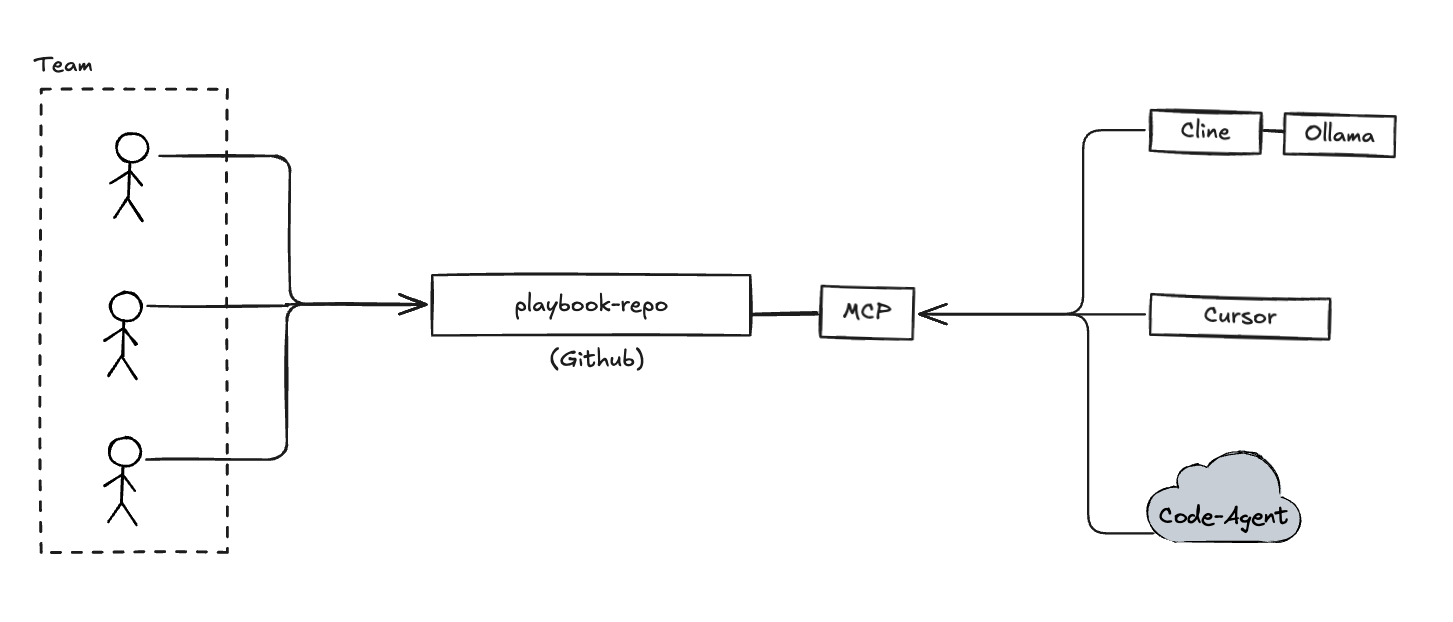
Your team can continuously enrich the knowledge base by editing the playbook-repo (typically a GitHub repository), enabling AI to automatically complete various tasks.
For playbook repository structure details, see docs/playbook.md.
🚀 How to Use
Setup
Basic Configuration
To use playbookmcp with a remote playbook repository:
{
  "mcpServers": {
    "playbookmcp": {
      "command": "npx",
      "args": [
        "-y",
        "playbookmcp@latest",
        "--playbook-repo",
        "<your playbook repo>"
      ]
    }
  }
}
Local Development
For testing with a local context directory:
{
  "mcpServers": {
    "playbookmcp-local": {
      "command": "npx",
      "args": [
        "-y",
        "playbookmcp@latest",
        "--playbook-path",
        "<your playbook files path>"
      ]
    }
  }
}
PlaybookMCP Development
For developing PlaybookMCP itself:
{
  "mcpServers": {
    "playbookmcp-dev": {
      "command": "node",
      "args": [
        "build/index.js",
        "--playbook-path",
        "<your playbook files path>"
      ]
    }
  }
}
You can also use inspector to inspect the MCP resources:
npx @modelcontextprotocol/inspector node build/index.js --playbook-repo <your playbook repo>
Chat with Your Code-Agent
Below is an example configuration in Cursor:
{
  "mcpServers": {
    "playbookmcp": {
      "command": "npx",
      "args": [
        "-y",
        "playbookmcp@latest",
        "--playbook-repo",
        "[email protected]:xuezhaojun/PlaybookMCP-demo.git"
      ]
    }
  }
}
The first command must be pb_start to initiate interaction:
pb_start Say Hi to playbookmcp.
Or more specific:
use MCP tool pb_start Say hi to playbookmcp.
Your code-agent will then add a comment on this issue.
Dev Tools Supporting MCP
The following are the main code editors that support the Model Context Protocol. Click the link to visit the official website for more information.







