
Sql Mcp Server
What is Sql Mcp Server
SQL_MCP_Server is an AI-powered SQL assistant called SQLGenius that converts natural language queries into SQL using Vertex AI’s Gemini Pro. It is built on the MCP architecture and Streamlit, providing an intuitive interface for exploring BigQuery data.
Use cases
Use cases for SQL_MCP_Server include generating SQL queries from user questions, visualizing data in real-time, exploring database schemas, and tracking query history for auditing and optimization purposes.
How to use
To use SQL_MCP_Server, clone the repository, install dependencies, set up your environment variables in a .env file, and run the Streamlit application. You can then ask questions in natural language, write SQL queries, and explore the database schema.
Key features
Key features include natural language to SQL conversion, an interactive Streamlit UI, real-time query execution and visualization, database schema exploration, query history tracking, safe query validation, and integration with BigQuery.
Where to use
SQL_MCP_Server is suitable for data analysts, data scientists, and business intelligence professionals who need to interact with BigQuery databases using natural language queries.
Clients Supporting MCP
The following are the main client software that supports the Model Context Protocol. Click the link to visit the official website for more information.





Overview
What is Sql Mcp Server
SQL_MCP_Server is an AI-powered SQL assistant called SQLGenius that converts natural language queries into SQL using Vertex AI’s Gemini Pro. It is built on the MCP architecture and Streamlit, providing an intuitive interface for exploring BigQuery data.
Use cases
Use cases for SQL_MCP_Server include generating SQL queries from user questions, visualizing data in real-time, exploring database schemas, and tracking query history for auditing and optimization purposes.
How to use
To use SQL_MCP_Server, clone the repository, install dependencies, set up your environment variables in a .env file, and run the Streamlit application. You can then ask questions in natural language, write SQL queries, and explore the database schema.
Key features
Key features include natural language to SQL conversion, an interactive Streamlit UI, real-time query execution and visualization, database schema exploration, query history tracking, safe query validation, and integration with BigQuery.
Where to use
SQL_MCP_Server is suitable for data analysts, data scientists, and business intelligence professionals who need to interact with BigQuery databases using natural language queries.
Clients Supporting MCP
The following are the main client software that supports the Model Context Protocol. Click the link to visit the official website for more information.
Content
SQLGenius - AI-Powered SQL Assistant
SQLGenius is an intelligent SQL assistant that helps you query your BigQuery database using natural language. Built with MCP (Model Context Protocol), Vertex AI’s Gemini Pro, and Streamlit.
🌟 Features
- Natural language to SQL conversion using Gemini Pro
- Interactive Streamlit UI with multiple tabs
- Real-time query execution and visualization
- Database schema explorer
- Query history tracking
- Safe query validation
- BigQuery integration
- MCP-based architecture
🎥 Demo
Watch SQLGenius in action! Here’s a quick demo of how to use the application:
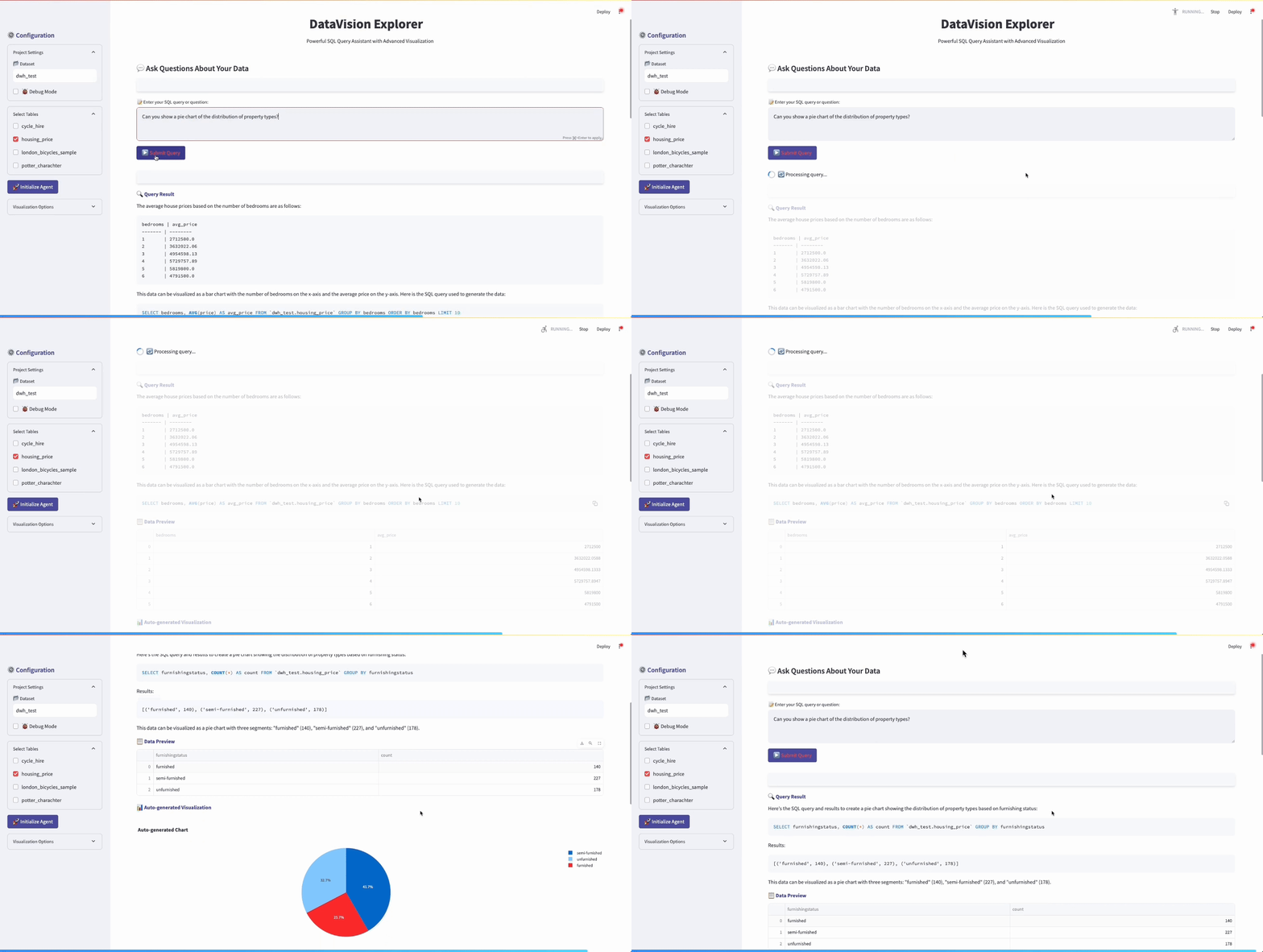
In this demo, you can see:
- Natural language query conversion to SQL
- Interactive data visualization
- Schema exploration
- Query history tracking
🚀 Installation
- Clone the repository and navigate to the project directory:
cd sql_mcp_server
- Install dependencies:
pip install -r requirements.txt
- Copy the
.env.examplefile to.envand fill in your configuration:
cp .env.example .env
- Set up your environment variables in
.env:
PROJECT_ID=your-project-id
DATASET_ID=your-dataset-id
GOOGLE_APPLICATION_CREDENTIALS=path/to/your/service-account.json
VERTEX_AI_LOCATION=us-central1
🎮 Usage
- Start the application:
streamlit run streamlit_app.py
-
The MCP server will start automatically when the Streamlit app launches
-
Use the tabs to:
- Ask natural language questions about your data
- Write SQL queries directly
- Explore your database schema
📊 Interface Tabs
💬 Natural Language Query
Ask questions in plain English and get SQL results:
- “Show me the top 5 customers by revenue”
- “What products have the highest sales in January?”
- “How many orders were placed last month?”
📊 SQL Query
Write and execute SQL queries directly:
SELECT * FROM orders
WHERE order_date > '2023-01-01'
ORDER BY total_amount DESC
LIMIT 10
📋 Database Explorer
- Browse available tables
- View table schemas
- See sample data from any table
🔒 Security Features
- Only SELECT queries are permitted
- Query validation to prevent dangerous operations
- Secure credential management
- Error handling and input validation
🛠️ Architecture
SQLGenius uses the Model Context Protocol (MCP) to expose tools that enable:
- Natural Language Processing: Convert English questions to SQL
- Data Exploration: Fetch schema information and sample data
- SQL Execution: Run validated queries against your database
The architecture consists of:
- MCP Server: Handles DB connection and provides tools
- Streamlit Frontend: User interface for interacting with the system
- Vertex AI (Gemini Pro): Powers natural language understanding
- BigQuery: Executes SQL queries on your data
📝 MCP Tools
The following MCP tools are available:
execute_nl_query: Execute a natural language queryexecute_sql_query: Execute a raw SQL querylist_tables: List all available tablesget_table_schema: Get schema for a specific table
📚 Advanced Usage
To add custom tools to the MCP server:
- Edit the
register_tools()method insql_mcp_server.py - Add your custom tool using the
@self.tool()decorator - Restart the server
🤝 Contributing
Contributions are welcome! Please feel free to submit a Pull Request.
Dev Tools Supporting MCP
The following are the main code editors that support the Model Context Protocol. Click the link to visit the official website for more information.







