
Seeker O1
What is Seeker O1
Seeker-o1 is a flexible open-source AI agent system designed for executing tasks through natural language instructions, processing text inputs, and running code in a controlled environment. It serves as an upgrade and alternative to the original Seeker deep research agent.
Use cases
Use cases for Seeker-o1 include solving problems from images, executing code snippets, processing text data for analysis, and providing interactive responses to user queries.
How to use
To use Seeker-o1, install the system following the provided installation instructions, configure it as needed, and then interact with the AI agent through the command line interface (CLI) by issuing tasks and commands in natural language.
Key features
Key features of Seeker-o1 include single-agent system architecture, enhanced memory capabilities (both short-term and long-term), integration with various tools for task execution, and the ability to process text and perform calculations.
Where to use
Seeker-o1 can be used in various fields such as education for tutoring, software development for code execution, research for data analysis, and any domain requiring automation of tasks through AI.
Clients Supporting MCP
The following are the main client software that supports the Model Context Protocol. Click the link to visit the official website for more information.





Overview
What is Seeker O1
Seeker-o1 is a flexible open-source AI agent system designed for executing tasks through natural language instructions, processing text inputs, and running code in a controlled environment. It serves as an upgrade and alternative to the original Seeker deep research agent.
Use cases
Use cases for Seeker-o1 include solving problems from images, executing code snippets, processing text data for analysis, and providing interactive responses to user queries.
How to use
To use Seeker-o1, install the system following the provided installation instructions, configure it as needed, and then interact with the AI agent through the command line interface (CLI) by issuing tasks and commands in natural language.
Key features
Key features of Seeker-o1 include single-agent system architecture, enhanced memory capabilities (both short-term and long-term), integration with various tools for task execution, and the ability to process text and perform calculations.
Where to use
Seeker-o1 can be used in various fields such as education for tutoring, software development for code execution, research for data analysis, and any domain requiring automation of tasks through AI.
Clients Supporting MCP
The following are the main client software that supports the Model Context Protocol. Click the link to visit the official website for more information.
Content
Seeker-o1

Contents
- Intro
- Demo
- Features & Capabilities
- Prerequisites
- Installation
- Configuration
- Quick Start
- Usage Examples
- Basic Examples
- Contributions
- License
Intro
Seeker-o1 is a flexible open-source AI agent system. It is also an upgrade and an alternative of @Seeker the deep research agent
Demo
video
https://github.com/user-attachments/assets/b1b68a64-425d-487a-b3bc-741f124caa1b
Image Recognition
Add the path to your image them giving a task to the agent:
task "solve this problem in the image" sample_images/deqn.png
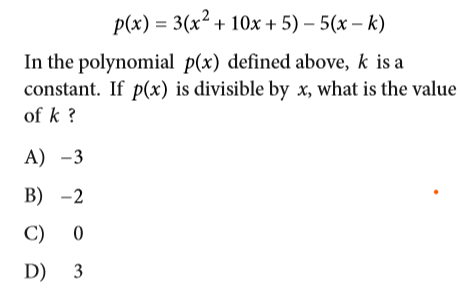
Answer:
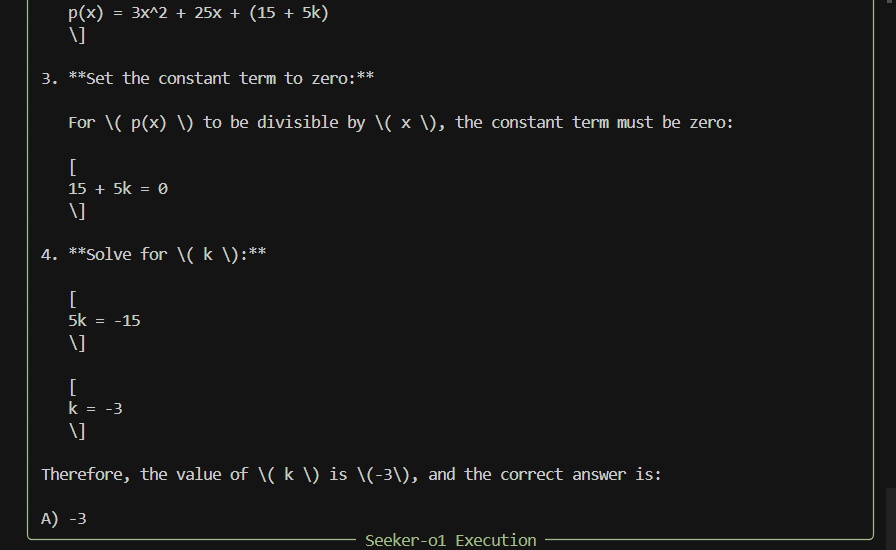
Memory
The agent has both short-term and long-term memory
below is a long term memory example

Seeker-o1 empowers users to create AI agents that can:
- Execute tasks through natural language instructions
- Process text inputs
- Perform basic calculations
- Run code in a controlled environment
✨ Features & Capabilities
AI Agent Architecture

- Single-Agent System: Process and execute tasks with a single agent
- Tool Integration: Use a variety of tools to accomplish tasks
- Memory Management: Basic context retention during conversation
Current Tool Ecosystem
-
Text Processing:
- Character counting
- Word counting
- Text transformation (uppercase, lowercase, capitalize, reverse)
-
Code Execution:
- Python code execution
- Output capture and analysis
-
Calculations:
- Basic arithmetic operations
- Expression evaluation
API Integration
- OpenAI API Support: Seamless integration with GPT models
Seeker-o1 supports multiple installation methods to accommodate different user preferences and environments.
Prerequisites
- Python 3.11 or higher
- pip (Python package installer)
- Git
Installation:
# Clone the repository
git clone https://github.com/iBz-04/Seeker-o1.git
cd Seeker-o1

# Create and activate a virtual environment
python -m venv venv
source venv/bin/activate  # On Windows: venv\Scripts\activate

# Install in development mode
pip install -e .
Configuration
After installation, you’ll need to configure Seeker-o1 with your API keys:
- Create a
.envfile in the project root - Add your API keys:
OPENAI_API_KEY=your_openai_api_key
Quick Start
CLI Mode
Start interactive mode:
best & simplest Option
In your terminal, simply type:
seeker-o1
Alternatively :
After installing in editable or standard mode, you can launch the Seeker-o1 CLI directly:
seeker-o1 --help
This displays global options. To run a one-off task:
seeker-o1 --mode multi --task "solve the math problem in this image" assets/images/equation.png
Once inside, use help or ? to list available commands, and task to execute tasks.
📋 Usage Examples
Basic Examples
Text Processing
from seeker_o1.core.agent.tool_agent import ToolAgent

# Create an agent with text processing capabilities
agent = ToolAgent(tools=["text"])

# Process text
response = agent.execute("Count words in 'Hello, world!'")
print(response)
Code Execution
from seeker_o1.core.agent.tool_agent import ToolAgent

# Create an agent with code execution capabilities
agent = ToolAgent(tools=["code"])

# Execute Python code
response = agent.execute("Run code ```print('Hello, world!')```")
print(response)
Contributions
We welcome contributions from the community, feel free to report issues, request features or submit pull requests!
📄 License
Seeker-o1 is released under the MIT License.
Dev Tools Supporting MCP
The following are the main code editors that support the Model Context Protocol. Click the link to visit the official website for more information.







