
Sillytavern Mcp Client
What is Sillytavern Mcp Client
SillyTavern-MCP-Client is an extension of the Model Context Protocol (MCP) specifically designed for the SillyTavern application, providing enhanced functionalities and solutions to user issues.
Use cases
Use cases include enhancing user interactions in gaming environments, providing context-sensitive responses in customer service applications, and facilitating dynamic content generation in creative writing tools.
How to use
To use SillyTavern-MCP-Client, install it via the SillyTavern extension installer using the provided URL. After installation, enable ‘Enable function calling’ in the sampler settings and manage MCP servers through the extension menu.
Key features
Key features include seamless integration with SillyTavern, the ability to manage multiple MCP servers, and enhanced function calling capabilities for improved performance.
Where to use
SillyTavern-MCP-Client is primarily used in applications that require context-aware interactions, such as chatbots, virtual assistants, and other AI-driven platforms.
Clients Supporting MCP
The following are the main client software that supports the Model Context Protocol. Click the link to visit the official website for more information.





Overview
What is Sillytavern Mcp Client
SillyTavern-MCP-Client is an extension of the Model Context Protocol (MCP) specifically designed for the SillyTavern application, providing enhanced functionalities and solutions to user issues.
Use cases
Use cases include enhancing user interactions in gaming environments, providing context-sensitive responses in customer service applications, and facilitating dynamic content generation in creative writing tools.
How to use
To use SillyTavern-MCP-Client, install it via the SillyTavern extension installer using the provided URL. After installation, enable ‘Enable function calling’ in the sampler settings and manage MCP servers through the extension menu.
Key features
Key features include seamless integration with SillyTavern, the ability to manage multiple MCP servers, and enhanced function calling capabilities for improved performance.
Where to use
SillyTavern-MCP-Client is primarily used in applications that require context-aware interactions, such as chatbots, virtual assistants, and other AI-driven platforms.
Clients Supporting MCP
The following are the main client software that supports the Model Context Protocol. Click the link to visit the official website for more information.
Content
An extension of MCP for SillyTavern. A possible solution of https://github.com/SillyTavern/SillyTavern/issues/3335
⚠️ Important: This extension requires the SillyTavern MCP Server plugin to be installed first!
Make sure you only installing trusted MCP servers.
Installation
Prerequisites:
- Install the MCP Server plugin first - Go to SillyTavern MCP Server and install it
Then install this client extension:
- Install via the SillyTavern extension installer:
https://github.com/bmen25124/SillyTavern-MCP-Client
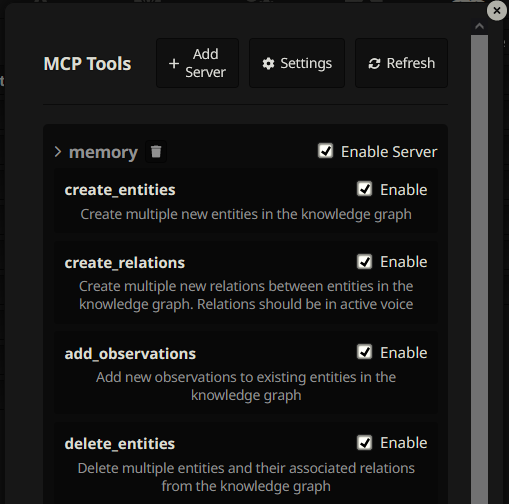
- Install MCP servers via extension menu.
- Enable
Enable function callingin sampler settings.
Demo
https://github.com/user-attachments/assets/659c5112-c2d0-425d-a6fc-e4b47b517066
FAQ
I’m getting “MCP Server plugin not found” error
This means you haven’t installed the required SillyTavern MCP Server plugin yet. Install it first, restart SillyTavern, then try again.
Where can I find more servers?
I need to change the server configuration, how can I do that?
Press Settings button to open location of mcp_settings.json with your File Explorer. Edit the file. Disconnect and reconnect via Enable Server tickbox.
I’m getting an error when I try to connect to the MCP server.
Check out SillyTavern console for more information. Possible errors:
- Read twice the readme of MCP server.
- Missing arguments.
- Invalid
envparam. You might need to set the API key if it’s required.
Dev Tools Supporting MCP
The following are the main code editors that support the Model Context Protocol. Click the link to visit the official website for more information.







