
Whatsapp Agent
What is Whatsapp Agent
Whatsapp_Agent is an agent that interacts with WhatsApp using the WhatsApp MCP server to send messages and perform various actions on behalf of the user.
Use cases
Use cases include automating responses in customer service, sending bulk messages, retrieving chat histories, and managing media files in conversations.
How to use
To use Whatsapp_Agent, clone the repository, set up a virtual environment, install dependencies, and configure the WhatsApp MCP server along with an OpenAI API key.
Key features
Key features include searching contacts, listing messages and chats, sending messages and files, downloading media, and retrieving chat context.
Where to use
Whatsapp_Agent can be used in customer support, automated messaging, and personal communication management across various industries.
Clients Supporting MCP
The following are the main client software that supports the Model Context Protocol. Click the link to visit the official website for more information.





Overview
What is Whatsapp Agent
Whatsapp_Agent is an agent that interacts with WhatsApp using the WhatsApp MCP server to send messages and perform various actions on behalf of the user.
Use cases
Use cases include automating responses in customer service, sending bulk messages, retrieving chat histories, and managing media files in conversations.
How to use
To use Whatsapp_Agent, clone the repository, set up a virtual environment, install dependencies, and configure the WhatsApp MCP server along with an OpenAI API key.
Key features
Key features include searching contacts, listing messages and chats, sending messages and files, downloading media, and retrieving chat context.
Where to use
Whatsapp_Agent can be used in customer support, automated messaging, and personal communication management across various industries.
Clients Supporting MCP
The following are the main client software that supports the Model Context Protocol. Click the link to visit the official website for more information.
Content
WhatsApp Agent
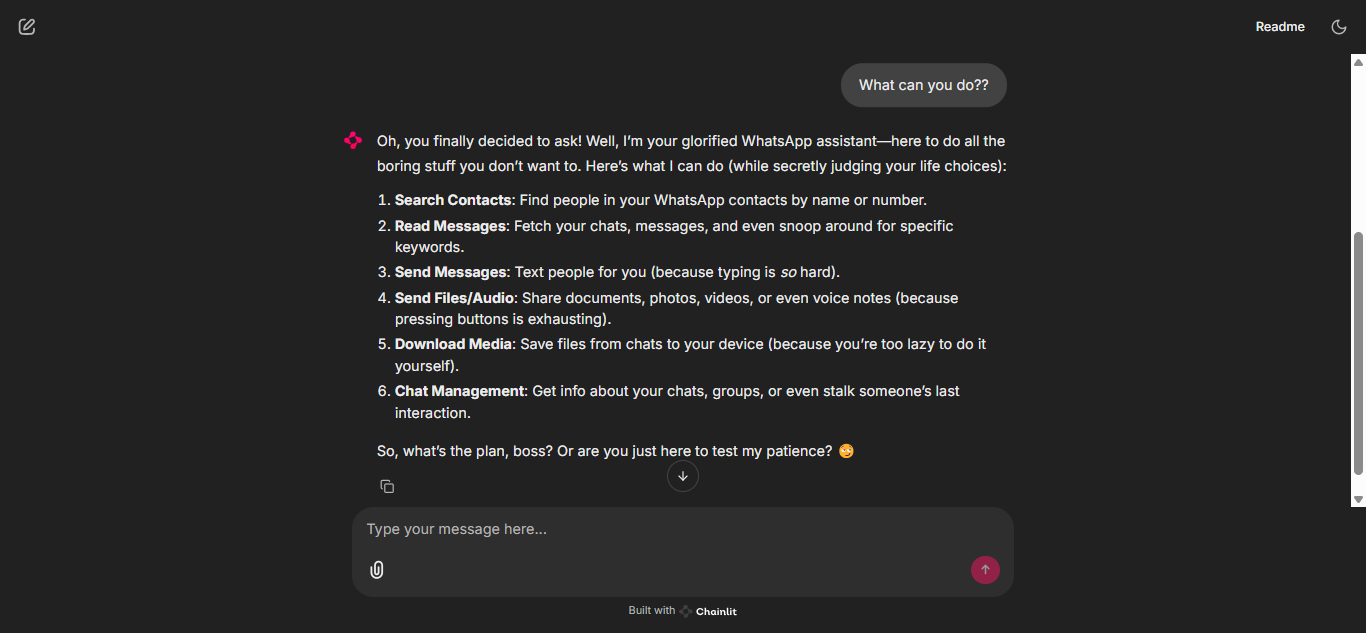
An Agent that interacts with WhatsApp using WhatsApp MCP server. It can perform multiple actions on the user’s behalf.
🚀 Features
The Agent is connected to WhatsApp MCP server. This server provides the following tools:
- search_contacts: Search for contacts by name or phone number
- list_messages: Retrieve messages with optional filters and context
- list_chats: List available chats with metadata
- get_chat: Get information about a specific chat
- get_direct_chat_by_contact: Find a direct chat with a specific contact
- get_contact_chats: List all chats involving a specific contact
- get_last_interaction: Get the most recent message with a contact
- get_message_context: Retrieve context around a specific message
- send_message: Send a WhatsApp message to a specified phone number or group JID
- send_file: Send a file (image, video, raw audio, document) to a specified recipient
- send_audio_message: Send an audio file as a WhatsApp voice message (requires the file to be an .ogg opus file or ffmpeg must be installed)
- download_media: Download media from a WhatsApp message and get the local file path
⚡Quick Start
Prerequisites
- Python 3.10+
- WhatsApp MCP server
- An OpenAI API key (or compatible service like DeepSeek)
- uv
[!NOTE]
To setup WhatsApp MCP server, follow the instructions in the README.
Installation
Follow these steps to set up the project on your local machine:
-
Clone the repository
git clone https://github.com/aasherkamal216/whatsapp_agent.git cd whatsapp_agent -
Create and activate a virtual environment
uv venv # On macOS/Linux source .venv/bin/activate # On Windows .venv\Scripts\activate -
Install dependencies
uv sync -
Set up environment variables
Copy the example environment file and update it with your credentials:
cp .env.example .envAdd your environment variables to the
.envfile.
Usage
Run the Chainlit app:
uv run chainlit run chainlit_app.py -w
The application will be running at http://localhost:8000
Example Questions
Here are some example questions you can ask the WhatsApp Agent:
- Show me my recent chats.
- Send a message to John Doe: “Meeting at 5pm.”
- List all messages from John in the last week.
- Download the last photo sent in the SF News group.
- Search for contacts named Alex.
- Get the last interaction with +1234567890.
Dev Tools Supporting MCP
The following are the main code editors that support the Model Context Protocol. Click the link to visit the official website for more information.







