
Winformsapp Mcp
What is Winformsapp Mcp
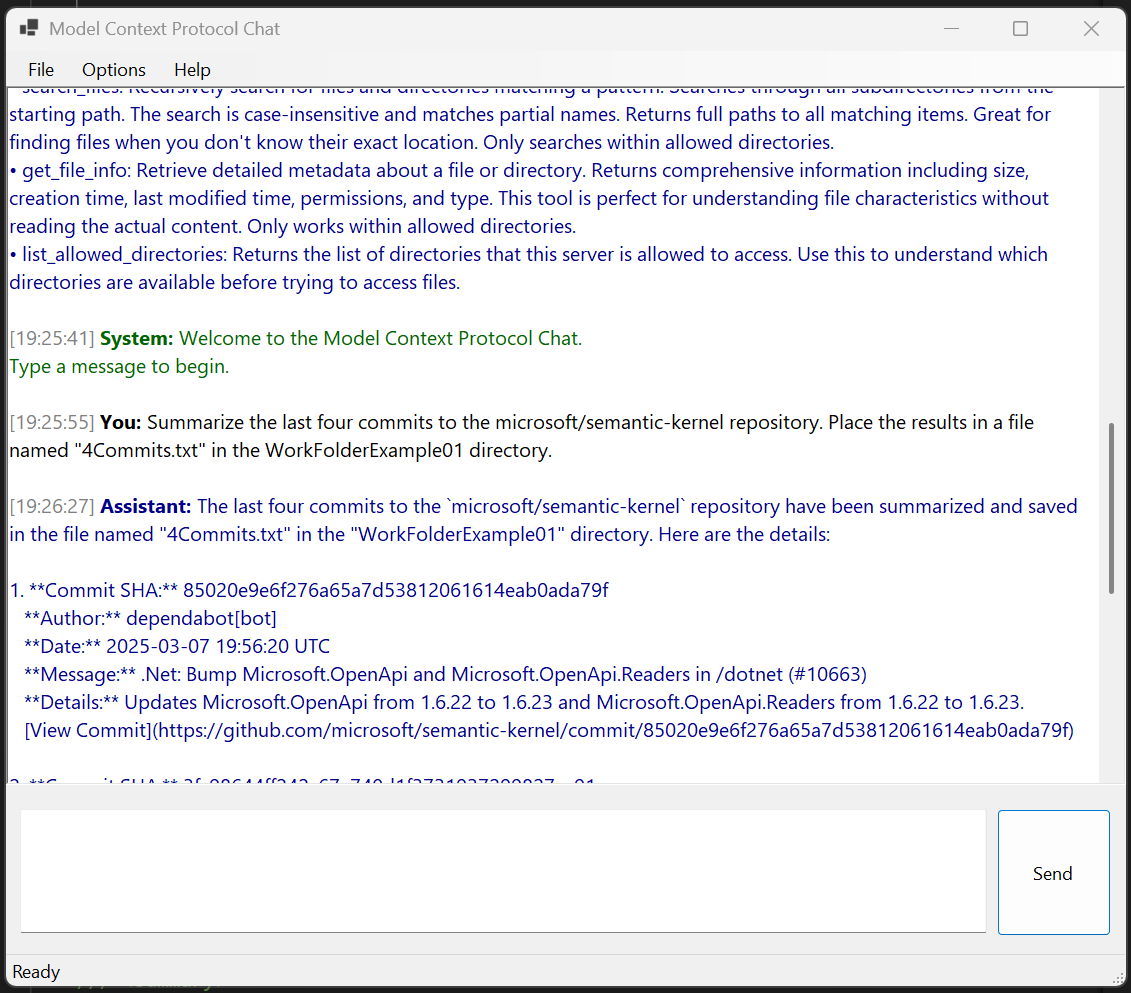
WinFormsApp-MCP is a Windows Forms application that demonstrates the integration of Semantic Kernel with the Model Context Protocol (MCP). It provides functionalities for interacting with GitHub, GitLab, and filesystem operations, utilizing ChatGPT models.
Use cases
Use cases include automating GitHub and GitLab repository management, performing filesystem operations with AI assistance, and leveraging ChatGPT models for enhanced user interactions.
How to use
To use WinFormsApp-MCP, clone the repository, open the solution in Visual Studio, input your OpenAI API key in the settings dialog or set it as an environment variable, configure the MCP settings as needed, and then run the application.
Key features
Key features include support for OpenAI (ChatGPT) models, tool functionalities for accessing GitLab and GitHub repositories, filesystem operations, and context-aware interactions.
Where to use
WinFormsApp-MCP can be used in software development environments, particularly for integrating AI capabilities into applications that require interaction with version control systems and local file operations.
Clients Supporting MCP
The following are the main client software that supports the Model Context Protocol. Click the link to visit the official website for more information.





Overview
What is Winformsapp Mcp
WinFormsApp-MCP is a Windows Forms application that demonstrates the integration of Semantic Kernel with the Model Context Protocol (MCP). It provides functionalities for interacting with GitHub, GitLab, and filesystem operations, utilizing ChatGPT models.
Use cases
Use cases include automating GitHub and GitLab repository management, performing filesystem operations with AI assistance, and leveraging ChatGPT models for enhanced user interactions.
How to use
To use WinFormsApp-MCP, clone the repository, open the solution in Visual Studio, input your OpenAI API key in the settings dialog or set it as an environment variable, configure the MCP settings as needed, and then run the application.
Key features
Key features include support for OpenAI (ChatGPT) models, tool functionalities for accessing GitLab and GitHub repositories, filesystem operations, and context-aware interactions.
Where to use
WinFormsApp-MCP can be used in software development environments, particularly for integrating AI capabilities into applications that require interaction with version control systems and local file operations.
Clients Supporting MCP
The following are the main client software that supports the Model Context Protocol. Click the link to visit the official website for more information.
Content
WinFormsApp-MCP
WinFormsApp-MCP is a Windows Forms application demonstrating Semantic Kernel with Model Context Protocol (MCP). It provides tool functionality for GitHub, GitLab, and filesystem operations, and works with ChatGPT models.
Overview
This application showcases the integration of large language models (LLMs) with Microsoft’s Semantic Kernel framework, allowing models to interact with local and remote resources through the Model Context Protocol (MCP).
The implementation is based on the step-by-step guide from the Microsoft Semantic Kernel blog.
Features
-
LLM Support:
- OpenAI (ChatGPT) models
-
Tool Functionality:
- GitLab repository access
- GitHub repository access
- Filesystem operations
- Context-aware interactions
Requirements
- .NET 8.0 or later
- API key for OpenAI
Configuration
The application provides a settings interface to configure:
- API key
- Model selection
- GitLab integration settings
- Filesystem access controls
You can also configure the application using environment variables:
string? apiKey = Environment.GetEnvironmentVariable("OpenAI__ApiKey");
string? modelId = Environment.GetEnvironmentVariable("OpenAI__ChatModelId") ?? "gpt-4o-mini";
The application will check for these environment variables:
OpenAI__ApiKey: Your OpenAI API keyOpenAI__ChatModelId: The model to use (defaults to “gpt-4o-mini” if not specified)
Getting Started
- Clone the repository
- Open the solution in Visual Studio
- Add your API key in the Settings dialog or set it as an environment variable
- Configure MCP settings as needed
- Run the application
MCP Resources
- Anthropic MCP Announcement - Original introduction of the Model Context Protocol
- MCP Servers Directory - Directory of available MCP servers
- Model Context Protocol Documentation - Official MCP documentation
- mcpdotnet NuGet Package - .NET library for Model Context Protocol
- Semantic Kernel Documentation
- Semantic Kernel GitHub Repository
- Integrating MCP Tools with Semantic Kernel Guide
License
[Include your license information here]
Dev Tools Supporting MCP
The following are the main code editors that support the Model Context Protocol. Click the link to visit the official website for more information.







