
Wireshark Mcp
What is Wireshark Mcp
Wireshark_mcp is a server based on the Model Context Protocol (MCP) that allows AI assistants to interact with Wireshark through the tshark command-line tool. It combines the powerful capabilities of Wireshark/tshark with the intelligent analysis of large language models (LLMs) for smart network data analysis.
Use cases
Use cases for Wireshark_mcp include troubleshooting network issues through conversational queries, performing real-time packet analysis, and generating insights from network traffic data using AI.
How to use
To use Wireshark_mcp, start the MCP server by running ‘python wireshark_mcp.py’. After that, you can check the service status and tool instructions by visiting ‘http://127.0.0.1:3000/status’. Configure the client to connect to the MCP server using the provided settings.
Key features
Key features of Wireshark_mcp include AI-driven analysis with natural language interaction, intelligent anomaly detection, conversational analysis, smart filtering, and enhanced functionalities for protocol analysis, security analysis, performance diagnostics, and statistical analysis.
Where to use
Wireshark_mcp can be used in various fields such as network security, performance monitoring, and data analysis, making it suitable for IT professionals, network administrators, and cybersecurity experts.
Clients Supporting MCP
The following are the main client software that supports the Model Context Protocol. Click the link to visit the official website for more information.





Overview
What is Wireshark Mcp
Wireshark_mcp is a server based on the Model Context Protocol (MCP) that allows AI assistants to interact with Wireshark through the tshark command-line tool. It combines the powerful capabilities of Wireshark/tshark with the intelligent analysis of large language models (LLMs) for smart network data analysis.
Use cases
Use cases for Wireshark_mcp include troubleshooting network issues through conversational queries, performing real-time packet analysis, and generating insights from network traffic data using AI.
How to use
To use Wireshark_mcp, start the MCP server by running ‘python wireshark_mcp.py’. After that, you can check the service status and tool instructions by visiting ‘http://127.0.0.1:3000/status’. Configure the client to connect to the MCP server using the provided settings.
Key features
Key features of Wireshark_mcp include AI-driven analysis with natural language interaction, intelligent anomaly detection, conversational analysis, smart filtering, and enhanced functionalities for protocol analysis, security analysis, performance diagnostics, and statistical analysis.
Where to use
Wireshark_mcp can be used in various fields such as network security, performance monitoring, and data analysis, making it suitable for IT professionals, network administrators, and cybersecurity experts.
Clients Supporting MCP
The following are the main client software that supports the Model Context Protocol. Click the link to visit the official website for more information.
Content
Wireshark MCP
Wireshark MCP 是一个基于 Model Context Protocol (MCP) 的服务器,允许 AI 助手通过 tshark 命令行工具与 Wireshark 进行交互。它将 Wireshark/tshark 的强大功能与大语言模型(LLM)的智能分析能力相结合。通过 Model Context Protocol (MCP),该工具能够让 AI 助手直接与 tshark 进行交互,实现智能化的网络数据分析。
功能特性
基础功能
- AI 驱动分析:突出自然语言交互、智能异常检测等特性
- 交互方式:详细说明对话式分析、智能过滤和结果解读功能
- LLM 增强功能:描述了协议分析、安全分析、性能诊断和统计分析等增强功能
系统要求
- Python 3.9 +
- Wireshark/tshark
- MCP SDK
安装
- 确保已安装 Wireshark 和 tshark:
- 安装 Python 依赖:
pip install -r requirements.txt
使用方法
- 启动 MCP 服务器:
python wireshark_mcp.py
- 访问状态页面查看服务状态和工具说明:
http://127.0.0.1:3000/status
- 配置客户端 MCP 服务器:
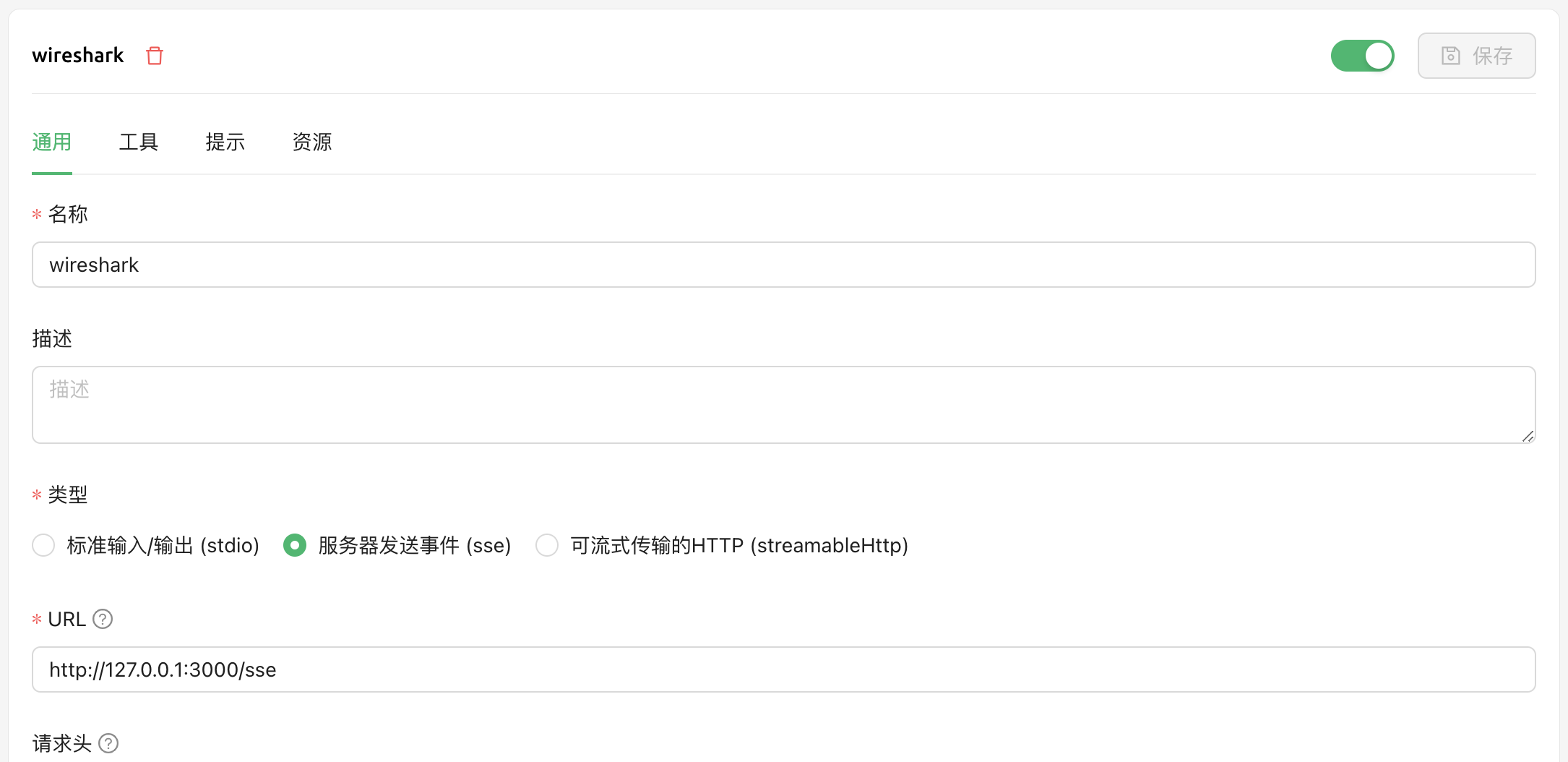
配置说明:
- 名称:wireshark
- 类型:服务器发送事件 (sse)
- URL:http://127.0.0.1:3000/sse
使用效果
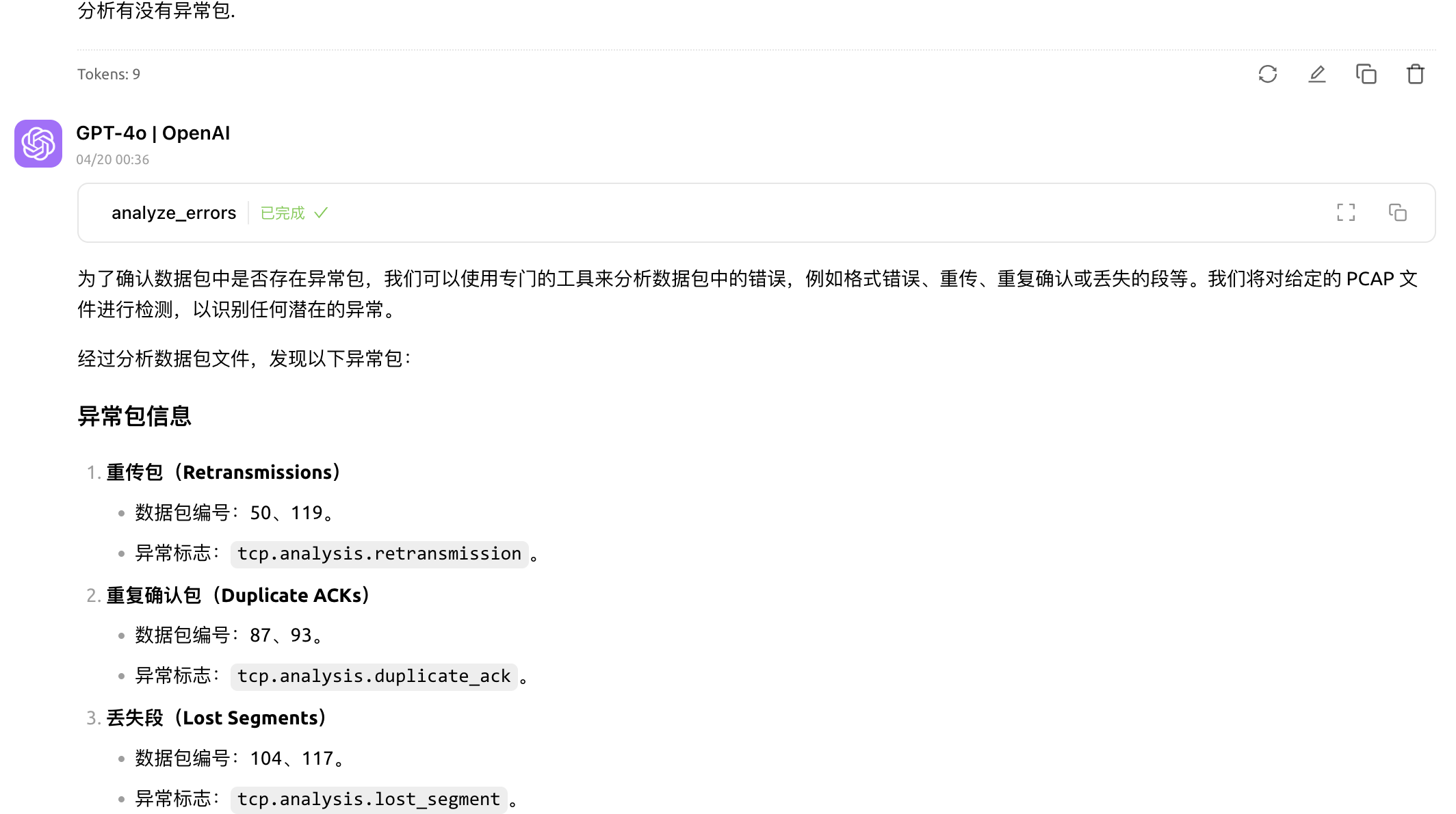
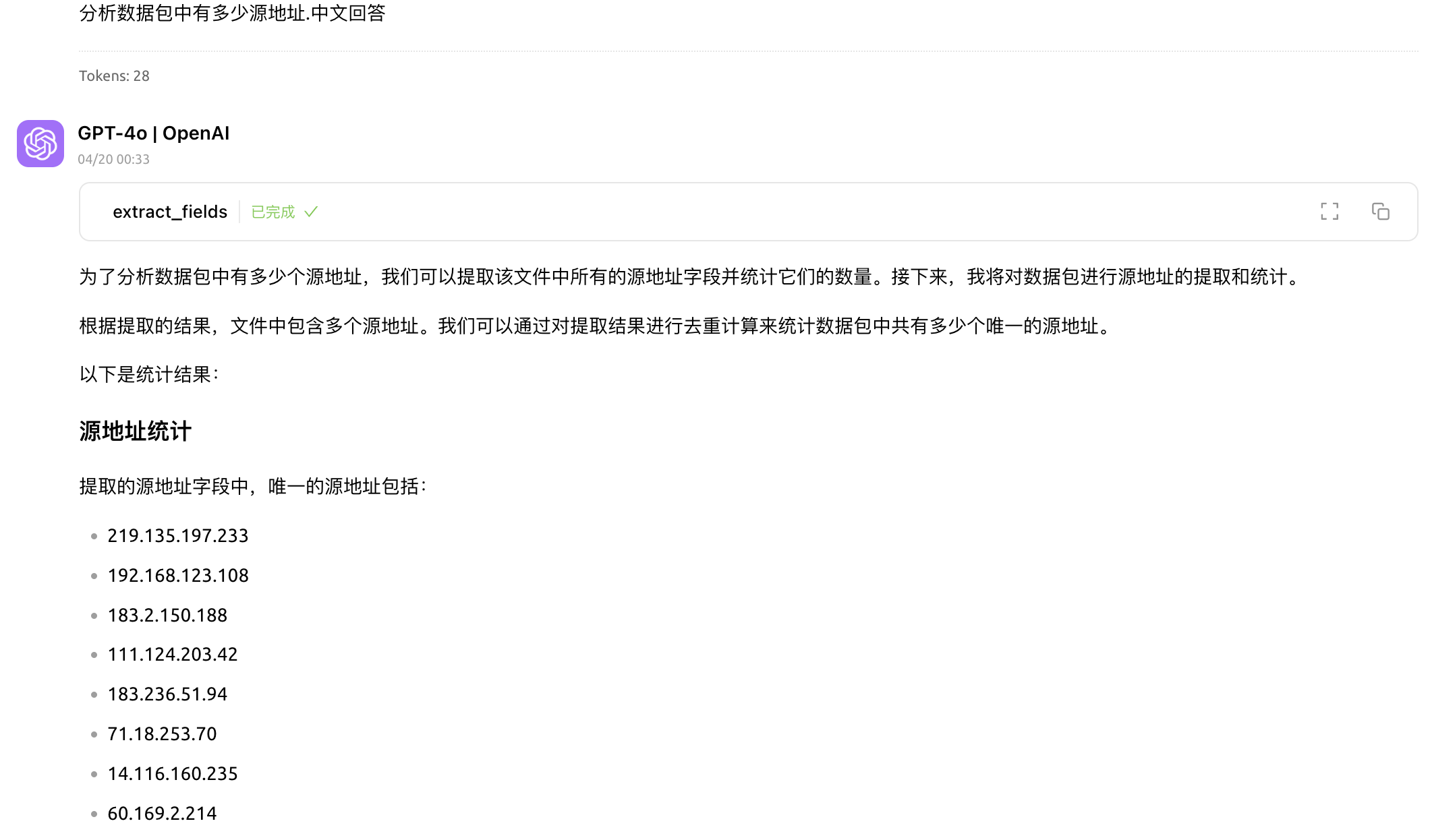
其他
- 数据包数量限制:默认限制为 5000 个数据包
- 编写目标之一想通过LLM对话来发现网络问题.
- 有点意思,不过意思不大,太耗大模型tokens,还不如调用 tshark 命令直接查.
许可证
Apache License 2.0
特别感谢
https://mp.weixin.qq.com/s/G_6efZFEgGTeOcRtyaNS1g?poc_token=HKpP_2ejJpvhJJ4EJ9J-8b9U5eZ3U0Jvkk_YPKoO
https://github.com/shubham-s-pandey/WiresharkMCP
Dev Tools Supporting MCP
The following are the main code editors that support the Model Context Protocol. Click the link to visit the official website for more information.







