
Worldminiapp Mcp
What is Worldminiapp Mcp
WorldMiniApp_MCP is a server designed to facilitate the querying of World Mini Apps documentation, integrating it with Cursor to assist developers in coding their Mini Apps.
Use cases
Use cases include assisting developers in coding Mini Apps by providing documentation queries, enhancing productivity through integrated tools, and supporting educational purposes for learning Mini App development.
How to use
To use WorldMiniApp_MCP, set up a Python environment, install the required dependencies, build the documentation vector store, run the MCP server, and configure Cursor to connect to the MCP server.
Key features
Key features include integration with Cursor, the ability to query Mini Apps documentation, and support for various Python libraries for enhanced functionality.
Where to use
WorldMiniApp_MCP can be used in software development environments where developers are creating Mini Apps, particularly those utilizing the World platform.
Clients Supporting MCP
The following are the main client software that supports the Model Context Protocol. Click the link to visit the official website for more information.





Overview
What is Worldminiapp Mcp
WorldMiniApp_MCP is a server designed to facilitate the querying of World Mini Apps documentation, integrating it with Cursor to assist developers in coding their Mini Apps.
Use cases
Use cases include assisting developers in coding Mini Apps by providing documentation queries, enhancing productivity through integrated tools, and supporting educational purposes for learning Mini App development.
How to use
To use WorldMiniApp_MCP, set up a Python environment, install the required dependencies, build the documentation vector store, run the MCP server, and configure Cursor to connect to the MCP server.
Key features
Key features include integration with Cursor, the ability to query Mini Apps documentation, and support for various Python libraries for enhanced functionality.
Where to use
WorldMiniApp_MCP can be used in software development environments where developers are creating Mini Apps, particularly those utilizing the World platform.
Clients Supporting MCP
The following are the main client software that supports the Model Context Protocol. Click the link to visit the official website for more information.
Content
World MiniApps MCP Server with Cursor
This project sets up an MCP server to query World Mini Apps docs and integrates it with Cursor.
Idea
The idea is to have an agent capable to read the MiniApps Documentation, and thenn help you code your world MiniApp with Cursor.
Prerequisites
- Python 3: Download from python.org or install via Homebrew:
brew install python - Cursor: Installed on your system.
Setup Instructions
1. Setup Your Python Environment
Open your terminal and run these commands:
# Create a virtual environment
python3 -m venv .venv

# Activate the virtual environment
source .venv/bin/activate
2. Install Dependencies
With your virtual environment activated, install the required packages:
pip install langchain_community langchain-openai langchain-anthropic scikit-learn bs4 pandas pyarrow matplotlib lxml langgraph "mcp[cli]" tiktoken
3. Build the Documentation Vector Store
Before running the build script, export your OpenAI API key in the terminal:
export OPENAI_API_KEY="your-openai-api-key"
Then, run:
python3 worldMiniApp-MCP/miniApp_build_docs.py
Obs.: Mateo (World Team) said that you can use https://docs.world.org/llms-full.txt for all World Docs support.
This script will create llms_full.txt and sklearn_vectorstore.parquet.
4. Run the MCP Server
Start your MCP server by running:
python3 worldMiniApp-MCP/miniApp_mcp.py
The server runs over stdio and waits for MCP requests.
5. Configure Cursor to Use Your MCP Server
-
Open Cursor Settings:
- In Cursor, go to Settings and click the MCP tab.
-
Activate MCP and Add Configuration:
- Copy and paste the JSON below into the MCP configuration area:
{
  "mcpServers": {
    "world-mini-app-mcp": {
      "command": "your-absolute-path-to-repo-folder/WorldMCP/.venv/bin/python",
      "args": [
        "your-absolute-path-to-repo-folder/WorldMCP/worldMiniApp-MCP/miniApp_mcp.py"
      ],
      "env": {
        "OPENAI_API_KEY": "sk-xxxxxxxxxxxxxxxxxxxx"
      }
    }
  }
}- Replace
"your-openai-api-key"with your actual API key.
- Save the Configuration:
- Cursor will now detect your MCP server.
Image support for the 3 steps:
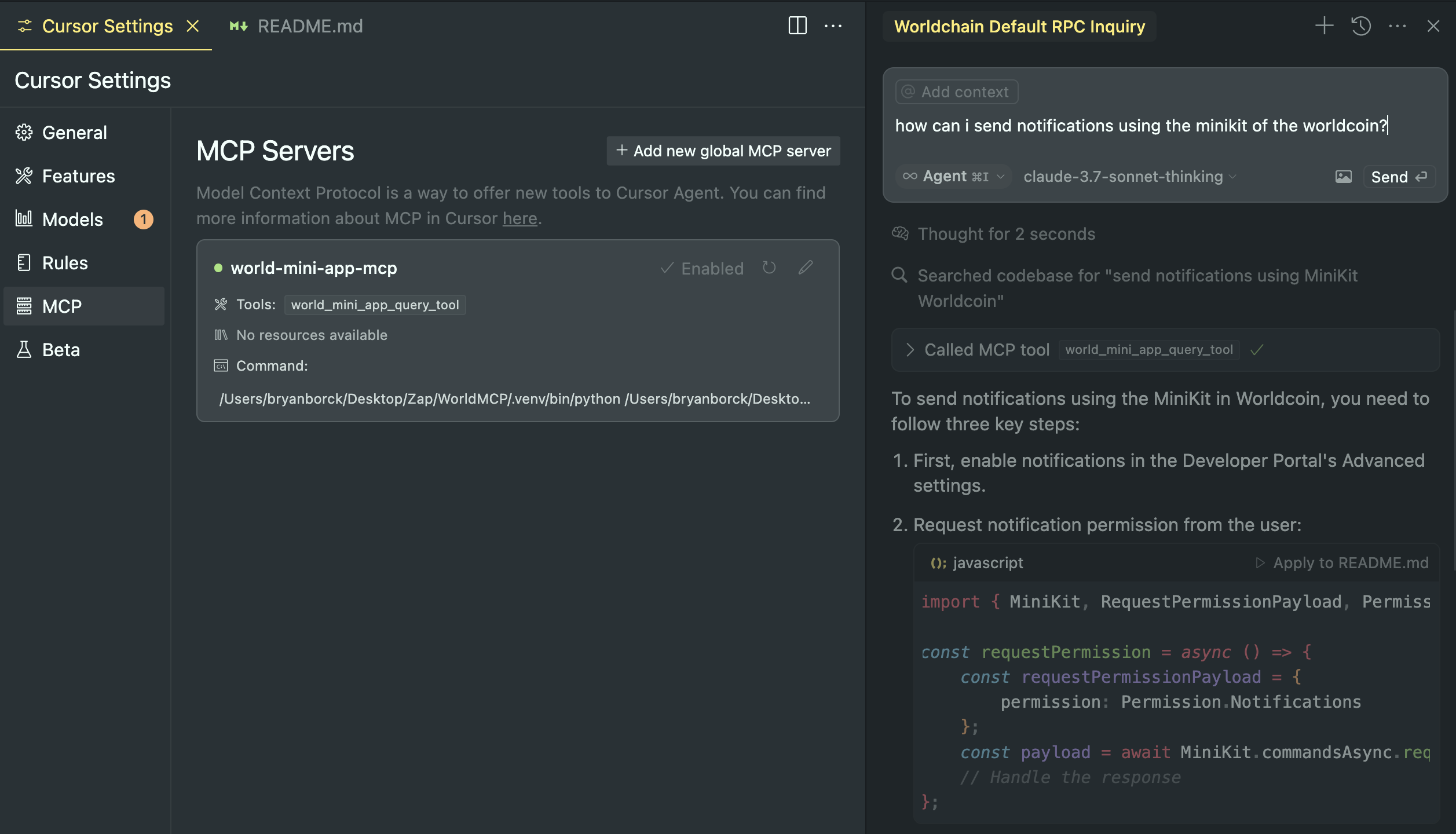
6. Chat with the MCP Agent in Cursor
- Switch to Agent Mode:
- Instead of standard chat, activate Agent mode in Cursor.
- When you chat, Cursor will use your MCP tool (world_mini_app_query_tool) to fetch World MiniApp documentation as needed.
-
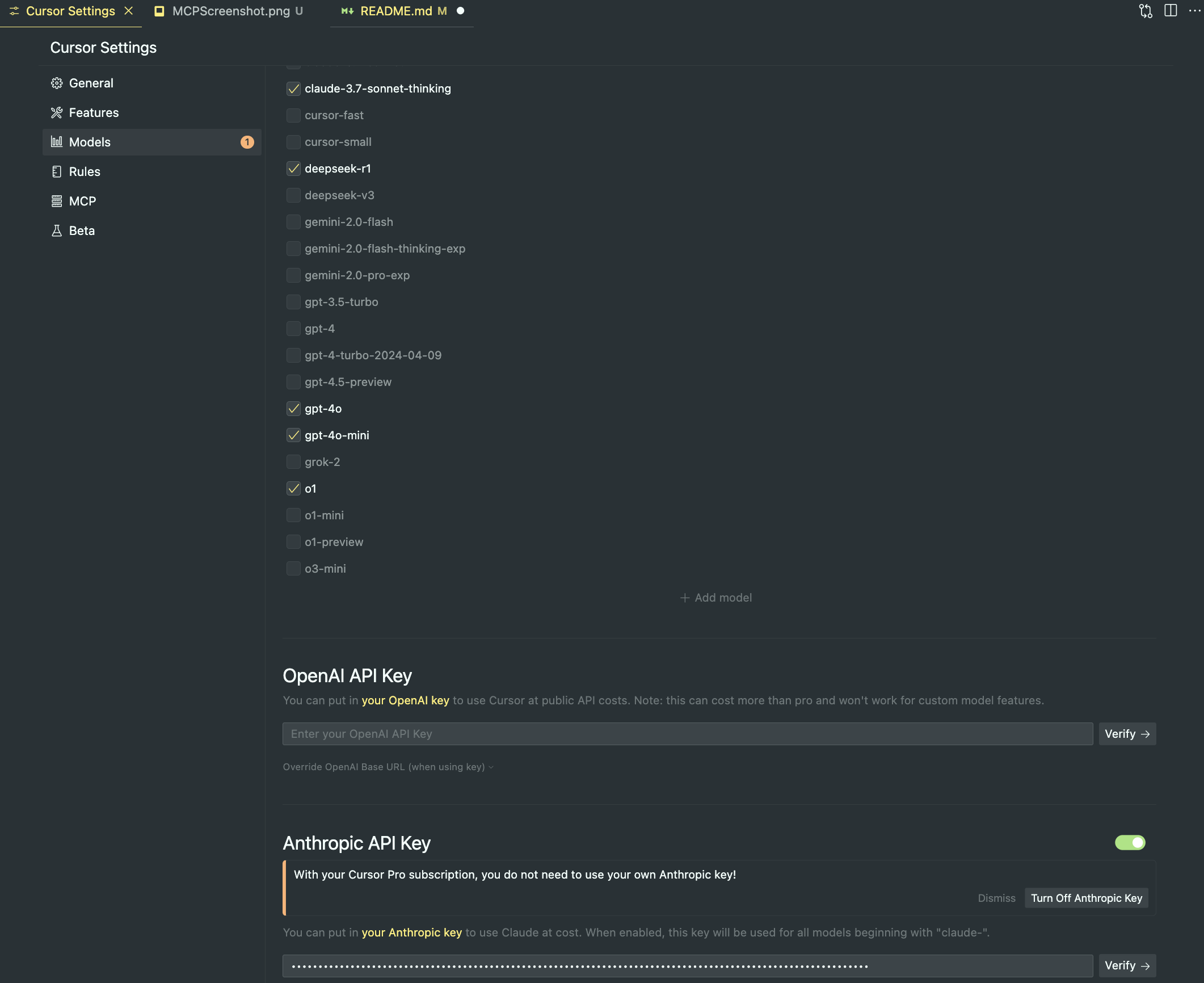
Remember to use Claude Sonnet
- specially the model “claude-3.7-sonnet-thinking”
-
Get API Key from Anthropic:
- Go to https://console.anthropic.com/
- Create a Profile
- Get an API Key putting credit, 10 USD is a good amount to test and use for build your miniApp (remembers Claude 3.7 has more token usege)
-
Open Cursor Settings:
- In Cursor, go to Settings and click the Models tab.
- Select the Claude model
- Put your Anthtopic API Key
Image support for the 3 steps:
(Optional) Test with MCP Inspector
To manually inspect your MCP server, install and run MCP Inspector:
npm install -g @modelcontextprotocol/inspector
mcp-inspector
Dev Tools Supporting MCP
The following are the main code editors that support the Model Context Protocol. Click the link to visit the official website for more information.







