
Yapi Mcp
What is Yapi Mcp
Yapi-MCP is a server designed to interact with the YApi platform, providing tools for API management and documentation retrieval.
Use cases
Use cases for Yapi-MCP include automating API documentation retrieval, integrating YApi with other development tools, and enhancing API management workflows in development teams.
How to use
To use Yapi-MCP, install the necessary packages with ‘pnpm install’ and start the server in development mode using ‘pnpm run dev’. Configure the environment by creating a ‘.env’ file with your YApi token and base URL, as well as the server port.
Key features
Key features of Yapi-MCP include the ability to retrieve API descriptions from YApi using the ‘get_api_desc’ tool, which requires the API ID as a parameter.
Where to use
Yapi-MCP can be used in software development environments where API management and documentation are essential, particularly in projects that utilize the YApi platform.
Clients Supporting MCP
The following are the main client software that supports the Model Context Protocol. Click the link to visit the official website for more information.





Overview
What is Yapi Mcp
Yapi-MCP is a server designed to interact with the YApi platform, providing tools for API management and documentation retrieval.
Use cases
Use cases for Yapi-MCP include automating API documentation retrieval, integrating YApi with other development tools, and enhancing API management workflows in development teams.
How to use
To use Yapi-MCP, install the necessary packages with ‘pnpm install’ and start the server in development mode using ‘pnpm run dev’. Configure the environment by creating a ‘.env’ file with your YApi token and base URL, as well as the server port.
Key features
Key features of Yapi-MCP include the ability to retrieve API descriptions from YApi using the ‘get_api_desc’ tool, which requires the API ID as a parameter.
Where to use
Yapi-MCP can be used in software development environments where API management and documentation are essential, particularly in projects that utilize the YApi platform.
Clients Supporting MCP
The following are the main client software that supports the Model Context Protocol. Click the link to visit the official website for more information.
Content
Yapi MCP Server
环境配置
在项目根目录创建 .env 文件,并配置以下环境变量:
# Yapi项目配置

# Server configuration
PORT=3388

# Token配置
# 多项目Token格式: projectId:token,projectId:token
YAPI_TOKEN=projectId:your_yapi_token_here,projectId2:your_yapi_token2_here

# 项目基础URL
YAPI_BASE_URL=your_yapi_base_url_here

# 缓存时效(分钟),默认10分钟
YAPI_CACHE_TTL=10

# 日志级别: debug, info, warn, error, none
# - debug: 输出所有日志,包括详细的调试信息
# - info: 输出信息、警告和错误日志(默认)
# - warn: 只输出警告和错误日志
# - error: 只输出错误日志
# - none: 不输出任何日志
YAPI_LOG_LEVEL=info
MCP Server 启动
sse模式
pnpm install
pnpm run dev
stdio启动
1、pnpm run build
2、复制dist/cli.js的地址,如 User/xxxx/dist/cli.js
3、stdio方式启动
node User/xxxx/dist/cli.js --stdio --yapi-base-url=https://yapi.xxxxx.com --yapi-token=projectId:token --yapi-cache-ttl=10
如何获取 token
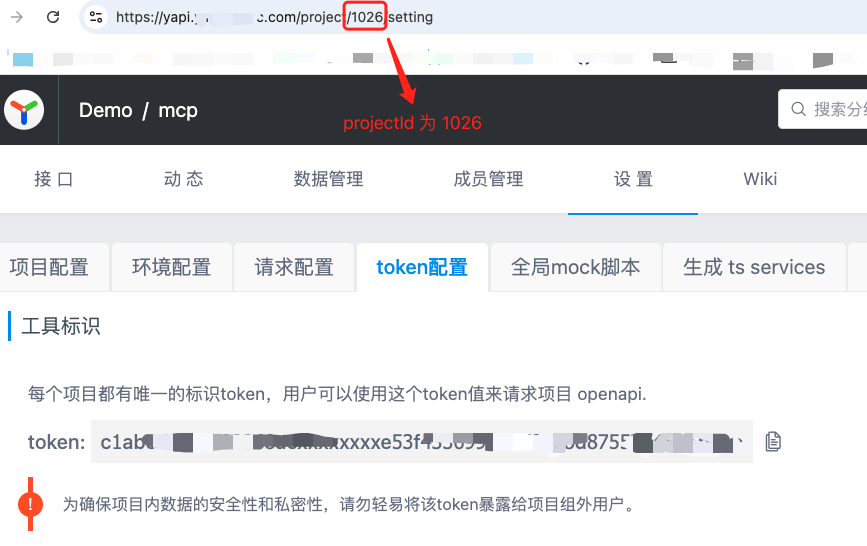
该 token 配置在.env 文件中示例:
YAPI_TOKEN=1026:c1abxxxxxxxxxx
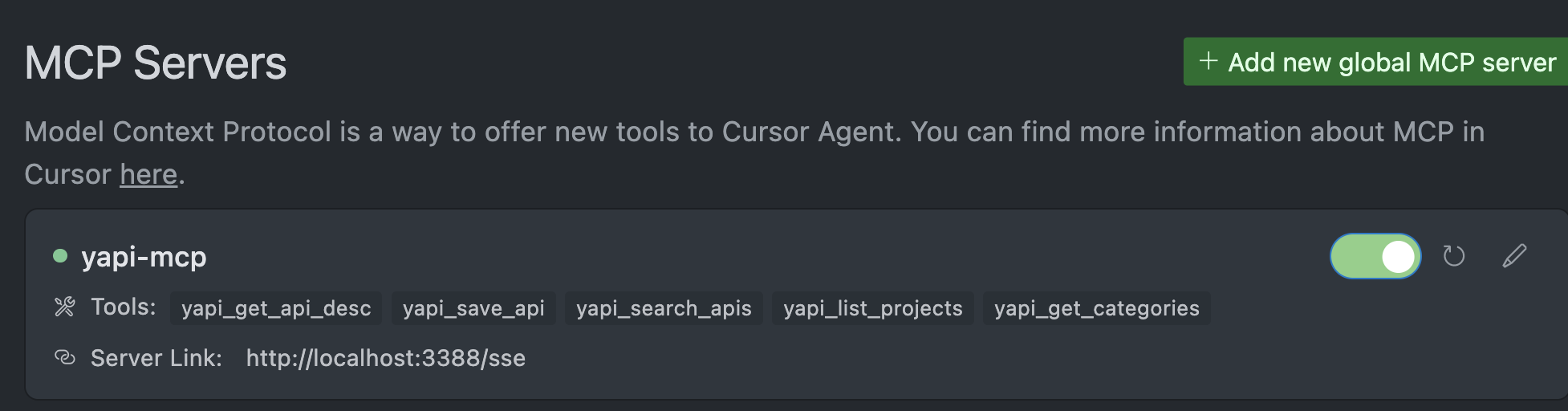
在Cursor中使用(SSE)
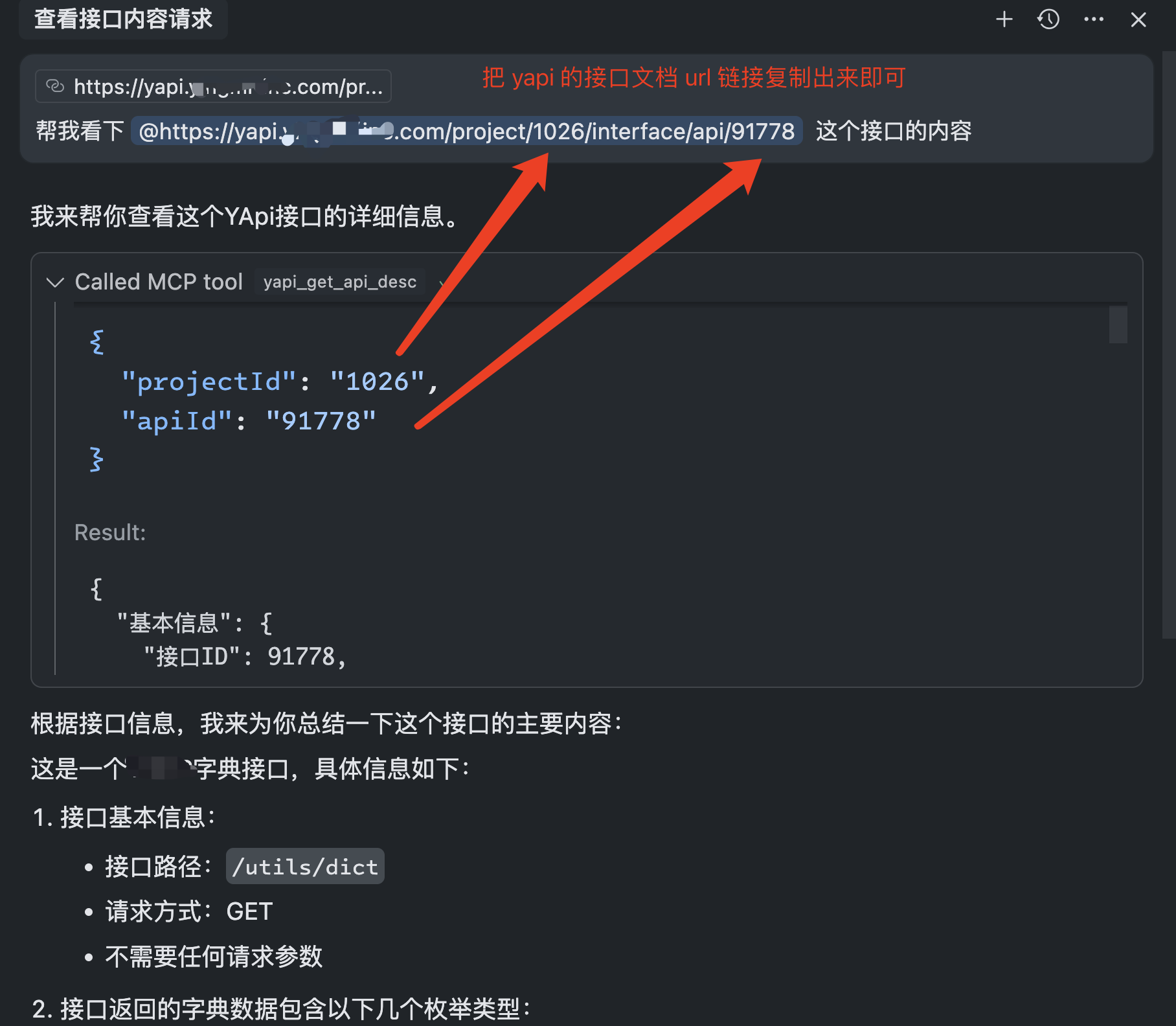
使用例子
Available Tools
The server provides the following MCP tools:
yapi_get_api_desc
获取YApi中特定接口的详细信息。
yapi_save_api
新增或更新YApi中的接口信息。
yapi_search_apis
搜索YApi中的接口。
yapi_list_projects
列出YApi的项目ID(projectId)和项目名称。
yapi_get_categories
获取YApi项目下的接口分类列表,以及每个分类下的接口信息。
get_api_desc
获取指定的yapi接口.
Dev Tools Supporting MCP
The following are the main code editors that support the Model Context Protocol. Click the link to visit the official website for more information.







