
Agent Llm Mcp Rag
What is Agent Llm Mcp Rag
agent-llm-mcp-rag is an intelligent agent system that integrates Large Language Models (LLM), Model Context Protocol (MCP), and Retrieval-Augmented Generation (RAG) technologies. It retrieves relevant information from knowledge bases, utilizes the reasoning capabilities of LLMs, and performs tasks through tool invocation to provide intelligent Q&A and task execution functionalities.
Use cases
Use cases include providing automated customer support, answering frequently asked questions, executing tasks using external tools, and managing knowledge bases for organizations.
How to use
To use agent-llm-mcp-rag, clone the project repository, install the necessary dependencies, create a virtual environment, and configure the API keys in the .env file. Then, start the service and interact with the agent through the Gradio WebUI.
Key features
Key features include intelligent Q&A based on knowledge base content, tool invocation through the MCP protocol, knowledge management capabilities for creating, updating, and deleting knowledge bases, and flexible extension for adding new tools and functionalities.
Where to use
agent-llm-mcp-rag can be used in various fields such as customer support, educational platforms, knowledge management systems, and any application requiring intelligent interaction with users and data.
Clients Supporting MCP
The following are the main client software that supports the Model Context Protocol. Click the link to visit the official website for more information.





Overview
What is Agent Llm Mcp Rag
agent-llm-mcp-rag is an intelligent agent system that integrates Large Language Models (LLM), Model Context Protocol (MCP), and Retrieval-Augmented Generation (RAG) technologies. It retrieves relevant information from knowledge bases, utilizes the reasoning capabilities of LLMs, and performs tasks through tool invocation to provide intelligent Q&A and task execution functionalities.
Use cases
Use cases include providing automated customer support, answering frequently asked questions, executing tasks using external tools, and managing knowledge bases for organizations.
How to use
To use agent-llm-mcp-rag, clone the project repository, install the necessary dependencies, create a virtual environment, and configure the API keys in the .env file. Then, start the service and interact with the agent through the Gradio WebUI.
Key features
Key features include intelligent Q&A based on knowledge base content, tool invocation through the MCP protocol, knowledge management capabilities for creating, updating, and deleting knowledge bases, and flexible extension for adding new tools and functionalities.
Where to use
agent-llm-mcp-rag can be used in various fields such as customer support, educational platforms, knowledge management systems, and any application requiring intelligent interaction with users and data.
Clients Supporting MCP
The following are the main client software that supports the Model Context Protocol. Click the link to visit the official website for more information.
Content
🤖 Agent = LLM + MCP + RAG
📝 项目简介
这是一个结合大语言模型(LLM)、模型上下文协议(MCP)和检索增强生成(RAG)技术的智能Agent系统。该系统可以通过检索知识库的相关信息,借助大语言模型的理解和推理能力,并通过工具调用执行实际操作,提供智能化的问答和任务执行功能。
🧩 核心组件
1. 🧠 大语言模型 (LLM)
- 基于OpenAI兼容接口的LLM客户端
- 支持通义千问等大模型
- 负责自然语言理解、推理和回答生成
2. 🔧 模型上下文协议 (MCP)
- 基于MCP协议的工具调用框架
- 支持动态加载和使用多种工具
- 提供文件操作、地图查询等工具能力
3. 📚 检索增强生成 (RAG)
- 基于向量数据库的知识检索系统
- 支持创建和管理多个知识库
- 利用语义检索技术找到最相关的信息
🏗️ 系统架构
┌───────────────────┐
│     用户界面      │
│  (Gradio WebUI)   │
└─────────┬─────────┘
          │
┌─────────▼─────────┐
│    API服务       │
│  (FastAPI)       │
└─────────┬─────────┘
          │
┌─────────▼─────────┐
│    Agent 核心     │
└─────────┬─────────┘
          │
┌─────────┴─────────┐
│                   │
▼                   ▼
┌───────────┐  ┌────────────┐  ┌────────────┐
│    LLM    │  │    MCP     │  │    RAG     │
│  客户端   │  │  工具客户端 │  │ 检索系统   │
└───────────┘  └────────────┘  └────────────┘
✨ 功能特点
- 🤔 智能问答:基于知识库内容回答用户问题
- 🛠️ 工具调用:通过MCP协议使用外部工具执行任务
目前只接入了fetch、filesystem、高德地图
- 📋 知识管理:支持创建、更新和删除知识库
- 🔄 灵活扩展:易于添加新的工具和功能
🚀 使用方法
🔍 环境要求
- Python 3.10+
▶️ 启动服务
-
克隆项目并进入项目
git clone [email protected]:xyx138/agent-llm-mcp-rag.git cd agent-llm-mcp-rag -
安装 uv
curl -LsSf https://astral.sh/uv/install.sh | sh  # linux/mac
powershell -ExecutionPolicy ByPass -c "irm https://astral.sh/uv/install.ps1 | iex"  # windows
重启终端,确保 uv 命令生效
-
进入项目根目录,创建虚拟环境
uv python pin 3.11 # 指定python版本 uv sync # 创建环境并同步依赖 -
安装 node (以windows为例,如果安装过node跳过这步)
访问node官网,选择下载msi文件,点击msi文件后一路下一步即可
# 验证是否安装成功 node -v # v22.15.0 npm -v # 10.9.2 -
修改配置文件
复制
.env.example到同级目录下,并更名为.env, 将其中的api和项目路径改为自己的,创建api可以参考下面的文档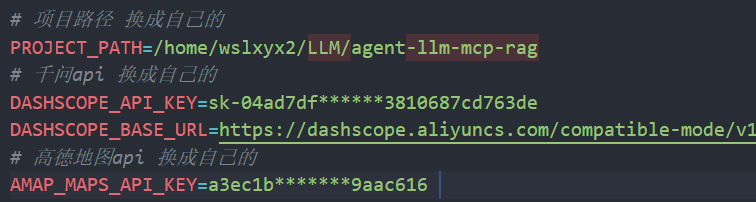
-
启动项目
uv run src/api.py
Dev Tools Supporting MCP
The following are the main code editors that support the Model Context Protocol. Click the link to visit the official website for more information.







