
Agentforce Mcp Server
What is Agentforce Mcp Server
agentforce-mcp-server is an MCP (Model Context Protocol) server designed for Salesforce’s Agentforce Service Agent. It facilitates communication between the Agentforce Agent API and the main API interfaces, leveraging the MCP Protocol.
Use cases
Use cases include initiating customer support chats, sending messages during live interactions, and managing session lifecycle in applications that require real-time communication with agents.
How to use
To use agentforce-mcp-server, install the necessary packages via npm, set up your Salesforce Org with Agentforce, and configure your Connected App with OAuth2 credentials. Then, run the server and use an MCP-compatible client to interact with the exposed tools.
Key features
Key features include the ability to start a new chat session, send messages to the active session, and end the session. It also provides standardized error handling for better user experience.
Where to use
agentforce-mcp-server is primarily used in customer service and support environments, particularly where Salesforce’s Agentforce is implemented to manage agent interactions.
Clients Supporting MCP
The following are the main client software that supports the Model Context Protocol. Click the link to visit the official website for more information.





Overview
What is Agentforce Mcp Server
agentforce-mcp-server is an MCP (Model Context Protocol) server designed for Salesforce’s Agentforce Service Agent. It facilitates communication between the Agentforce Agent API and the main API interfaces, leveraging the MCP Protocol.
Use cases
Use cases include initiating customer support chats, sending messages during live interactions, and managing session lifecycle in applications that require real-time communication with agents.
How to use
To use agentforce-mcp-server, install the necessary packages via npm, set up your Salesforce Org with Agentforce, and configure your Connected App with OAuth2 credentials. Then, run the server and use an MCP-compatible client to interact with the exposed tools.
Key features
Key features include the ability to start a new chat session, send messages to the active session, and end the session. It also provides standardized error handling for better user experience.
Where to use
agentforce-mcp-server is primarily used in customer service and support environments, particularly where Salesforce’s Agentforce is implemented to manage agent interactions.
Clients Supporting MCP
The following are the main client software that supports the Model Context Protocol. Click the link to visit the official website for more information.
Content
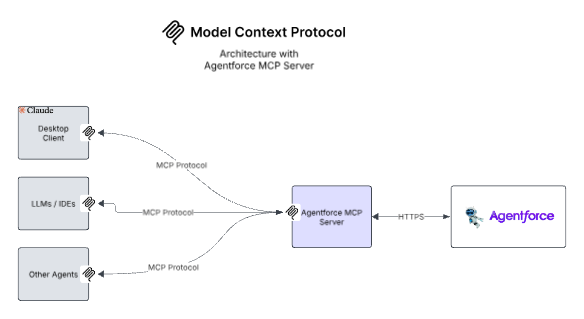
MCP Architecture with Agentforce
Agentforce MCP Server
This is an MCP (Model Context Protocol) server for Salesforce’s Agentforce Service Agent. THe MCP Server uses Agentforce Agent API to communicate with the Agent while exposing the main API interfaces as Tools based on the MCP Protocol.
🧩 MCP Tools Exposed
| Tool Name | Description |
|---|---|
| start-session | Initializes a new Agentforce chat session |
| send-message | Sends a message to the active session |
| end-session | Ends the active session |
🛠️ Requirements
- Node.js 18+
- Salesforce Org with Agentforce and an active Agentforce Service Agent
- Connected App with Client Credentials OAuth2 flow
- MCP-compatible client (e.g. ChatGPT, Open Interpreter, or custom)
📦 Installation
npm install
Or if you’re setting up from scratch:
npm install @modelcontextprotocol/sdk axios zod
🔧 Build
npm run build
🔍 Testing
Use an MCP-compatible client (like MCP Inspector) to call tools and verify responses https://modelcontextprotocol.io/docs/tools/inspector.
- Run the command below
npx @modelcontextprotocol/inspector node ./build/server.js \ <SALESFORCE_ORG_DOMAIN_URL > \ <CONNECTEDAPP_CLIENTID> \ <CONNECTEDAPP_CLIENTSECRET> \ <AGENTID> - Navigate to the inspector at http://localhost:5173/ and test your MCP Server
- More info to test MCP Server https://modelcontextprotocol.io/docs/tools/debugging
- More info on setting up and using Agentforce Agent API https://developer.salesforce.com/docs/einstein/genai/guide/agent-api-get-started.html
🛡️ Error Handling
All errors are standardized using a centralized error handler. If something goes wrong (e.g., authentication failure), meaningful messages will be shown.
Claude Desktop Config
The following uses stdio so the mcp server is running locally.
{
  "mcpServers": {
    "agentforce": {
      "command": "node",
      "args": [
        "/path/to/directory/build/server.js",
        "SALESFORCE_ORG_DOMAIN_URL",
        "CONNECTEDAPP_CLIENT_ID",
        "CONNECTEDAPP_CLIENT_SECRET",
        "AGENT_ID"
      ]
    }
  }
}
##💡 Notes
This server uses STDIO transport.
If you want to use SSEServerTransport use the sample below
import { SSEServerTransport } from "@modelcontextprotocol/sdk/server/sse.js";
import express from "express";

const app = express();
var transport: SSEServerTransport ;

app.get("/sse", async (req, res) => {
  transport = new SSEServerTransport("/messages", res);
  await server.connect(transport);
});

app.post("/messages", async (req, res) => {
  // Note: to support multiple simultaneous connections, these messages will
  // need to be routed to a specific matching transport. (This logic isn't
  // implemented here, for simplicity.)
  await transport.handlePostMessage(req, res);
});

app.listen(PORT);
Dev Tools Supporting MCP
The following are the main code editors that support the Model Context Protocol. Click the link to visit the official website for more information.







