
Agentman
What is Agentman
Agentman is a powerful tool designed for building, managing, and deploying AI agents using the Model Context Protocol (MCP). It simplifies the development process with an intuitive Agentfile syntax.
Use cases
Use cases include creating automated agents for data fetching, social media content generation, and complex multi-agent systems for various applications.
How to use
To use Agentman, install it via pip with the command ‘pip install agentman’. You can create an Agentfile to define your agents and workflows, and then deploy them with a single command.
Key features
Key features include a Docker-like interface, declarative configuration, support for multi-agent workflows, built-in MCP integration, one-command deployment, secure secrets management, and production-ready environments.
Where to use
Agentman can be used in various fields such as software development, AI research, automation tasks, and any domain that requires the orchestration of multiple AI agents.
Clients Supporting MCP
The following are the main client software that supports the Model Context Protocol. Click the link to visit the official website for more information.





Overview
What is Agentman
Agentman is a powerful tool designed for building, managing, and deploying AI agents using the Model Context Protocol (MCP). It simplifies the development process with an intuitive Agentfile syntax.
Use cases
Use cases include creating automated agents for data fetching, social media content generation, and complex multi-agent systems for various applications.
How to use
To use Agentman, install it via pip with the command ‘pip install agentman’. You can create an Agentfile to define your agents and workflows, and then deploy them with a single command.
Key features
Key features include a Docker-like interface, declarative configuration, support for multi-agent workflows, built-in MCP integration, one-command deployment, secure secrets management, and production-ready environments.
Where to use
Agentman can be used in various fields such as software development, AI research, automation tasks, and any domain that requires the orchestration of multiple AI agents.
Clients Supporting MCP
The following are the main client software that supports the Model Context Protocol. Click the link to visit the official website for more information.
Content
🤖 Agentman: A tool for building and managing AI agents


Agentman is the first Docker-like tool for building, managing, and deploying AI agents using the Model Context Protocol (MCP). Transform your AI workflows with intuitive Agentfile syntax that lets you define complex multi-agent systems and deploy them as production-ready containers in minutes, not hours.
📚 Table of Contents
- ⚡ Quick Start
- 🧠 Framework Support
- 🏗️ Build Your First Agent
- 🎯 Why Choose Agentman?
- 🚀 Quick Demo
- 📖 Detailed Usage
- 🏗️ Agentfile Reference
- 🎯 Example Projects
- 🔧 Advanced Configuration
- 🧪 Testing
- 🤝 Contributing
- 📋 System Requirements
[!TIP]
AI-Driven Development: This project showcases the future of software development - almost entirely coded by Claude Sonnet 4 + AI Agents, demonstrating how AI can handle complex architecture design, implementation, comprehensive testing, and documentation.
⚡ Quick Start
Get your first AI agent running in under 2 minutes:
# 1. Install Agentman
pip install agentman-mcp

# 2. Create and run your first agent
mkdir my-agent && cd my-agent
agentman run --from-agentfile -t my-agent .
That’s it! Your agent is now running in a Docker container.
🧠 Framework Support
Agentman supports two powerful AI agent frameworks:
FastAgent (Default)
- Decorator-based approach with
@fast.agent()and@fast.chain() - MCP-first design with seamless tool integration
- Production-ready with comprehensive logging and monitoring
- Configuration: Uses
fastagent.config.yamlandfastagent.secrets.yaml
- Class-based approach with
Agent()andTeam() - Multi-model support for OpenAI, Anthropic, and more
- Rich tool ecosystem with built-in integrations
- Configuration: Uses environment variables via
.envfile
Choose your framework:
FRAMEWORK fast-agent  # Recommended for production MCP workflows
FRAMEWORK agno        # Great for research and multi-model experiments
| Feature | FastAgent (Default) | Agno |
|---|---|---|
| Best For | Production MCP workflows | Research & experimentation |
| API Style | Decorator-based (@fast.agent()) |
Class-based (Agent(), Team()) |
| Configuration | YAML files | Environment variables (.env) |
| Model Focus | MCP-optimized models | Multi-provider support |
| Tool Integration | MCP-first design | Rich ecosystem |
| Learning Curve | Moderate | Easy |
Prerequisites
- Python 3.10+ installed on your system
- Docker installed and running
- Basic understanding of AI agents and MCP concepts
🏗️ Build Your First Agent
Create a URL-to-social-media pipeline in 5 minutes:
1. Create a project directory:
mkdir url-to-social && cd url-to-social
2. Create an Agentfile:
FROM yeahdongcn/agentman-base:latest
MODEL anthropic/claude-3-sonnet

# Add web search capability
MCP_SERVER fetch
COMMAND uvx
ARGS mcp-server-fetch
TRANSPORT stdio

# Define your agents
AGENT url_analyzer
INSTRUCTION Given a URL, provide a comprehensive summary of the content
SERVERS fetch

AGENT social_writer
INSTRUCTION Transform any text into a compelling 280-character social media post

# Chain them together
CHAIN content_pipeline
SEQUENCE url_analyzer social_writer

CMD ["python", "agent.py"]
3. Build and run:
agentman run --from-agentfile -t url-to-social .
4. Test it! Provide a URL when prompted and watch your agent fetch content and create a social media post.
💡 Pro Tip: Add Default Prompts
Make your agent start automatically with a predefined task:
echo "Analyze https://github.com/yeahdongcn/agentman and create a social post about it" > prompt.txt
agentman run --from-agentfile -t auto-agent .
Your agent will now execute this prompt automatically on startup! 🎉
🚀 Overview
Agentman brings the simplicity of Docker to AI agent development. Just as Docker revolutionized application deployment, Agentman revolutionizes AI agent development with:
- Familiar workflow:
build,run, and deploy like any container - Declarative syntax: Simple
Agentfileconfiguration - Production-ready: Optimized containers with dependency management
- MCP-native: First-class support for Model Context Protocol
The intuitive Agentfile syntax lets you focus on designing intelligent workflows while Agentman handles the complex orchestration, containerization, and deployment automatically.
[!IMPORTANT]
Agentman supports both FastAgent (production-focused) and Agno (research-focused) frameworks, with full support for Anthropic Claude and OpenAI GPT models.
🚀 See It In Action
🎬 Video Demonstrations
| Framework | Use Case | Demo |
|---|---|---|
| FastAgent | Social Media Pipeline |  |
| Agno | GitHub Profile Analysis | 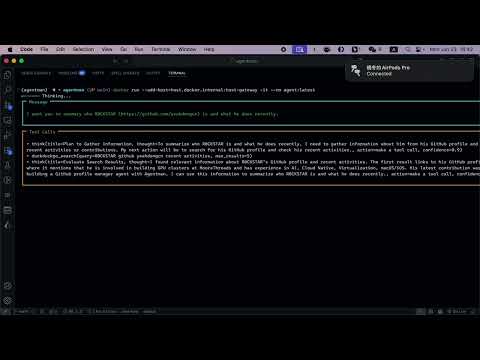 |
In these demos you’ll see:
- Creating multi-agent workflows with simple
Agentfilesyntax - Building and running agents with one command
- Real-time agent execution with URL fetching and content generation
- Streaming output and reasoning steps
🎯 Why Choose Agentman?
| Capability | Benefit |
|---|---|
| 🐳 Docker-Like Interface | Familiar build and run commands - no learning curve |
📝 Declarative Agentfile |
Define complex workflows in simple, readable syntax |
| 🔗 Multi-Agent Orchestration | Chains, routers, and parallel execution out-of-the-box |
| 🔌 Native MCP Integration | Zero-configuration access to 50+ MCP servers |
| 📄 Smart Prompt Loading | Auto-detect and load prompts from prompt.txt |
| 🚀 Production-Ready | Optimized Docker containers with dependency management |
| 🔐 Secure Secrets | Environment-based secret handling with templates |
| 🧪 Battle-Tested | 91%+ test coverage ensures reliability |
🌟 What Makes Agentman Different?
Traditional AI Development:
# Multiple config files, complex setup, manual orchestration
npm install langchain
pip install openai anthropic
# Configure tools manually...
# Write orchestration code...
# Handle deployment yourself...
With Agentman:
# One tool, one config file, one command
pip install agentman-mcp
echo "AGENT helper\nINSTRUCTION Help users" > Agentfile
agentman run --from-agentfile .
Result: Production-ready containerized agents in minutes, not days.
- Creating an
Agentfilewith multi-agent workflow - Building and running the agent with one command
- Real-time agent execution with URL fetching and social media post generation
📖 Usage Guide
🔨 Building Agents
Create agent applications from an Agentfile using familiar Docker-like commands:
# Basic build in current directory
agentman build .

# Custom Agentfile and output directory
agentman build -f MyAgentfile -o ./output .

# Build and create Docker image
agentman build --build-docker -t my-agent:v1.0 .
📁 Generated Output:
agent.py- Main application with runtime logicfastagent.config.yaml/.env- Framework configurationDockerfile- Optimized multi-stage containerrequirements.txt- Auto-generated dependenciesprompt.txt- Default prompt (if exists)
🏃 Running Agents
Deploy and execute your agents with flexible options:
# Run existing Docker image
agentman run my-agent:latest

# Build and run from Agentfile (recommended for development)
agentman run --from-agentfile ./my-project

# Interactive mode with port forwarding
agentman run -it -p 8080:8080 my-agent:latest

# Clean up automatically when done
agentman run --rm my-agent:latest
🏗️ Agentfile Reference
The Agentfile uses a Docker-like syntax to define your agent applications. Here’s a comprehensive reference:
Base Configuration
FROM yeahdongcn/agentman-base:latest   # Base image
FRAMEWORK fast-agent                   # AI framework (fast-agent or agno)
MODEL anthropic/claude-3-sonnet        # Default model for agents
EXPOSE 8080                            # Expose ports
CMD ["python", "agent.py"]             # Container startup command
Framework Configuration
Choose between supported AI agent frameworks:
FRAMEWORK fast-agent  # Default: FastAgent framework
FRAMEWORK agno        # Alternative: Agno framework
Framework Differences:
| Feature | FastAgent | Agno |
|---|---|---|
| API Style | Decorator-based (@fast.agent()) |
Class-based (Agent()) |
| Configuration | YAML files | Environment variables |
| Model Support | MCP-optimized models | Multi-provider support |
| Tool Integration | MCP-first | Rich ecosystem |
| Use Case | Production MCP workflows | Research & experimentation |
MCP Servers
Define external MCP servers that provide tools and capabilities:
MCP_SERVER filesystem
COMMAND uvx
ARGS mcp-server-filesystem
TRANSPORT stdio
ENV PATH_PREFIX /app/data
Agent Definitions
Create individual agents with specific roles and capabilities:
AGENT assistant
INSTRUCTION You are a helpful AI assistant specialized in data analysis
SERVERS filesystem brave
MODEL anthropic/claude-3-sonnet
USE_HISTORY true
HUMAN_INPUT false
Workflow Orchestration
Chains (Sequential processing):
CHAIN data_pipeline
SEQUENCE data_loader data_processor data_exporter
CUMULATIVE true
Routers (Conditional routing):
ROUTER query_router
AGENTS sql_agent api_agent file_agent
INSTRUCTION Route queries based on data source type
Orchestrators (Complex coordination):
ORCHESTRATOR project_manager
AGENTS developer tester deployer
PLAN_TYPE iterative
PLAN_ITERATIONS 5
HUMAN_INPUT true
Secrets Management
Secure handling of API keys and sensitive configuration:
# Environment variable references
SECRET OPENAI_API_KEY
SECRET ANTHROPIC_API_KEY

# Inline values (for development only)
SECRET DATABASE_URL postgresql://localhost:5432/mydb

# Grouped secrets with multiple values
SECRET CUSTOM_API
API_KEY your_key_here
BASE_URL https://api.example.com
TIMEOUT 30
Default Prompt Support
Agentman automatically detects and integrates prompt.txt files, providing zero-configuration default prompts for your agents.
🌟 Key Features
- 🔍 Automatic Detection: Simply place a
prompt.txtfile in your project root - 🐳 Docker Integration: Automatically copied into containers during build
- 🔄 Runtime Loading: Agent checks for and loads prompt content at startup
- ⚡ Zero Configuration: No Agentfile modifications required
📋 How It Works
- Build Time: Agentman scans your project directory for
prompt.txt - Container Build: If found, the file is automatically copied to the Docker image
- Runtime: Generated agent checks for the file and loads its content
- Execution: Prompt content is passed to
await agent(prompt_content)at startup
📁 Project Structure Example
my-agent/
├── Agentfile                # Agent configuration
├── prompt.txt              # ← Your default prompt (auto-loaded)
└── agent/                  # ← Generated output directory
    ├── agent.py            #   Generated agent with prompt loading logic
    ├── prompt.txt          #   ← Copied during build process
    ├── Dockerfile          #   Contains COPY prompt.txt instruction
    └── requirements.txt    #   Python dependencies
💡 Example Prompts
Task-Specific Prompt:
Analyze the latest GitHub releases for security vulnerabilities and generate a summary report.
User-Specific Prompt:
I am a GitHub user with the username "yeahdongcn" and I need help updating my GitHub profile information.
Complex Workflow Prompt:
Process the following workflow:
1. Clone the repository https://github.com/ollama/ollama
2. Checkout the latest release tag
3. Analyze the changelog for breaking changes
4. Generate a migration guide
🛠️ Generated Logic
When prompt.txt exists, Agentman automatically generates this logic in your agent.py:
import os

# Check for default prompt file
prompt_file = "prompt.txt"
if os.path.exists(prompt_file):
    with open(prompt_file, 'r', encoding='utf-8') as f:
        prompt_content = f.read().strip()
    if prompt_content:
        await agent(prompt_content)
This ensures your agent automatically executes the default prompt when the container starts.
🎯 Example Projects
1. GitHub Profile Manager (with Default Prompt)
A comprehensive GitHub profile management agent that automatically loads a default prompt.
Project Structure:
github-profile-manager/
├── Agentfile
├── prompt.txt          # Default prompt automatically loaded
└── agent/              # Generated files
    ├── agent.py
    ├── prompt.txt      # Copied during build
    └── ...
prompt.txt:
I am a GitHub user with the username "yeahdongcn" and I need help updating my GitHub profile information.
Key Features:
- Multi-agent chain for profile data collection, generation, and updating
- Automatic prompt loading from
prompt.txt - Integration with GitHub MCP server and fetch capabilities
2. GitHub Repository Maintainer
A specialized agent for maintaining GitHub repositories with automated release management.
Project Structure:
github-maintainer/
├── Agentfile
├── prompt.txt          # Default task: "Clone https://github.com/ollama/ollama and checkout the latest release tag."
└── agent/              # Generated files
Key Features:
- Release checking and validation
- Repository cloning and management
- Automated maintenance workflows
3. URL-to-Social Content Pipeline
A simple yet powerful content processing chain for social media.
Project Structure:
chain-ollama/
├── Agentfile
└── agent/              # Generated files
Key Features:
- URL content fetching and summarization
- Social media post generation (280 characters, no hashtags)
- Sequential agent chain processing
4. Advanced Multi-Agent System
Example of a more complex multi-agent system with routers and orchestrators:
FROM yeahdongcn/agentman-base:latest
MODEL anthropic/claude-3-sonnet

MCP_SERVER database
COMMAND uvx
ARGS mcp-server-postgres

AGENT classifier
INSTRUCTION Classify customer inquiries by type and urgency
SERVERS database

AGENT support_agent
INSTRUCTION Provide helpful customer support responses
SERVERS database

AGENT escalation_agent
INSTRUCTION Handle complex issues requiring human intervention
HUMAN_INPUT true

ROUTER support_router
AGENTS support_agent escalation_agent
INSTRUCTION Route based on inquiry complexity and urgency
🔧 Advanced Configuration
Custom Base Images
FROM python:3.11-slim
MODEL openai/gpt-4

# Your custom setup...
RUN apt-get update && apt-get install -y curl

AGENT custom_agent
INSTRUCTION Specialized agent with custom environment
Environment Variables
MCP_SERVER api_server
COMMAND python
ARGS -m my_custom_server
ENV API_TIMEOUT 30
ENV RETRY_COUNT 3
ENV DEBUG_MODE false
Multi-Model Setup
AGENT fast_responder
MODEL anthropic/claude-3-haiku
INSTRUCTION Handle quick queries

AGENT deep_thinker
MODEL anthropic/claude-3-opus
INSTRUCTION Handle complex analysis tasks
📁 Project Structure
agentman/
├── src/agentman/           # Core source code
│   ├── __init__.py
│   ├── cli.py             # Command-line interface
│   ├── agent_builder.py   # Agent building logic
│   ├── agentfile_parser.py # Agentfile parsing
│   └── common.py          # Shared utilities
├── examples/              # Example projects
│   ├── github-profile-manager/
│   ├── github-maintainer/
│   ├── chain-ollama/
│   └── chain-aliyun/
├── tests/                 # Comprehensive test suite
├── docker/               # Docker base images
└── README.md             # This file
🏗️ Building from Source
git clone https://github.com/yeahdongcn/agentman.git
cd agentman

# Install
make install
🧪 Testing
Agentman includes comprehensive test suites with high coverage:
# Run all tests
make test

# Run tests with coverage
make test-cov
Test Coverage
- 91%+ overall coverage across core modules
- Agent Builder: Comprehensive tests for agent generation and Docker integration
- Agentfile Parser: Complete syntax parsing and validation tests
- Prompt.txt Support: Full coverage of automatic prompt detection and loading
- Dockerfile Generation: Tests for container build optimization
🤝 Contributing
We welcome contributions! This project serves as a showcase of AI-driven development, being almost entirely coded by Claude Sonnet 4 + AI Agents. This demonstrates how AI can handle complex software development tasks including architecture design, implementation, testing, and documentation.
Development Workflow
- Fork and clone the repository
- Create a feature branch from
main - Write tests for new functionality (AI-generated tests achieve 91%+ coverage)
- Ensure tests pass with
make test - Format code with
make format - Submit a pull request with clear description
Areas for Contribution
- 🔌 New MCP server integrations
- 🤖 Additional agent workflow patterns
- 📚 Documentation and examples
- 🧪 Test coverage improvements
- 🐛 Bug fixes and optimizations
📋 System Requirements
- Python: 3.10+ (supports 3.10, 3.11, 3.12, 3.13)
- Docker: Required for containerization and running agents
- Operating System: Unix-like systems (Linux, macOS, WSL2)
- Memory: 2GB+ RAM recommended for multi-agent workflows
- Storage: 1GB+ available space for base images and dependencies
📄 License
MIT License - see LICENSE for details.
🙏 Acknowledgments
- 🤖 AI-Powered Development: This project showcases the future of software development - almost entirely coded by Claude Sonnet 4 + AI Agents, demonstrating how AI can handle complex architecture design, implementation, comprehensive testing, and documentation
- 🏗️ Built on FastAgent: Agentman leverages the fast-agent framework as its foundation, providing robust agent infrastructure and seamless MCP integration
- 🐳 Inspired by Podman: Just as Podman provides a Docker-compatible interface for containers, Agentman brings familiar containerization concepts to AI agent management
- 🧪 Test-Driven Excellence: Achieved 91%+ test coverage through AI-driven test generation, ensuring reliability and maintainability
- 🌟 Community-Driven: Built with the vision of making AI agent development accessible to everyone
🚀 Ready to Build the Future of AI?
Transform your ideas into production-ready AI agents in minutes
⚡ Quick Start • 🎯 Examples • 🤝 Contribute • 📚 Docs
Join the AI agent revolution - build smarter, deploy faster ✨
Community & Stats:


Dev Tools Supporting MCP
The following are the main code editors that support the Model Context Protocol. Click the link to visit the official website for more information.







