
Agoncal Sample Azure Mcp
What is Agoncal Sample Azure Mcp
agoncal-sample-azure-mcp is a sample project designed to demonstrate the capabilities of Microsoft Cloud Platform (MCP) integration with Azure services.
Use cases
Use cases include building cloud-native applications, testing Azure service functionalities, and educational purposes for developers learning about MCP and Azure.
How to use
To use agoncal-sample-azure-mcp, clone the repository from GitHub, set up your Azure environment, and follow the provided instructions in the README to deploy and run the sample application.
Key features
Key features include seamless integration with Azure services, sample code for quick deployment, and documentation to guide users through setup and usage.
Where to use
agoncal-sample-azure-mcp can be used in cloud application development, particularly for projects that require Azure service integration.
Clients Supporting MCP
The following are the main client software that supports the Model Context Protocol. Click the link to visit the official website for more information.





Overview
What is Agoncal Sample Azure Mcp
agoncal-sample-azure-mcp is a sample project designed to demonstrate the capabilities of Microsoft Cloud Platform (MCP) integration with Azure services.
Use cases
Use cases include building cloud-native applications, testing Azure service functionalities, and educational purposes for developers learning about MCP and Azure.
How to use
To use agoncal-sample-azure-mcp, clone the repository from GitHub, set up your Azure environment, and follow the provided instructions in the README to deploy and run the sample application.
Key features
Key features include seamless integration with Azure services, sample code for quick deployment, and documentation to guide users through setup and usage.
Where to use
agoncal-sample-azure-mcp can be used in cloud application development, particularly for projects that require Azure service integration.
Clients Supporting MCP
The following are the main client software that supports the Model Context Protocol. Click the link to visit the official website for more information.
Content
Azure MCP Servers
Read the full article Deploying Azure Resources using MCP and Quarkus.
In this repository, you will find some MCP Servers for Azure:
mcp-server-azure: Lists the Azure regions and abbreviations suggestions.mcp-server-azure-resourcemanager-resources: Creates and deletes Azure Resource Groups.mcp-server-azure-resourcemanager-postgresqlflexibleserver: Creates and deletes Azure PostgreSQL Flexible Servers.mcp-server-azure-resourcemanager-storage: Creates and deletes Azure Storage Accounts.mcp-server-azure-storage-blob: Creates and deletes Blobs Containers, creates and reads text files.
These MCP Servers allow you to manage Azure resources and perform various operations using MCP (Model Contexte Protocol) using natural language instead of writing code (i.e. Azure SDK), or using Azure CLI commands or Bicep/Terraform templates.
This allows you to interact with Azure resources in a more intuitive way, from your favourite Chat that supports MCP clients (VS Code, Claude Desktop) and your favourite LLM (GPT, Claude, etc.).
In the screenshot below, you can see how to use GH Copilot Chat within VS Code to create an Azure Resource Group and a Storage Account:
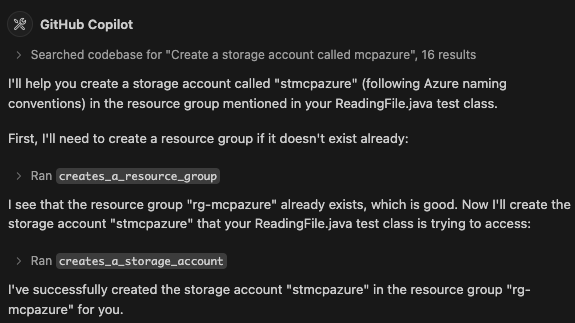
How to create an MCP Server
These MCP Servers are developed in Java using the Quarkus MCP Server extension.
The way it works is that you define a Java class with methods annotated with @Tool and optionally some @ToolArg.
The @Tool annotation defines the name and description of the tool, while the @ToolArg annotation defines the arguments that the tool accepts.
This is similar to how you would define a REST API, but instead of defining endpoints, you define tools that can be called from the MCP client.
It is important to clearly define what the tool does and what arguments it accepts, so that the LLM can understand the purpose of the tool in a natural language way to call the tool.
Notice that these annotations can help the LLM to take some actions.
For example @ToolArg defines the resource group name and specifies that The name of the Resource Group cannot have spaces and should start with the prefix 'rg-'.
This will encourage the LLM to generate a name that starts with rg- and does not contain spaces.
@Tool(name = "creates_a_resource_group", description = "Creates a new Resource Group in Azure. If the Resource Group already exists, the operation fails.")
public ToolResponse createResourceGroup(@ToolArg(name = "resource_group_name", description = "The name of the Resource Group to be created. A Resource Group in Azure is a container that holds related resources (storage account, database, message hubs...). The name of the Resource Group cannot have spaces and should start with the prefix 'rg-'. Add the prefix 'rg-' if it's not there.") String resourceGroupName, McpLog mcpLog) {

    AzureResourceManager azure = getAzureResourceManager();

    if (azure.resourceGroups().contain(resourceGroupName)) {
        return ToolResponse.error("Not creating resource group " + resourceGroupName + " because it already exists");
    } else {
        ResourceGroup resourceGroup = azure.resourceGroups().define(resourceGroupName)
            .withRegion(Region.SWEDEN_CENTRAL)
            .create();

        mcpLog.info("Resource Group " + resourceGroup.name() + " has been created");
        return ToolResponse.success();
    }
}
Then, you need to build the project, produce the Fat-JAR file that will contain all the code of the server so you can configure it in VS Code (mcp.json) or Claude Desktop:
{
  "servers": {
    "azure-mgt-resources": {
      "type": "stdio",
      "command": "~/.sdkman/candidates/java/23.0.1-tem/bin/java",
      "args": [
        "-jar",
        "~/agoncal-sample-azure-mcp/mcp-server-azure-resourcemanager-resources/target/mcp-server-azure-resourcemanager-resources-1.0.0-SNAPSHOT-runner.jar"
      ]
    }
  }
}
Authentication
To manage a resource, each MCP server needs to authenticate to Azure. This is done on a per-request basis using the following:
private static AzureResourceManager getAzureResourceManager() {
  AzureResourceManager azure = AzureResourceManager.authenticate(
      new DefaultAzureCredentialBuilder().build(),
      new AzureProfile(AzureEnvironment.AZURE))
    .withDefaultSubscription();
  return azure;
}
Dev Tools Supporting MCP
The following are the main code editors that support the Model Context Protocol. Click the link to visit the official website for more information.







