
Ai Create Mcp
What is Ai Create Mcp
ai-create-mcp is a Go-based tool designed to convert OpenAPI Specification (OAS) files into a Model Context Protocol (MCP) program, facilitating the generation of MCP-compliant code or configurations.
Use cases
Use cases for ai-create-mcp include generating backend services that adhere to MCP standards, automating the setup of new projects based on existing OAS files, and integrating with tools like Claude.app for enhanced functionality.
How to use
To use ai-create-mcp, install it via Go with the command ‘go install github.com/xxlv/ai-create-mcp’ or clone the repository and build it manually. Configure the tool using command-line flags to specify project details and OAS file paths.
Key features
Key features include the ability to convert OAS files to MCP protocol, customizable project settings (name, directory, version), optional integration with Claude.app, and an inspector tool for debugging and analysis.
Where to use
ai-create-mcp can be used in software development environments where there is a need to generate MCP-compliant applications from OpenAPI specifications, particularly in API management and microservices architecture.
Clients Supporting MCP
The following are the main client software that supports the Model Context Protocol. Click the link to visit the official website for more information.





Overview
What is Ai Create Mcp
ai-create-mcp is a Go-based tool designed to convert OpenAPI Specification (OAS) files into a Model Context Protocol (MCP) program, facilitating the generation of MCP-compliant code or configurations.
Use cases
Use cases for ai-create-mcp include generating backend services that adhere to MCP standards, automating the setup of new projects based on existing OAS files, and integrating with tools like Claude.app for enhanced functionality.
How to use
To use ai-create-mcp, install it via Go with the command ‘go install github.com/xxlv/ai-create-mcp’ or clone the repository and build it manually. Configure the tool using command-line flags to specify project details and OAS file paths.
Key features
Key features include the ability to convert OAS files to MCP protocol, customizable project settings (name, directory, version), optional integration with Claude.app, and an inspector tool for debugging and analysis.
Where to use
ai-create-mcp can be used in software development environments where there is a need to generate MCP-compliant applications from OpenAPI specifications, particularly in API management and microservices architecture.
Clients Supporting MCP
The following are the main client software that supports the Model Context Protocol. Click the link to visit the official website for more information.
Content
AI-Create-MCP (WIP)
This project is a work in progress and not yet complete.
ai-create-mcp is a Go-based tool that converts OpenAPI Specification (OAS) files into a Model Context Protocol (MCP) program. It provides a simple and efficient way to generate MCP-compliant code or configurations from OAS files, with customizable options for project setup and integrations.
Features
- Convert OAS files to MCP protocol.
- Customizable project name, directory, and version.
- Optional integration with Claude.app.
- Inspector tool for debugging and analysis.
Installation
To install the ai-create-mcp, ensure you have Go installed on your system. Then, run the following command:
go install github.com/xxlv/ai-create-mcp
Alternatively, clone the repository and build it manually:
git clone https://github.com/xxlv/ai-create-mcp.git
cd ai-create-mcp
go build
Usage
The tool is configured via command-line flags. Below is the list of available flags and their descriptions:
| Flag | Type | Default Value | Description |
|---|---|---|---|
-path |
string | "" |
Directory to create the project in |
-name |
string | "" |
Project name |
-oaspath |
string | "" |
Path to the OAS file |
-version |
string | "0.1.0" |
Server version |
-inspector |
bool | true |
Enable/disable the inspector tool |
-description |
string | "Simple mcp" |
Project description |
-claudeapp |
bool | true |
Enable/disable Claude.app integration |
-autoyes |
bool | true |
Enable/disable auto-confirmation |
Example
To generate an MCP project from an OAS file, run:
ai-create-mcp -path ./myproject -name my-mcp-app -oaspath ./openapi.yaml -version 1.0.0
This command will:
- Create a project in the
./myprojectdirectory. - Name the project
my-mcp-app. - Use the OAS file located at
./openapi.yaml. - Set the server version to
1.0.0.
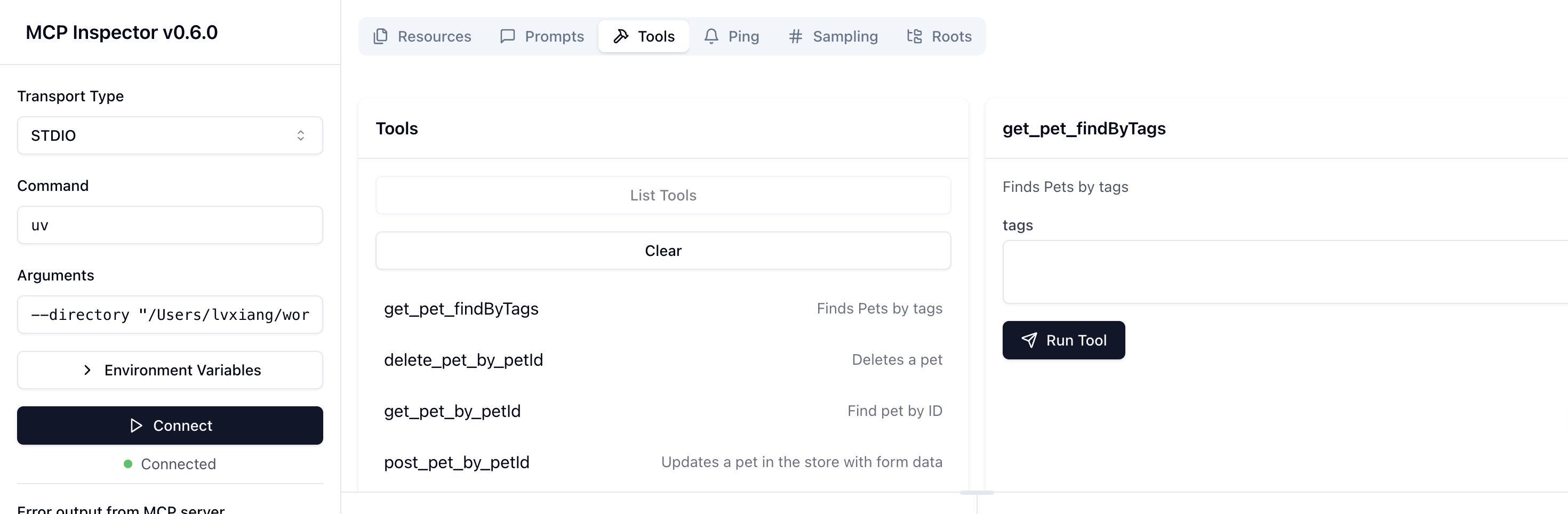
./testdata/openapi.ymlwill be converted into the following tools🔧
To disable the inspector and Claude.app integration, use:
ai-create-mcp -path ./myproject -name my-mcp-app -oaspath ./openapi.yaml -inspector=false -claudeapp=false
For a fully automated run (no prompts), enable -autoyes:
ai-create-mcp -path ./myproject -name my-mcp-app -oaspath ./openapi.yaml -autoyes
Configuration
The tool relies on the provided command-line flags for configuration. Ensure that:
- The
-oaspathpoints to a valid OAS file (e.g.,.yaml). - The
-pathdirectory is writable. - The
-nameadheres to valid naming conventions for your use case.
Contributing
Contributions are welcome! To contribute:
- Fork the repository.
- Create a new branch (
git checkout -b feature/your-feature). - Make your changes and commit them (
git commit -m "Add your feature"). - Push to the branch (
git push origin feature/your-feature). - Open a pull request.
License
This project is licensed under the MIT License. See the LICENSE file for details.
Contact
For questions or support, please open an issue on the GitHub repository.
Dev Tools Supporting MCP
The following are the main code editors that support the Model Context Protocol. Click the link to visit the official website for more information.







