
Airy
What is Airy
Airy is an AI tool designed for interacting with databases, allowing users to chat with their databases and generate SQL queries seamlessly.
Use cases
Use cases for Airy include developers generating SQL queries quickly, data analysts chatting with databases to retrieve insights, and teams running an MCP server for collaborative database management.
How to use
To use Airy, install it via Cargo by running ‘cargo install airy’. You can then run commands such as ‘airy chat’ to interact with your database or ‘airy mcp’ to run it as an MCP server.
Key features
Key features of Airy include terminal-based chat with databases, automatic SQL query generation, and the ability to run as an MCP server.
Where to use
Airy can be used in various fields that require database interaction, such as data analysis, application development, and database management.
Clients Supporting MCP
The following are the main client software that supports the Model Context Protocol. Click the link to visit the official website for more information.





Overview
What is Airy
Airy is an AI tool designed for interacting with databases, allowing users to chat with their databases and generate SQL queries seamlessly.
Use cases
Use cases for Airy include developers generating SQL queries quickly, data analysts chatting with databases to retrieve insights, and teams running an MCP server for collaborative database management.
How to use
To use Airy, install it via Cargo by running ‘cargo install airy’. You can then run commands such as ‘airy chat’ to interact with your database or ‘airy mcp’ to run it as an MCP server.
Key features
Key features of Airy include terminal-based chat with databases, automatic SQL query generation, and the ability to run as an MCP server.
Where to use
Airy can be used in various fields that require database interaction, such as data analysis, application development, and database management.
Clients Supporting MCP
The following are the main client software that supports the Model Context Protocol. Click the link to visit the official website for more information.
Content
airy

An AI tool for interacting with databases.
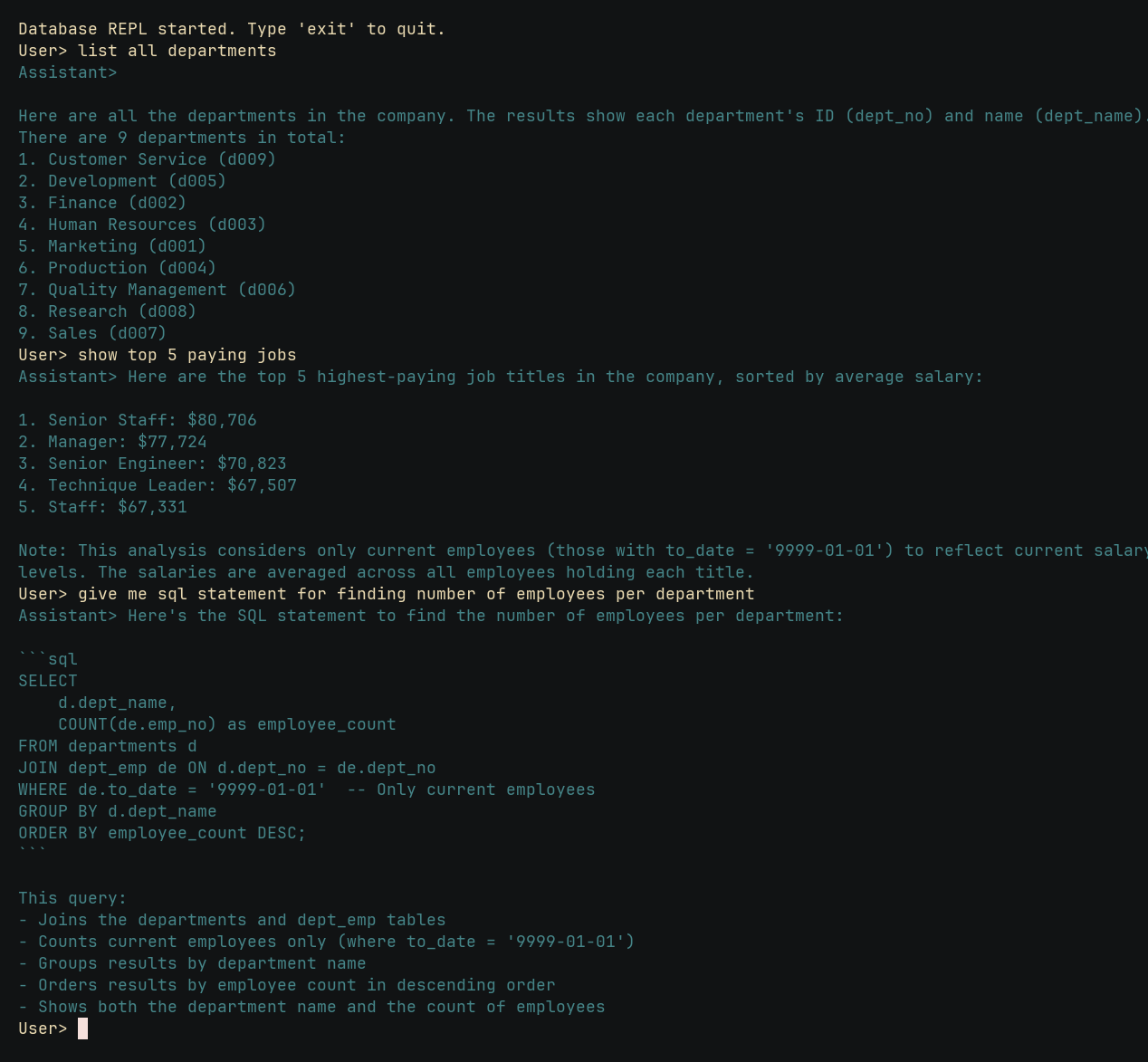
Features:
- Chat with your database in terminal.
- Generate SQL queries.
- Run as a MCP server.
Installation
Download from GitHub Releases.
Install using Cargo.
$ cargo install airy
Help
Usage: airy [OPTIONS] <COMMAND>

Commands:
  chat
  mcp
  help  Print this message or the help of the given subcommand(s)

Options:
      --openrouter-api-key <OPENROUTER_API_KEY>
          OpenRouter API Key [env: OPENROUTER_API_KEY=]
      --openrouter-base-url <OPENROUTER_BASE_URL>
          OpenRouter Base URL [env: OPENROUTER_BASE_URL=] [default: https://openrouter.ai/api/v1]
      --model <MODEL>
          OpenRouter model ID [env: MODEL=] [default: mistralai/devstral-small:free]
      --max-tokens <MAX_TOKENS>
          Max tokens [default: 1024]
      --mysql-url <MYSQL_URL>
          MySQL URL [env: MYSQL_URL=]
      --postgres-url <POSTGRES_URL>
          PostgreSQL URL [env: POSTGRES_URL=]
  -h, --help
          Print help
  -V, --version
          Print version
Usage: airy mcp [OPTIONS]

Options:
      --sse          Run as a server using SSE
      --port <PORT>  Set the Port [default: 8080]
  -h, --help         Print help
Development
Set up the dev environment.
$ just mysql-download-data # downloads test data

$ just docker-up # starts Docker containers
$ just migrate up # runs migrations to the latest version

$ just mysql-load-data # loads data into the database
Run chat.
$ OPENROUTER_API_KEY=[..] cargo run -- --mysql-url "mysql://employee:[email protected]:3306/employee" chat
You can also provide OPENROUTER_API_KEY, MYSQL_URL and other arguments as environment variables.
Run MCP server with server-sent events.
$ cargo run -- --mysql-url "mysql://employee:[email protected]:3306/employee" mcp --sse
You can test the MCP server with @modelcontextprotocol/inspector by connecting to http://localhost:8080/sse.
Dev Tools Supporting MCP
The following are the main code editors that support the Model Context Protocol. Click the link to visit the official website for more information.







