
Alfresco Mcp Poc
What is Alfresco Mcp Poc
Alfresco MCP PoC is a Proof of Concept project that integrates Alfresco as a Model Context Protocol server, demonstrating how to connect Alfresco’s capabilities to AI through standard client-server applications.
Use cases
Use cases include integrating AI functionalities into content management systems, automating document processing, and enhancing user interactions with AI-driven insights in enterprise applications.
How to use
To use Alfresco MCP PoC, clone the repository, run the Alfresco Docker Compose setup, and verify the deployment by accessing the Alfresco Share interface at http://localhost:8080/share.
Key features
Key features include a Docker Compose setup for Alfresco deployment, a Java-based client application for MCP interactions, and a Node.js-based server application for handling MCP requests.
Where to use
Alfresco MCP PoC can be used in fields such as content management, AI integration, and enterprise application development, where managing and processing content in conjunction with AI capabilities is required.
Clients Supporting MCP
The following are the main client software that supports the Model Context Protocol. Click the link to visit the official website for more information.





Overview
What is Alfresco Mcp Poc
Alfresco MCP PoC is a Proof of Concept project that integrates Alfresco as a Model Context Protocol server, demonstrating how to connect Alfresco’s capabilities to AI through standard client-server applications.
Use cases
Use cases include integrating AI functionalities into content management systems, automating document processing, and enhancing user interactions with AI-driven insights in enterprise applications.
How to use
To use Alfresco MCP PoC, clone the repository, run the Alfresco Docker Compose setup, and verify the deployment by accessing the Alfresco Share interface at http://localhost:8080/share.
Key features
Key features include a Docker Compose setup for Alfresco deployment, a Java-based client application for MCP interactions, and a Node.js-based server application for handling MCP requests.
Where to use
Alfresco MCP PoC can be used in fields such as content management, AI integration, and enterprise application development, where managing and processing content in conjunction with AI capabilities is required.
Clients Supporting MCP
The following are the main client software that supports the Model Context Protocol. Click the link to visit the official website for more information.
Content
Alfresco MCP Proof of Concept (PoC)
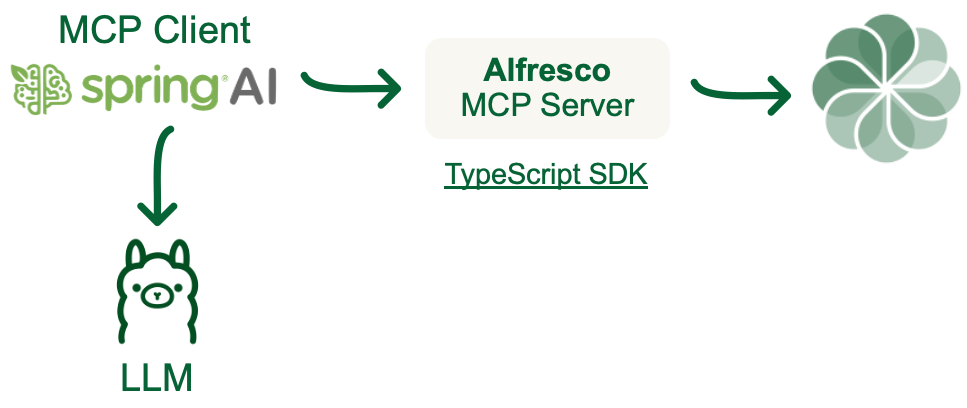
This repository contains a Proof of Concept (PoC) for integrating Alfresco as a Model Context Protocol server. The project demonstrates how to connect Alfresco capabilities to AI using standard client-server applications.
Project Structure
The repository is structured as follows:
alfresco/: Contains a Docker Compose setup for a standard Alfresco deployment. This must be run before the MCP integration.alfresco-mcp-client/: A Java-based client application for interacting with the MCP server using Spring AIalfresco-mcp-server/: A Node.js-based server application for handling MCP requests using TypeScript SDK
Prerequisites
Before running the project, ensure you have the following installed:
- Docker (version 20.10.0 or higher)
- Docker Compose (version 1.29.0 or higher)
- Java Development Kit (JDK) 17 or higher (for the client application)
- Node.js (version 18 or higher) and npm (for the server application)
- Git (for cloning the repository)
Getting Started
Step 1: Clone the Repository
Clone the repository to your local machine:
git clone https://github.com/aborroy/alfresco-mcp-poc.git
cd alfresco-mcp-poc
Step 2: Run the Alfresco Docker Compose
Navigate to the alfresco/ directory and start the Alfresco deployment using Docker Compose:
cd alfresco
docker-compose up --build --force-recreate
This will start the Alfresco Content Services stack, including the repository, Share, and other required services. Wait for all services to initialize completely.
Step 3: Verify Alfresco Deployment
Once the services are up, you can access the Alfresco Share interface at:
- Alfresco Share: http://localhost:8080/share
- Alfresco Repository: http://localhost:8080/alfresco
Use the default credentials (admin / admin) to log in.
Step 4: Set Up and Run the MCP Client
Start the Ollama server locally:
ollama serve
Navigate to the alfresco-mcp-client/ directory and follow the instructions in its README.md to set up and run the MCP client:
cd ../alfresco-mcp-client
mvn clean package
java -jar target/alfresco-mcp-client-0.8.0.jar
Customization
You can customize the Alfresco deployment by modifying the docker-compose.yml file in the alfresco/ directory. Additionally, the MCP server and client components can be configured to suit your specific use case.
Contributing
Contributions to this project are welcome! Please open an issue or submit a pull request with your proposed changes.
Dev Tools Supporting MCP
The following are the main code editors that support the Model Context Protocol. Click the link to visit the official website for more information.







