
Alibabacloud Dms Mcp Server
What is Alibabacloud Dms Mcp Server
AlibabaCloud DMS MCP Server is an AI-powered unified data management gateway designed to connect over 40 different data sources, providing a multi-cloud universal data management solution. It focuses on secure data access across various sources, including full support for Alibaba Cloud’s own database services and mainstream databases.
Use cases
DMS MCP Server serves DBAs and developers who need centralized management and access to diverse databases across different environments. Use cases include querying information across multiple database instances, performing data retrieval, and executing natural language queries to facilitate complex data interactions.
How to use
To use the DMS MCP Server, download the source code from GitHub or install via PyPI. Configure the server by specifying the connection settings in a JSON configuration file for either multi-instance or single database modes. The user must provide Alibaba Cloud credentials and, if needed, a connection string for direct database access.
Key features
Key features of DMS MCP include natural language to SQL (NL2SQL) capabilities, automatic routing of SQL queries to the correct data sources, fine-grained security and access control, and auditing capabilities. It also allows for code generation and data migration tasks, simplifying complex data management scenarios.
Where to use
DMS MCP Server is suitable for environments where multiple database management is necessary, such as production, testing, and development. It is especially useful for organizations that operate using diverse database technologies like MySQL, Oracle, PostgreSQL, and others within both Alibaba Cloud and external data ecosystems.
Clients Supporting MCP
The following are the main client software that supports the Model Context Protocol. Click the link to visit the official website for more information.





Overview
What is Alibabacloud Dms Mcp Server
AlibabaCloud DMS MCP Server is an AI-powered unified data management gateway designed to connect over 40 different data sources, providing a multi-cloud universal data management solution. It focuses on secure data access across various sources, including full support for Alibaba Cloud’s own database services and mainstream databases.
Use cases
DMS MCP Server serves DBAs and developers who need centralized management and access to diverse databases across different environments. Use cases include querying information across multiple database instances, performing data retrieval, and executing natural language queries to facilitate complex data interactions.
How to use
To use the DMS MCP Server, download the source code from GitHub or install via PyPI. Configure the server by specifying the connection settings in a JSON configuration file for either multi-instance or single database modes. The user must provide Alibaba Cloud credentials and, if needed, a connection string for direct database access.
Key features
Key features of DMS MCP include natural language to SQL (NL2SQL) capabilities, automatic routing of SQL queries to the correct data sources, fine-grained security and access control, and auditing capabilities. It also allows for code generation and data migration tasks, simplifying complex data management scenarios.
Where to use
DMS MCP Server is suitable for environments where multiple database management is necessary, such as production, testing, and development. It is especially useful for organizations that operate using diverse database technologies like MySQL, Oracle, PostgreSQL, and others within both Alibaba Cloud and external data ecosystems.
Clients Supporting MCP
The following are the main client software that supports the Model Context Protocol. Click the link to visit the official website for more information.
Content
English | 中文
AlibabaCloud DMS MCP Server
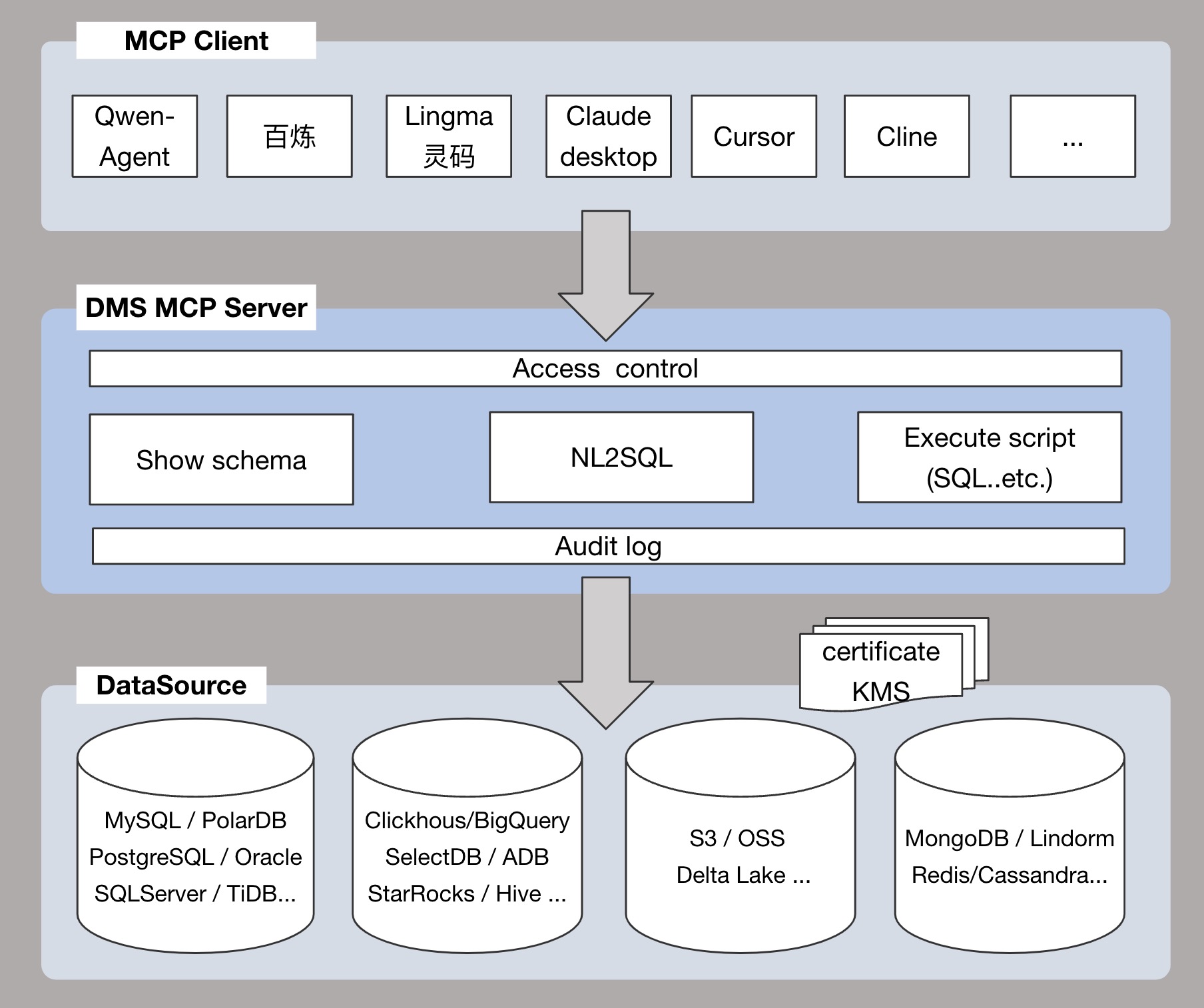
AI-powered unified data management gateway that supports connection to over 40+ data sources, serving as a multi-cloud universal data MCP Server to address cross-source data secure access in one-stop solution.
- Supports full Alibaba Cloud series: RDS, PolarDB, ADB series, Lindorm series, TableStore series, MaxCompute series.
- Supports mainstream databases/warehouses: MySQL, MariaDB, PostgreSQL, Oracle, SQLServer, Redis, MongoDB, StarRocks, Clickhouse, SelectDB, DB2, OceanBase, Gauss, BigQuery, etc.
Core Features
Provides AI with a unified data access layer and metadata access layer, solving through standardized interfaces:
- Maintenance costs caused by data source fragmentation
- Compatibility issues between heterogeneous protocols
- Security risks from uncontrolled account permissions and non-auditable operations
Key features via MCP include:
- NL2SQL: Execute SQL via natural language to obtain data results
- Code Generation: Retrieve schema information through this service to generate DAO code or perform structural analysis
- Data Retrieval: Automatically route SQL to accurate data sources for business support
- Security: Fine-grained access control and auditability
- Data Migration: Configure data migration tasks
Usage Methods
DMS MCP Server currently supports two usage modes.
Mode One: Multi-instance Mode
- Supports adding instances to DMS, allowing access to multiple database instances.
- Suitable for scenarios where managing and accessing multiple database instances is required.
Scenario Example:
You are a company DBA who needs to manage and access various types of database instances (e.g., MySQL, Oracle, PostgreSQL) in production, test, and development environments. With DMS MCP Server, you can achieve unified access and centralized management of these heterogeneous databases.
Typical Question Examples:
- Get a list of all databases named
test. - Retrieve details of the
test_dbdatabase from themyHost:myPortinstance. - What tables are in the
test_dbdatabase? - Use a tool to query data from the
test_dbdatabase and answer: “What is today’s user traffic?”
Mode Two: Single Database Mode
- Directly specify the target database by configuring the
CONNECTION_STRINGparameter in the server (format:dbName@host:port). - Suitable for scenarios that focus on accessing a single database.
Scenario Example:
You are a developer who frequently accesses a fixed database (e.g., [email protected]:3306) for development and testing. Set the CONNECTION_STRING parameter in the DMS MCP Server configuration as follows:
CONNECTION_STRING = mydb@192.168.1.100:3306
Afterward, every time the service starts, the DMS MCP Server will directly access this specified database without needing to switch instances.
Typical Question Examples:
- What tables do I have?
- Show the field structure of the
test_tabletable. - Retrieve the first 20 rows from the
test_tabletable. - Use a tool to answer: “What is today’s user traffic?”
Tool List
| Tool Name | Description | Applicable Mode |
|---|---|---|
| addInstance | Adds an instance to DMS. Only Aliyun instances are supported. | Multi-instance Mode |
| listInstances | Search for instances from DMS. | Multi-instance Mode |
| getInstance | Retrieves detailed information about an instance based on host and port. | Multi-instance Mode |
| searchDatabase | Searches databases based on schemaName. | Multi-instance Mode |
| getDatabase | Retrieves detailed information about a specific database. | Multi-instance Mode |
| listTable | Lists tables under a specified database. | Multi-instance Mode & Single Database Mode |
| getTableDetailInfo | Retrieves detailed information about a specific table. | Multi-instance Mode & Single Database Mode |
| executeScript | Executes an SQL script and returns the result. | Multi-instance Mode & Single Database Mode |
| nl2sql | Converts natural language questions into SQL queries. | Multi-instance Mode |
| askDatabase | Natural language querying of a database (NL2SQL + execute SQL). | Single Database Mode |
| configureDtsJob | Configures a DTS migration task | Multi-instance Mode |
| startDtsJob | Starts a DTS migration task | Multi-instance Mode |
| getDtsJob | Views details of a DTS migration task | Multi-instance Mode |
For a full list of tools, please refer to: Tool List
Supported Data Sources
| DataSource/Tool | NL2SQL nlsql | Execute script executeScript | Show schema getTableDetailInfo | Access control default | Audit log default |
|---|---|---|---|---|---|
| MySQL | ✅ | ✅ | ✅ | ✅ | ✅ |
| MariaDB | ✅ | ✅ | ✅ | ✅ | ✅ |
| PostgreSQL | ✅ | ✅ | ✅ | ✅ | ✅ |
| Oracle | ✅ | ✅ | ✅ | ✅ | ✅ |
| SQLServer | ✅ | ✅ | ✅ | ✅ | ✅ |
| Redis | ❌ | ❌ | ✅ | ✅ | ✅ |
| MongoDB | ❌ | ❌ | ✅ | ✅ | ✅ |
| StarRocks | ✅ | ✅ | ✅ | ✅ | ✅ |
| Clickhouse | ✅ | ✅ | ✅ | ✅ | ✅ |
| SelectDB | ✅ | ✅ | ✅ | ✅ | ✅ |
| DB2 | ✅ | ✅ | ✅ | ✅ | ✅ |
| OceanBase | ✅ | ✅ | ✅ | ✅ | ✅ |
| Gauss | ✅ | ✅ | ✅ | ✅ | ✅ |
| BigQuery | ✅ | ✅ | ✅ | ✅ | ✅ |
| PolarDB | ✅ | ✅ | ✅ | ✅ | ✅ |
| PolarDB-X | ✅ | ✅ | ✅ | ✅ | ✅ |
| AnalyticDB | ✅ | ✅ | ✅ | ✅ | ✅ |
| Lindorm | ✅ | ✅ | ✅ | ✅ | ✅ |
| TableStore | ❌ | ❌ | ✅ | ✅ | ✅ |
| Maxcompute | ✅ | ✅ | ✅ | ✅ | ✅ |
| Hologres | ✅ | ✅ | ✅ | ✅ | ✅ |
Prerequisites
- uv is installed
- Python 3.10+ is installed
- An AK/SK or STS Token with access rights to Alibaba Cloud DMS(AliyunDMSFullAccess)
Pre-configuration
Before accessing a database instance via DMS, you must first add the instance to DMS.
There are two methods to add an instance:
Method One: Use the addInstance tool provided by DMS MCP to add an instance
The DMS MCP Server provides the addInstance tool for quickly adding an instance to DMS.
For more details, see the description of the addInstance tool in the “Tool List.”
Method Two: Add an instance via the DMS console
- Log in to the DMS Console.
- On the home page of the console, click the Add Instance icon in the database instance area on the left.
- On the Add Instance page, enter the instance information (e.g., instance address, port, username, password).
- Click Submit to complete the instance addition.
Getting Started
Option 1: Run from Source Code
Download the Code
git clone https://github.com/aliyun/alibabacloud-dms-mcp-server.git
Configure MCP Client
Add the following content to the configuration file:
Multi-instance Mode
{
  "mcpServers": {
    "dms-mcp-server": {
      "command": "uv",
      "args": [
        "--directory",
        "/path/to/alibabacloud-dms-mcp-server/src/alibabacloud_dms_mcp_server",
        "run",
        "server.py"
      ],
      "env": {
        "ALIBABA_CLOUD_ACCESS_KEY_ID": "access_id",
        "ALIBABA_CLOUD_ACCESS_KEY_SECRET": "access_key",
        "ALIBABA_CLOUD_SECURITY_TOKEN": "sts_security_token optional, required when using STS Token"
      }
    }
  }
}
Single Database Mode
{
  "mcpServers": {
    "dms-mcp-server": {
      "command": "uv",
      "args": [
        "--directory",
        "/path/to/alibabacloud-dms-mcp-server/src/alibabacloud_dms_mcp_server",
        "run",
        "server.py"
      ],
      "env": {
        "ALIBABA_CLOUD_ACCESS_KEY_ID": "access_id",
        "ALIBABA_CLOUD_ACCESS_KEY_SECRET": "access_key",
        "ALIBABA_CLOUD_SECURITY_TOKEN": "sts_security_token optional, required when using STS Token",
        "CONNECTION_STRING": "dbName@host:port"
      }
    }
  }
}
Option 2: Run via PyPI Package
Multi-instance Mode
{
  "mcpServers": {
    "dms-mcp-server": {
      "command": "uvx",
      "args": [
        "alibabacloud-dms-mcp-server@latest"
      ],
      "env": {
        "ALIBABA_CLOUD_ACCESS_KEY_ID": "access_id",
        "ALIBABA_CLOUD_ACCESS_KEY_SECRET": "access_key",
        "ALIBABA_CLOUD_SECURITY_TOKEN": "sts_security_token optional, required when using STS Token"
      }
    }
  }
}
Single Database Mode
{
  "mcpServers": {
    "dms-mcp-server": {
      "command": "uvx",
      "args": [
        "alibabacloud-dms-mcp-server@latest"
      ],
      "env": {
        "ALIBABA_CLOUD_ACCESS_KEY_ID": "access_id",
        "ALIBABA_CLOUD_ACCESS_KEY_SECRET": "access_key",
        "ALIBABA_CLOUD_SECURITY_TOKEN": "sts_security_token optional, required when using STS Token",
        "CONNECTION_STRING": "dbName@host:port"
      }
    }
  }
}
Contact us
For any questions or suggestions, join the Alibaba Cloud DMS MCP Group (DingTalk Group ID: 129600002740) .
License
This project is licensed under the Apache 2.0 License.
Dev Tools Supporting MCP
The following are the main code editors that support the Model Context Protocol. Click the link to visit the official website for more information.







