
Api2mcptools
What is Api2mcptools
api2mcptools is a Node.js package designed to convert APIs into tools that comply with the Model Context Protocol (MCP).
Use cases
Use cases include building custom tools for API interactions, automating data retrieval from external services, and integrating multiple APIs into a unified MCP-compliant application.
How to use
To use api2mcptools, you can either run it quickly with npx by setting the CONFIG_JSON_PATH environment variable or install it locally or globally using npm.
Key features
Key features include the ability to configure multiple tools, define input schemas, and make API requests using Axios with customizable configurations.
Where to use
api2mcptools can be used in various fields such as software development, API integration, and tool automation, particularly where MCP compliance is required.
Clients Supporting MCP
The following are the main client software that supports the Model Context Protocol. Click the link to visit the official website for more information.





Overview
What is Api2mcptools
api2mcptools is a Node.js package designed to convert APIs into tools that comply with the Model Context Protocol (MCP).
Use cases
Use cases include building custom tools for API interactions, automating data retrieval from external services, and integrating multiple APIs into a unified MCP-compliant application.
How to use
To use api2mcptools, you can either run it quickly with npx by setting the CONFIG_JSON_PATH environment variable or install it locally or globally using npm.
Key features
Key features include the ability to configure multiple tools, define input schemas, and make API requests using Axios with customizable configurations.
Where to use
api2mcptools can be used in various fields such as software development, API integration, and tool automation, particularly where MCP compliance is required.
Clients Supporting MCP
The following are the main client software that supports the Model Context Protocol. Click the link to visit the official website for more information.
Content
@terryliyongjie/api2mcptools

A Node.js package that converts APIs to MCP (Model Context Protocol) tools.
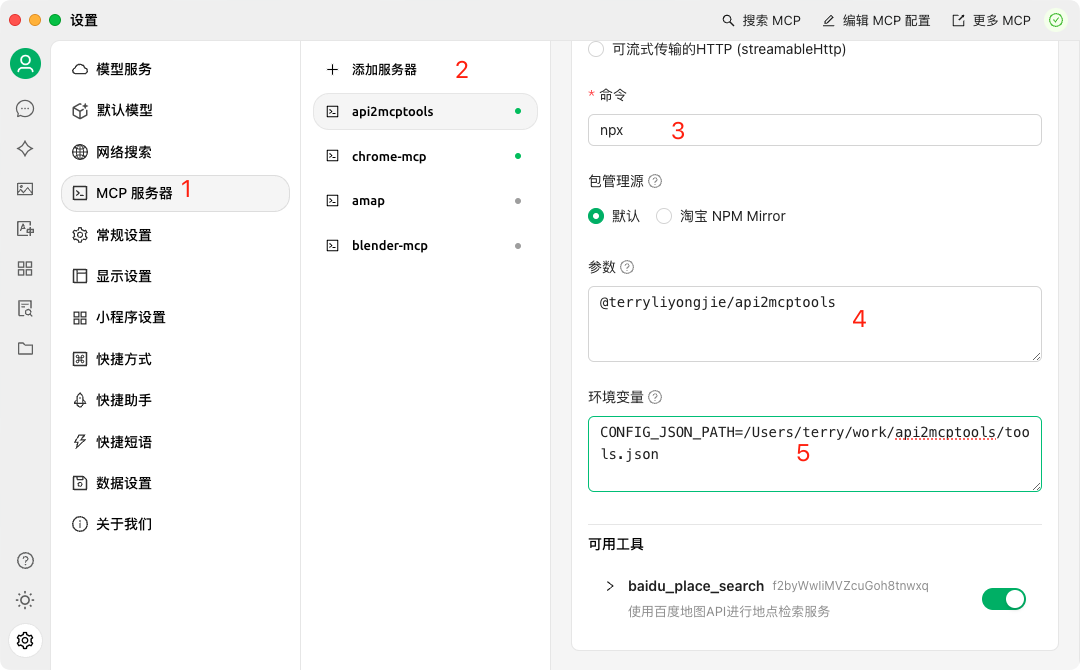
- CherryStudio Example CherryStudio
Installation
Option 1: Quick Start with npx (Recommended)
set CONFIG_JSON_PATH=example.json
npx @terryliyongjie/api2mcptools
Option 2: Traditional Installation
# Install locally in your project
npm install @terryliyongjie/mcp-tools

# Or install globally to use as a CLI tool
npm install -g @terryliyongjie/mcp-tools
Configuration
Environment Variables
# Required: Path to your configuration JSON file
CONFIG_JSON_PATH=example.json
Example configuration file (example.json):
// Single tool configuration
{
    "name": "tool_name",
    "description": "Tool description",
    "inputSchema": {
        "type": "object",
        "properties": {
            "param1": {
                "type": "string",
                "description": "Parameter description"
            }
        },
        "required": ["param1"]
    },
    "axiosConfig": {
        "url": "https://api.example.com/endpoint",
        "method": "get",
        "params": {
            "key": "your_api_key"
        }
    }
}

// Or multiple tools configuration
[
    {
        "name": "baidu_place_search",
        "description": "使用百度地图API进行地点检索服务",
        "inputSchema": {
            "type": "object",
            "properties": {
                "query": {
                    "type": "string",
                    "description": "检索关键字"
                },
                "region": {
                    "type": "string",
                    "description": "检索行政区划区域"
                }
            },
            "required": ["query", "region"]
        },
        "axiosConfig": {
            "url": "https://api.map.baidu.com/place/v2/search",
            "method": "get",
            "params": {
                "ak": "your_baidu_map_key"
            }
        }
    },
    // More tools...
]
Features
- Convert JSON APIs to MCP tools
- Easy integration with MCP ecosystem
- Support for various API types
- Command-line interface (CLI) support
Usage
As a CLI Tool
After installing globally, you can use the command directly in your terminal:
mcp-tools [options]
As a Module
// Example code coming soon
Development
# Install dependencies
npm install

# Build the project
npm run build

# Run in development mode
npm run dev

# Watch mode during development
npm run watch

# Run MCP inspector
npm run inspector
License
MIT
Dev Tools Supporting MCP
The following are the main code editors that support the Model Context Protocol. Click the link to visit the official website for more information.







