
Aps Mcp Server
What is Aps Mcp Server
aps-mcp-server is a minimal prototype MCP server that integrates Autodesk ACC APIs using the Autodesk Platform Services (APS) toolkit.
Use cases
Use cases for aps-mcp-server include automating workflows with Autodesk APIs, integrating design tools with cloud services, and developing custom applications that leverage Autodesk’s capabilities.
How to use
To use aps-mcp-server, you can set it up using either the ‘uv’ tool or ‘pip’. After installing dependencies and configuring your credentials in the .env file, you can run the server using the command ‘python aps_dm_server.py’.
Key features
Key features of aps-mcp-server include easy integration with Autodesk APIs, a minimal setup process, and compatibility with Claude Desktop for enhanced functionality.
Where to use
aps-mcp-server can be used in fields such as software development, architecture, engineering, and construction, where Autodesk tools and APIs are utilized.
Clients Supporting MCP
The following are the main client software that supports the Model Context Protocol. Click the link to visit the official website for more information.





Overview
What is Aps Mcp Server
aps-mcp-server is a minimal prototype MCP server that integrates Autodesk ACC APIs using the Autodesk Platform Services (APS) toolkit.
Use cases
Use cases for aps-mcp-server include automating workflows with Autodesk APIs, integrating design tools with cloud services, and developing custom applications that leverage Autodesk’s capabilities.
How to use
To use aps-mcp-server, you can set it up using either the ‘uv’ tool or ‘pip’. After installing dependencies and configuring your credentials in the .env file, you can run the server using the command ‘python aps_dm_server.py’.
Key features
Key features of aps-mcp-server include easy integration with Autodesk APIs, a minimal setup process, and compatibility with Claude Desktop for enhanced functionality.
Where to use
aps-mcp-server can be used in fields such as software development, architecture, engineering, and construction, where Autodesk tools and APIs are utilized.
Clients Supporting MCP
The following are the main client software that supports the Model Context Protocol. Click the link to visit the official website for more information.
Content
APS MCP Server
A minimal MCP server integrating Autodesk ACC APIs via APS toolkit.
Video Overview
Setup
Option 1: Using uv (recommended)
-
Install uv if you don’t have it:
curl -LsSf https://astral.sh/uv/install.sh | sh -
Copy
.env.sampleto.envand fill in your credentials:cp .env.sample .env -
Create and activate a virtual environment:
uv venv # On Windows: .venv\Scripts\activate # On Unix or MacOS: source .venv/bin/activate -
Install dependencies:
uv pip install -r requirements.txt -
Run the MCP server:
python aps_dm_server.py
Option 2: Using pip
-
Copy
.env.sampleto.envand fill in your credentials:cp .env.sample .env -
Create and activate a virtual environment:
python -m venv .venv # On Windows: .venv\Scripts\activate # On Unix or MacOS: source .venv/bin/activate -
Install dependencies:
pip install -r requirements.txt -
Run the MCP server:
python aps_dm_server.py
Integration with Claude Desktop
To use this MCP server with Claude Desktop:
-
Make sure you have Claude Desktop installed (download from Claude.ai)
-
Open your Claude Desktop configuration file:
code ~/Library/Application\ Support/Claude/claude_desktop_config.jsonCreate it if it doesn’t exist.
-
Add the appropriate configuration:
Option A: Direct Python from virtual environment (most reliable)
{
  "mcpServers": {
    "acc": {
      "command": "/ABSOLUTE/PATH/TO/YOUR/.venv/bin/python",
      "args": [
        "/ABSOLUTE/PATH/TO/YOUR/aps_dm_server.py"
      ],
      "env": {
        "PYTHONPATH": "/ABSOLUTE/PATH/TO/YOUR/PROJECT/FOLDER"
      }
    }
  }
}
Replace paths with absolute paths to your environment and project.
Option B: Using uv
{
  "mcpServers": {
    "acc": {
      "command": "/ABSOLUTE/PATH/TO/uv",
      "args": [
        "--directory",
        "/ABSOLUTE/PATH/TO/YOUR/PROJECT/FOLDER",
        "run",
        "aps_dm_server.py"
      ]
    }
  }
}
Find the absolute path to
uvby runningwhich uvin your terminal. -
Save the file and restart Claude Desktop completely
-
Look for the hammer icon in Claude Desktop to access the ACC tools
macOS Specific Setup
macOS users may encounter permission issues when integrating with Claude Desktop:
-
Permission Issues: If you see errors like
Operation not permittedin logs:- Open System Preferences → Privacy & Security → Full Disk Access
- Add Terminal and Claude applications by clicking the “+” button
-
Working Directory Issues: If you see errors about current directory not existing:
- Always use absolute paths in your configuration
- Consider storing projects in locations with fewer permissions restrictions (e.g., Documents folder)
-
Finding the correct Python path: To get the exact path to your virtual environment’s Python:
source .venv/bin/activate # Activate your environment first which python # Get the full path -
Checking logs for troubleshooting:
tail -n 50 -f ~/Library/Logs/Claude/mcp*.log
Requirements
- Python 3.11 or higher
- Dependencies listed in requirements.txt
System Architecture
This MCP server acts as a bridge between Claude AI and the Autodesk APS platform. The diagram below illustrates how data flows through the system:
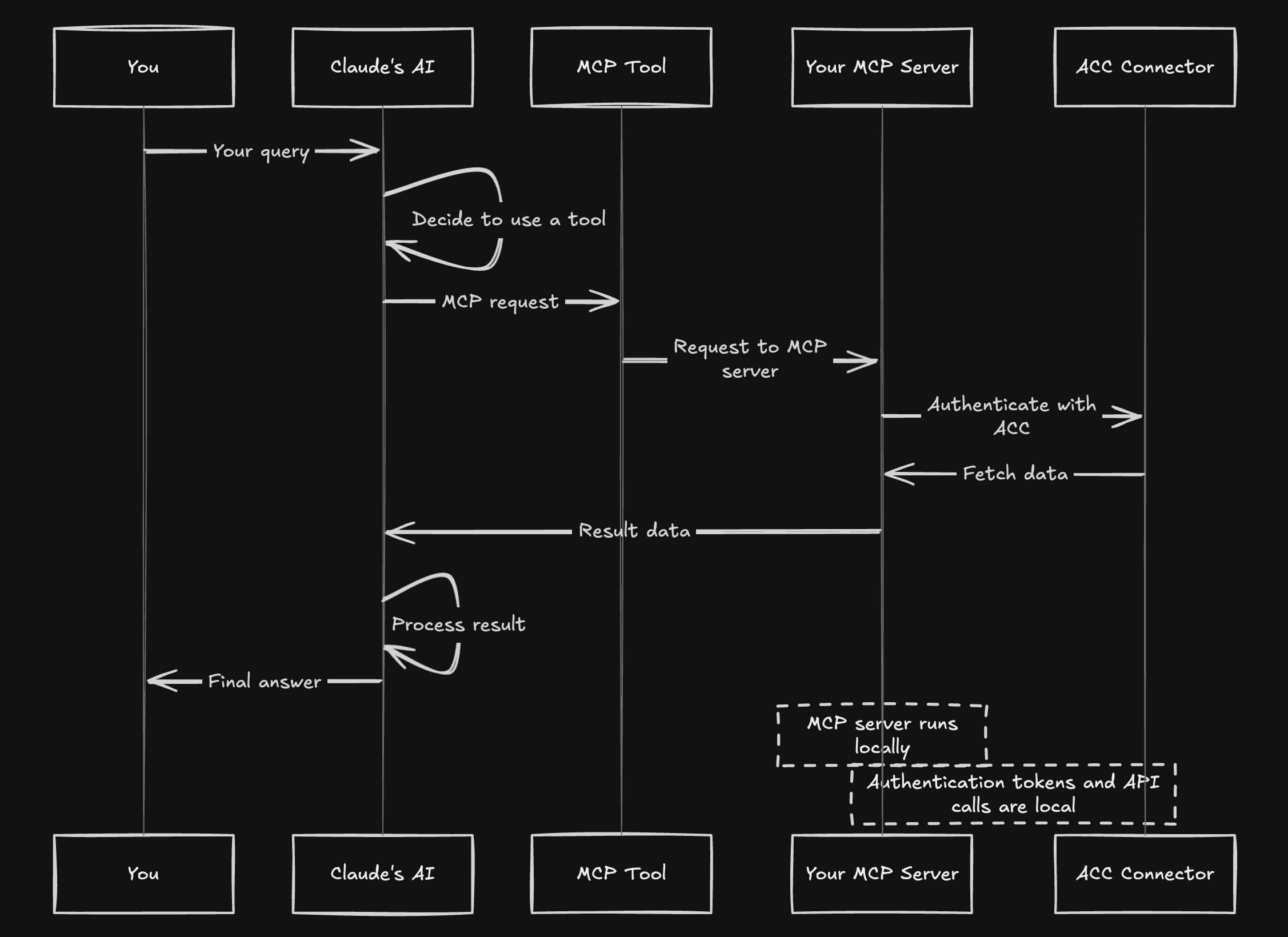
- Your query to Claude triggers tool selection
- Claude sends MCP requests to your local server
- The MCP server connects to APS/ACC using your credentials
- Data flows back to Claude which processes and formats results
Available Tools
The MCP server exposes the following tools:
get_hubs: Get all available hubsget_projects: Get all projects within a hubget_project_files: Get files in a specific folder of a projectget_versions: Get version information for a specific item
Troubleshooting
If you encounter issues with Claude Desktop integration:
-
Server not showing up:
- Check configuration file syntax (valid JSON)
- Use absolute paths everywhere
- Restart Claude Desktop completely
-
Permission errors:
- Grant Full Disk Access to Terminal and Claude
- Try using Python directly rather than through uv
- Try moving the project to a location with fewer restrictions
-
Environment errors:
- Ensure all dependencies are installed
- Try using the direct path to Python in your virtual environment
- Check your
.envfile has correct Autodesk credentials
-
Logs check:
tail -n 50 -f ~/Library/Logs/Claude/mcp*.log -
Manual testing:
Test your server works by running it directly:cd /path/to/your/project source .venv/bin/activate python aps_dm_server.py
Using with OpenAI Agents SDK
This project includes integration with the OpenAI Agents SDK, allowing you to use the MCP server with an OpenAI agent.
-
Make sure your
.envfile includes your OpenAI API key:OPENAI_API_KEY=your_openai_api_key -
Install the additional dependencies:
uv pip install openai>=1.31.0 -
Run the agent:
python main_agent.py
This will start an interactive session where you can ask the agent questions about your Autodesk projects.
Dependencies and Licensing
This project uses the following open source components:
- aps-toolkit - A library for Autodesk Platform Services (GPL-3.0)
- mcp - Multimodal Capability Protocol implementation
- python-dotenv - Environment variable management
- openai and openai-agents - OpenAI integration
This project is licensed under the GNU General Public License v3.0 as required by the aps-toolkit dependency.
Disclaimer
This software is provided “as is”, without warranty of any kind, express or implied. This is a prototype for demonstration purposes only. The author takes no responsibility for any damages or issues that may arise from using this software. Use at your own risk.
Dev Tools Supporting MCP
The following are the main code editors that support the Model Context Protocol. Click the link to visit the official website for more information.







