
Ardupilot Mcp Server Sandbox
What is Ardupilot Mcp Server Sandbox
The ardupilot-mcp-server-sandbox is a sandbox environment for the MCP (Model Context Protocol) server that allows users to interact with ArduPilot using natural language. It is compatible with MCP-enabled chat environments such as Claude Desktop and Cline.
Use cases
Use cases for ardupilot-mcp-server-sandbox include simulating drone missions, testing autonomous flight behaviors, and integrating natural language processing capabilities into drone control systems.
How to use
To use ardupilot-mcp-server-sandbox, install Python 3.10 or higher, set up the required dependencies using ‘pip install -r requirements.txt’, and run the server with ‘python ardupilot_mcp_server.py’. You can also integrate it with chat applications like Claude Desktop or Cline by following the setup instructions provided in the documentation.
Key features
Key features of ardupilot-mcp-server-sandbox include support for the MCP protocol, compatibility with various operating systems (Windows, macOS, Linux), and the ability to simulate ArduPilot drones using the Mission Planner simulator.
Where to use
ardupilot-mcp-server-sandbox can be used in various fields such as drone simulation, autonomous vehicle development, and robotics research, where natural language interaction with control systems is beneficial.
Clients Supporting MCP
The following are the main client software that supports the Model Context Protocol. Click the link to visit the official website for more information.





Overview
What is Ardupilot Mcp Server Sandbox
The ardupilot-mcp-server-sandbox is a sandbox environment for the MCP (Model Context Protocol) server that allows users to interact with ArduPilot using natural language. It is compatible with MCP-enabled chat environments such as Claude Desktop and Cline.
Use cases
Use cases for ardupilot-mcp-server-sandbox include simulating drone missions, testing autonomous flight behaviors, and integrating natural language processing capabilities into drone control systems.
How to use
To use ardupilot-mcp-server-sandbox, install Python 3.10 or higher, set up the required dependencies using ‘pip install -r requirements.txt’, and run the server with ‘python ardupilot_mcp_server.py’. You can also integrate it with chat applications like Claude Desktop or Cline by following the setup instructions provided in the documentation.
Key features
Key features of ardupilot-mcp-server-sandbox include support for the MCP protocol, compatibility with various operating systems (Windows, macOS, Linux), and the ability to simulate ArduPilot drones using the Mission Planner simulator.
Where to use
ardupilot-mcp-server-sandbox can be used in various fields such as drone simulation, autonomous vehicle development, and robotics research, where natural language interaction with control systems is beneficial.
Clients Supporting MCP
The following are the main client software that supports the Model Context Protocol. Click the link to visit the official website for more information.
Content
ArduPilot MCP Server Sandbox
ArduPilot ドローンをLLMと連携して自然言語で操作するMCPサーバーです。
Claude DesktopやCline などMCPホストから利用可能です。
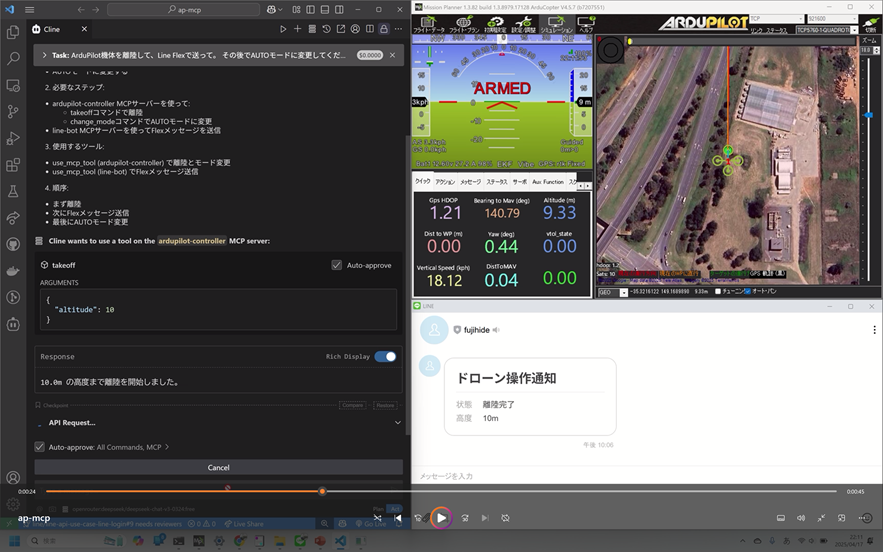
https://youtu.be/y1WE1cDC54Y?si=iy6vdGl38aTRcFcF
動作環境(SITLテスト可能)
- ArduPilot (SITL or 実機)
- MAVLink 通信が
tcp:127.0.0.1:5762で受け付け可能であること - Python 3.10+
Mission Planner のシミュレータを使う場合
ArduPilotドローンのシミュレーションを簡単に試すには、Mission Planner の内蔵シミュレータを使うのが便利です。
- Mission Planner をインストール
- 起動後、上部メニューの
シミュレーションボタンをクリック - 次の画面で
Multirotor(マルチローター)を選択 - ダイアログの
Stableボタンをクリック - ArduPilotシミュレータが起動し、tcp:127.0.0.1:5762 で待ち受けを開始します
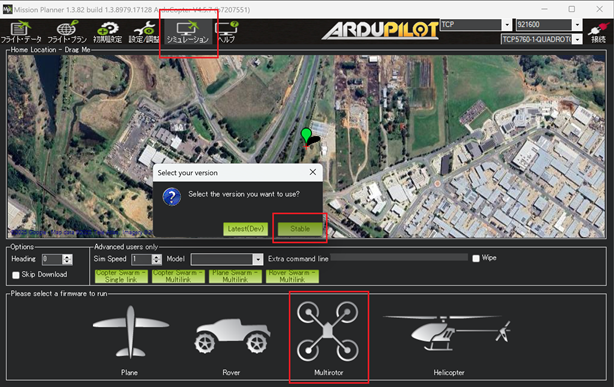
セットアップ手順
-
Python 環境の準備
- Python 3.10+ 推奨
- Windows / macOS / Linux 対応
-
利用可能なツールのインストール
pip install -r requirements.txt -
MCPサーバーの起動確認(手動実行)
python ardupilot_mcp_server.py「MCPサーバーを起動します…」と出れば準備完了です。
Cline との連携手順
- OpenRouter にサインアップし、APIキーを取得
- VS Code に Cline 拡張機能 をインストール
- VS Code の settings.json に以下を追加:
{
  "cline.apiKey": "sk-xxxxxxx",
  "cline.apiBaseUrl": "https://openrouter.ai/api/v1",
  "cline.defaultModel": "deepseek/deepseek-chat-v3-0324:free",
  "cline.mcpServers": {
    "ardupilot-controller": {
      "command": "python",
      "args": [
        "${workspaceFolder}/ardupilot_mcp_server.py"
      ],
      "env": {
        "PYTHONPATH": "${env:USERPROFILE}\\.local\\lib\\python3.12\\site-packages"
      }
    }
  }
}
Claude Desktop からの使用方法(GUI連携)
-
Claude Desktop をインストール
-
設定ファイル
claude_desktop_config.jsonを開くWindows の場合:
C:\Users\{ユーザー名}\AppData\Roaming\Claude\claude_desktop_config.json -
以下を追記:
{
  "mcpServers": {
    "ardupilot-controller": {
      "command": "python",
      "args": [
        "C:/Users/your-user-name/path/to/ardupilot_mcp_server.py"
      ],
      "alwaysAllow": [
        "arm",
        "disarm",
        "takeoff",
        "change_mode"
      ]
    }
  }
}
※ パスは環境に応じて調整してください。
-
Claude Desktop を再起動
利用できるMCPツール一覧
| コマンド | 説明 |
|---|---|
| arm() | 機体をアームします |
| disarm() | 機体をディスアームします |
| takeoff(altitude=10.0) | 指定高度まで離陸します |
| change_mode(mode=“GUIDED”) | モードを変更します |
プロンプト例(チャットでの操作)
Cline、または Claude Desktop に話しかけて、ArduPilot を自然言語で操作できます:
- 「ArduPilotをアームして」
- 「10メートルまで離陸して」
- 「モードをGUIDEDに変更して」
- 「ArduPilotをディスアームして」
※ MCP サーバーに登録されているツールに応じて、自然文が自動で変換されます。
Dev Tools Supporting MCP
The following are the main code editors that support the Model Context Protocol. Click the link to visit the official website for more information.







